n8n Review (2026): Is Self-Hosting Worth It?
n8n is one of those tools where the monthly subscription price is only half the equation. You can pay n8n to host your automations in the cloud, or you can run the Community Edition on your own server and take full responsibility for the infrastructure.
For a solopreneur, freelancer, or small agency trying to replace expensive Zapier or Make subscriptions, the appeal of “free” self-hosted automation is massive. But running production-grade infrastructure is never truly free.
This guide breaks down exactly how much n8n Cloud really costs when you factor in 2026 execution limits, what self-hosting actually entails, and whether the time spent managing a Docker container is worth the money you save.
Quick Verdict
Best for n8n Cloud:
- Beginners who have never used a Linux command line.
- Solopreneurs who want to build their first automation this afternoon.
- Users with low-frequency, event-driven workflows (e.g., triggering a Slack message when a Stripe payment succeeds).
- People who refuse to manage server updates, SSL certificates, or database backups.
Best for Self-Hosting (Community Edition):
- Technical users, developers, and system administrators.
- Businesses with high-frequency workflows (e.g., polling an inbox every 5 minutes).
- Users deploying looping AI agents that consume massive amounts of workflow executions.
- Companies that strictly require data to remain on their own controlled servers.
My Overall Verdict:
For most solo operators, I recommend starting with n8n Cloud. The $24/month Starter plan buys you immediate access to a stable environment where you can learn the node ecosystem without wrestling with reverse proxies. However, as soon as your workflows scale to polling APIs frequently or running complex AI agent loops, n8n Cloud’s execution limits become prohibitively expensive. At that point, migrating to a self-hosted Docker instance on a $14/month VPS is the financially superior choice.
[Future internal link: How to migrate from n8n Cloud to self-hosted Docker]
What is n8n?
n8n (pronounced “node-by-node”) is a visual workflow automation tool. Like Zapier or Make, it allows you to connect different software applications via their APIs without writing raw code.
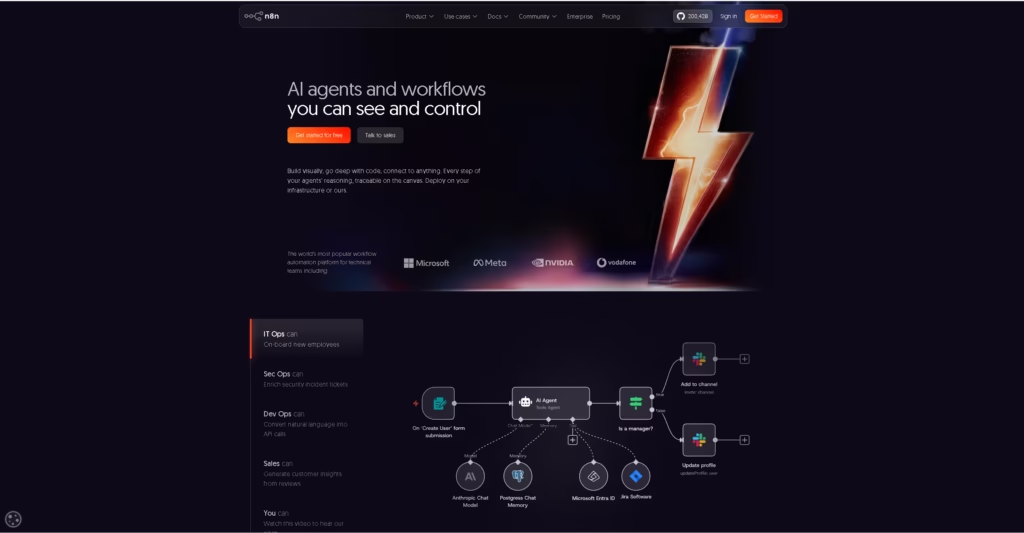
You drag and drop Nodes onto a canvas. Every workflow starts with a Trigger (e.g., “When a new row is added to Airtable”) and is followed by Actions (e.g., “Send an email via Gmail”).
Here is a practical example of a workflow:
- Webhook Trigger: Receives a payload from an external form.
- OpenAI Node: An AI model analyzes the text to determine the user’s intent.
- If/Else Router: If the intent is “Sales,” route to Node A. If “Support,” route to Node B.
- CRM Node: Update the user’s record in HubSpot.
- Slack Node: Ping the appropriate channel.
What makes n8n unique in 2026 is its execution model and its license. Unlike Zapier, which charges per individual task (step) in a workflow, n8n Cloud charges per workflow execution (the entire run from start to finish). And unlike Make, n8n provides a source-available version that you can run on your own hardware for free under specific licensing terms.
n8n Cloud vs. Self-Hosted Comparison
| Feature | n8n Cloud | Self-Hosted (Community Edition) |
| Setup | Instant (Browser) | Requires Linux, Docker, & DNS routing |
| Maintenance | Handled by n8n | Your responsibility |
| Cost Model | Monthly subscription ($24+) | “Free” software + your server costs ($10-$50) |
| Execution Limits | Hard limits (2,500 to 40,000/mo) | Limited only by your server’s RAM/CPU |
| Data Control | Resides on n8n servers | 100% on your hardware |
| Database | Managed (SQLite or PostgreSQL) | User configured (PostgreSQL strongly advised) |
| Backups | Handled automatically | Requires custom scripts or Updraft-style cron jobs |
| Best For | Fast deployment & zero maintenance | High-volume workflows & custom integrations |
n8n Cloud: Detailed Review
Pricing and Execution Limits in 2026
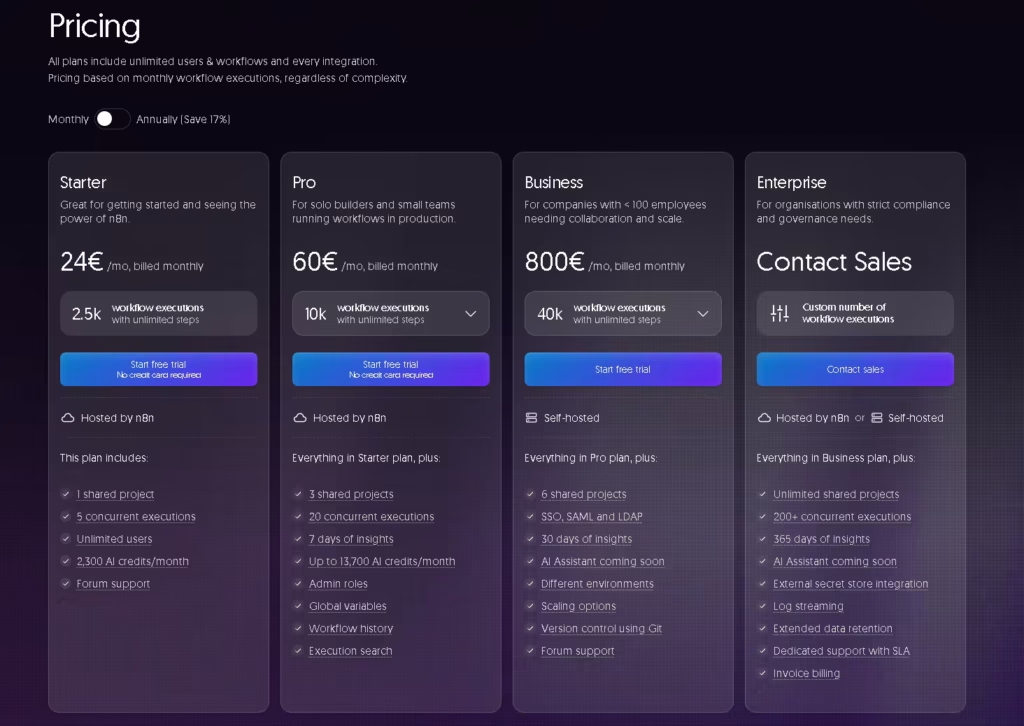
n8n Cloud pricing operates on four main tiers. Importantly, as of recent updates, n8n removed the cap on active workflows—you can now run as many different workflows as you want on any plan. The restriction is strictly based on Executions per month.
- Starter ($24/mo): 2,500 executions.
- Pro ($60/mo): 10,000 executions.
- Business ($800/mo): 40,000 executions, plus Git-based version control and Single Sign-On (SSO).
The Execution Trap
Because n8n charges per complete workflow run, long workflows with dozens of steps are highly cost-effective compared to Zapier.
However, n8n Cloud heavily penalizes polling workflows. If you build a simple workflow that checks a server health API or an email inbox every 5 minutes, that workflow runs 12 times an hour, 288 times a day, and 8,640 times a month.
A single polling trigger will immediately blast past the $24/mo Starter plan’s 2,500 execution limit. Once you hit the limit, your automations either pause until the next billing cycle, or you are forced to upgrade to the $60/mo Pro plan.
Who Should Use Cloud?
n8n Cloud is brilliant for event-driven architectures. If your workflows are triggered by external webhooks (e.g., a Stripe payment goes through, pushing a payload to n8n), executions only trigger when real business value is created. For event-driven setups, n8n Cloud provides excellent reliability, automatic updates, and zero database stress.
Self-Hosted n8n: Detailed Review
Self-hosting n8n means you rent a computer (a server), install the Linux operating system, install Docker, pull the n8n software image, and maintain the connection to the internet.
The software itself is free under n8n’s Sustainable Use License (Community Edition).
The Licensing Rules (Sustainable Use License)
n8n is not strictly “open source” under the OSI definition. It uses a fair-code model called the Sustainable Use License.
Before you self-host, you must understand these commercial rules:
- What you CAN do: You can self-host n8n for your own internal business operations. You can use it to sync your CRM, automate your own invoices, or run your solopreneur marketing engine. You can also provide consulting services, building workflows for clients, provided the clients host their own instance or buy their own Cloud account.
- What you CANNOT do: You cannot sell “n8n-as-a-service.” You cannot white-label n8n, host it on your server, and charge users a monthly fee to log in and use it. You cannot build a SaaS product where the core value relies entirely on an embedded n8n backend without signing a separate Embed agreement.
How Much Does Self-Hosting Actually Cost?
“Free” n8n is never actually free. If you deploy it properly in 2026, expect these base costs:
- The Virtual Private Server (VPS): To run n8n, a database, and Docker comfortably, you need at least 2GB of RAM and 1-2 vCPU cores. A reliable DigitalOcean Droplet, Hetzner, or Cloudways server will cost between $5 and $15 per month.
- The Domain Name: You need a domain (e.g.,
n8n.yourdomain.com) to secure webhook endpoints with SSL. Cost: $10/year. - Offsite Backups: Storing automated database snapshots on Amazon S3 or Backblaze B2. Cost: ~$1/month.
- The Time Cost: You must spend time updating the Docker container, monitoring server logs, and ensuring your SSL certificates auto-renew.
[Future internal link: The Best Budget VPS Providers for Automations]
The Database Reality (SQLite vs PostgreSQL)
By default, self-hosted n8n stores your execution history and credentials in a SQLite database. SQLite is a flat file. It works perfectly for local testing.
However, SQLite is a trap for production environments. When multiple workflows trigger simultaneously, SQLite locks the entire database file to write data. As your automation volume grows, these writes queue up, timeout, and can corrupt the database. Furthermore, you cannot take a safe “hot backup” of a SQLite file while n8n is actively writing to it.
If you are self-hosting for a business, you must deploy n8n alongside a PostgreSQL database. PostgreSQL handles parallel row-level locking, allows for zero-downtime backups, and is mandatory if you ever want to run n8n in “Queue Mode” (using Redis to spread workloads across multiple server workers).
A Complete Beginner’s Guide to Self-Hosting with Docker
The officially recommended way to self-host n8n is using Docker Compose. Docker acts like a shipping container for software; it holds n8n and all its dependencies so it runs perfectly on any Linux server without conflicting with other programs.
Here is the architectural flow of a self-hosted setup:
- The Internet sends a request to
n8n.yourdomain.com. - A Reverse Proxy (like Traefik, Caddy, or Nginx) intercepts the traffic, verifies your HTTPS/SSL certificate, and routes it safely into Docker.
- Docker passes the traffic to the n8n Container.
- n8n processes the workflow and reads/writes execution data to the PostgreSQL Container.
Note: For step-by-step terminal commands, refer to our dedicated deployment guide. A proper installation requires configuring environment variables for timezone (GENERIC_TIMEZONE), database connections (DB_TYPE=postgresdb), and user authentication.
[Future internal link: Step-by-Step n8n PostgreSQL Docker Deployment Guide]
Security & Maintenance Responsibilities
When you choose to self-host, you inherit the role of a system administrator.
What You Must Secure
- HTTPS: Exposing n8n over HTTP means your API keys and client credentials are sent in plain text. You must use Let’s Encrypt to generate SSL certificates.
- SSH Access: Disable password logins on your VPS and enforce SSH Key authentication. Enact a firewall (UFW) to block all ports except 80 (HTTP), 443 (HTTPS), and 22 (SSH).
- Environment Variables: Your database passwords and n8n encryption key (
N8N_ENCRYPTION_KEY) must be secured in a.envfile. If you lose the encryption key, every API credential stored inside n8n becomes permanently unrecoverable.
Updates
n8n ships updates rapidly. On n8n Cloud, this happens silently in the background. When self-hosting, you must SSH into your server, pull the latest Docker image (docker compose pull), and recreate the container. Before executing any update, you must take a PostgreSQL database dump—because if a new n8n version includes a breaking schema change, you will need that backup to roll back to the previous version.
n8n for AI Automations and Solopreneurs
n8n has pivoted heavily toward integrating AI agent capabilities. Unlike Zapier, which requires you to manually parse JSON to use advanced OpenAI features, n8n has dedicated Advanced AI nodes.
You can build workflows that utilize:
- Memory Nodes: Allowing an AI to remember previous context in a continuous slack conversation.
- Tool Calling: Giving an LLM the ability to decide when to search the web, when to query your CRM, or when to execute a calculator script.
- Human-in-the-Loop: Pausing a workflow to send a Slack button requesting human approval before an AI drafts and sends a sensitive client email.
Because AI agents often utilize “loops” (thinking, acting, observing, and thinking again), a single agent interaction can trigger dozens of node executions. On n8n Cloud, looping agents will consume your monthly execution limits violently. If you plan to build complex, looping AI agents, self-hosting becomes almost mandatory for cost control.
Building Your First Autonomous AI Agent in n8n
Real-World Scenarios: Which Should You Choose?
Scenario A: “I am a freelance copywriter with zero coding experience. I just want to automate my client onboarding emails.”
Recommendation: Use n8n Cloud (Starter plan). Your workflows are event-driven (a client signs a contract, an email sends). You will not hit the 2,500 execution limit, and you avoid the steep learning curve of Linux server management.
Scenario B: “I run a solo marketing agency. I need to scrape 500 websites a day, run the data through an LLM to categorize them, and push the results to Airtable.”
Recommendation: Self-host n8n on a VPS. Scraping and looping data through LLMs will obliterate the Cloud Starter and Pro plans. For $15/month on a VPS, you can run this 50,000 times a day with zero overage charges.
Scenario C: “I want to build an automation backend and sell it as a monthly subscription service to real estate agents.”
Recommendation: Stop. Under the Sustainable Use License, you cannot sell n8n as a white-labeled service. You must contact n8n for a commercial Embed agreement, or require every real estate agent to buy their own n8n Cloud account which you then manage for them.
n8n Pros and Cons
Pros:
- Execution-based billing makes complex, multi-step workflows incredibly cost-efficient compared to task-based platforms.
- Source-available Community Edition allows for unlimited self-hosted scaling.
- Advanced AI nodes support deep agentic tool-calling and memory.
- Supports raw JavaScript execution inside nodes for custom data manipulation.
Cons:
- Cloud Starter plan (2,500 limits) is hostile to polling workflows (like checking email inboxes periodically).
- Self-hosting requires navigating Docker, PostgreSQL, and Linux command-line administration.
- The default SQLite self-hosted database is unsuitable for high-volume production use.
Final Verdict: Is Self-Hosting Worth It in 2026?
Self-hosting n8n is absolutely worth the effort—but only if you view infrastructure management as a core competency of your business.
If your primary goal is simply to get an automation running so you can focus on selling your services, the time saved by the $60/month n8n Cloud Pro plan easily outweighs the hosting bill.
However, if your operational model requires continuous data scraping, heavy hourly API polling, or looping AI agents, n8n Cloud’s execution limits will bottleneck your growth. In that case, spinning up a $15 DigitalOcean Droplet, installing Docker and PostgreSQL, and taking ownership of your infrastructure is the most profitable decision a solopreneur can make.
FAQ
Can I self-host n8n for free?
The n8n software (Community Edition) is free to download and use for internal business purposes. However, you must pay for the server infrastructure (VPS), domain name, and backup storage required to host it securely.
Is self-hosted n8n unlimited?
There are no artificial software limits on executions or workflows in the Community Edition. You are only limited by the CPU and RAM of the server you install it on.
Does n8n require Docker?
While you can technically install n8n using npm, n8n officially recommends using Docker (specifically Docker Compose). It isolates the application and makes updates, database connections, and rollbacks significantly safer.
What database does n8n use?
Self-hosted n8n defaults to SQLite. However, for production environments, multiple users, or high-volume workflows, you should configure it to use PostgreSQL to prevent database locking and corruption.
Is n8n really free when self-hosted for a business?
Yes, under the Sustainable Use License, you can use the free version for your own internal business operations (e.g., automating your CRM, HR, or marketing). You only violate the free license if you try to sell n8n itself as a service to others.