
n8n expressions let you read a field, clean text, work with arrays or change a date inside a node. This reference gives you 50 copyable examples, sample outputs and a free workflow that checks them.
I ran every example against the same sample input on 8 October 2026. The result was 50 passed, 0 failed. That is a check of these fixtures, not a claim that each snippet covers every input you might receive.
How to use an n8n expression
- Open the field you want to fill in a node such as Edit Fields.
- Switch that field from Fixed to Expression.
- Paste the complete example, including the double braces.
- Run the previous node so n8n has sample data. Check the preview and the output type.
For example, {{ $json.customer.name }} reads the name from the current item’s customer object. If your data has a different shape, change the path. An expression cannot find a field that your input does not contain.
The lab uses JSON.stringify around each expression to compare results consistently. In your normal fields, copy the expression in the tables below. You do not need that extra test wrapper.
What the lab actually tested
The workflow contains a Manual Trigger, a Sample input Code node, an Edit Fields node and a result checker. It makes no external requests and uses fictional data. One manual run evaluated all 50 examples and compared their values with the expected results.
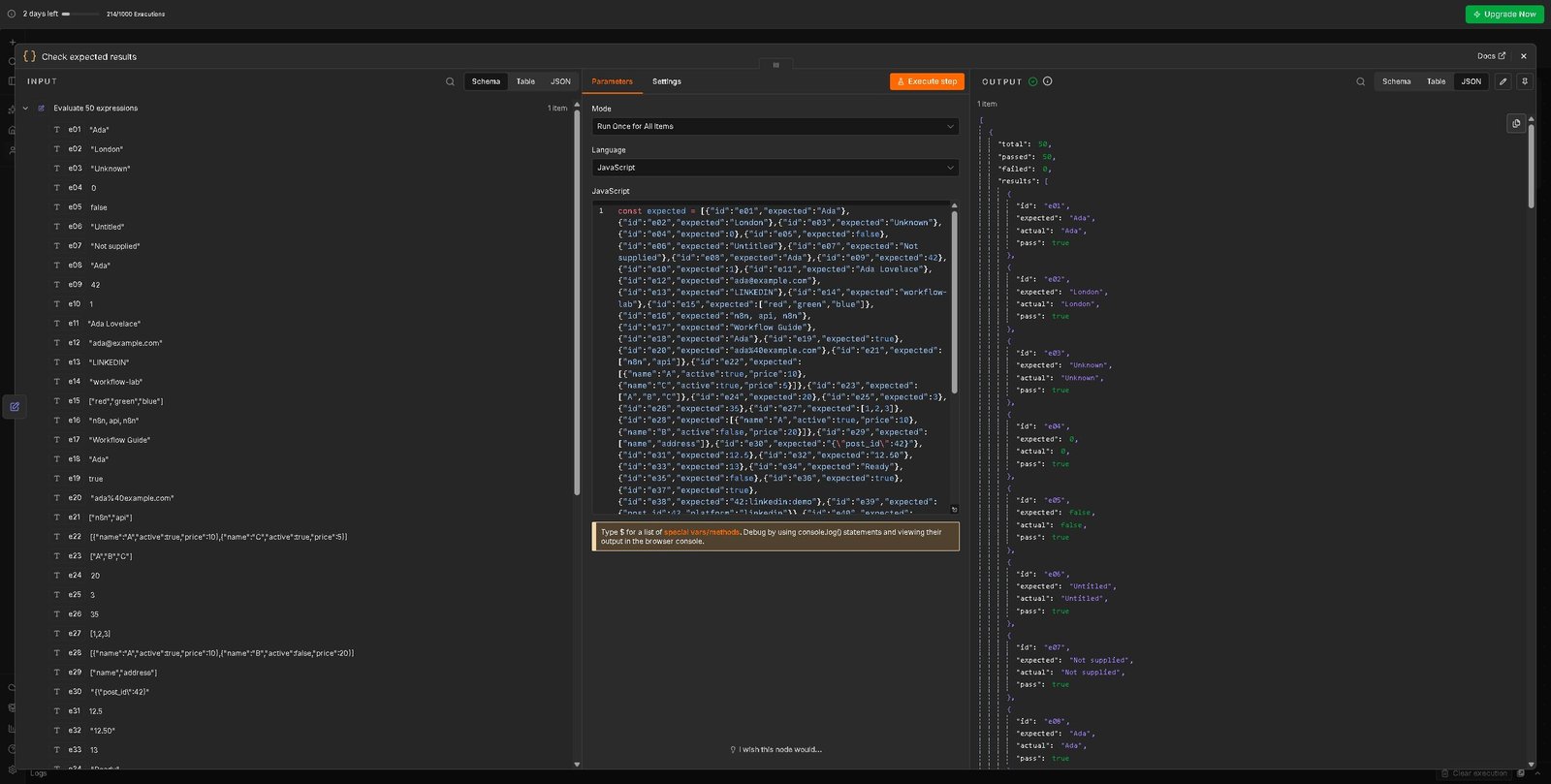
The input has one item. Most date examples use UTC; one converts the same instant to Asia/Kolkata. English month text was used in this run. Results can change with different input, locale, timezone or item counts.
View the sample JSON used for the tests
{
  "name": "  Ada Lovelace  ",
  "email": " ADA@EXAMPLE.COM ",
  "message": "red, green, blue",
  "slug": "Workflow Lab",
  "url": "https://example.com/docs?a=1",
  "amount": "12.50",
  "count": 0,
  "enabled": false,
  "status": "paid",
  "date": "2026-10-08T10:30:00Z",
  "localDate": "08/10/2026",
  "unix": 1791455400,
  "tags": [
    "n8n",
    "api",
    "n8n"
  ],
  "numbers": [
    3,
    1,
    2
  ],
  "items": [
    {
      "name": "A",
      "active": true,
      "price": 10
    },
    {
      "name": "B",
      "active": false,
      "price": 20
    },
    {
      "name": "C",
      "active": true,
      "price": 5
    }
  ],
  "customer": {
    "name": "Ada",
    "address": {
      "city": "London"
    }
  },
  "body": {
    "post_id": 42
  },
  "platform": "linkedin",
  "account_id": "demo",
  "optional": null,
  "empty": ""
}
50 n8n expressions with examples
All expected outputs below refer to the sample JSON above. Quotes in an output mean text; brackets mean an array.
Read data
| Task and expected result | Expression and use note |
|---|---|
| 1. Read a field Expected: "Ada" | {{ $json.customer.name }}Use the current item. |
| 2. Read a nested value Expected: "London" | {{ $json.customer.address.city }}Match the actual JSON path. |
| 3. Missing field fallback Expected: "Unknown" | {{ $json.missing ?? 'Unknown' }}Nullish fallback handles null and undefined. |
| 4. Keep a valid zero Expected: 0 | {{ $json.count ?? 10 }}Do not use || when zero is valid. |
| 5. Keep a valid false Expected: false | {{ $json.enabled ?? true }}False can be a real setting. |
| 6. Use a fallback for blank text Expected: "Untitled" | {{ $json.empty || 'Untitled' }}Here a blank string should use the fallback. |
| 7. Check for a missing nested field Expected: "Not supplied" | {{ $json.customer.phone?.number ?? 'Not supplied' }}Optional chaining avoids an absent nested object. |
| 8. Read from a named node Expected: "Ada" | {{ $('Sample input').first().json.customer.name }}first() deliberately selects the first item, not a matching item. |
| 9. Read the first incoming item Expected: 42 | {{ $input.first().json.body.post_id }}Use item linking for multiple independent records. |
| 10. Count incoming items Expected: 1 | {{ $input.all().length }}This fixture provides one item. |
Clean text
| Task and expected result | Expression and use note |
|---|---|
| 11. Trim spaces Expected: "Ada Lovelace" | {{ $json.name.trim() }}Requires a string. |
| 12. Normalize an email Expected: "ada@example.com" | {{ $json.email.trim().toLowerCase() }}Lowercasing is a cleanup rule, not email validation. |
| 13. Uppercase a string Expected: "LINKEDIN" | {{ $json.platform.toUpperCase() }}Useful for display labels. |
| 14. Build a simple slug Expected: "workflow-lab" | {{ $json.slug.toLowerCase().replace(/\s+/g, '-') }}For this ASCII fixture; not a full URL slug sanitizer. |
| 15. Split comma-separated text Expected: ["red","green","blue"] | {{ $json.message.split(',').map(x => x.trim()) }}Returns an array. |
| 16. Join tags Expected: "n8n, api, n8n" | {{ $json.tags.join(', ') }}Duplicates remain unless removed first. |
| 17. Replace a word Expected: "Workflow Guide" | {{ $json.slug.replace('Lab', 'Guide') }}replace changes the first matching occurrence. |
| 18. Read the first three characters Expected: "Ada" | {{ $json.name.trim().slice(0, 3) }}slice does not change the original string. |
| 19. Check whether text contains a word Expected: true | {{ $json.slug.includes('Workflow') }}Case-sensitive match. |
| 20. Encode a query value Expected: "ada%40example.com" | {{ $json.email.trim().toLowerCase() && encodeURIComponent($json.email.trim().toLowerCase()) }}Encode values rather than a whole URL. |
Arrays and JSON
| Task and expected result | Expression and use note |
|---|---|
| 21. Remove duplicate strings Expected: ["n8n","api"] | {{ [...new Set($json.tags)] }}Equality is case-sensitive. |
| 22. Keep active rows Expected: [{"name":"A","active":true,"price":10},{"name":"C","active":true,"price":5}] | {{ $json.items.filter(x => x.active === true) }}Checks boolean true. |
| 23. Read each row name Expected: ["A","B","C"] | {{ $json.items.map(x => x.name) }}Returns an array of names. |
| 24. Find one row Expected: 20 | {{ $json.items.find(x => x.name === 'B')?.price ?? null }}find returns the first match. |
| 25. Count rows Expected: 3 | {{ $json.items.length }}Use Array.isArray first if the field may have another type. |
| 26. Sum prices Expected: 35 | {{ $json.items.reduce((sum, x) => sum + x.price, 0) }}Fixture prices are already numbers. |
| 27. Sort numbers safely Expected: [1,2,3] | {{ [...$json.numbers].sort((a, b) => a - b) }}Copy first to avoid mutating the source array. |
| 28. Take two rows Expected: [{"name":"A","active":true,"price":10},{"name":"B","active":false,"price":20}] | {{ $json.items.slice(0, 2) }}Returns a smaller array. |
| 29. Read object keys Expected: ["name","address"] | {{ $json.customer && Object.keys($json.customer) }}This is an object, not all input item names. |
| 30. Convert an object to JSON text Expected: "{\"post_id\":42}" | {{ JSON.stringify($json.body) }}Useful when a destination needs a string. |
Numbers and conditions
| Task and expected result | Expression and use note |
|---|---|
| 31. Convert numeric text Expected: 12.5 | {{ Number($json.amount) }}Validate blanks and non-numeric text before sending. |
| 32. Format two decimal places Expected: "12.50" | {{ Number($json.amount).toFixed(2) }}toFixed returns text. |
| 33. Round up a duration Expected: 13 | {{ Math.ceil(Number($json.amount)) }}Useful when a wait unit needs a whole number. |
| 34. Pick a status label Expected: "Ready" | {{ $json.status === 'paid' ? 'Ready' : 'Review' }}A simple two-way decision. |
| 35. Require two checks Expected: false | {{ $json.status === 'paid' && $json.enabled === true }}Both checks must pass. |
| 36. Accept either status Expected: true | {{ ['paid', 'pending'].includes($json.status) }}Explicit allowed values. |
| 37. Check numeric validity Expected: true | {{ Number.isFinite(Number($json.amount)) }}Blank text converts to zero; reject blanks separately. |
| 38. Build a stable demo key Expected: "42:linkedin:demo" | {{ [$json.body.post_id, $json.platform, $json.account_id].join(':') }}Choose fields and escaping rules to avoid real-world collisions. |
| 39. Keep only selected fields Expected: {"post_id":42,"platform":"linkedin"} | {{ ({post_id:$json.body.post_id,platform:$json.platform}) }}Build the object a downstream service actually expects. |
| 40. Read names with JMESPath Expected: ["A","B","C"] | {{ $jmespath($json, 'items[*].name') }}JMESPath query; different syntax from JavaScript. |
Dates and JMESPath
| Task and expected result | Expression and use note |
|---|---|
| 41. Filter with JMESPath Expected: ["A","C"] | {{ $jmespath($json, 'items[?active == `true`].name') }}Backticks denote a JSON literal inside the query. |
| 42. Sum with JMESPath Expected: 35 | {{ $jmespath($json, 'sum(items[*].price)') }}The selected prices must be numbers. |
| 43. Read an ISO date Expected: "2026-10-08" | {{ DateTime.fromISO($json.date, {zone:"utc"}).toISODate() }}Use an explicit zone for repeatable output. |
| 44. Format an ISO date Expected: "08 Oct 2026" | {{ DateTime.fromISO($json.date, {zone:"utc"}).toFormat("dd LLL yyyy") }}Month text follows the locale; this run used English. |
| 45. Move an instant to another timezone Expected: "16:00" | {{ DateTime.fromISO($json.date).setZone("Asia/Kolkata").toFormat("HH:mm") }}setZone preserves the instant and changes its display. |
| 46. Add seven calendar days Expected: "2026-10-15" | {{ DateTime.fromISO($json.date, {zone:"utc"}).plus({days:7}).toISODate() }}Calendar days can differ from 24-hour durations around DST. |
| 47. Subtract one day Expected: "2026-10-07" | {{ DateTime.fromISO($json.date, {zone:"utc"}).minus({days:1}).toISODate() }}Parse the date before doing date math. |
| 48. Parse a known date format Expected: "2026-10-08" | {{ DateTime.fromFormat($json.localDate, "dd/MM/yyyy", {zone:"utc"}).toISODate() }}Specify the format; 08/10 is ambiguous without it. |
| 49. Convert Unix seconds Expected: "2026-10-08" | {{ DateTime.fromSeconds($json.unix, {zone:"utc"}).toISODate() }}fromMillis is for milliseconds, not seconds. |
| 50. Reject an invalid date Expected: false | {{ DateTime.fromISO("not-a-date").isValid }}Route invalid input for review instead of booking from it. |
Common mistakes that change the result
Using || when zero or false is valid
|| uses a fallback for any falsy value, including zero, false and empty text. ?? uses it only for null or undefined. That difference matters for a count of zero or a setting that is turned off.
Reading the first item when you need the matching item
$("Sample input").first() always selects that node’s first item. It worked here because the fixture had one item. When processing several customers, check n8n’s item linking and use a matching item where appropriate. Otherwise you can give every customer the first customer’s data.
Assuming a cleaned email is a valid email
Trimming and lowercasing only clean a string. They do not prove that an address is valid or deliverable. Add a separate validation step before sending messages.
Mixing seconds, milliseconds and local time
Unix seconds belong in fromSeconds. Milliseconds belong in fromMillis. Parse a known date format and choose a timezone before you build a booking time. If a date is invalid, send it for review.
Returning text when the next node needs a number
toFixed(2) returns text. JSON.stringify also returns text. Read the next node’s requirements before choosing a field type. Do not send a formatted display string where an API expects a number.
Quick questions
What does $json mean in n8n?
It is the JSON data for the current input item. Use it when each item should be processed with its own values.
Can I use JavaScript in an expression?
Yes, for small field transformations. Move longer logic into a Code node when the expression becomes hard to read or test.
Why does my expression show undefined?
Check whether the previous node ran, whether the field exists, and whether the path and item selection are correct. Use a fallback only after you understand which value is missing.
How do I use today’s date?
n8n provides $now and $today for current dates. They depend on time and timezone, so this fixed-fixture lab uses explicit dates instead. Test your chosen timezone before relying on them for a schedule.
Can I reuse this lab in a tutorial?
Yes. The original examples and workflow are provided under the MIT license in the ZIP. You can cite this page for the test method and result, and reuse the examples under that license.
Use these expressions in a real workflow
- Clean lead email data in n8n before it reaches the next step.
- Handle Retry-After and rate limits with a separate tested retry lab.
- Add Slack approval to an n8n workflow and check the rejection and timeout paths.
- Browse the n8n workflow collection.
Official references and test notes
Test record: OperantSolo, 8 October 2026. 50 examples, one fixed input item, one manual n8n Cloud execution, 50 passed and zero failed. The ZIP includes the fixture, workflow, expected values, recorded output and license. Download the complete lab.