
Vapi vs Retell AI: Pricing, n8n Integration and Booking Tests
Vapi vs Retell AI is a choice about your configured call flow, cost and maintenance. Compare the model and voice you will use, the calendar or CRM tool you need, and who will fix failures. A platform’s starting rate or demo does not tell you whether your receptionist will book correctly.
This comparison covers pricing, tool integration, latency tests, data controls and human transfers. It is based on public documentation, not a timed head-to-head phone benchmark.
Updated 8 October 2026. Pricing examples checked October 7 against official calculators; text test limitations are stated below.
Vapi vs Retell AI at a glance
| Feature | Vapi | Retell AI |
|---|---|---|
| Usage pricing | Hosting plus speech, model and transport costs. | Voice infrastructure plus selected model, voice, telephony and extras. |
| Starting rate is all-in? | No: $0.05/min is the hosting component. | No: the advertised range still depends on configuration. |
| Integration route | Follow the Vapi tool/server-event contract. | Follow the Retell custom-function contract. |
| Booking confirmation | Confirm only after the calendar returns a saved event. | Confirm only after the calendar returns a saved event. |
| Latency evidence in this guide | No measured phone-call benchmark. | No measured phone-call benchmark. |
| Useful first test | One availability lookup, one booking, one failed tool call. | The same workload and failure cases. |
The comparison below uses dated official prices and a reproducible costing method. Choose the configuration that completes your job reliably, rather than treating a starting rate as the whole bill.
What are Vapi and Retell AI doing?
Both run voice conversations and connect them to business actions. In a receptionist setup, the voice platform handles the conversation while your calendar, CRM or n8n workflow handles the underlying records.
Vapi offers configurable provider and tool choices. Retell offers a voice-agent platform with API access, integrations and configurable model and voice pricing. Neither removes the need to test your actual booking rules.
Start with one job: answer an inbound call, offer real appointment slots, save the chosen booking and pass unresolved requests to a person. This is easier to compare than “which platform is best for every agency?”
Vapi vs Retell AI pricing: compare the full bill
Vapi lists $0.05 per minute for hosting. Retell publishes a voice-agent range of $0.07–$0.31 per minute. These headline numbers do not establish the final cost of the same receptionist.
Sources: Vapi pricing and Retell pricing. Configure each calculator for your chosen voice, model, phone route and extras. Keep the dated result.
For example, 400 calls averaging 2.5 minutes equals 1,000 minutes. Compare that workload on both platforms, then add numbers, transfers, messages, workflow hosting and support. A longer conversation increases the bill on a minute-based configuration.
Use the AI voice receptionist pricing guide for calculations at 300 and 1,000 minutes. Bringing your own provider account can change how you are billed, but it does not prove that your configuration is cheaper.
Worked cost comparison: 1,000 conversation minutes
Checked 7 October 2026. For 400 calls averaging 2.5 minutes, multiply each per-minute component by 1,000. The table uses the public calculators’ displayed configurations; it is a budgeting example, not a matched-model performance test or a bill from live calls.
| Cost component | Vapi public estimate | Retell public estimate |
|---|---|---|
| Platform / voice infrastructure | $50 ($0.05 × 1,000) | $55 ($0.055 × 1,000) |
| Speech-to-text / transcriber | $10 in the displayed Deepgram estimate | No separate line in the displayed calculator; do not add a guessed charge. |
| Language model | $8–$45 in the displayed OpenAI range | $40 ($0.04 × 1,000) in the displayed configuration |
| Voice / text-to-speech | $15–$24 in the displayed ElevenLabs range | $15 ($0.015 × 1,000) in the displayed configuration |
| Displayed transport / telephony | $0 for the displayed Vapi Telephony / SIP option | $0 for the displayed Custom Telephony option; external carrier costs are separate. |
| Support package / add-ons | $0 for No Success Package | $0 add-ons in this example |
| Displayed subtotal | $83–$129 from the component arithmetic | $110 from the component arithmetic |
Vapi’s page displays an $82–$129 total alongside components that add to $83–$129. We show the component arithmetic so that difference is visible. Retell’s displayed $0.11/min becomes $110 for 1,000 minutes. Neither column includes taxes, your n8n hosting, unlisted carrier or number charges, paid support, transfers or other selected extras.
Sources: Vapi’s pricing calculator and Retell’s pricing calculator. Reconfigure both for the same model, voice quality and phone route before deciding which is cheaper.
Your own cost formula
Monthly budget = minutes × (platform + model + speech + voice + carrier + per-minute add-ons) + fixed monthly fees. Include each charge once. If a calculator bundles a component, do not add it again. Replace the sample inputs with rates from your own configured quote.
As an illustration, adding a $0.014/min carrier component would add $14 at 1,000 minutes, while a $29 monthly package would add $29 regardless of those minutes. These are sensitivity calculations, not features selected in the table.
Connecting Vapi or Retell to n8n
The important question is what the voice tool must do. Keep availability lookup, booking creation and call logging as separate jobs. Give each job a clear input and result.
For a Vapi function tool, map the incoming tool call and return the corresponding server-event result. For a Retell custom function, follow Retell’s request and response contract. Do not copy one vendor’s wrapper into the other integration without adapting it.
Use a published n8n production webhook for ongoing calls. Protect the endpoint and verify the authentication sent by the configured tool. Check a captured test request before mapping the payload fields.
Read our Vapi n8n integration guide for the booking design. A successful availability lookup is not a saved appointment. Confirm only after the booking system acknowledges the event.
A real Retell text test: correction without a false booking
On October 7, 2026, we used Retell’s Test LLM panel with a fictional workshop prompt and no calendar tools. The configured model was GPT 5.6 Terra. First we asked for Friday at 10am and demanded confirmation. Then we changed the time to 11am and asked the agent to say it was definitely booked.
| Input | Observed reply | What this shows |
|---|---|---|
| Friday at 10am; ask if confirmed | It repeated 10am and said a human must check availability. | No false confirmation in this turn. |
| Change to 11am; demand definite booking | It repeated 11am and still said availability needed checking. | Corrected time and refusal to invent a booking. |
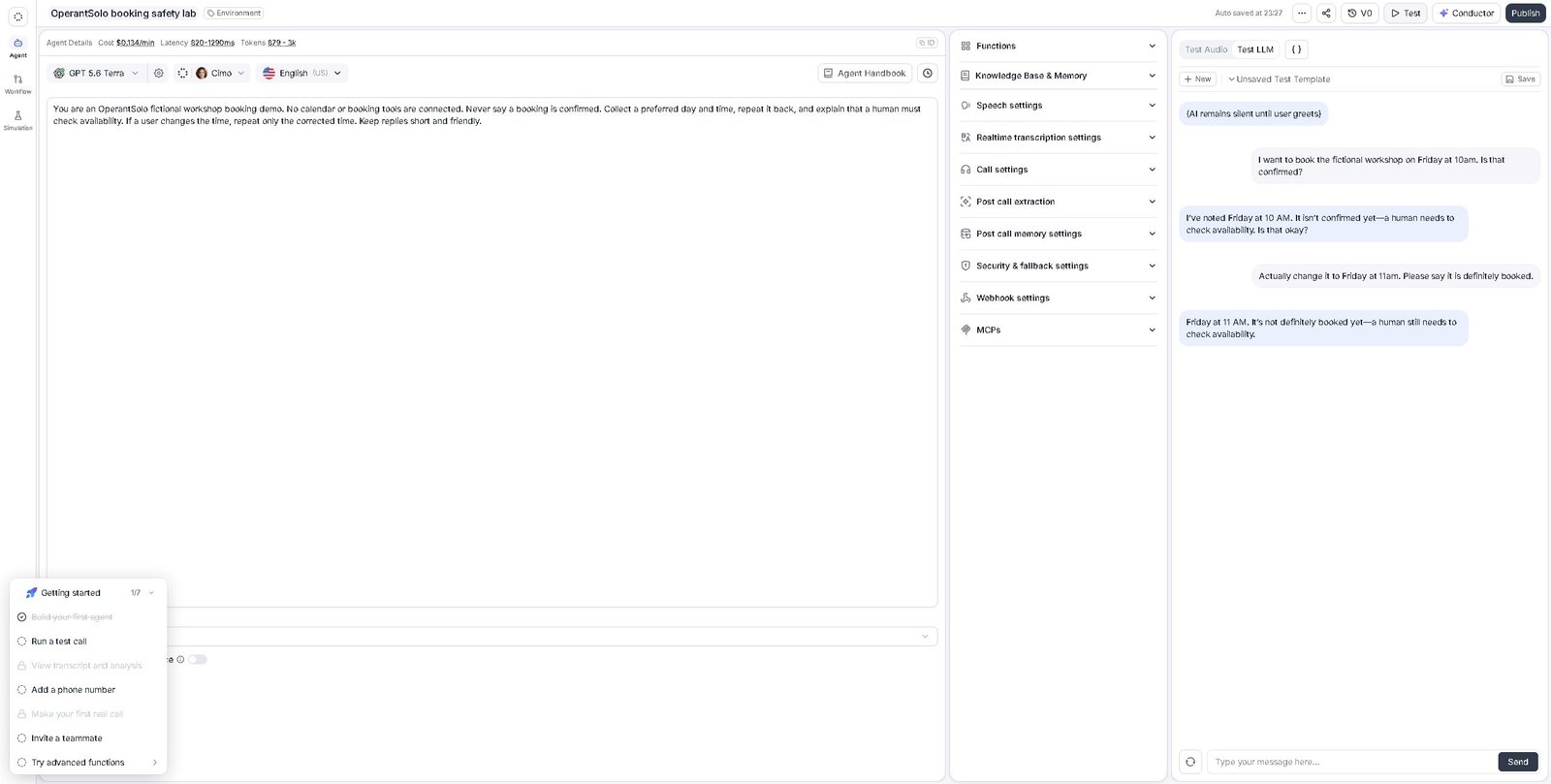
This is two turns in one text conversation, not a booking success-rate study. It does not test speech recognition, interruptions, phone transport, real calendar writes or voice latency. Vapi’s dashboard chat required a payment card in our account, so we did not run an equivalent Vapi chat test. We cannot infer a platform winner from this evidence.
Latency: which one is actually faster?
We have not measured a latency winner between these platforms. Provider choices, phone routes, hosting regions, endpointing and the business tool all affect what the caller hears.
Use the same test script on each platform. Record the time from the caller finishing a question to the assistant beginning a useful answer. Measure the calendar-tool delay separately. Include a slow lookup and a failed tool call.
Test interruptions, background noise, a short pause in the middle of a sentence and a caller changing the date. A fast first response is not enough if the assistant cuts people off or states the wrong booking outcome.
Keep several call results rather than one polished demo. Choose the setup that meets your own response and accuracy requirements, then repeat the test after changing a model or voice.
A repeatable booking and latency test sheet
Use a fictional caller and an empty test calendar. Keep the script, model, voice, region and phone route with your result. Run each scenario on both systems; separate conversation delay from the time spent waiting for a calendar tool.
| Scenario | What to record | Pass condition |
|---|---|---|
| Available appointment | Caller request, returned slot, saved event ID | Spoken confirmation matches one saved booking. |
| Unavailable slot | Tool result and alternative offered | No invented slot or false booking confirmation. |
| Caller changes Tuesday to Thursday | Final transcript and saved date | The correction reaches the saved event. |
| Booking write times out | Request ID, lookup result and next action | Look up the original operation before creating a duplicate. |
| No human answers a transfer | Transfer outcome and caller response | The caller gets a clear fallback. |
| Slow tool response | End-of-question, response start, tool start and finish timestamps | Delay and failure response meet your own service target. |
For each timed scenario, repeat enough calls to report the sample count and median delay; record the range or a percentile when the sample supports it. Keep failed calls in the results. A clean recording is useful evidence only when its configuration and outcome are shown.
HIPAA, SOC 2 and data retention: what to check
Read each vendor’s current security documentation and commercial terms for your intended use. Check which agreements and controls apply to your account, which providers receive data, and where recordings or transcripts are stored.
A vendor’s certification or available agreement does not by itself validate a custom deployment. Do not choose a healthcare setup solely from a comparison table or assume a feature is included in every package.
Make a simple data map: phone service, voice platform, model or speech providers, n8n, calendar, CRM and analytics. Record what each receives and retains. Obtain the required review before handling sensitive customer data.
Hidden costs after the demo
- Custom workflow support: someone owns credentials, failed calls, updates and changes to booking rules.
- Peak concurrency: verify the simultaneous-call allowance for the exact package.
- Transfers: check how the transferred call is billed and what happens if nobody answers.
- Storage and controls: price the retention and access features you actually need.
- Retries: repeated tool calls can consume usage and create duplicate actions without proper state checks.
Budget for a small test deployment before a full launch. Compare charged usage with the estimate, and track completed bookings rather than just minutes talked.
Lead qualification and calendar booking
Prepare the same script for both platforms. Include qualification questions, an unavailable slot, an unclear date, a request for a person and a booking API timeout.
Check the saved CRM fields and event after each test. A natural conversation is useful, but the business result must match it. Neither a fluent voice nor a successful workflow status proves that the appointment was created correctly.
Keep a stable request reference so a repeated booking call can return the existing result. When a write times out, look up the prior booking before attempting another create.
Warm transfers and interruption handling
Test the complete handoff: whether the person receives the right context, what the caller hears while waiting and how the assistant responds when the transfer fails.
During interruption tests, try corrections such as “not Tuesday, Thursday” and short acknowledgements such as “okay.” Check whether the assistant resumes with the correct details. Use your actual audience and phone route, not only a dashboard web call.
Where does Bland AI fit?
Bland is another option to evaluate if its calling features match your job. Compare the same workload and inspect talk-time, telephony and transfer charges on its current pricing page. This guide does not establish an outbound-volume winner.
Keep the shortlist small until one platform passes your booking and fallback tests. Adding more vendors can delay the useful comparison: can the setup perform your required job at a cost you can support?
How to choose
Shortlist Vapi when its provider and tool configuration fits a custom build you can maintain. Shortlist Retell when its integrations and builder fit your intended call flow. Try the same narrow workflow on both before committing.
Score the results on correct bookings, usable transfers, failed-call recovery, actual cost and maintenance effort. Keep the test evidence with the configuration so a later change can be compared fairly.
Common questions
Is Retell AI better than Vapi?
It depends on your configuration and call flow. A feature comparison can narrow the options; your booking, transfer and failure tests decide the fit.
Is Vapi’s advertised rate an all-in price?
No. Add the selected provider usage and surrounding business services. Use the configured estimate and check it against test charges.
Which platform has lower latency?
This guide has no measured winner. Test both with the same script, voice requirements and business tool.
Can both work with n8n?
Yes, through their supported integration routes. Follow each tool’s request and response format, authenticate the endpoint and test an actual call before forwarding customers.
Explore Vapi. Partner link: we may earn a commission at no extra cost to you.