🔄 Updated September 2026
Quick Answer: To build an AI receptionist, connect three layers: a phone number (Twilio or one bought inside Vapi), a voice AI platform that runs the conversation (Vapi or Retell), and an automation tool like n8n that checks your calendar and books appointments. Budget for the voice platform, model, speech and phone charges, then test the full cost with your own call volume; setup time depends on your calendar integration and fallback rules.
Disclosure: Operant Solo is reader-supported. We may earn an affiliate commission when you purchase through links on this page, at no additional cost to you. Recommendations are based on independent testing and evaluation.
An AI voice receptionist can answer routine calls outside business hours and pass booking requests to your calendar. Whether it completes a booking reliably depends on the voice platform, tool response, calendar rules and a human fallback. This guide shows the parts you need to connect and the failure cases to test before sending real callers to it.
This guide walks through the full build: the architecture, which voice platform to choose, a seven-step setup, the real cost per minute, and the failure points that break production receptionists.
Methodology: Pricing was checked against vendor pricing pages and current third-party breakdowns in September 2026.
What an AI Receptionist Is (and How It Works)
Start with one job: answer an inbound call, collect the caller’s name and reason, check an appointment slot, and either confirm the calendar event or offer a human callback. You need a number routed to the assistant, a published tool endpoint, and an explicit fallback for unanswered or failed bookings. Import a Twilio number into Vapi or use an available Vapi number; confirm your country and number support before buying one. Vapi’s Twilio import guide covers the phone setup.
Test it before forwarding live calls: try an available slot, an already-booked slot, a caller who changes the date, a tool timeout, and a request for a person. Record whether the calendar event was created and whether the assistant stated the true outcome. These are test cases to run in your own accounts, not results from a production phone deployment.
An AI receptionist is a voice agent that lets businesses answer phone calls automatically. It works by converting the caller’s speech to text, deciding what to do with a language model, taking actions like booking through connected tools, and speaking the response back in a natural voice.
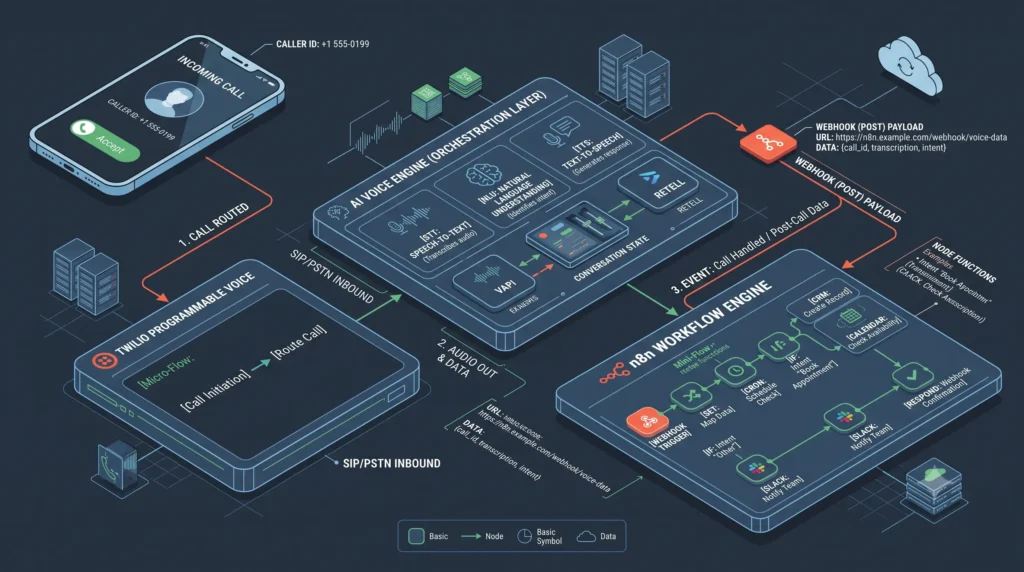
A production AI receptionist runs across three layers:
| Layer | What it does | Tools |
|---|---|---|
| 1. Telephony | Provides the phone number and carries the call audio | Twilio, or numbers bought inside Vapi |
| 2. Voice engine | Runs the live conversation: speech-to-text → language model → text-to-speech | Vapi, Retell AI, Bland AI |
| 3. Business logic | Checks calendars, books appointments, updates your CRM | n8n, Make |
The voice platform can use its own integrations or call an external tool. In the Vapi + n8n setup below, a published n8n webhook checks calendar availability and returns a structured result before the assistant confirms a slot. Do not promise a booking until the calendar has acknowledged it. Measure your own tool latency and send the call to a human or take a callback request when the tool times out. Vapi documents its n8n and calendar integration options.
Build or Buy? Decide First
| Your situation | Best route |
|---|---|
| You need a line live today, with standard booking and no technical work | Buy a managed platform (Retell’s visual builder, or a done-for-you service) |
| You use a niche CRM or custom scheduling system | Build with Vapi + n8n |
| You handle 500+ call minutes a month | Build: per-minute control beats bundled overage pricing |
| You’re setting up receptionists for multiple clients | Build once, reuse the n8n workflows for every client |
| You’re uncomfortable with webhooks and JSON | Buy |
The rest of this guide covers the build route.
Choose Your Voice Platform
| Vapi | Retell AI | Bland AI | |
|---|---|---|---|
| Pricing model | $0.05/min platform fee; you pay speech, model, voice and phone providers separately | From $0.07/min, with speech, model and voice bundled | $0.14/min on the free Start plan, or $0.12/min on the $299/month Build plan, with speech, model and voice bundled |
| Realistic all-in cost | ~$0.13–$0.32/min | ~$0.07–$0.31/min | ~$0.12–$0.14/min, plus $0.04–$0.05/min for transferred calls |
| Best for | Developers who want to choose every component | Teams that want a managed platform and faster setup | High-volume outbound calling |
| Compliance | HIPAA add-on listed at $2,000/month | HIPAA, SOC 2 Type II and GDPR included | SOC 2, HIPAA (with a signed BAA) and GDPR on the Enterprise plan |
| Bring your own API keys | Yes. That provider bills you directly | Limited | Limited |
Verdict: Choose Vapi if you want full control over the stack and the lowest cost at volume. Choose Retell if you work in healthcare or another regulated field, or if you want the fastest setup, since compliance comes bundled. This guide uses Vapi, but the n8n layer works the same with Retell.
How to Build an AI Receptionist: 7 Steps
Step 1: Get a phone number
You have two options:
- Buy a number inside Vapi (about $2 per number per month). This is the simplest route.
- Use Twilio if you want carrier-level control or already have Twilio numbers. In Twilio, go to Phone Numbers → Manage → Buy a number, choose a local area code, then import the number into Vapi using your Twilio credentials.
To keep your existing business number, either port it to Twilio or set conditional call forwarding from your current carrier, so the AI answers only when you’re busy or after hours.
Step 2: Create the assistant in Vapi
In Vapi, create a new assistant and pick its three components:
| Component | What to choose | Why |
|---|---|---|
| Transcriber (STT) | Deepgram’s current Nova model | Fast, accurate, inexpensive |
| Model (LLM) | A fast, low-cost model such as GPT-6 Luna or Claude Haiku 4.5 | Voice needs speed more than deep reasoning |
| Voice (TTS) | Cartesia Sonic or ElevenLabs Flash | Streaming voices that start speaking quickly |
For most receptionist calls, a smaller fast model gives a better experience than a flagship model, because response speed matters more than reasoning depth.
Step 3: Write the system prompt
Paste this into the assistant’s system prompt and adapt it to your business:
# Identity
You are Maya, the receptionist for Acme Dental. You are warm, concise and professional.

# Style
- Keep responses to 1–2 sentences.
- Never read URLs, IDs or timestamps aloud.
- Use natural phrases like "Let me check that for you."

# Critical rules
1. Never confirm a booking until the check_calendar_availability tool returns a confirmed slot.
2. If the caller doesn't give a date, ask: "What day works best for you?" Never guess.
3. If you can't hear clearly, say: "I'm having a little trouble hearing you. Could you repeat that?"
4. If the caller asks for something you can't do, offer to take a message and have someone call back.
Rule 1 is the most important line. It stops the AI from confirming appointments that were never actually booked.
Step 4: Build the calendar tool in n8n
If you don’t have n8n yet, start with n8n here. Self-hosted is cheapest at volume.
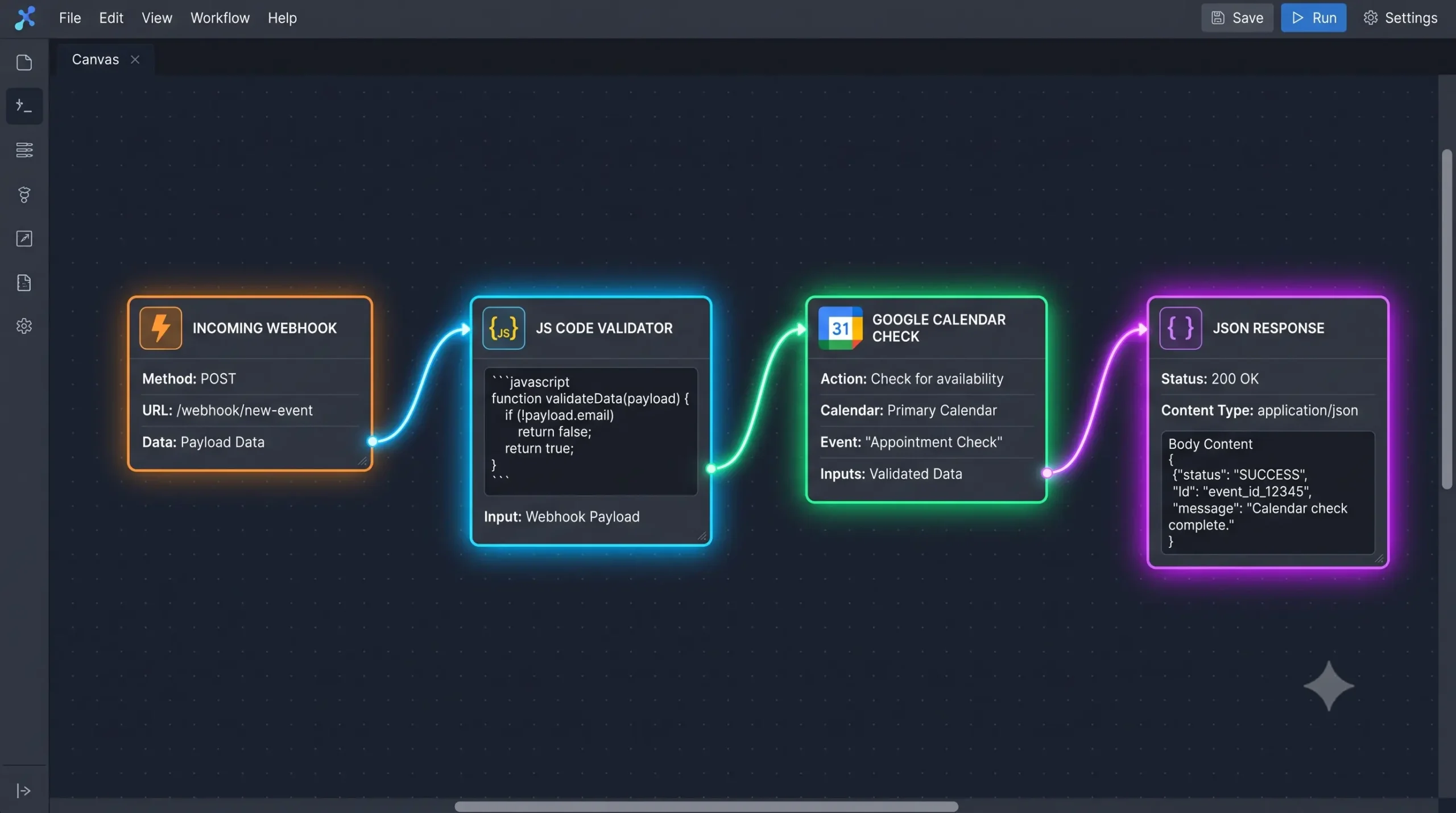
Build this workflow:
| Node | Settings |
|---|---|
| Webhook | Method: POST · Path: voice-calendar-check · Respond: Using ‘Respond to Webhook’ Node |
| Google Calendar (or Cal.com) | Get availability for the date the caller asked about |
| Code | Formats the open slots into one spoken sentence (below) |
| Respond to Webhook | Returns the Code node’s output immediately |
Setting the Webhook to respond through the Respond to Webhook node is essential. The default waits for the whole workflow to finish, and every extra second of silence on a phone call feels broken.
Code node:
// Format up to 3 open slots as one spoken sentence for Vapi
const body = $('Webhook').first().json.body;
const toolCallId = body.message.toolCallList[0].id; // confirm this path in your first test execution
const slots = $input.all().map(item => item.json.startTime).slice(0, 3);

return [{
  json: {
    results: [{
      toolCallId,
      result: slots.length
        ? `I have openings at ${slots.join(", ")}. Which works best for you?`
        : "I don't have any openings that day. Would another day work?"
    }]
  }
}];
Vapi expects the tool result in this results format, matched to the tool call’s ID. After your first test call, open the n8n execution and check the Webhook’s input to confirm the exact path to the tool call ID. Vapi’s payload structure can change between versions.
Step 5: Register the tool in Vapi
In Vapi, create a tool named check_calendar_availability, set its server URL to your n8n webhook’s production URL, and define one parameter:
| Parameter | Type | Description |
|---|---|---|
| date | string | The date the caller wants, in YYYY-MM-DD format |
Attach the tool to your assistant. Then build a second tool, book_appointment, the same way, so the AI can confirm a booking once the caller picks a slot.
Step 6: Tune speed and interruptions
| Setting | Target | Why |
|---|---|---|
| Silence timeout (endpointing) | 400–600 ms | Shorter cuts callers off mid-breath; longer feels sluggish |
| Interruptions (barge-in) | On | The AI must stop talking the moment the caller speaks |
| n8n tool response | Under 300 ms | Keeps total response time near human conversation pace |
| Total response time | Under ~1 second | Past about 1.5 seconds, callers ask “Hello, are you there?” |
Step 7: Test, then go live
Run at least 10 test calls before connecting real callers. Try:
- A clean booking
- A caller who changes the date mid-call
- A noisy background
- A question the AI can’t answer
- Two calls at the same time
Check every n8n execution, and confirm that no call was “booked” without a matching calendar event.
What It Costs
Vapi’s $0.05 per minute covers orchestration only. Speech-to-text, the language model, the voice and the phone line are billed separately. Here’s what a realistic stack costs:
| Cost line | Economical stack | Premium stack |
|---|---|---|
| Vapi platform fee | $0.05/min | $0.05/min |
| Phone line (telephony) | ~$0.01/min | ~$0.01–0.04/min |
| Speech-to-text | ~$0.004/min | ~$0.004–0.01/min |
| Language model | ~$0.01/min (small model) | ~$0.02–0.06/min |
| Voice (TTS) | ~$0.05/min | ~$0.05–0.10/min |
| Total | ≈ $0.13/min | ≈ $0.15–$0.25/min |
Estimates as of September 2026. Check each provider’s pricing page before budgeting.
Example: 400 calls a month averaging 2.5 minutes is 1,000 minutes. That’s roughly $130–$250 a month in call costs, plus about $2 for the phone number and around $10 for a self-hosted n8n server.
Voice quality is the biggest cost lever. Moving from an economical stack to a flagship model and a premium voice raises per-call costs sharply, and most of that increase comes from text-to-speech, not the language model. For a deeper breakdown, see our AI voice receptionist pricing guide.
Gotchas That Break Production Receptionists
- Vapi removed its visual Flow Studio in August 2026. Complex multi-step call flows now use Squads, a code-based setup where specialized agents hand calls to each other. If you want a visual builder, Retell is the better fit.
- Concurrency costs extra past 10 lines. Vapi charges about $10 a month for each concurrent line beyond the tenth. Most small businesses won’t hit this, but agencies running many clients will.
- Fake confirmations. Without Rule 1 in your prompt, models will cheerfully “book” appointments that don’t exist. Always require a tool confirmation.
- Call recording consent. Some US states require all parties to consent to a recording. Add a short line to your greeting, such as “This call may be recorded,” and check your state’s rules.
- Regulated industries. Healthcare practices handling patient information need a HIPAA-compliant setup. On Vapi, that’s a paid add-on; on Retell, it’s included.
Callers Who Mix Languages
If many of your callers switch between languages mid-sentence, set your transcriber to its multilingual mode and add common terms to the system prompt. For Hindi-English callers specifically, see our guide to the best AI receptionist in Hinglish.
Who Should Build / Who Should Buy
Build if:
- You use a niche CRM or scheduling tool with no ready-made integration
- You handle 500+ call minutes a month
- You’re setting up receptionists for clients (see how to start an AI receptionist agency and white-label voice AI platforms)
Buy if:
- You need a working line within a day
- Nobody on your team is comfortable with webhooks
- Your booking needs are fully covered by a standard calendar link
Test calls before going live
Use the call matrix with a test phone number and calendar. Verify tool failures, ambiguous requests, code switching and human handoff.
Want more practical guides? Subscribe to the Operant Solo newsletter if you like. Downloads are free without signing up.
FAQ
How much does it cost to build an AI receptionist?
Roughly $0.13 to $0.32 per call minute with Vapi, depending on the voice and model you choose, plus about $2 a month per phone number. A business taking 1,000 call minutes a month should budget roughly $130–$250 in call costs.
Can I keep my existing business phone number?
Yes. Either port the number to Twilio, or set conditional call forwarding from your current carrier, so the AI answers when you’re busy or after hours.
Can an AI receptionist handle several calls at once?
Yes. Each call runs as its own conversation, so five simultaneous callers get five parallel conversations with no busy signal. Vapi includes a set number of concurrent lines and charges for extras beyond that.
How do I stop the AI from confirming fake bookings?
Make booking confirmation depend on your tool. The system prompt should forbid confirming any appointment until the booking tool returns a confirmed result, and your n8n workflow should only return success after the calendar event is actually created.
Do I need to code to build an AI receptionist?
Not much. Vapi and n8n are configured mostly through their interfaces. The only code in this build is one short JavaScript node that formats calendar slots for speech.
Pingback: How to Use OpenAI Structured Outputs in n8n (No JSON Errors)
Pingback: How to Start an AI Receptionist Agency in 2026 (Real Costs & Stack)
Pingback: Why US-Based AI Voice Bots Fail At Hinglish AI Receptionist
Pingback: AI Voice Receptionist Pricing 2026: Real Costs, Picks
Pingback: Best AI Receptionist Platforms in 2026: Buyer's Guide - Operant Solo