Make.com Review 2026: Pricing, Pros, Cons, and Is It Worth It?
Editorial note: Prices and product limits can change. The figures below were checked against Make’s official pricing and documentation on September 29, 2026. Prices are shown in US dollars and may vary by billing cycle, credit allowance, taxes, and region.
Quick verdict
Make.com is one of the best visual automation platforms for solo operators and small teams that need more control than Zapier without taking on the technical overhead of self-hosting n8n. Its visual scenario builder makes multi-step workflows unusually easy to inspect, while routers, filters, iterators, aggregators, webhooks, error handlers, API connections, and more than 3,000 app integrations give it enough depth for serious business automation.
The catch is its credit-based pricing. A scenario that looks like one automation can consume many credits because modules may run once for every item moving through the workflow. Costs remain manageable when scenarios are designed carefully, but beginners can underestimate usage.
Make is best for people who want visual control and are willing to learn how data moves through a workflow. Zapier remains easier for simple “when this happens, do that” automations. n8n remains more attractive to technical users who want self-hosting or execution-based pricing.
| Category | Rating | What it means |
|---|---|---|
| Ease of use | 4.2/5 | Friendly visual interface, but complex mapping takes practice |
| Workflow flexibility | 4.8/5 | Excellent branching, transformation, API, and error-handling tools |
| Integrations | 4.6/5 | 3,000+ apps plus HTTP/API connectivity |
| AI automation | 4.3/5 | Strong AI app ecosystem and improving native agents; some features remain in beta |
| Pricing value | 4.4/5 | Strong entry-level value, but inefficient scenarios can burn credits quickly |
| Reliability controls | 4.5/5 | Detailed histories, retries, error routes, and incomplete executions |
| Collaboration | 4.1/5 | Useful team controls, though the best governance features sit higher in the plan stack |
| Overall | 4.5/5 | Best for visual, multi-step business automation |
OperantSolo verdict: Recommended for freelancers, agencies, creators, operators, and small businesses that have outgrown basic automations. Start on the free plan, build one real workflow, and estimate its monthly credit use before upgrading.

Make.com review at a glance
| Question | Short answer |
|---|---|
| What is Make.com? | A cloud-based visual platform for automating workflows and AI-driven business processes |
| Who is it best for? | Solo operators, agencies, operations teams, marketers, and technically curious no-code users |
| Is coding required? | No, although API knowledge and optional JavaScript or Python can extend it |
| Is there a free plan? | Yes; it has no time limit and includes 1,000 credits per month |
| How many integrations are available? | More than 3,000, plus a general HTTP connector for other APIs |
| How much does it cost? | At the time of review, monthly pricing for 10,000 credits started at $12 for Core, $21 for Pro, and $38 for Teams |
| Does Make include AI agents? | Yes. Make AI Agents are available in open beta, with availability and provider options depending on the plan |
| Can Make be self-hosted? | No; Make is primarily a managed cloud platform |
| Is Make better than Zapier? | Usually for visual, branching, data-heavy workflows; not always for absolute beginners or the broadest app catalogue |
| Is Make better than n8n? | Usually for a managed, visual no-code experience; not for users whose priority is self-hosting and code-level control |
What is Make.com?
Make.com—formerly known as Integromat—is a visual workflow automation platform. It connects applications and moves data between them according to rules you define.
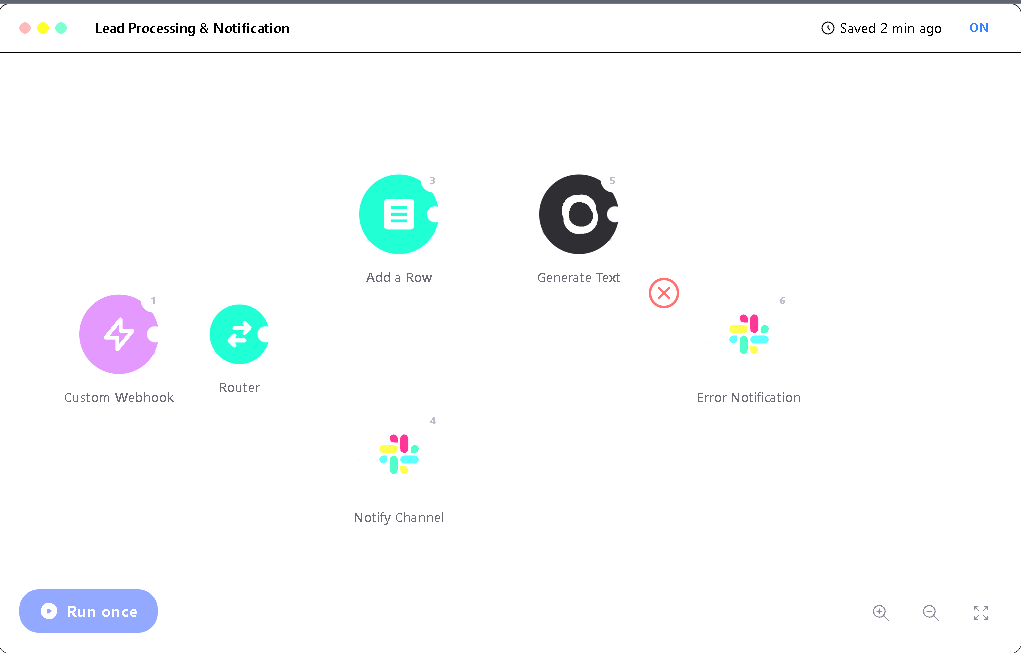
A workflow in Make is called a scenario. Each scenario contains one or more modules. A module might watch for a new form submission, search a CRM, transform text, call an API, create an invoice, send an email, or post a message to Slack. Connections between modules show how data moves through the process.
That visual model is Make’s defining strength. Instead of reading a long list of steps, you see the workflow as a map. Branches, filters, repeated items, failed runs, and the data emitted by each module can all be inspected from the canvas.
A simple scenario might look like this:
- A website form receives a new lead.
- Make checks whether the email address is valid.
- An AI module classifies the enquiry.
- A router sends qualified leads to the CRM and low-priority enquiries to a separate list.
- The prospect receives an appropriate reply.
- The owner receives a Slack notification.
- If the CRM is temporarily unavailable, an error handler retries the failed step.
This is more sophisticated than a basic point-to-point integration, but it can still be built without writing a conventional application.
Who owns Make.com?
Make is the product previously called Integromat. The platform was rebranded as Make in 2022 and is part of Celonis. You may still encounter “Integromat” in old tutorials, integration labels, forum posts, and search queries. In practical terms, an Integromat review is referring to an earlier version of today’s Make platform.
What can you automate with Make?
Make is broad enough to support both small personal workflows and multi-department business processes. Common uses include:
- Capturing and enriching sales leads
- Syncing contacts between forms, spreadsheets, CRMs, and email tools
- Creating invoices and updating accounting records
- Publishing or repurposing content
- Routing customer-support requests
- Generating proposals, reports, and documents
- Processing ecommerce orders and inventory updates
- Moving files between cloud-storage systems
- Calling AI models for classification, extraction, summarisation, or drafting
- Connecting an internal or niche API through HTTP requests
- Giving AI agents access to approved applications and reusable scenarios
For a solo business, Make is most useful when a repeated process crosses several apps. Automating a single action may save a minute; automating the entire handoff between lead capture, qualification, CRM entry, follow-up, and reporting can save hours and reduce missed steps.
Key Make.com features
1. Visual scenario builder
The scenario builder places apps and logic on a free-form canvas. You can zoom out to understand the whole system, then click a module to inspect its inputs, outputs, settings, and execution data.
This is not merely decorative. When a workflow branches into five paths, the visual layout makes the logic easier to audit. It is particularly useful when returning to an automation months after building it.
The main learning curve is mapping. Make exposes structured data from previous modules, and you choose which values should populate later fields. Once arrays, collections, bundles, and data types enter the picture, a “no-code” interface still requires careful thinking.
2. Routers and filters
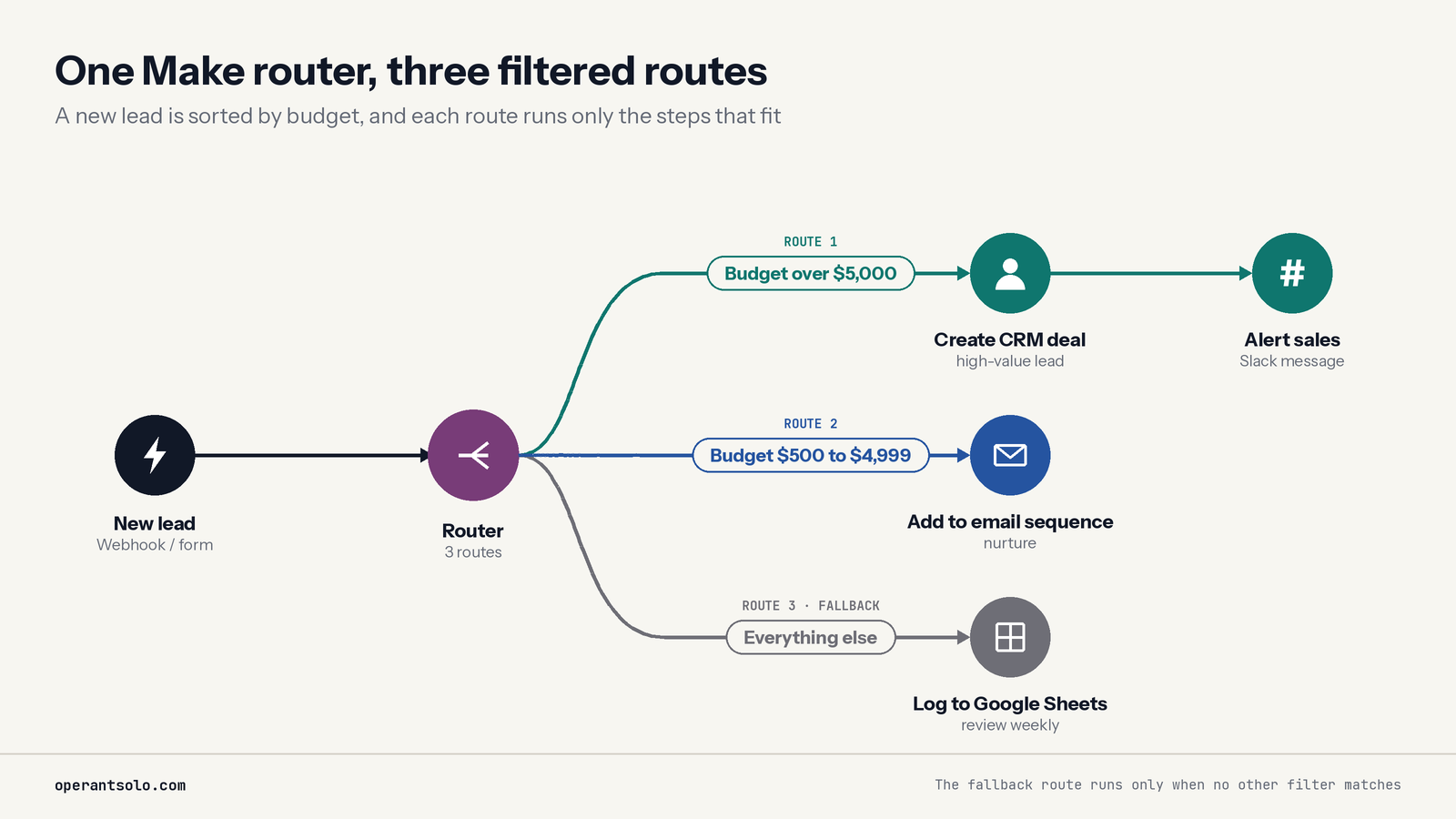
A router splits one flow into several routes. Filters decide which data can pass down each route.
For example, an incoming lead can follow different paths based on country, budget, service requested, or an AI-generated classification. This is one of the areas where Make feels more like a lightweight visual programming environment than a simple app connector.
3. Iterators and aggregators
An iterator separates an array into individual bundles so each item can be processed. An aggregator combines multiple bundles into a single result.
These tools are powerful but also important for pricing. If one module outputs 100 records and three later modules run for every record, the scenario can consume hundreds of credits from one trigger. Users should understand bundle flow before moving a high-volume process into production.
4. Webhooks and scheduling
Scenarios can run on a schedule or respond to webhooks. A webhook can trigger a workflow as soon as another system sends data, avoiding repeated polling and reducing delays.
The Free plan has a 15-minute minimum interval for scheduled scenarios. Core and higher plans can schedule scenarios down to the minute. Instant webhook-triggered scenarios are often a better fit when the source application supports them.
5. Data transformation
Make includes functions for working with text, numbers, dates, arrays, and structured data. It also offers JSON tools, data stores, and utilities that can reduce the need for an external database or custom script in smaller workflows.
Paid users can extend scenarios through the Make Code app with JavaScript or Python. Enterprise users can access additional custom-function capabilities.
6. HTTP and API connectivity
If Make does not offer a ready-made action, its HTTP app can communicate with services that expose an API. This significantly expands what can be automated, though it requires comfort with authentication, endpoints, request methods, headers, and JSON.
This is a meaningful advantage for solo operators using smaller SaaS tools. A missing native integration does not necessarily end the project.
7. Error handling and incomplete executions
Make provides several error-handling directives, including Retry, Resume, Skip, Commit, and Rollback. A failed bundle can be retried, replaced with a fallback value, skipped, or stored for later investigation depending on the workflow’s requirements.
With incomplete executions enabled, Make can preserve the state and data of a failed run. Temporary rate-limit, connection, and timeout errors can be retried automatically. Logical errors still require human review, but the failed data does not have to disappear silently.
This capability matters for business-critical automations. A cheerful “success” message is not enough; you need a defined outcome for failures.
8. Templates and reusable scenarios
Make offers templates for popular combinations of apps. Templates can shorten the initial setup, but they should be treated as starting points rather than production-ready systems. Authentication, field mapping, duplicate prevention, error handling, and business rules still need to be reviewed.
Subscenarios allow logic to be reused instead of copied across many automations. This makes larger systems easier to maintain.
9. Make Grid
Make Grid helps organisations visualise relationships between scenarios, systems, agents, and other automation assets. It becomes more relevant as a workspace grows beyond a handful of isolated scenarios. Solo users may not need it immediately, but agencies and operations teams can use it to understand dependencies and reduce accidental breakage.
10. AI integrations and Make AI Agents
Make lists hundreds of AI-related applications within its broader catalogue, including connections for OpenAI, Anthropic Claude, Google Gemini, Perplexity, ElevenLabs, and other specialist tools.
The newer Make AI Agents app allows an agent to use instructions, knowledge, models, application modules, scenarios, and MCP tools to decide how to complete a task. The redesigned version was released in open beta in February 2026. Make’s documentation warns that functionality and pricing may change while it remains in beta.
This makes Make useful for both deterministic automation and agentic workflows:
- Use a normal scenario when the steps and rules should remain predictable.
- Use an AI agent when the task requires interpreting an ambiguous request, choosing among tools, or adapting its next action.
The two approaches can be combined. An agent can make a bounded decision while an ordinary scenario handles sensitive or repeatable actions.
Make.com pricing in 2026
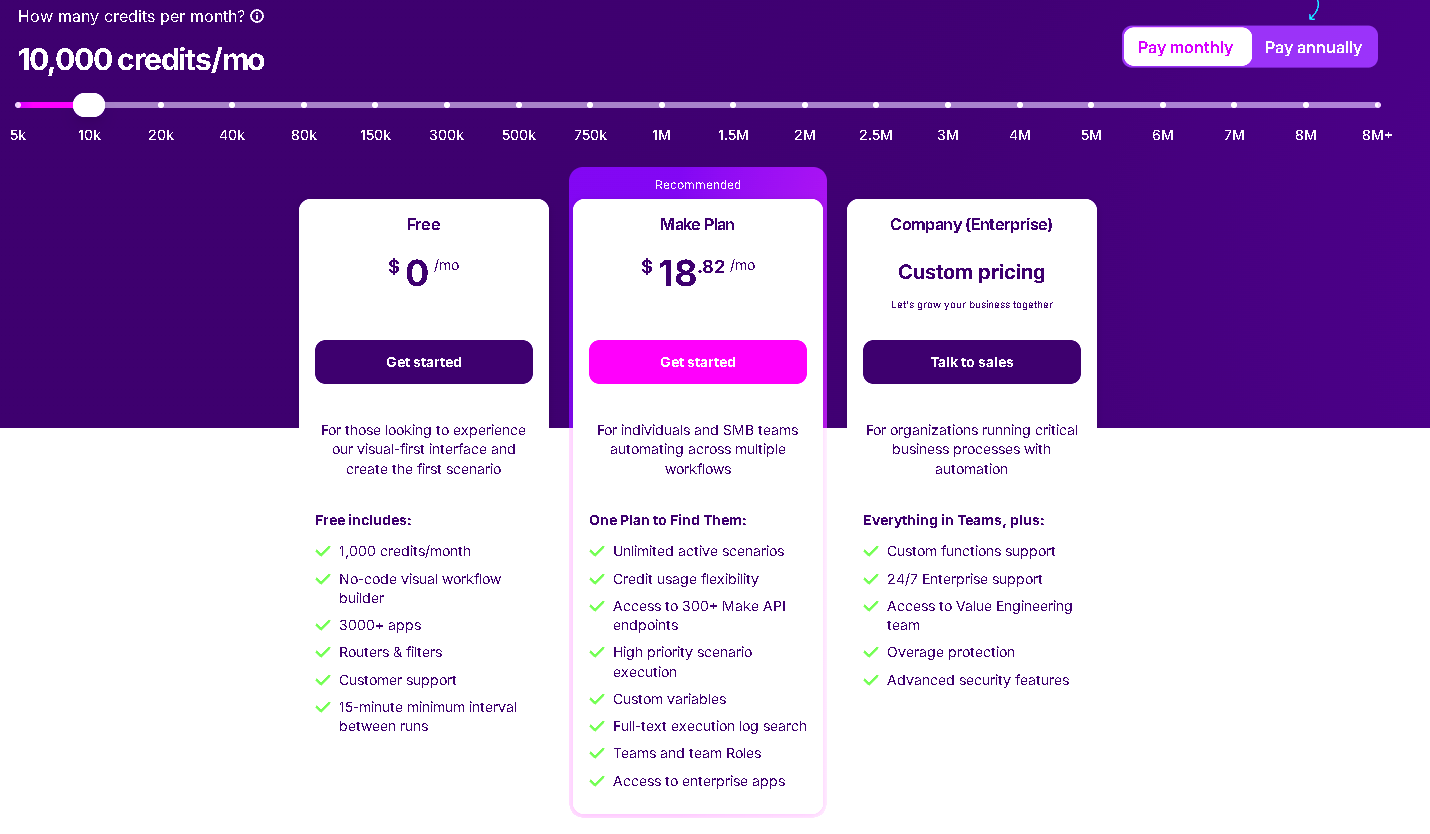
Make has five main plan levels: Free, Core, Pro, Teams, and Enterprise. Pricing scales with the number of credits purchased.
At the time of this review, Make displayed the following monthly prices for an allowance of 10,000 credits:
| Plan | Price | Included credits | Best for | Notable features |
|---|---|---|---|---|
| Free | $0/month | 1,000/month | Testing and light personal automations | Visual builder, 3,000+ apps, routers and filters, 15-minute minimum schedule |
| Core | $12/month | 10,000/month | Solo operators and small businesses | Unlimited active scenarios, one-minute scheduling, Make API access, higher transfer limits |
| Pro | $21/month | 10,000/month | Power users and important workflows | Priority execution, custom variables, full-text execution-log search |
| Teams | $38/month | 10,000/month | Collaborative teams and agencies | Team roles plus shared scenario templates |
| Enterprise | Custom | Custom | Larger organisations with governance requirements | Advanced security, enterprise apps, custom functions, 24/7 support, overage protection |
Annual billing is discounted. Make states that annual plans save 15% or more, but the precise total depends on the plan and credit allowance selected. Always confirm the live checkout price before publishing or purchasing.
What is a Make credit?
Make replaced “operations” with credits as its billing unit. The old word still appears in older reviews and community discussions, so it is easy to assume they are different generations of pricing.
For most non-AI apps:
One module operation normally consumes one credit.
The important word is operation. If a module processes ten separate bundles, it may run ten times and use ten credits. A five-module scenario is not automatically limited to five credits.
AI usage can work differently:
- Third-party AI connections generally use Make credits for module operations, while you separately pay the AI provider for tokens.
- Make’s own AI provider may consume credits dynamically based on operations, tokens, and other usage factors.
- Some built-in AI modules have fixed or dynamic rates higher than one credit.
A simple credit-cost example
Suppose a scenario runs 500 times per month and each run processes one item through six ordinary modules:
500 runs × 6 module operations = approximately 3,000 credits
Now suppose one module returns five items and four downstream modules run once per item:
500 runs × (2 initial operations + 5 × 4 downstream operations) = approximately 11,000 credits
Both scenarios may look compact on the canvas, yet the second uses far more credits. The execution inspector shows where credits are being spent, making it possible to optimise searches, filters, aggregations, and bulk actions.
Is the Make free plan useful?
Yes, for learning and validating a small workflow. It is not a short trial: the plan has no time limit. The main constraints are 1,000 credits per month, a 15-minute minimum schedule for polling scenarios, and smaller usage allowances.
The free plan is enough to answer three critical questions:
- Does Make connect to the exact apps and actions you require?
- Can the workflow handle real data and edge cases?
- How many credits does a typical execution consume?
It is less suitable for a time-sensitive or high-volume production workflow.
Make.com pros and cons
| Pros | Cons |
|---|---|
| Excellent visual representation of complex workflows | The visual interface does not eliminate the learning curve |
| More than 3,000 app integrations | Zapier has a larger advertised app catalogue |
| Strong branching, data transformation, and API tools | Credit usage can be difficult to predict when bundles multiply |
| Useful free plan with no expiry | Free scheduled scenarios have a 15-minute minimum interval |
| Competitive entry pricing | Unused credits expire at the end of the billing term |
| Detailed execution history and module-level inspection | Debugging complicated arrays and mappings can feel technical |
| Robust error handlers and incomplete executions | Important safety settings are not automatically right for every workflow |
| Supports deterministic workflows and AI agents | New AI Agents functionality remains in open beta |
| Managed cloud service with no server maintenance | No self-hosted edition for users requiring full infrastructure control |
| HTTP connections and optional code provide extensibility | External API and AI-provider charges can sit on top of Make’s bill |
What Make does particularly well
Complex workflows stay understandable
Make’s canvas communicates structure better than a long vertical list. When the workflow contains multiple branches, aggregations, retries, and external APIs, that clarity becomes operationally valuable rather than merely attractive.
It sits between beginner automation and custom software
Make handles workflows that would be awkward in an entry-level automation tool but do not justify building and maintaining a custom application. A technically curious owner can start without code and gradually introduce webhooks, APIs, and scripts as the business process matures.
It exposes the data
The ability to inspect the output bundles from each module is one of Make’s most useful debugging features. You can see what the previous app returned rather than guessing why a later field is blank.
It supports deliberate failure handling
Retries, alternate routes, stored incomplete executions, and rollback behaviour allow a workflow to be designed for failure. That is essential when an automation creates invoices, edits customer records, or sends external messages.
Where Make can frustrate users
“No-code” does not mean “no logic”
Make removes much of the syntax associated with programming, but users still need to understand conditions, data structures, state, ordering, and failure modes. Beginners often find their first two-module scenario easy and their first array-heavy scenario surprisingly difficult.
Credits can multiply quietly
Search modules, iterators, and downstream actions can turn one trigger into many operations. A workflow should be load-tested with realistic data before its monthly cost is estimated.
Too much freedom can create messy scenarios
The canvas makes it easy to keep adding branches. Without naming conventions, notes, reusable subscenarios, and disciplined error handling, a clever prototype can become difficult to maintain.
Cloud-only is not right for every organisation
Make provides managed infrastructure in AWS regions in Europe and North America, but it does not offer the same self-hosted model as n8n’s Community Edition. Organisations with strict data residency, isolated-network, or infrastructure-control requirements should assess this before building.
Is Make.com easy to use?
Make is easy to start and moderately difficult to master.
Connecting common SaaS apps and building a linear workflow is approachable. The interface guides users through selecting a trigger, authenticating an account, choosing an action, and mapping fields. The learning curve rises when a workflow needs:
- Nested arrays or collections
- Iterators and aggregators
- Multiple routers and filters
- Pagination
- Custom API authentication
- Deduplication and idempotency
- Advanced error recovery
- Cost optimisation across high volumes
A fair description is visual low-code, even though many useful scenarios require no handwritten code.
Is Make.com safe?
Make states that it adheres to GDPR and has completed SOC 2 Type II and SOC 3 audits. Its official comparison material also lists ISO 27001 certification. Make says its infrastructure runs on AWS and that hosting is available in European and North American regions.
Security still depends on implementation. A certified platform cannot prevent a user from granting excessive permissions, logging sensitive payloads, exposing a webhook, or allowing an AI agent to take an irreversible action without approval.
For safer Make scenarios:
- Grant each connection only the permissions it needs.
- Keep secrets out of notes, field mappings, and webhook URLs shared in screenshots.
- Enable Keep data confidential when execution payloads should not be retained, while recognising that this limits debugging.
- Add approval steps before payments, deletion, publishing, or other irreversible actions.
- Configure error handlers and incomplete executions deliberately.
- Review team roles and shared connections.
- Separate test and production workflows.
- Treat community apps and external MCP servers as additional trust decisions.
Make AI Agents review
Make’s move into agents is more than adding a text-generation module. An agent can interpret an input, choose among permitted tools, use knowledge, and decide what to do next.
That flexibility is useful for tasks such as:
- Classifying and routing customer enquiries
- Researching and enriching leads
- Drafting a response using business context
- Selecting the correct internal workflow based on a request
- Summarising tickets before escalating them
However, not every automation should become an agent. A deterministic scenario is easier to predict, test, and audit. If the workflow simply needs to copy an approved field from one system to another, adding autonomous reasoning creates cost and uncertainty without adding value.
The best pattern is often hybrid: let the model classify or draft, then let fixed logic validate and execute. For high-impact actions, include a human approval step.
Because the new Make AI Agents app remains in open beta, avoid designing a critical process around an assumption that its interface, functionality, or pricing will stay unchanged.
Make.com integrations
Make currently advertises more than 3,000 integrations. Its directory displayed over 3,600 results when this review was researched, including verified, community, built-in, and other app listings. Popular connections include:
- Google Sheets, Gmail, Drive, Docs, Calendar, and Forms
- OpenAI, Anthropic Claude, Google Gemini, Perplexity, and ElevenLabs
- Airtable, Notion, Coda, and Monday.com
- HubSpot, Pipedrive, Salesforce, and GoHighLevel
- Slack, Telegram, Discord, Twilio, and WhatsApp Business Cloud
- Shopify, Stripe, WooCommerce, and accounting platforms
- WordPress, Webflow, Buffer, and social platforms
- Supabase, databases, developer tools, and general HTTP APIs
Do not choose a platform based only on its advertised integration count. Check whether the specific app exposes the trigger, action, field, and authentication method you need. A platform can list an app while lacking one critical action.
Make.com vs Zapier
| Area | Make | Zapier |
|---|---|---|
| Best for | Visual, multi-step and branching workflows | Fast setup and straightforward app-to-app automation |
| Interface | Free-form visual scenario canvas | More guided, step-oriented workflow builder |
| Advertised integrations | 3,000+ | 9,000+ on Zapier’s current pricing page |
| Free usage | 1,000 credits/month | 100 tasks/month |
| Entry paid price | Core displayed at $12/month for 10,000 credits on monthly billing | Professional starts at $19.99/month; task allowance depends on selected tier |
| Usage model | Credits, usually based on module operations; some AI usage is dynamic | Tasks, with rates varying for some AI, code, and connector work |
| Branching and transformation | A major strength | Easier for simple flows; advanced logic is available |
| Learning curve | Moderate | Lower for basic automations |
| Custom connectivity | HTTP, APIs, code, custom apps | Webhooks, code, SDK, and custom integrations |
Choose Make when you need visual control, branching, transformations, and better economics for carefully designed multi-step workflows.
Choose Zapier when speed, simplicity, and the broadest possible selection of ready-made app connections matter more than visual depth.
For a deeper comparison, read n8n vs Zapier vs Make in 2026 and Pipedream vs Zapier.
Make.com vs n8n
| Area | Make | n8n |
|---|---|---|
| Best for | Managed visual automation for operators and teams | Technical users who want control, code, or self-hosting |
| Hosting | Managed cloud platform | Cloud plus a self-hosted Community Edition |
| Billing emphasis | Module-level credits | Completed workflow executions on hosted plans |
| Learning curve | Moderate | Moderate to high, depending on technical background |
| Integrations | 3,000+ advertised apps | Smaller native catalogue plus community nodes and HTTP connectivity |
| Visual experience | Highly visual canvas with animated data flow | Node-based workflow editor with stronger developer orientation |
| Maintenance | Make manages the platform | Self-hosters manage infrastructure, updates, security, and availability |
| Best economic fit | Optimised workflows with controlled module volume | Long, multi-step workflows where execution pricing is favourable |
Choose Make when you want a polished managed service, deep visual inspection, and less infrastructure work.
Choose n8n when self-hosting, developer flexibility, or paying per complete workflow execution is more important.
Read the related n8n review, n8n vs Make for AI agents, and n8n alternatives for more detail.
Who should use Make?
Make is a strong choice for:
- Solo operators automating lead handling, onboarding, reporting, or content operations
- Agencies building repeatable client workflows and internal delivery systems
- Marketers connecting forms, CRMs, ad platforms, spreadsheets, and reporting tools
- Operations teams that need branching logic and visibility without maintaining code
- Creators and publishers repurposing assets across channels with human approval
- Technically curious no-code users who want to progress into APIs and structured data
- Small businesses that need more control than basic point-to-point integrations provide
Who should avoid Make?
Make may not be the best fit if:
- You need a self-hosted automation platform.
- Your team wants the simplest possible setup for one- or two-step automations.
- A required app or action exists only in a competitor’s integration catalogue.
- You cannot tolerate credit usage that varies with the number of processed bundles.
- You need an entirely deterministic system but plan to rely heavily on beta AI-agent features.
- You do not have anyone willing to own, monitor, document, and maintain the workflows.
A practical way to test Make before paying
Do not start by rebuilding every automation in your business. Choose one workflow that is frequent, measurable, and reversible.
Recommended seven-step test
- Pick a process that currently takes at least one hour per week.
- Draw the process, including exceptions and approval points.
- Confirm that Make supports every required trigger and action.
- Build the smallest working version on the Free plan.
- Run it with realistic data, including duplicates, missing fields, and API failures.
- Add monitoring, error handling, and a manual fallback.
- Measure credits per successful outcome and multiply by expected monthly volume.
The goal is not simply to make the scenario run once. The goal is to determine whether it remains reliable and economical without constant supervision.
Final verdict: Is Make.com worth it in 2026?
Yes—Make.com is worth it for users who need flexible, visual automation and are prepared to understand how their data and credits move through each scenario. It offers an unusually strong balance between no-code accessibility and technical depth.
Its biggest advantages are the visual builder, branching logic, data-transformation tools, API connectivity, execution inspection, and robust failure handling. Its biggest weaknesses are the learning curve and the way credit consumption can increase when one input expands into many downstream operations.
For a solo operator, the Core plan is the natural starting point after the free allowance becomes restrictive. Pro becomes more compelling when priority execution, custom variables, and searchable execution logs matter. Teams is mainly justified by collaboration and role requirements.
Make is not automatically better than Zapier or n8n. It occupies a useful middle ground:
- Easier to operate than a self-hosted automation stack
- More visually expressive than a simple linear automation tool
- Flexible enough for APIs, code, AI, and serious business logic
Bottom line: If you can describe your business process clearly and test it with real data, Make can become one of the most valuable tools in a solo-business technology stack. If you only need two apps to exchange a small amount of data, a simpler tool may be easier.
Frequently asked questions about Make.com
What are the key features of Make.com?
Make’s key features are its visual scenario builder, routers and filters, iterators and aggregators, webhooks, scheduling, data transformation, more than 3,000 app integrations, HTTP/API connectivity, optional code, execution histories, error handlers, incomplete executions, reusable subscenarios, AI integrations, Make Grid, and Make AI Agents.
What is the general sentiment about Make.com?
Make is generally valued for visual flexibility and the ability to build sophisticated workflows at a competitive starting price. The most common reservations concern its learning curve and the difficulty of predicting credit use in scenarios that process many bundles. In short, users tend to praise its power and question its complexity—not its basic capability.
How does Make compare with other no-code automation platforms?
Make sits between beginner-friendly automation tools and developer-oriented workflow systems. It provides more visible branching and data control than many simple connectors, while remaining a managed service that requires less infrastructure work than a self-hosted platform. Zapier is usually easier for simple workflows; n8n offers more self-hosting and developer control.
What are the core capabilities of Make’s visual workflow builder?
The builder connects triggers, actions, searches, logic, data transformations, APIs, and AI tools on one canvas. Users can inspect the data emitted by each module, split flows with routers, gate them with filters, repeat work with iterators, combine results with aggregators, and add dedicated error routes.
Is Make.com suitable for small businesses?
Yes. Make is particularly suitable for small businesses with repeatable processes spanning several cloud apps. The Free plan supports testing, and the Core plan provides minute-level scheduling and unlimited active scenarios. Small businesses should estimate credit use and assign one person to monitor and maintain production workflows.
Is Make.com free?
Make has a free plan with no time limit. It includes 1,000 credits per month, access to the visual builder and 3,000+ apps, routers and filters, and a 15-minute minimum interval for scheduled scenarios.
How much does Make.com cost?
When checked in September 2026 with monthly billing and 10,000 credits selected, Make displayed Core at $12 per month, Pro at $21, and Teams at $38. Enterprise pricing is custom. Annual billing and different credit allowances change the effective price.
What counts as a credit in Make?
For most non-AI modules, one module operation consumes one credit. If a module processes multiple bundles, it may consume one credit for each operation. Some built-in AI features use credits dynamically based on tokens, operations, or other factors.
Does Make.com have AI agents?
Yes. Make AI Agents can use models, instructions, knowledge, application modules, scenarios, and MCP tools. The redesigned Make AI Agent app was released in open beta in February 2026, so its features and pricing may change.
Does Make.com require coding?
No. Most scenarios can be built without code. Knowledge of APIs, JSON, and data structures becomes useful for advanced workflows, and paid users can add JavaScript or Python through Make Code when necessary.
Is Make.com the same as Integromat?
Yes. Integromat was rebranded as Make. Older Integromat tutorials may still explain relevant concepts, but the interface, pricing, terminology, and features should be checked against current Make documentation.
Is Make.com better than Zapier?
Make is usually better for visual, branching, data-heavy workflows and can offer stronger value at higher activity levels. Zapier is often easier for beginners and advertises a larger app ecosystem. The better choice depends on the exact actions and monthly workload required.
Is Make.com better than n8n?
Make is usually better for users who want a managed, polished visual platform without maintaining servers. n8n is often better for developers who need self-hosting, deeper code-level control, or pricing based on complete workflow executions.
Can Make.com connect to an app without a native integration?
Often, yes. If the service provides an API, Make’s HTTP app can send requests to it. You will need the service’s API documentation and may need to configure authentication, headers, parameters, and JSON bodies manually.
Is Make.com good for AI automation?
Yes. Make connects to major AI providers and specialist AI applications, while also offering its own AI Toolkit and AI Agents. For reliability, use AI for tasks that genuinely require interpretation and keep predictable operations in deterministic scenario modules.