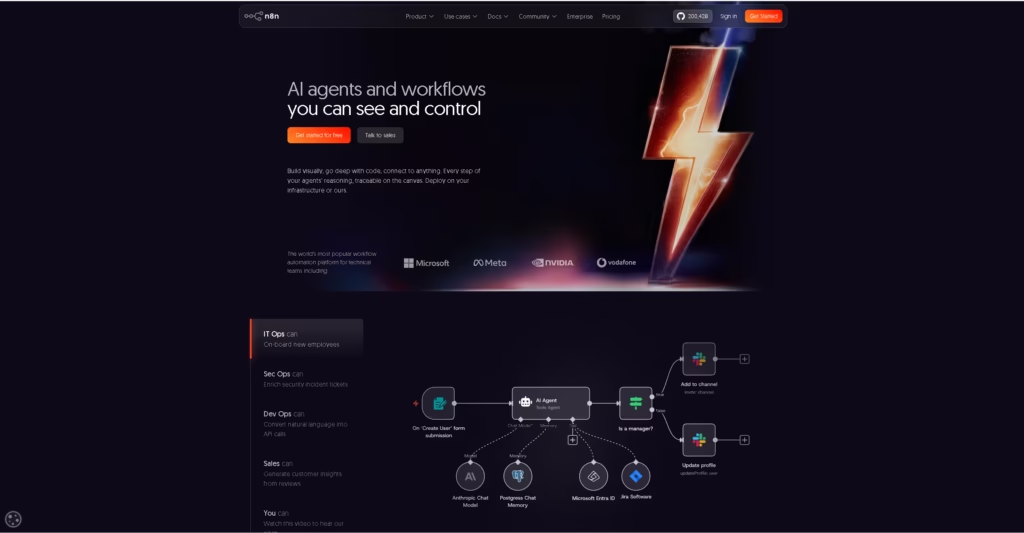
n8n Review 2026: Powerful, Cheap—and Not Beginner-Friendly
Quick Answer
Choose n8n Cloud if you want managed hosting and less server maintenance. Choose self-hosted n8n if you need deployment control and can handle updates, backups, and monitoring. Compare workflow volume and maintenance time alongside subscription costs; self-hosting can reduce software spending, but it transfers operational responsibility to you.
Last tested: September 28, 2026, on n8n 2.41.3 (n8n Cloud). See “What Counts as an Execution” for our measured results.
OUR RATING
Excellent for technical builders — unlimited self-hosted executions, native LangChain/MCP support, and clear licensing rules. Loses half a point for the real maintenance overhead (Docker, PostgreSQL, SSL) this review doesn’t sugarcoat.
The common pitch for n8n is simple: it is free if you self-host it. While the Community Edition provides unlimited workflows and runs without software license fees, self-hosting exchanges subscription dollars for maintenance time. You take on server provisioning, database integrity, and license compliance.
This n8n review 2026 examines the operational trade-offs, actual infrastructure costs, and architectural limits to determine whether your team should choose n8n Cloud or self-host.
Disclosure: Operant Solo is reader-supported. We may earn an affiliate commission when you purchase through links on this page, at no additional cost to you. Recommendations are based on independent testing and evaluation.
n8n Pros and Cons
| What works | What creates friction |
|---|---|
| One billed execution covers the full workflow, not every individual step | The learning curve is much steeper than the visual canvas suggests |
| Community Edition has no software subscription | Self-hosting still requires updates, backups, monitoring, and recovery |
| JavaScript, Python, HTTP requests, webhooks, and custom nodes remove most technical dead ends | Niche integrations often require direct API work |
| Strong branching, loops, data transformation, and error workflows | Test and production webhooks confuse new users |
| Useful AI Agent, LangChain, vector-store, and MCP support | Git-based version control and separate environments sit on expensive plans |
| You control where a self-hosted instance runs | Forum support is not enough when a revenue-critical workflow fails |
1. The Pricing Reality: Cloud vs. Self-Hosted
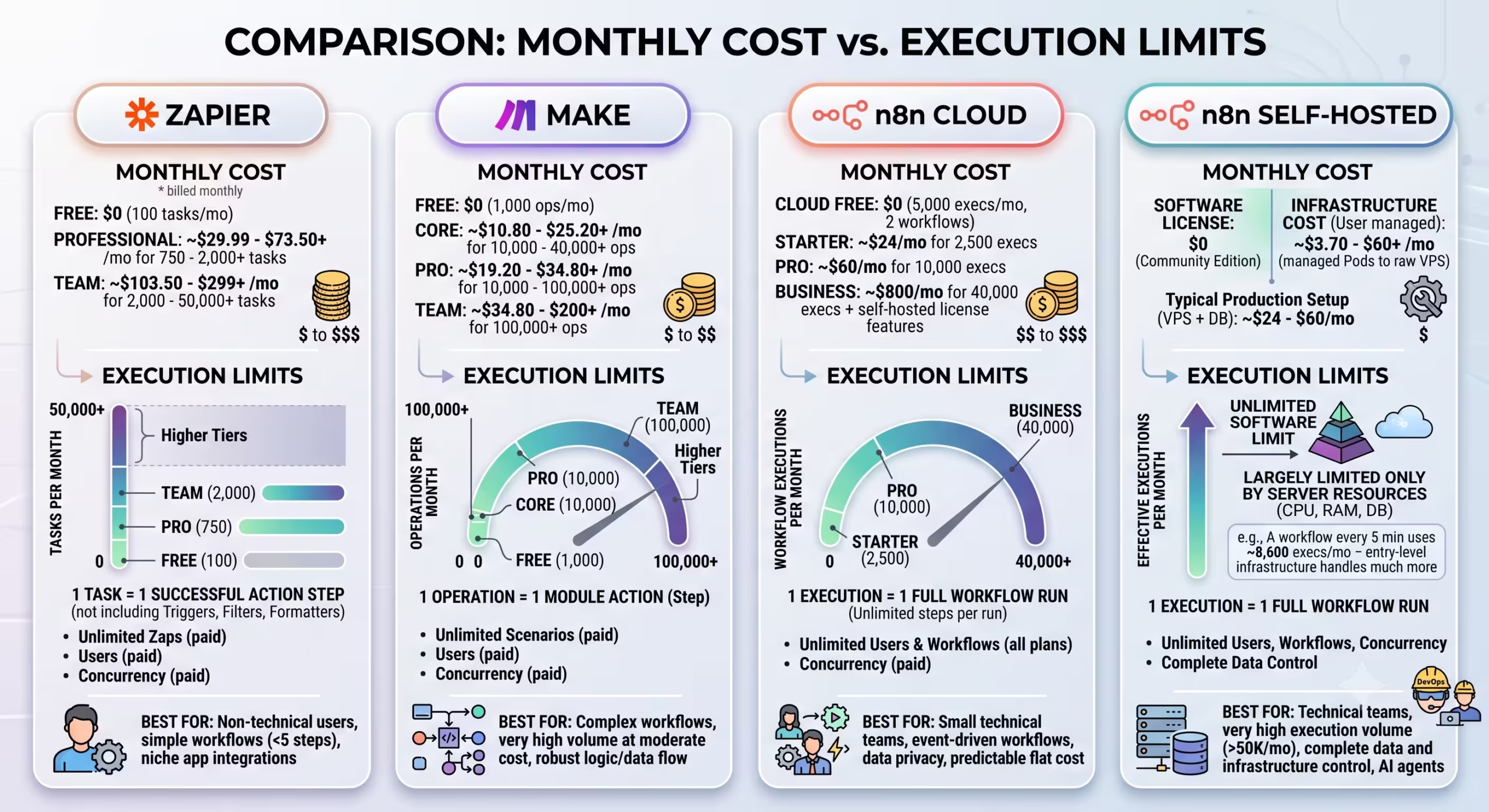
When evaluating n8n cloud vs self hosted, understanding execution metering is essential. In n8n, an execution counts as one full workflow cycle from the initial trigger to the terminal node, regardless of how many steps run inside it.
n8n bills by execution: one complete workflow run from trigger to final node, no matter how many steps run inside it. Since n8n removed the old workflow and user caps in 2025, every Cloud plan includes unlimited workflows and unlimited users. Execution volume is the only thing that changes your bill. Prices are listed in euros, because n8n is based in Berlin.
| Plan | Deployment | Annual price per month | Executions |
|---|---|---|---|
| Community Edition | Self-hosted | €0 software fee | Unlimited |
| Starter | n8n Cloud | €20 | 2,500/month |
| Pro | n8n Cloud | €50 | 10,000/month |
| Business | Self-hosted | €667 | 40,000/month |
| Enterprise | Cloud or self-hosted | Custom | Custom |
These are annual-billing prices from n8n’s current pricing page. Monthly billing costs more. n8n also documents a Pro-2 Cloud option starting at 50,000 monthly executions, although it is not displayed as a normal plan card. Check your admin panel or contact n8n before assuming the only upgrade after the standard Pro plan is Business or Enterprise.
What Counts as an Execution on n8n Cloud (Tested)
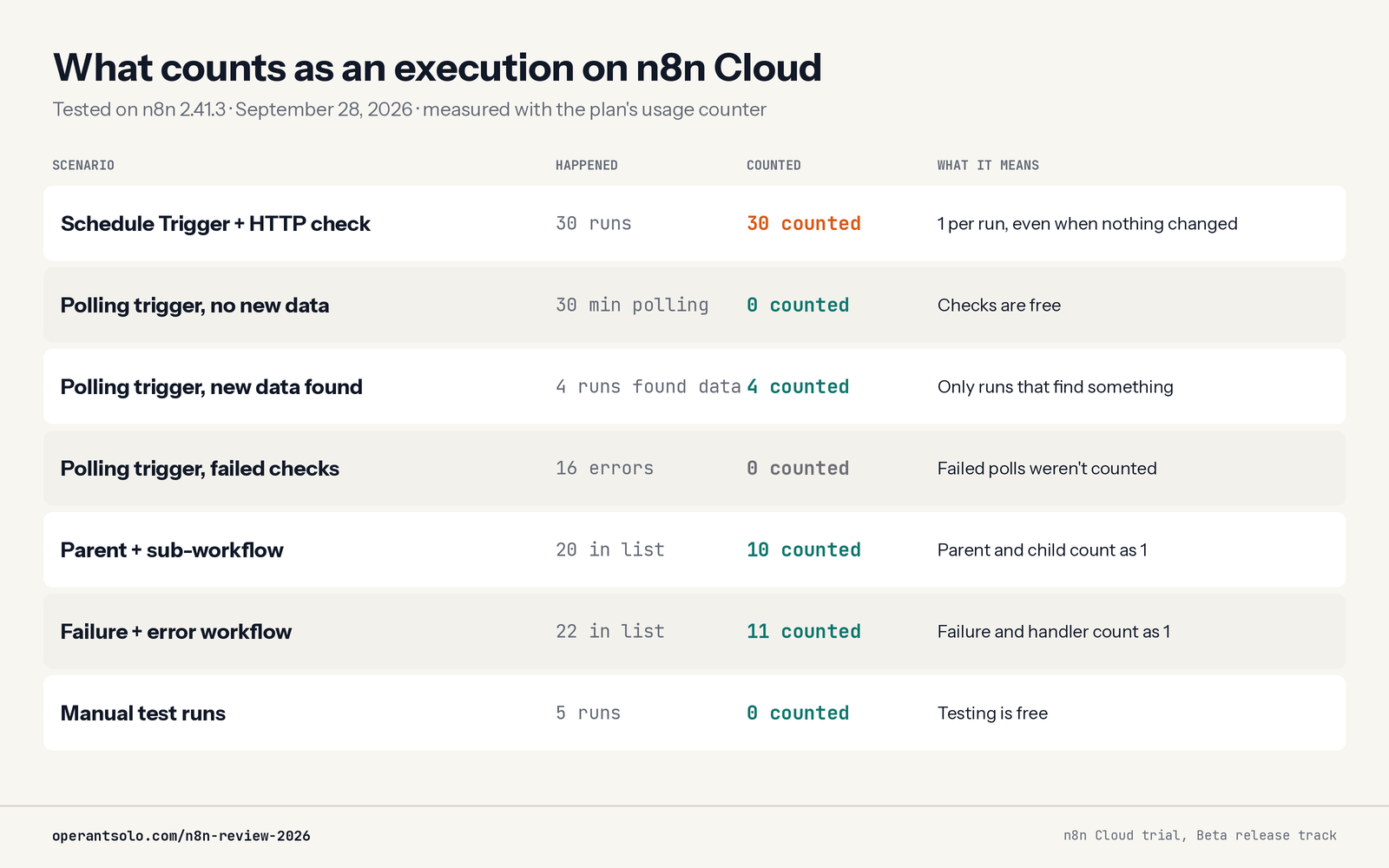
n8n Cloud plans are priced by executions, but n8n’s pricing page doesn’t show how different workflows use them. So we measured it. On September 28, 2026, we ran seven test workflows on n8n Cloud (version 2.41.3) and tracked the plan’s usage counter after every phase.
| Scenario | What happened | Counted on your plan |
|---|---|---|
| Schedule Trigger + HTTP request | 30 runs in 30 minutes | 30 (one per run, even when nothing changed) |
| Native polling trigger, no new data | Polled every minute for 30 minutes | 0 |
| Native polling trigger, new data found | 4 runs that found new items | 4 |
| Polling trigger, failed checks | 16 failed polls | 0 |
| Workflow that calls a sub-workflow | 20 runs in the list (10 parent + 10 child) | 10 (the pair counts once) |
| Failing workflow + error workflow | 22 runs in the list | 11 (the pair counts once) |
| Manual test runs from the editor | 5 runs | 0 |
What this means for your bill:
- Test freely. Clicking “Execute workflow” while building doesn’t use your plan’s executions.
- Sub-workflows are free to use. Splitting a big workflow into smaller called workflows didn’t add to the count.
- Error workflows don’t double your usage. A failure and its alert counted once.
- Check the right number. The usage counter for your plan is in the Admin Panel (the bottom of the n8n sidebar). The “Prod. executions” figure on the Overview page is a different, larger number.
The gap between the standard plan cards is steep. Pro is €50 a month when billed annually for 10,000 executions. n8n also documents a Pro-2 Cloud tier starting at 50,000 executions, although it is not shown as a normal card on the public pricing page. Confirm its current price in your account before treating self-hosting or Enterprise as the only next step.
Git version control and separate dev, staging and production environments start at the Business plan. Because Business is a self-hosted license, you can’t get Git-based workflow versioning on the Starter or Pro Cloud plans. On n8n Cloud, it requires an Enterprise contract.
Trial: Starter and Pro include a 14-day free trial with no credit card required. There’s no permanent free Cloud plan.
The Real n8n Self Hosting Cost
Self-hosting n8n eliminates software license fees, but hardware and operations are not free. A standard production deployment requires:
- Virtual Private Server (VPS): A 2 vCPU / 4GB RAM instance on Hetzner, DigitalOcean, or AWS Lightsail costs $6 to $14/month.
- Domain & DNS: Routing webhooks securely via SSL requires a dedicated domain (~$10/year).
- Automated Backups: Offsite snapshots of your volume mounts and PostgreSQL database run roughly $1 to $2/month.
Your true baseline n8n self hosting cost is between $8 and $17 per month.
MONTHLY COST AT 10,000 EXECUTIONS (COMPLEX MULTI-STEP FLOWS)

┌──────────────────────────────┬──────────────────────────────┬─────────────────┐

│ Platform │ Estimated Monthly Cost │ Billing Metric │

├──────────────────────────────┼──────────────────────────────┼─────────────────┤

│ Zapier │ ~$130+ / month │ Per Task/Step │

│ Make.com │ ~$19–$35 / month │ Per Operation │

│ n8n Cloud (Pro) │ €50 / month billed annually │ Per Execution │

│ n8n Self-Hosted (VPS) │ ~$8–$15 / month │ Flat Server Fee │

└──────────────────────────────┴──────────────────────────────┴─────────────────┘
Among modern automation tools, Zapier becomes cost-prohibitive for multi-step logic because it charges per task. Make offers affordable entry tiers, but AI agent loops consume operations quickly. Self-hosted n8n is the most cost-effective option once operational volume scales.
The Real Execution Trap: Schedule Triggers, Not Polling
It’s common advice that polling burns through n8n Cloud executions. Our test showed that’s only half true, and the difference decides whether Cloud Starter works for you.
Native polling triggers are cheap. Trigger nodes like the RSS Feed Trigger check for new data on a schedule, but an execution only happens when they find something new. Our RSS trigger polled a quiet feed every minute for 30 minutes and used zero executions. Pointed at a busy feed, it used 4, one for each check that found new items.
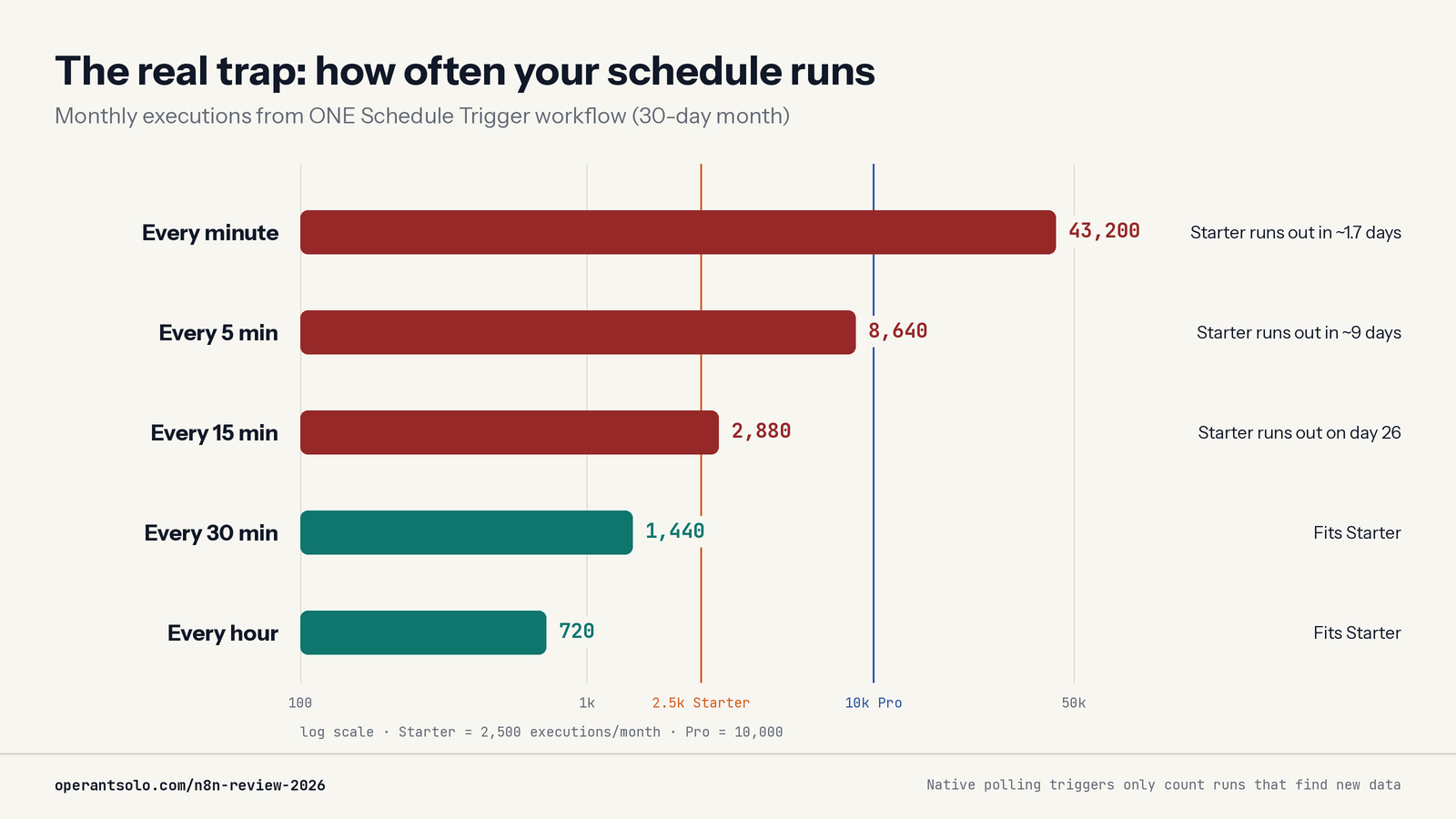
Schedule Trigger + a check is the real trap. Many workflows use a Schedule Trigger followed by an HTTP Request or app node that looks for changes. That pattern costs an execution every time it runs, whether it finds anything or not. In our test, 30 runs cost 30 executions.
Here’s what one Schedule Trigger workflow uses in a 30-day month:
| Runs every | Executions per month | On Starter (2,500/month) |
|---|---|---|
| 1 minute | 43,200 | Runs out in about 1.7 days |
| 5 minutes | 8,640 | Runs out in about 9 days |
| 15 minutes | 2,880 | Runs out on about day 26 |
| 30 minutes | 1,440 | Fits |
| 1 hour | 720 | Fits |
How to avoid it:
- Use a native trigger node when one exists for your app, instead of a Schedule Trigger plus a check.
- Use webhooks when the app can push changes to you. They only run when something happens.
- Slow the schedule down. Most “check for changes” workflows don’t need to run every minute.
- Self-host if a workflow really must run every minute. Self-hosted n8n has no execution limit.
Who it’s for
- Solo operators comfortable with workflow logic.
- Multi-step automations that need API calls, branching, or custom code.
- Builders willing to learn debugging and deployment basics.
Who should skip it
- Users who want every integration to work with minimal configuration.
- Self-hosting is a poor fit if you cannot maintain updates and backups.
- Consider a simpler managed tool when setup time is your main constraint.
2. Deploying Production n8n Docker Instances
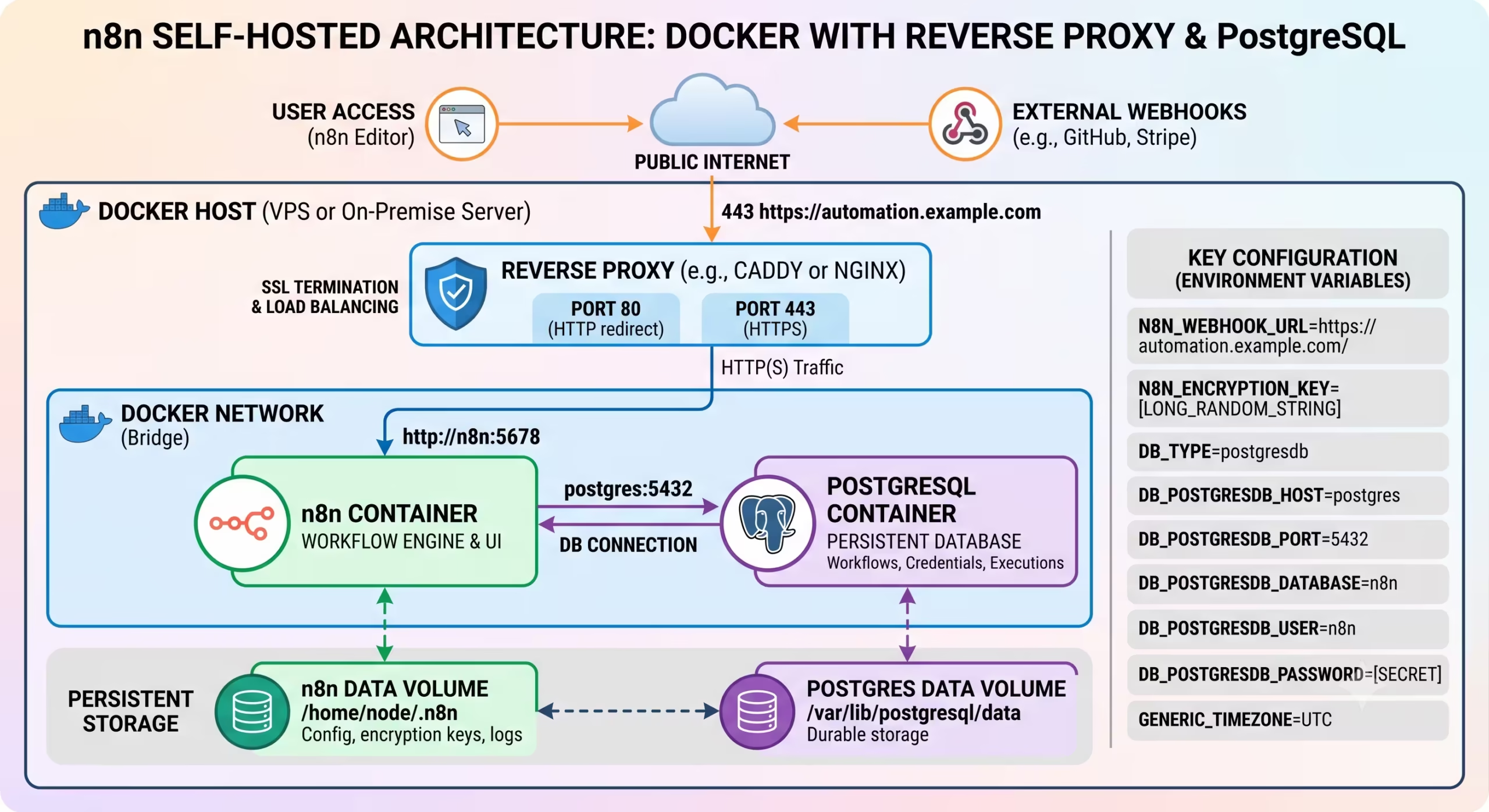
Running n8n docker containers in production requires more than a simple docker run command.
PRODUCTION DOCKER ARCHITECTURE:

┌─────────────────────────────────────────────────────────────┐

| Reverse Proxy (Caddy, Traefik, Nginx) - SSL Termination |

└──────────────────────────────┬──────────────────────────────┘

▼

┌─────────────────────────────────────────────────────────────┐

| n8n Container (App Engine) |

└──────────────┬──────────────────────────────┬───────────────┘

▼ ▼

┌─────────────────────────────┐ ┌─────────────────────────────┐

| Dedicated PostgreSQL DB | | Redis Queue (Queue Mode) |

| (Replaces Default SQLite) | | (Distributes to Workers) |

└─────────────────────────────┘ └─────────────────────────────┘
The Production Database: SQLite vs. PostgreSQL
By default, self-hosted n8n boots with an embedded SQLite database. While sufficient for sandbox testing, SQLite uses file-level locking during write operations. Under production workloads:
- Concurrent webhook executions force database writes to queue up, triggering timeout errors.
- Unplanned container terminations risk corrupting the SQLite file.
- Live backups cannot run safely while n8n is writing execution logs.
SQLite is acceptable for evaluation and light single-instance use. PostgreSQL becomes the safer choice when concurrency, durability, backup routines or queue mode matter. Do not migrate because a checklist says “production”; migrate because your workload and recovery requirements justify it.
Infrastructure Overhead
Managing your own n8n instances introduces maintenance obligations:
- SSL and Ingress: You must configure a reverse proxy (Caddy, Traefik, or Nginx) to terminate SSL certificates. Webhooks will fail without secure HTTPS endpoints.
- Image Updates: Applying security patches requires pulling the latest Docker image and recreating containers via docker compose down && docker compose up -d.
- Database Migrations: Major releases occasionally introduce database schema updates. Back up your database before updating to ensure you can roll back if needed.
If your billable consulting rate is $100/hour, spending two hours troubleshooting an unresponsive Linux server eliminates any savings over n8n Cloud.
The Production Failures Nobody Budgets For
Back up your n8n encryption key separately from the database. Restoring a database without the original key can leave stored credentials unreadable.
Prune old execution data. Logs and binary payloads grow quietly until they fill the disk and stop the instance.
Do not update a production instance blindly. Pin the version, read the release notes, back up the database, and know how you will roll back before recreating the container.
Every important workflow also needs an owner. Somebody must receive failure alerts, review unsuccessful executions, and decide when a retry could create a duplicate invoice, email, order, or CRM record.
The dangerous automation is not always the one showing a red error. It is the workflow that reports success after writing the wrong data—or fails silently for three days before anybody notices.
Before exposing an instance to the internet, review the n8n security vulnerabilities of 2026.
3. Licensing Rules: The Sustainable Use License
n8n is not licensed under traditional open-source terms like MIT or Apache 2.0. It operates under the Sustainable Use License.
Permitted Uses
- Running internal automations for your own company.
- Developing automations for consulting clients, provided each client operates their own n8n instance or Cloud subscription.
Prohibited Uses
- Operating a white-labeled “automation-as-a-service” platform where external customers pay to access n8n directly.
- Bundling n8n as an embedded backend inside a commercial SaaS product without an enterprise Embed agreement.
Review these licensing boundaries before building multi-tenant SaaS products powered by self-hosted n8n.
4. Building Advanced n8n Automation & AI Workflows
The platform’s standout strength is its support for hybrid, agent-driven logic. Rather than treating AI as a simple text completion module, an n8n automation integrates reasoning models directly into execution chains.
- Native LangChain Nodes: Configure AI Agent nodes connected to conversational memory, external vector stores, and custom tools.
- Model Context Protocol (MCP): Connect your canvas to external tools using n8n MCP Server Triggers and Client nodes.
- Inline Python and JavaScript: When standard nodes fall short, add a Code node to execute JavaScript (Node.js) or Python. You can manipulate JSON arrays, write custom regex, or parse payloads without running external webhooks.
- Enterprise Version Control: Native Git version control is a Business-plan feature, and Business is a self-hosted license. Cloud Starter and Pro don’t include it. Self-hosted Community teams can still export workflow JSON through the n8n public API into a private GitHub repo.
Where n8n Starts Fighting Back
The Canvas Looks Easier Than the Work Is
Dragging nodes onto a canvas is simple. Understanding why one node returns an array while the next expects a single object is not.
Once your workflows become useful, you start dealing with JSON paths, expressions, API authentication, pagination, rate limits, binary files, and badly structured payloads.
A non-developer can learn n8n. But “no-code” creates the wrong expectation. I would describe it as code-optional and systems-thinking-required.
OAuth Is a Day-One Self-Hosting Trap
Google, Microsoft, and other OAuth integrations require a correct public callback URL. If your self-hosted instance uses an IP address, unreliable tunnel, incorrect domain, or broken HTTPS setup, authentication can fail before you build the useful part of the workflow.
n8n Cloud removes most of this setup. That is one reason I recommend using Cloud for your first serious workflow, even if you expect to self-host later.
Test and Production Webhooks Behave Differently
n8n provides separate test and production webhook URLs.
Test mode waits for sample data and may accept only the next request. The production URL requires the workflow to be published and active. New users regularly send data to the wrong URL and then waste time debugging a workflow that never received the request.
The design makes sense once you understand it. The interface does not explain the difference well enough when you first encounter it.
Integration Count Does Not Equal Integration Depth
n8n’s public repository now claims more than 1,500 integrations. That does not mean every integration supports every trigger and action you need.
Popular nodes for tools such as Google Sheets, Slack, Notion, and common CRMs are generally solid. Niche services may expose only a few operations, depend on community-maintained nodes, or push you back to the HTTP Request node.
Before migrating, check your five most important apps. Do not check whether the app logo appears in the catalog. Check whether the exact triggers, searches, updates, and authentication methods you need are supported.
For workflows that need your approval before acting, use our n8n human-in-the-loop tutorial.
When n8n Is the Wrong Tool
n8n is flexible, but that does not make it the right answer for every automated process.
Avoid using it for sub-second customer-facing application logic. Each node adds overhead, and external API calls make response times less predictable. Build that part as an application service and use n8n around it.
Do not use n8n as a high-volume stream processor. If you need to process millions of Kafka events, use a system designed for continuous streaming.
It is also a poor substitute for a dedicated analytics pipeline when the entire job involves moving large numbers of tables between databases and warehouses. Airbyte, Fivetran, dbt, or a custom data pipeline will usually be easier to operate.
The final bad fit is a team with no technical owner. Business users may be able to read the canvas, but somebody still needs to understand APIs, credentials, retries, data structures, and production failures.
If nobody owns those problems, the workflow becomes technical debt with connecting lines.
n8n vs Zapier, Make, and Code-First Systems
Choose Zapier When Speed Matters More Than Control
Zapier is easier to learn, offers broader coverage for mainstream business apps, and is kinder to non-technical users.
I would choose it for straightforward automations when somebody needs the workflow running today and the expected task volume is modest. Its weakness is cost: multi-step workflows can consume task allowances quickly.
Choose Make When You Want Visual Power Without Running a Server
Make sits between Zapier and n8n. It offers more visual control than Zapier while keeping infrastructure out of your hands.
Its data mapping can feel more intuitive, especially for people who prefer working visually. However, Make charges by operations, so loops and large multi-step workflows can become expensive.
Choose Code When the Workflow Is Part of the Product
If the workflow requires strong automated tests, code review, typed interfaces, low latency, or complicated state management, build software.
Code-first systems such as Temporal, Prefect, or Trigger.dev demand more engineering work. In return, they provide cleaner testing, deployment, and version-control mechanics.
n8n wins when the speed of visual development and ready-made connectors matters more than having a conventional codebase.
5. Cloud or self-hosted?
| Choose | When it fits | Cost you still own |
|---|---|---|
| n8n Cloud | You want the first workflow running quickly and do not want to maintain a server. | Execution limits and higher-volume plan pricing. |
| Self-hosted Community Edition | You can own Docker, HTTPS, backups, updates, credentials and monitoring. | Infrastructure, recovery work and your time. |
| Another tool | No one technical will own failures, or the workflow needs low latency, streaming or a dedicated data pipeline. | Migration and connector limits. |
Self-hosting gives you deployment control. It does not make a workflow compliant by itself. Your data path, access controls, retention, contracts, logs and operating process still decide that.
Still choosing? Compare n8n, Zapier and Make, or read the Pipedream versus Zapier comparison when code-level control matters.
Frequently Asked Questions
Do manual test runs count toward my n8n Cloud executions?
No. In our test on n8n 2.41.3, five manual runs from the editor didn’t change the plan’s usage counter at all. Only production (published) runs counted.
Does calling a sub-workflow use an extra execution?
Not in our test. A parent workflow and the sub-workflow it called counted as one execution together. Note that n8n requires the sub-workflow to be published before the parent can be published.
Do polling triggers use up executions on n8n Cloud?
Native polling triggers only used executions when they found new data. Our RSS trigger checked every minute for 30 minutes with nothing new and used zero. A Schedule Trigger with a check step is different: it uses one execution every run.
Pingback: n8n Human in the Loop: How to Safely Control AI Agents
Pingback: Zapier AI Agents Review (2026): The Hidden Costs & Best Alternatives
Pingback: How to Automate Freelance Business (And Stop Doing Free Admin Work)
Pingback: n8n Security in 2026: What Every Self-Hoster Needs to Know
Pingback: Pipedream vs Zapier (2026): Which Should Solopreneurs Actually Use?
Pingback: n8n vs Make in 2026: The Hidden Cost of AI Agent Workflows
Pingback: n8n Is Now Worth $5.2B After n8n SAP Investment — What It Means for You
Pingback: GPT-5.5 vs Claude Opus 4.8: Best Pick for Automation (2026)
Pingback: How to Build Multi-Model AI Agents in n8n Using GitHub's HydraFusion Patterns (Cut Costs Up to 67%) - Operant Solo
Pingback: AI Agent Workflows for Solopreneurs: What's Safe to Automate in 2026
Pingback: How to Build an AI Email Parser (And Stop Manual CRM Entry)
Pingback: AI Lead Enrichment: How to Automate Client Research
Pingback: How to Automate Client Onboarding (Stripe, Drive & n8n)
Pingback: GPT-6 Astra: Should You Upgrade Your Automation Workflows?
Pingback: Cursor AI vs Make: Should You Code Automations in 2026?
Pingback: n8n Statistics 2026: 70+ Data Points on Users, Revenue, Funding & AI Automation Growth - Operant Solo
Pingback: n8n vs Zapier vs Make (2026): Which Automation Platform Should You Use? - Operant Solo