Disclosure: Operant Solo is reader-supported. We may earn an affiliate commission when you purchase through links on this page, at no additional cost to you. Recommendations are based on independent testing and evaluation.
The hard part of building AI agent workflows isn’t connecting two apps together. It’s figuring out what happens when the system makes a mistake.
If you spend five minutes on YouTube, you’ll see tech influencers promising an “autonomous AI agency” that closes clients and prints money while you sleep. But if you run a real one-person business — a consultant in Chicago, a freelance developer in Bengaluru, a designer in Paris — your most valuable asset is your reputation. One hallucinated email sent to a premium client can ruin your month.
Quick Answer: The safest AI agent workflows for solopreneurs never let the AI take a final, irreversible action on its own. Instead, the agent drafts the work — a reply, a summary, a proposal — and pauses for your approval before anything gets sent, published, or paid. This is called Human-in-the-Loop (HITL), and it’s the framework behind every workflow below.
Here’s exactly what you should — and shouldn’t — let an AI agent do, and how to build that safety net into your systems.
Checkout Our Dedicated n8n review here
Traditional Automation vs. Agentic AI: Why the Difference Matters
🔄 Updated September 2026
Before you build anything, you need to understand the fundamental shift happening in process automation right now.
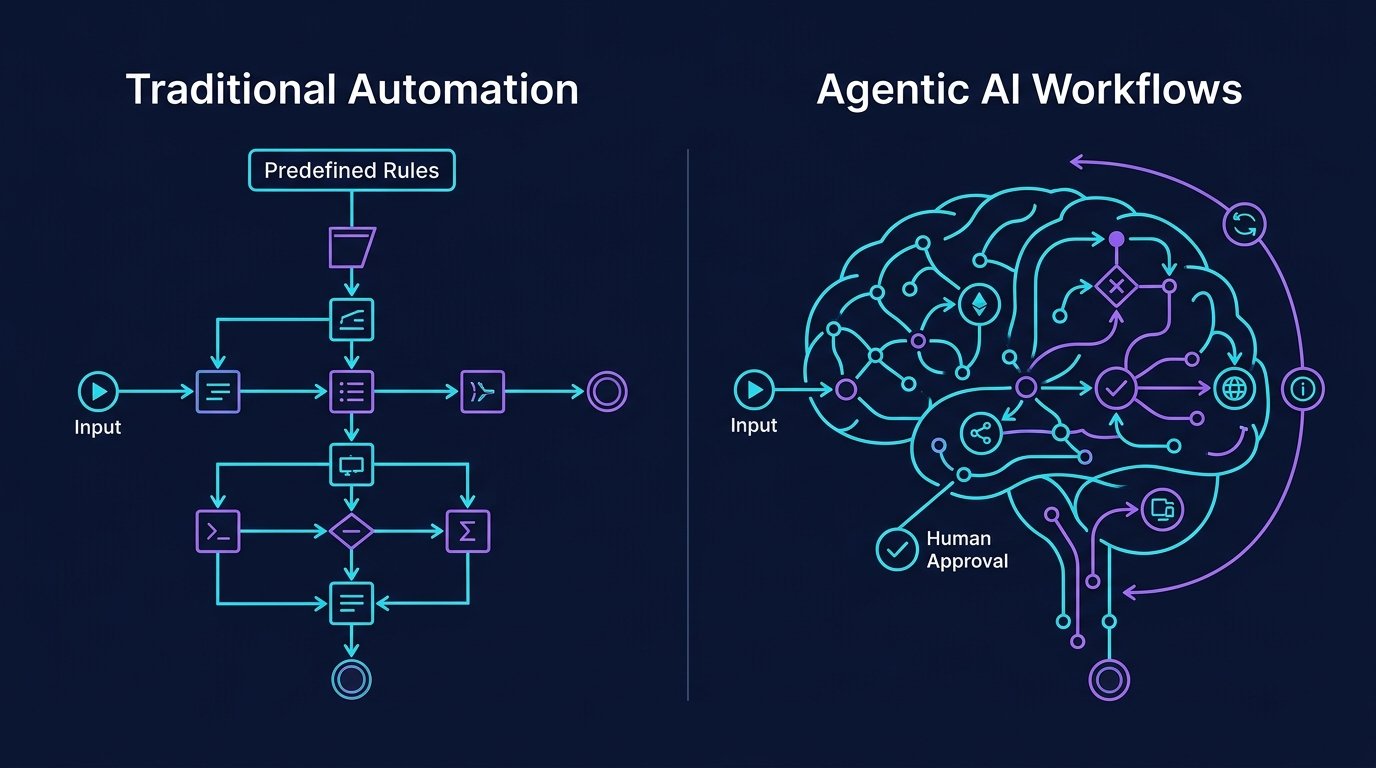
Traditional automation follows predefined rules: if I get an email with the word “Invoice,” move it to a Google Drive folder. It’s dumb, but reliable. Every path is hard-coded. There are no surprises. Zapier, Make, and IFTTT all built massive businesses on this model.
Agentic AI is fundamentally different. An AI agent is given a goal and allowed to make decisions: read my emails, decide which ones are urgent, and reply to the clients who are upset. It’s smart, but unpredictable. The agent uses large language models (like GPT-5.5 or Claude Sonnet 4.5) to interpret context, reason through ambiguity, and choose between multiple possible actions.
Here’s where it gets dangerous for solopreneurs:
| Traditional Automation | Agentic AI Workflows | |
|---|---|---|
| Decision-making | None — follows predefined rules | Uses AI models to reason through decision points |
| Error type | Predictable (wrong rule = wrong outcome) | Unpredictable (hallucination, misinterpretation) |
| Failure cost (enterprise) | Low — 2% error rate is a rounding error | Low — caught by QA teams |
| Failure cost (solopreneur) | Low | High — you might accidentally insult your best client |
| Speed | Real-time, milliseconds | Seconds to minutes (LLM inference time) |
| Handles complex tasks? | No — breaks on edge cases | Yes — can handle tasks requiring judgment |
When a large software company runs an AI agent, a 2% failure rate is a rounding error. When a solopreneur runs one, a 2% failure rate means you might accidentally insult your best client.
The solution isn’t to avoid agentic AI entirely. It’s to put yourself at the critical decision points where mistakes are irreversible.
The Human-in-the-Loop Approach
If you’re running a solo business, never let an AI agent click “Send,” “Publish,” or “Pay” without your approval.
Instead, use the Human-in-the-Loop framework: the AI agent collects the data, processes the logic, and drafts the final result. You review it and click approve. You get roughly 90% of the time savings with none of the reputational risk.
This is how every serious enterprise deploys AI agents too. Google’s own internal agent systems have human in the loop checkpoints for anything that touches production code, customer data, or financial systems. If it’s good enough for a $2 trillion company, it’s good enough for your freelance business.
How Agent Workflows Combine LLMs with External Tools
A common misconception is that an AI agent is “just ChatGPT.” It’s not. Modern agent workflows combine the reasoning power of large language models with external tools, APIs, and data sources to create something far more capable.
Here’s the architecture of a typical AI agent workflow:
- Trigger: Something happens (new email, calendar event, file upload).
- Context Gathering: The agent pulls relevant data from your CRM, email, calendar, or database. This is where maintaining context across multiple data sources becomes critical.
- LLM Reasoning: The AI model processes the context, interprets intent, and generates a response or plan.
- Tool Execution: The agent uses external tools (send email draft, create task, update spreadsheet).
- Human Checkpoint: Before any irreversible action, the workflow pauses for your approval.
This is what separates a toy demo from a production-grade system. The agent doesn’t just generate text — it connects agents to your real business tools and enforces safety gates at every critical decision point.
4 AI Agent Workflows That Actually Make Sense for Solopreneurs
Instead of trying to replace yourself, use AI to tee up the work so you can knock it down in minutes instead of hours.
Workflow 1: The Inbox Triage Agent
Before: You spend an hour every morning reading newsletters, client requests, spam, and software updates, trying to figure out what actually matters.
After:
- An email arrives in your inbox.
- A webhook sends the email text to an LLM, like Claude Sonnet 4.5.
- The agent categorizes it: Urgent Client Issue, Lead/Inquiry, Newsletter, or Administrative.
- If it’s a lead, the agent extracts the budget and timeline, creates a CRM record, and writes a reply draft.
Human control: The AI only drafts the response. You review it, adjust the tone, and hit send yourself.
Why this works: Email triage is a perfect use case for specialized agents because it’s a complex task that follows semi-predictable patterns, but requires judgment that predefined rules can’t handle. A rule-based filter can’t tell the difference between “I’m unhappy with the timeline” (urgent) and “I’m happy with the timeline” (not urgent). An LLM can.
Workflow 2: The Meeting Ops Assistant
Before: You finish a call, re-read your messy notes, spend 30 minutes formatting a follow-up email, and manually update your task manager.
After:
- Your meeting ends and a tool like Fathom or Fireflies generates the transcript.
- Your automation platform passes that transcript to an AI agent.
- The agent extracts the three main decisions, lists tasks assigned to you, and lists tasks assigned to the client.
- It creates tasks in your Notion or ClickUp board with due dates and drafts a follow-up email.
Human control: You review the task board for realistic deadlines and approve the follow-up email before it sends.
Why this works: Meeting follow-ups are tasks requiring both comprehension and structured output. The agent needs to understand conversational context, extract action items from rambling discussions, and format them into a specific template. This is exactly the kind of complex task that large language models excel at — but where a single misattributed action item could cause real problems.
Workflow 3: The Content Repurposing Engine
Before: You write a long blog post, then spend two hours chopping it into a LinkedIn post and a Twitter thread.
After:
- You move a finished blog post into a “Ready to Repurpose” folder.
- An AI agent reads the full post.
- Based on a strict style prompt, it generates three LinkedIn posts and one 5-part Twitter thread.
- It pushes the drafts into your scheduling tool (like Buffer).
Human control: The AI schedules posts as drafts only. You edit the hooks so they sound authentic, then hit schedule.
Why this works: Content repurposing is high-volume, low-risk process automation. The worst case scenario is a mediocre LinkedIn post — not a ruined client relationship. This makes it one of the safest AI workflows to start with.
Workflow 4: The Research & Competitor Monitor
Before: You manually check competitor pricing once a quarter, usually only after you’ve already lost a few deals to it.
After:
- Every Monday, an automation triggers a web-scraping agent (like Browserbase).
- The agent scans your top three competitors’ pricing pages.
- It compares the current text to last week’s.
- If it spots a change, it sends a summary to your Slack.
Human control: Purely informational — the AI takes no action beyond keeping you informed.
Why this works: This is a real-time intelligence system that requires zero human in the loop because the agent never takes an outbound action. It only observes and reports. This is the safest category of AI workflows — monitor-and-alert.
Multi-Agent Orchestration: When One Agent Isn’t Enough
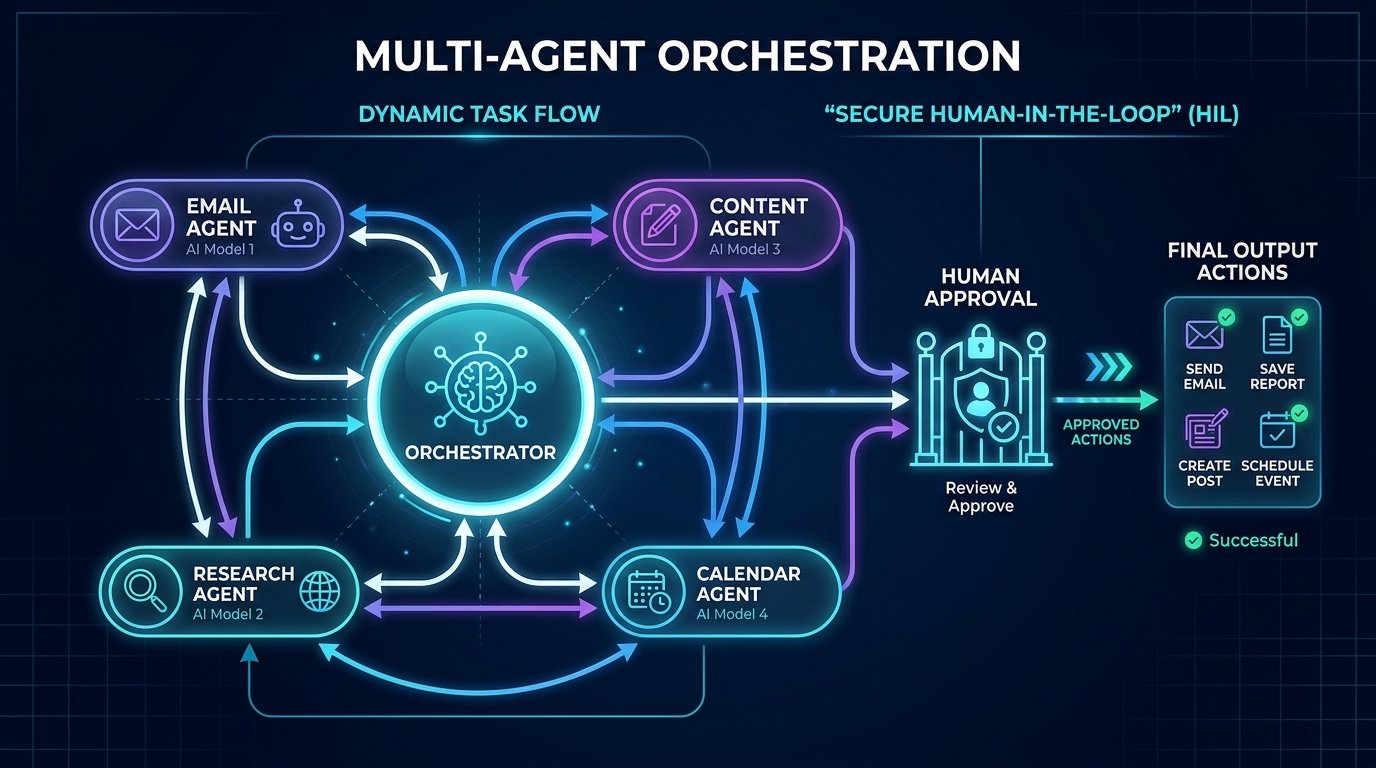
As your workflows get more sophisticated, you’ll hit the limits of a single agent. That’s when you need multi-agent orchestration — a system where multiple agents work together, each handling a specific subtask.
For example, consider a complete “New Client Intake” workflow:
- Email Agent (specialized in communication) reads the incoming inquiry and extracts key details: name, company, budget, timeline, project type.
- Research Agent (specialized in web scraping) pulls the prospect’s LinkedIn profile, company website, and recent news mentions.
- Content Agent (specialized in writing) drafts a personalized response using the research data, referencing their specific industry and recent achievements.
- Calendar Agent (specialized in scheduling) checks your availability and proposes three meeting times.
The orchestrator connects agents in sequence, passing context from one to the next. Each specialized agent uses a different AI model optimized for its task — a cheap, fast model for data extraction, and a more capable model for the personalized writing.
This is the power of multi-agent orchestration: instead of asking one overloaded agent to do everything, you deploy multiple agents that are each experts in their domain, handling complex tasks that no single agent could manage well alone.
The critical rule still applies: The entire chain pauses at the human checkpoint before any outbound action (sending the email, booking the calendar slot) is executed.
The Memory System: How Agents Handle Long-Term Context
One of the biggest frustrations with basic AI automations is that they have no memory. Every time the agent runs, it starts from scratch. It doesn’t remember that your client Sarah prefers bullet points over paragraphs, or that you already discussed pricing in last Tuesday’s call.
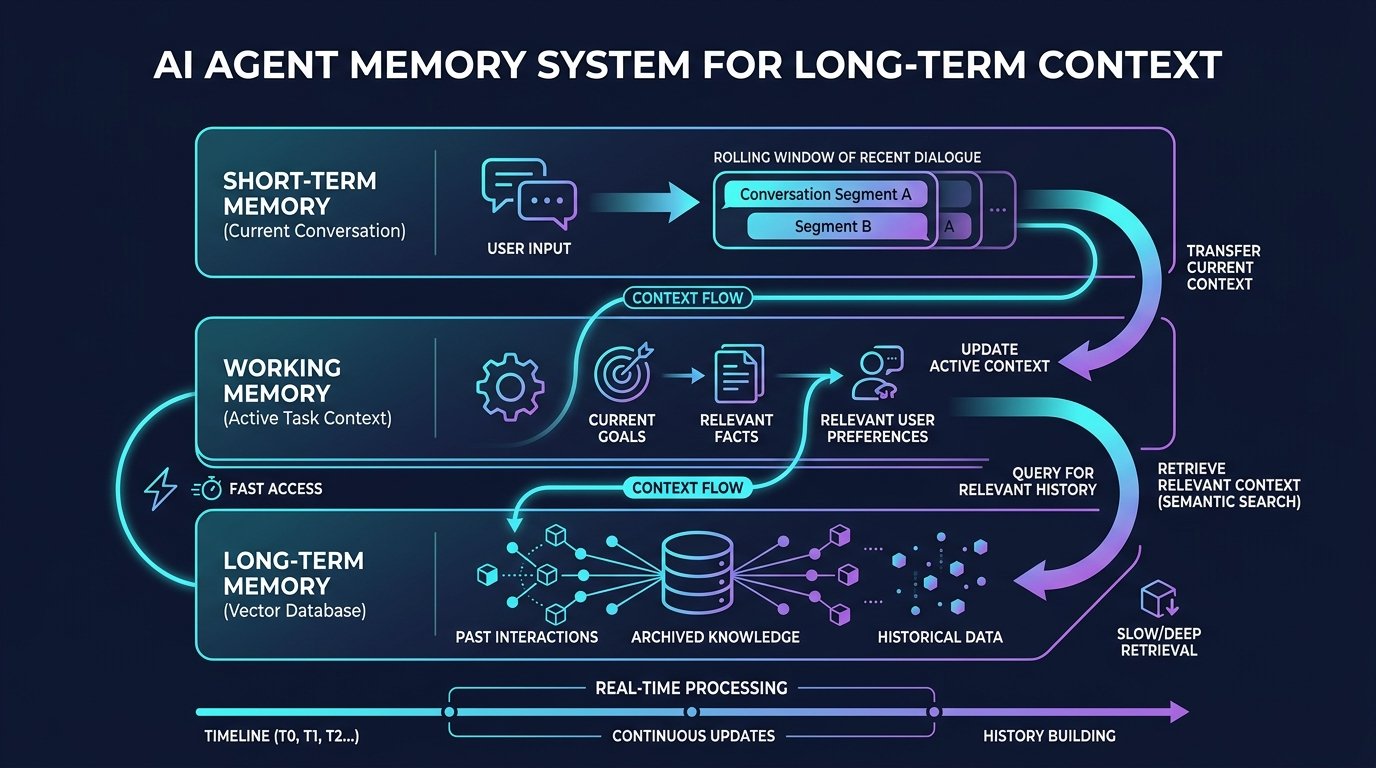
A proper memory system solves this by giving your agent persistent context:
- Short-Term Memory: The current conversation or task window. This is the real-time context the large language model uses to generate its immediate response.
- Working Memory: The active project context — deadlines, client preferences, recent interactions. This is pulled from your CRM, project management tool, or a structured database.
- Long-Term Memory: Historical data stored in a vector database (like Pinecone or Weaviate). This lets the agent perform semantic search over past emails, meeting notes, and documents to find relevant context from weeks or months ago.
Maintaining context across these three layers is what makes the difference between an agent that writes generic responses and one that writes “Hi Sarah, following up on our call last Tuesday about the Q4 campaign — here’s the revised timeline you asked for.”
For solopreneurs building on n8n, you can implement a basic memory system using the built-in memory nodes (Buffer Window Memory for short-term, Postgres or Supabase for long-term storage). On Make.com, you’d use the Data Store module to persist context between scenario runs.
The long-term payoff is massive: your agent gets smarter the longer you use it, because it accumulates a richer understanding of your clients, your preferences, and your business patterns.
Comparing the “Pause Button” Methods
You have three practical ways to build the human-approval step into these workflows:
| The Draft Method | Relay.app | Make.com + Slack | n8n Wait Node | |
|---|---|---|---|---|
| How it works | Final step sets output to “draft” instead of “send/publish” | Native “Human Approval” node pauses the workflow | AI output posted to Slack with Approve/Reject buttons via webhook | Built-in Wait node pauses execution until webhook callback |
| Setup difficulty | Easiest — no new tool needed | Easy — built for this specific purpose | Moderate — requires wiring a webhook | Moderate — requires webhook + form setup |
| Cost | Free (built into Make/Zapier/Gmail) | Free tier available; paid plans for volume | Included in your existing Make.com plan | Free (self-hosted n8n) |
| Best for | Beginners, first AI workflow | Anyone who wants a dedicated approval UI | Users already living in Slack daily | Technical users who want full control |
| Real-time response? | No — you check drafts manually | Yes — push notification to phone | Yes — Slack notification | Yes — webhook callback |
The Draft Method is the safest starting point: in Make or Zapier, set your final action to “Create Draft” instead of “Send Email,” or set social posts to draft status instead of published.
Relay.app is a workflow tool built specifically around Human-in-the-Loop — you drag a “Human Approval” node directly into the workflow. The AI drafts, the workflow pauses, you get a notification, you click approve, it resumes.
Make.com + Slack works well if you’re already using Make’s AI Agent modules: route the output to Slack as an interactive message with Approve/Reject buttons, and a webhook listens for your click.
n8n Wait Node is the most powerful option for technical users. The n8n human-in-the-loop tutorial shows exactly how to configure the Wait node to pause execution, send you a Slack or email notification with the draft content, and resume only when you approve via a webhook callback. This gives you full control over every decision point in your agent workflows.
The Decision Points Framework: What to Automate vs. What to Gate
Not every step in an AI workflow needs human approval. That would defeat the purpose. Instead, use this decision points framework to determine where to place your safety gates:
✅ Safe to Fully Automate (No Human Needed)
- Internal data organization (sorting files, tagging documents)
- Monitor-and-alert workflows (competitor tracking, uptime monitoring)
- Data extraction and structuring (parsing invoices, extracting contact info)
- Internal summarization (meeting notes for your own reference)
⚠️ Requires Human Review Before Action
- Any outbound communication (emails, social posts, proposals)
- Financial actions (creating invoices, processing refunds)
- Client-facing content (blog posts, case studies, portfolio updates)
- Scheduling and commitments (booking meetings, setting deadlines)
🛑 Do Not Automate (Keep Fully Manual)
- Contract negotiations and legal agreements
- Hiring/firing decisions
- Pricing strategy changes
- Anything involving sensitive personal data without explicit consent
Use this framework as your north star when designing AI workflows. Every time you add a new step, ask: “If this goes wrong, does it cost me embarrassment, money, or a relationship?” If yes, add a human in the loop checkpoint.
The Hidden Costs and Failures of AI Agents
The Infinite Loop Trap: If an AI agent auto-replies to incoming emails and the client has an auto-responder, the two bots can talk to each other thousands of times overnight. By morning, your API bill is $400 and your email provider may flag your domain. Always use the Draft method first while testing a new agent.
GDPR and Privacy: If you operate in France or have EU clients, you cannot pass sensitive client data (names, financial details, health info) into standard LLM APIs without checking compliance. OpenAI’s API does not use API data to train models by default, but your own data processing agreements still need to be in order.
API Costs Add Up: Running a complex AI agent means passing a lot of context back and forth. This is manageable for a business saving 10 hours a week, but worth watching closely if you’re just starting out. If you want to keep software costs near zero, self-hosting n8n removes the monthly platform fee entirely. Check our n8n Review 2026 for a full cost breakdown.
Context Window Limits: Even the best large language models have context window limits. If your agent tries to process a 50-page contract or a month’s worth of emails in a single call, it will either truncate the input or produce degraded output. A good memory system solves this by selectively retrieving only the relevant chunks, rather than dumping everything into the prompt.
Model Selection Matters: Not every task needs GPT-5.5 or Claude Opus. For simple classification tasks (email triage, tag assignment), a smaller, faster AI model like GPT-4.1 Mini works just as well at 1/10th the cost. Match your AI models to the complexity of the task. Our multi-model AI agent patterns guide shows exactly how to implement this cost optimization.
Spending authority is the highest-stakes version of this problem. See our breakdown of AI agent wallets and autonomous spending risk.
n8n
Best for: technical automation workflows
Consider n8n when your workflow needs custom logic or control over deployment. Self-hosting also requires time for updates, backups, and monitoring.
Operant Solo may earn a commission if you purchase through this link, at no extra cost to you.
Pingback: No API Integration: 3 Ways MSPs Can Solve It in 2026
Pingback: AI Agent Wallets: Should You Let AI Spend Money Autonomously?
Pingback: n8n Human in the Loop: How to Safely Control AI Agents
Pingback: Zapier AI Agents Review (2026): The Hidden Costs & Best Alternatives
Pingback: How to Automate Website Without API (AI Agents vs Make.com)
Pingback: Build an AI Email Parser: Automate Email to CRM in 2026
Pingback: How to Automate Freelance Business in 2026