The End of the Monolithic Agent Era
The initial wave of automation relied on the single agent paradigm. A developer would select a flagship Large Language Model (LLM) — typically GPT-4 or Claude Opus — and force it to execute every step of a workflow. This approach is fundamentally flawed. Using a premium reasoning model to perform basic data formatting is equivalent to hiring a senior software architect to sort paper files. It is computationally slow and financially inefficient.
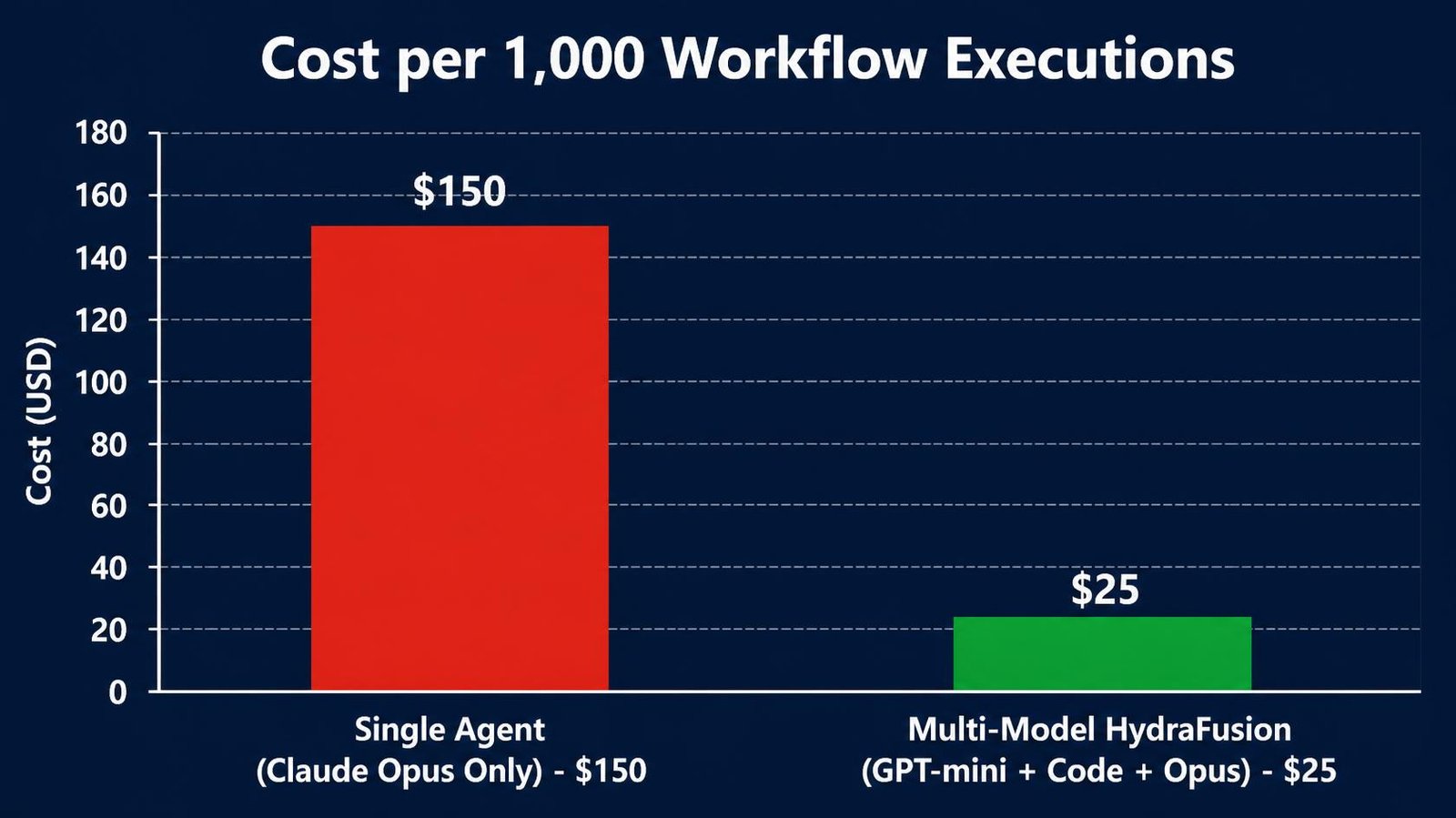
The modern standard for enterprise automation is the multi-model architecture. By deploying specialized models sequentially based on task complexity, businesses achieve faster execution times and reduce API costs by up to 80%.
Quick Answer: A multi-model ai agent n8n workflow — often referred to as the HydraFusion pattern — connects multiple specialized LLMs within a single orchestration pipeline. It utilizes cheap, high-speed models (like Claude Haiku or GPT-4o-mini) for data extraction and formatting, reserving heavy reasoning models (like Claude Opus 4.8 or GPT 5.5) exclusively for complex decision-making. By leveraging n8n’s visual ai nodes alongside custom code nodes, developers can route data between these models seamlessly, achieving maximum operational efficiency.
This guide deconstructs the HydraFusion pattern, explaining how to architect advanced agent systems in n8n, and provides concrete real world applications for deployment.
Disclosure: Operant Solo is reader-supported. We may earn an affiliate commission when you purchase through links on this page, at no additional cost to you. Recommendations are based on independent testing and evaluation.
What is a Multi-Model AI Agent?
A multi-model AI agent abandons the concept of a monolithic intelligence. Instead, it operates as an orchestration of micro-intelligences, routing specific data transformations to the exact model best suited for the task.
The Problem with Single Agent Systems
When you construct a single agent workflow, you are forced to optimize for the most complex task in the chain. If step four of a five-step workflow requires deep logical reasoning, you must configure the entire agent to use an expensive, high-latency model. Consequently, you pay premium API rates for steps one, two, three, and five — which likely consist of basic categorization, JSON formatting, or text summarization that a lightweight model could execute in milliseconds.
The HydraFusion Pattern Explained
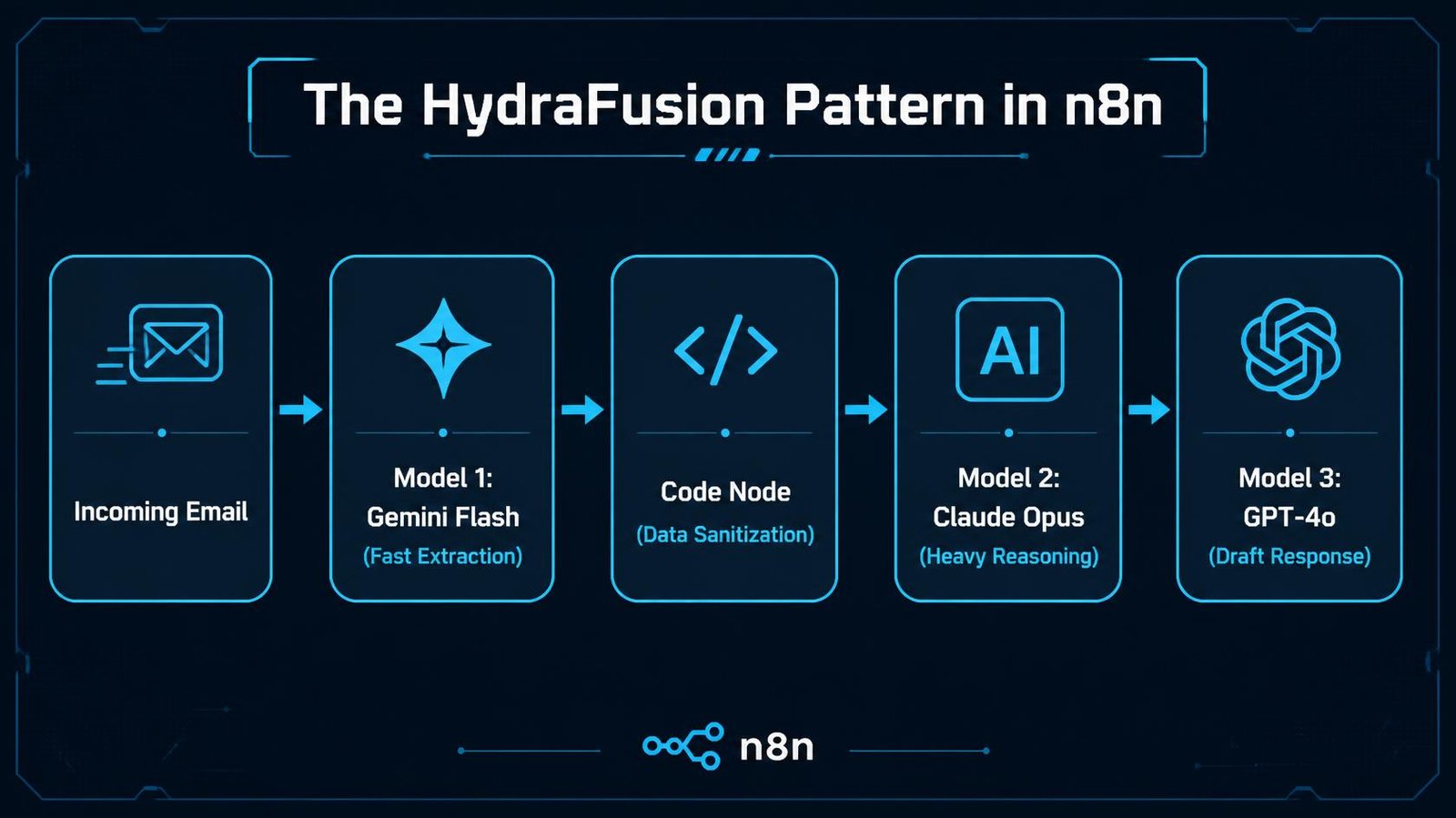
The HydraFusion pattern dictates that an automation pipeline should act like a multi-headed entity. The pipeline evaluates the incoming data and routes it to the correct “head” (LLM).
- The Parser Head: A fast, cheap model (e.g., Llama 3 or Gemini Flash) extracts unstructured text from an email and outputs a clean JSON object.
- The Reasoner Head: A heavy model (e.g., Claude Opus) analyzes that JSON object, applies business logic, and makes a strategic decision.
- The Communicator Head: A highly articulate model (e.g., GPT-4o) takes the decision and drafts a polite, empathetic email to the client.
This division of labor is the defining characteristic of elite ai agents.
Architecting the Pattern in n8n
n8n is the premier orchestration layer for building a multi-model ai agent n8n architecture because of its granular control over individual API calls and node sequencing.
Utilizing AI Nodes
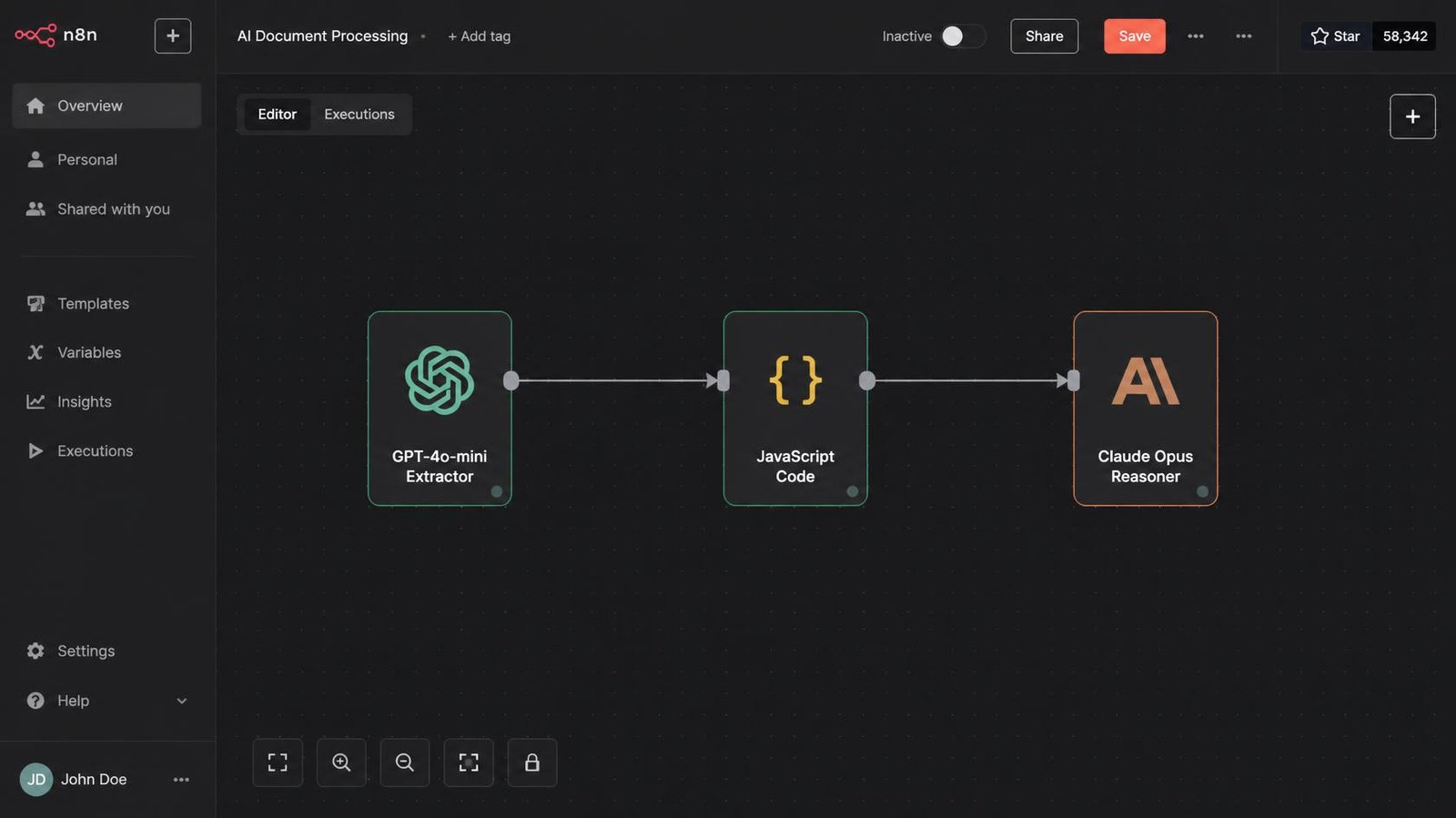
The platform provides dedicated, visual ai nodes (such as the Advanced AI node or specific OpenAI/Anthropic nodes). These nodes allow you to drag and drop different LLMs into the same canvas. You can chain an OpenAI node directly into an Anthropic node, passing the output of GPT-4o-mini as the input prompt for Claude 3.5 Sonnet. This native interoperability eliminates the need for complex API bridging scripts.
Custom Logic via Code Nodes
While visual nodes handle standard interactions, complex data transformation often requires JavaScript. By placing code nodes between your ai nodes, you can intercept the output of the first model, sanitize it, strip out unnecessary tokens, and restructure the payload before feeding it to the second model. This precise token management is crucial for minimizing costs when invoking the expensive reasoning model.
Real World Applications
The theoretical benefits of multi-model agent systems translate directly into massive operational gains when applied to enterprise workflows.
1. High-Volume Invoice Processing
A logistics company receives 5,000 invoices daily via email, featuring hundreds of different PDF layouts.
- The Multi-Model Workflow: An n8n webhook receives the email. A lightweight, visually capable model (like GPT-4o-mini) scans the PDF and extracts the vendor name, total amount, and date, outputting raw JSON. An n8n code node verifies the JSON structure. The data is then passed to a heavy reasoning model (Claude Opus). Opus compares the invoice data against the original purchase order stored in the database to detect discrepancies or fraudulent overcharges.
- The ROI: Using Opus to read 5,000 raw PDFs would cost thousands of dollars and take hours. Using the lightweight model for the initial extraction reduces API costs by 90%, reserving the expensive model solely for discrepancy detection.
2. Automated Content Pipeline
A digital marketing agency requires high-quality SEO articles based on trending industry news.
- The Multi-Model Workflow: n8n scrapes RSS feeds for breaking news. A fast model (Llama 3) summarizes the raw articles into bullet points. The heavy reasoning model (Claude Opus) analyzes the bullet points and drafts a comprehensive, highly technical 2,000-word article. Finally, a specialized editing model (GPT-4) reviews the article for grammatical perfection and exact keyword density.
- The ROI: The workflow leverages Anthropic’s superior long-form writing capabilities while utilizing cheaper models for the initial research and final proofreading.
Step-by-Step: Building a Multi-Model AI Agent in n8n
Constructing a multi-model ai agent n8n pipeline requires strict data discipline. Follow these sequential steps to ensure stable execution.
Step 1: Define the Specialization Zones
Before opening n8n, map your workflow on paper. Identify which steps are deterministic (data extraction, formatting) and which are probabilistic (reasoning, decision making). Assign lightweight models to the deterministic steps and heavyweight models to the probabilistic steps.
Step 2: Configure the Extraction Node
Drop an OpenAI node onto the canvas and select a fast, cheap model (e.g., gpt-4o-mini). In the system prompt, instruct the model to output strict JSON. Do not ask it to make decisions; ask it only to organize the raw input data.
Step 3: Implement the Transition Code Node
The output from an LLM is rarely perfect. Drop a Code Node immediately after your extraction node. Write a short JavaScript snippet to parse the JSON, handle potential formatting errors, and extract only the essential variables required for the next step. If you pass raw, verbose LLM output directly into your heavy reasoning model, you are wasting tokens and money.
Step 4: Configure the Reasoning Node
Connect the output of your Code Node to an Anthropic node, selecting a premium model (e.g., claude-3-opus). Configure the prompt to utilize the sanitized variables passed from the previous step. Because the data is now perfectly formatted and concise, the reasoning model can execute its complex logic rapidly and cost-effectively.
Overcoming Latency and Reliability Issues
While multi-model ai agent n8n architectures are highly efficient, chaining multiple API calls introduces two specific risks: accumulated latency and cascading failures.
Managing Accumulated Latency
If you chain four LLMs sequentially, the total execution time is the sum of all four API response times. To mitigate this, execute non-dependent ai nodes in parallel. For example, if you need to summarize an email and simultaneously translate it into Spanish, use n8n’s branching features to run both lightweight models at the same time, merging their outputs before triggering the final reasoning model.
Preventing Cascading Failures
If the first model in your chain hallucinates or outputs broken JSON, the subsequent models will fail. You must build error-handling loops utilizing code nodes. If the Code Node fails to parse the JSON from Model 1, n8n should automatically route the data back to Model 1 with an appended prompt: “You output invalid JSON. Fix the syntax and try again.” Elite ai agents self-correct before the error reaches the expensive reasoning tier.
Conclusion: The Future of Automation Architecture
The era of relying on a single, monolithic LLM to execute an entire business process is over. As API costs compound and execution speed becomes paramount, businesses must adopt specialized architectures.
By deploying a multi-model ai agent n8n pipeline using the HydraFusion pattern, automation engineers can achieve the perfect balance of intelligence and efficiency. By strategically deploying lightweight models for extraction, utilizing code nodes for strict data formatting, and reserving heavy models exclusively for deep reasoning, you can build enterprise-grade agent systems that deliver flawless results at a fraction of the traditional cost.
Frequently Asked Questions
What is a multi-model AI agent?
A multi-model AI agent abandons the single agent approach. It is an automated workflow that routes specific tasks to different LLMs based on complexity. For example, it uses a cheap, fast model to format data and an expensive, highly intelligent model to make complex decisions.
How do you build a multi-model ai agent n8n workflow?
You construct a multi-model ai agent n8n pipeline by dragging different ai nodes (such as OpenAI and Anthropic connectors) onto the canvas and chaining them together. You use the output of the first model as the input for the second model.
Why do I need code nodes in an AI workflow?
Code nodes are essential for sanitizing data between AI steps. If the first AI model outputs extra conversational text (e.g., “Here is your JSON:”), a custom JavaScript code node strips that text away, ensuring the second AI model receives perfectly formatted data.
What are the real world applications of this pattern?
Common real world applications include high-volume invoice processing (fast models extract text, heavy models detect fraud), automated customer support (fast models categorize intent, heavy models draft refunds), and content generation pipelines.
Does a multi-model approach save money?
Yes, dramatically. Heavy reasoning models (like Claude Opus) are extremely expensive. By using cheap models (like GPT-4o-mini) to handle 80% of the routine formatting and extraction, you reserve the expensive model only for the final 20% of complex reasoning, slashing overall API costs.
Related Reading:
- GPT 5.5 vs Claude Opus 4.8: The Simple 2026 Guide →
- n8n vs Make (2026): Which is Better for AI Automation? →
- Cursor AI vs Make: Should You Code Automations in 2026? →
- Zapier AI Agents Review (2026): The Hidden Costs & Alternatives →
- Affordable AI Voice Receptionist: The Real Cost in 2026 →
- n8n Review 2026: n8n Cloud vs Self-Hosted Reality →
n8n
Best for: technical automation workflows
Consider n8n when your workflow needs custom logic or control over deployment. Self-hosting also requires time for updates, backups, and monitoring.
Operant Solo may earn a commission if you purchase through this link, at no extra cost to you.
Pingback: Safe AI Agent Workflows for Solopreneurs (2026)
Pingback: n8n Human in the Loop Tutorial (2026)
Pingback: Claude Sonnet 4.5 vs GPT-5: Which API is Cheaper in 2026?
Pingback: AI Agent Wallets: Autonomous Spending Risk (2026 Guide)
Pingback: n8n Statistics 2026: 70+ Data Points on Users, Revenue, Funding & AI Automation Growth - Operant Solo
Pingback: n8n MCP Integration: Build AI Agents in 2026
Pingback: How to Build AI Agents in 2026 (Using n8n, Make & GPT-5.5)
Pingback: GPT-6 Astra Review: What Automation Builders Need to Know
Pingback: n8n Security Vulnerabilities 2026: Is n8n Safe to Use?
Pingback: WhatsApp AI Agent n8n: The Best, Ultimate 2026 Guide
Pingback: AI Customer Service Agent: The 2026 Implementation Guide
Pingback: Build an AI Receptionist Agency: The 2026 Guide for Builders
Pingback: n8n vs Zapier vs Make: Best 2026 Automation Platform
Pingback: OpenAI Structured Outputs in n8n (Fix JSON Errors)
Pingback: Automate Website Without API: Build AI Browser Agents
Pingback: AI Receptionist for Dental Clinics Demand: 2026 Guide