
The n8n Respond to Webhook node lets your workflow decide what the caller gets back: the status code, the headers and the body. Most “my n8n webhook does not work” problems come from five things: the wrong URL, the wrong method, a body that cannot be parsed, no useful response, or no key check. I built a small test workflow on n8n Cloud on 22 October 2026 and recorded the real responses for each case. All data is fictional.
Quick answer
Use the test URL while you build, and click Execute workflow before every call. Use the production URL only after you publish the workflow. If the caller needs a specific reply, set the Webhook node to respond using the Respond to Webhook node and add that node to the workflow. If the endpoint should not be open to everyone, check a secret and return 401 when it does not match.
How I tested: the OperantSolo webhook lab
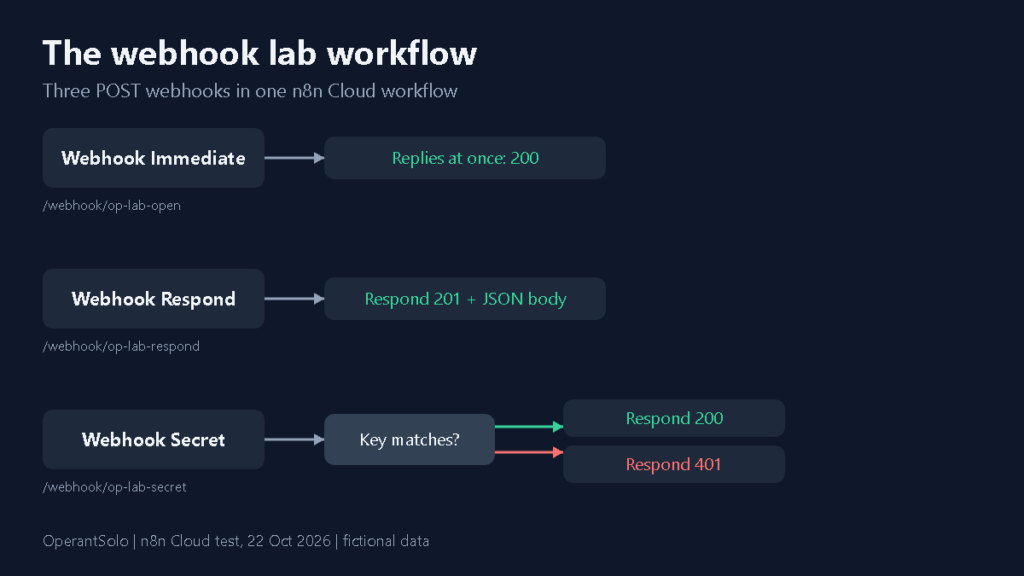
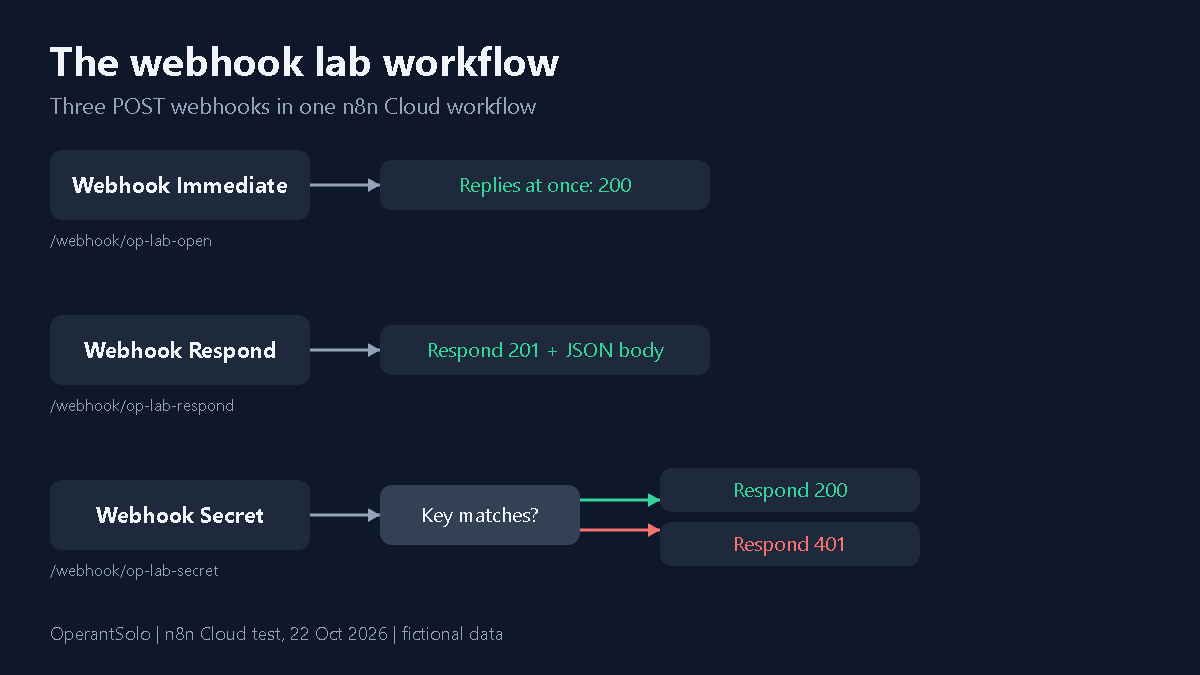
I built one workflow called “OperantSolo webhook lab” with three POST webhooks. The first uses the default response. The second uses the Respond to Webhook node. The third checks an x-lab-key header with an IF node and answers 200 or 401. Everything below comes from calling those three endpoints.
Test URL vs production URL
The Webhook node shows two URLs. The test URL contains /webhook-test/. The production URL contains /webhook/. According to the n8n Webhook node documentation, the test URL is registered when you listen for a test event, and the production URL is registered when you publish the workflow.
What I saw on n8n Cloud:
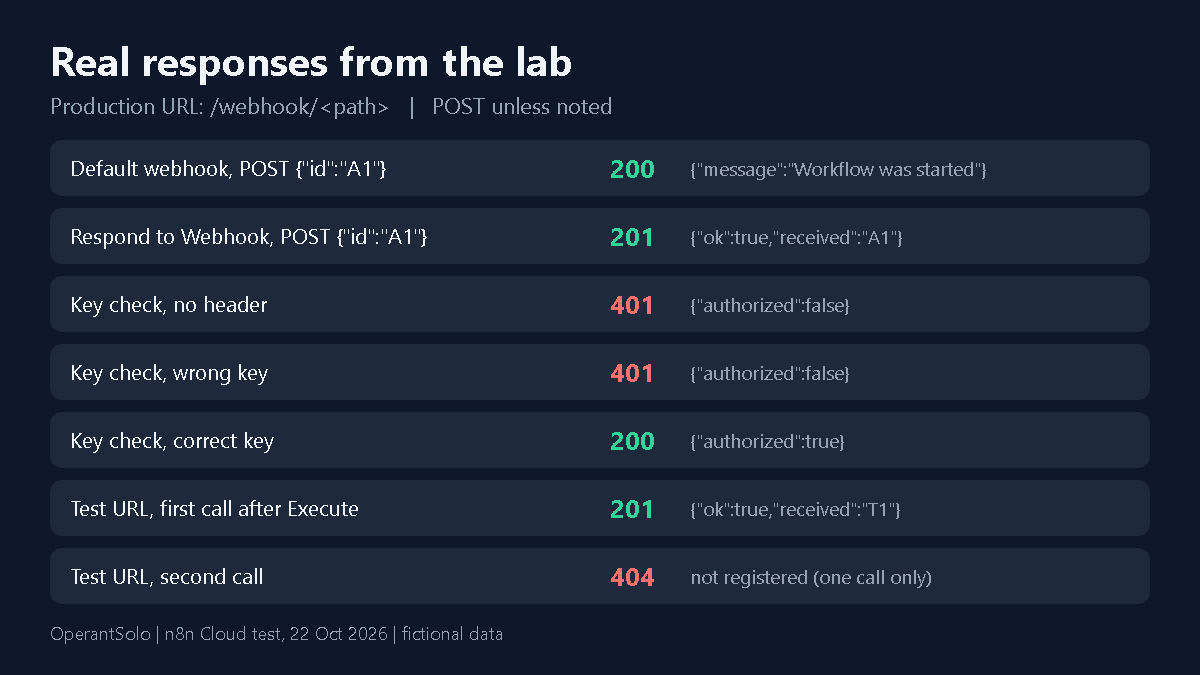
- I clicked Execute workflow and called the test URL once: it returned 201 with my response body.
- I called the same test URL a second time: it returned 404 with “The requested webhook is not registered” and a hint to click Execute workflow again. The test URL works for one call per click.
- I called the production URL before the workflow was published: it returned a plain 500 Internal Server Error page with no JSON. That was on my instance, so check this first if you see a bare 500.
Default response vs the Respond to Webhook node
With the default Respond setting, n8n answers right away and your workflow runs afterwards. My call returned 200 with {"message":"Workflow was started"}. The caller never sees what your workflow produces.
To control the reply, set Respond to “Using Respond to Webhook node” on the Webhook node and add the Respond to Webhook node. The Respond to Webhook node documentation says the Webhook node must be set this way for the node to control the response. In my test the Respond node returned status 201 and a JSON body that echoed the id I sent: {"ok":true,"received":"A1"}. A form-encoded body (id=F1) worked the same way and came back as F1.
To read request data in the Respond node, use expressions such as {{ $json.body.id }}. If expressions are new to you, see our guide to n8n expressions with 50 tested examples.
A simple key check: 401 vs 200
This is a learning example, not a full security setup. The IF node compares the x-lab-key header with a fictional test value. A match goes to a Respond node with status 200. Anything else goes to a Respond node with status 401.
| Request | Result |
|---|---|
| No x-lab-key header | 401 {“authorized”:false} |
| Wrong key | 401 {“authorized”:false} |
| Correct key (fictional test value) | 200 {“authorized”:true} |
For real use, the n8n Webhook node documentation lists built-in authentication options on the Webhook node: Basic auth, Header auth and JWT auth, plus an IP allowlist option. I did not test those built-in options in this lab. If your webhook can be replayed or called twice, read n8n webhook duplicate prevention next.
Common n8n webhook errors and what they meant
| What I saw | What it meant in my test |
|---|---|
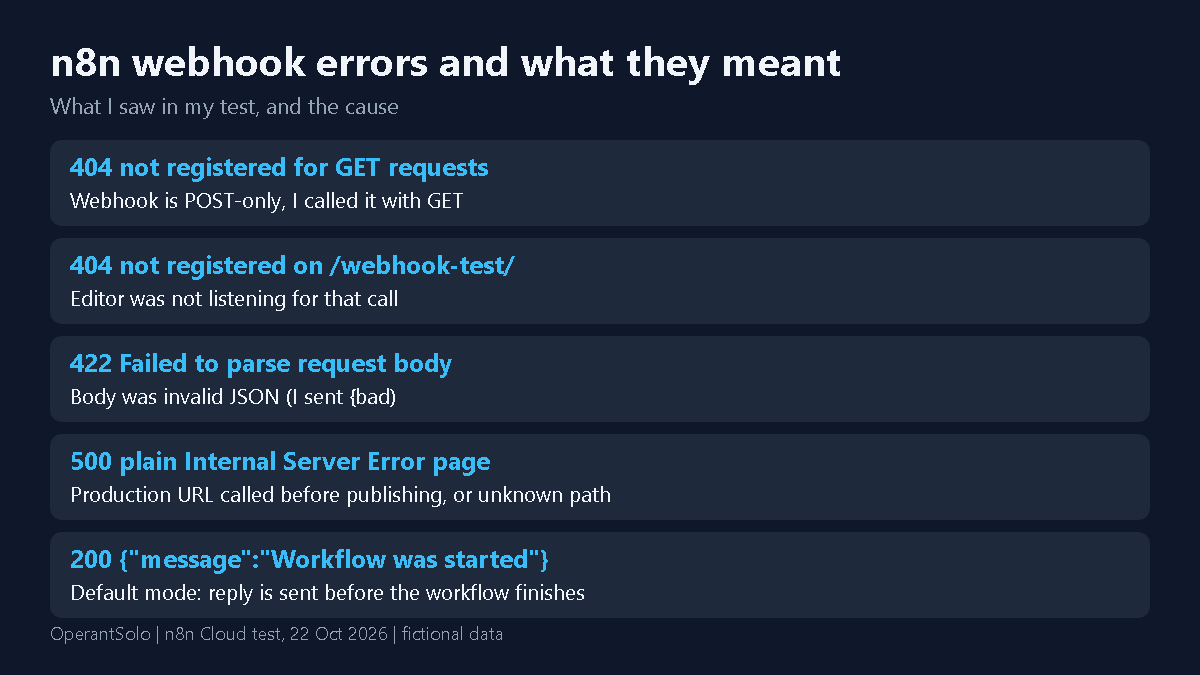
| 404 “not registered for GET requests. Did you mean to make a POST request?” | The webhook was set to POST and I called it with GET |
| 404 “not registered” on /webhook-test/ | The editor was not listening for that call |
| 422 “Failed to parse request body” | The body was invalid JSON (I sent {bad) |
| 500 plain “Internal Server Error” | Production URL called before the workflow was published, or the path does not exist |
| 200 {“message”:”Workflow was started”} | Default response mode: the reply is sent before the workflow finishes |
If a webhook workflow fails after it starts, an n8n error workflow can alert you, and it has limits that are worth knowing. If your Respond node returns empty data from a child workflow, see n8n sub-workflow return fixes.
What I did not test
Self-hosted settings such as the WEBHOOK_URL variable or tunnel URLs, Basic auth, Header auth and JWT credentials on the Webhook node, HMAC signature checks, rate limits, large payloads and retries. Results can differ by n8n version and plan, so treat this as a tested learning example, not a production guarantee.
Need a webhook fixed?
If your webhook still fails after these checks, send the workflow for an email review. It is $29 for a quick fix and $79 for a full fix, and you pay only after I confirm I can fix it. See how the n8n workflow review by email works.