
Updated on: . Page layout and subscription copy updated; any recorded lab test dates remain separate.
n8n webhook duplicate prevention starts with a stable event ID and a record of what you have already processed. Before repeating an action, check that record. For production use, the check and claim must be atomic: two executions must not both win permission to do the same work.
If your webhook created the same CRM entry twice, the answer is usually more than “turn off retries.” A retry can be useful when a request fails. The problem is repeating a successful action because the sender did not receive a clear response.
We built a small replay lab to make this visible. On 13 October 2026, it passed 16 live sequential HTTP checks in n8n Cloud. A separate logic workflow passed 15 synthetic checks. You can download the files, run the cases and compare your output with ours.
What this lab proves: the specified fictional cases behaved as expected when sent one at a time. It uses a mock action counter and experimental workflow static data. It does not prove concurrent safety, crash recovery or exactly-once delivery. Keep it away from real orders, payments and customer data.
Why does an n8n webhook create duplicate actions?
Imagine an app sends an “order updated” event. Your workflow writes to a CRM. The app waits for a response, but the connection drops before it sees one. It sends the event again. If the workflow treats each request as new work, the CRM gets a second entry.
The same problem can happen when someone manually replays an event or retries a failed workflow. A new n8n execution ID tells you that a workflow ran again. It does not tell you that the business event is new.
Use the sender’s event ID when it stays the same across retries. Scope it by provider and account so unrelated senders cannot collide. If a provider sends separate events for the same intended action, define a business action key as well. A record ID alone is often too broad: one order may have several valid updates.
Idempotency means repeating a request has the same intended effect as doing it once. In this lab, the first valid event raises a counter from 0 to 1. Its duplicate leaves the counter at 1. That is an easy result to inspect without touching a real service.
For duplicate social posts specifically, use our WordPress social media automation guide. This article focuses on incoming webhook events and their replay behaviour.
n8n webhook duplicate prevention: download the free lab
Download the webhook replay lab ZIP. It includes the receiver JSON, sender JSON, synthetic checks, setup notes and the complete observed results. No paid API or external credential is needed for these fictional tests. Your n8n execution limits still apply.
- receiver-baseline.json: accepts fictional POST events and returns the decision and mock action count.
- sender-tests.json: sends 16 cases, one at a time, then compares the actual response with the expected result.
- synthetic-lab.json: checks the model’s logic in memory. These are separate from the HTTP tests.
- http-results.json and test-report.md: the recorded results from our run.
Start with an n8n test workspace and roughly a minute to run the suite after setup. The sender creates a fresh run ID each time, so a new suite does not reuse the previous suite’s event records.
1. Import and configure the receiver
Create a blank workflow. Use its menu to import receiver-baseline.json from the ZIP. The canvas has three connected nodes: Fictional webhook, Validate and record fictional action, and Return observed status.
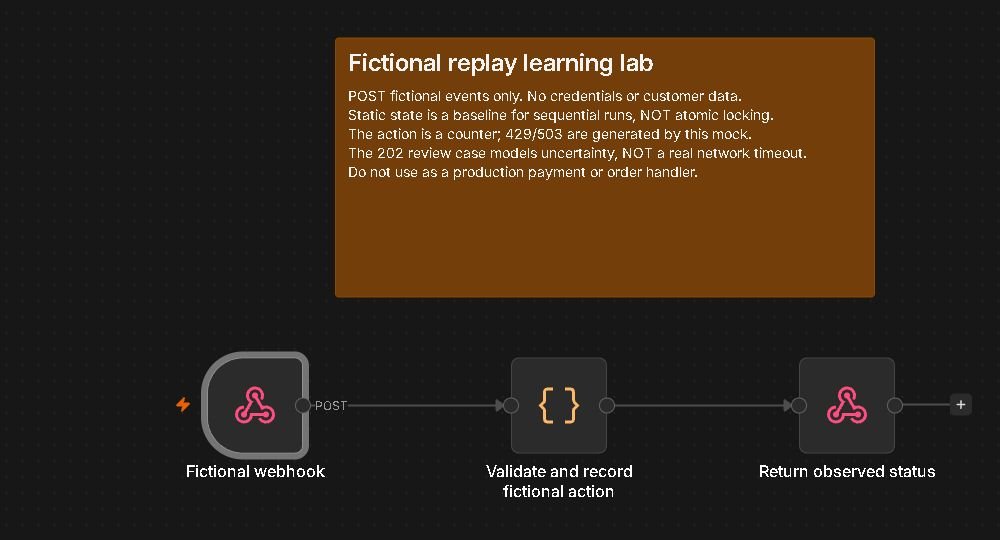
Open the Webhook node and keep its method as POST. Its response mode must use the Respond to Webhook node. The Code node makes the decision, and the response node returns it.
Publish the receiver for the duration of this lab, then copy its Production URL. We use that URL because the baseline needs static data to persist between successful webhook executions. The normal “Listen for test event” route is not equivalent for this experiment. See n8n’s static-data documentation.
The imported receiver has no authentication and accepts only the fictional lab format. That format check is not a security control. Keep the endpoint temporary, send no private data and unpublish it when you finish.
2. Point the sender at your own webhook
Import sender-tests.json as another workflow. Open POST one fixture per second and replace the placeholder URL with the receiver’s Production URL. Keep the JSON body expression as {{$json}}. If expressions are new to you, our tested n8n expression examples explain how current-item data moves between nodes.
The HTTP Request node sends a batch of one item with a 1,000 ms interval. It includes the response status and headers, and its Never Error option lets the test inspect deliberate 400, 429 and 503 responses. It has a 10-second timeout.
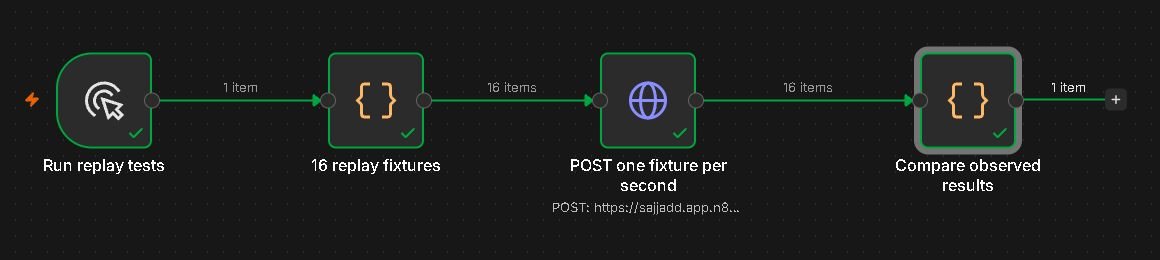
Click Execute workflow. Open Compare observed results after it finishes. A successful reproduction should show cases: 16, passed: 16 and failed: 0. Check those fields, not just the green node borders: the comparison report does not throw an error when a case fails.
The lab permits up to 20 distinct run IDs and 100 stored events per run. If you hit a limit, use a fresh imported receiver workflow with a different webhook path. Unpublish the old one first. Avoid editing or deleting state in a workflow that handles real traffic.
How the duplicate check makes its decision
The receiver reads the JSON request body. It checks the lab marker, run ID, event ID, entity ID and version before counting any action. Versions must be integers; the string “4” is deliberately rejected.
It then looks for an existing event in that run. If the event is complete, it returns duplicate without raising the counter. If that ID is reused with a different entity or version, it returns conflict. This limited comparison is enough for the fixture fields; a real handler must compare all fields that affect the action.
For a new event, it checks the latest accepted version for that entity. A version that is older or equal returns stale. This prevents the lab’s version 2 update from overwriting version 3. It assumes a reliable, increasing version number. Adapt the rule to your provider rather than comparing arrival times blindly.
The rate_limit and unavailable fixtures return a retry response on their first attempt. The next scripted attempt can apply the action. The ambiguous fixture counts its mock action once, then parks the event in review. A second request does not repeat it.
Our 16 n8n webhook duplicate prevention test results
These are the observed responses from the live HTTP run. Actions is the cumulative mock count for that run, not the number of real orders or API writes. All 16 comparisons passed.
| Test | HTTP | Decision | Actions |
|---|---|---|---|
| valid | 200 | applied | 1 |
| duplicate | 200 | duplicate | 1 |
| newer | 200 | applied | 2 |
| older arrives last | 200 | stale | 2 |
| missing ID | 400 | reject | 2 |
| 429 first attempt | 429 | retry | 2 |
| 429 next attempt | 200 | applied | 3 |
| 503 first attempt | 503 | retry | 3 |
| 503 next attempt | 200 | applied | 4 |
| ambiguous mock write | 202 | review | 5 |
| ambiguous retry | 202 | review | 5 |
| reconcile mock write | 200 | reconciled | 5 |
| manual replay | 200 | duplicate | 5 |
| ID reused for changed payload | 409 | conflict | 5 |
| malformed version | 400 | reject | 5 |
| retry budget exhausted | 422 | stop | 5 |
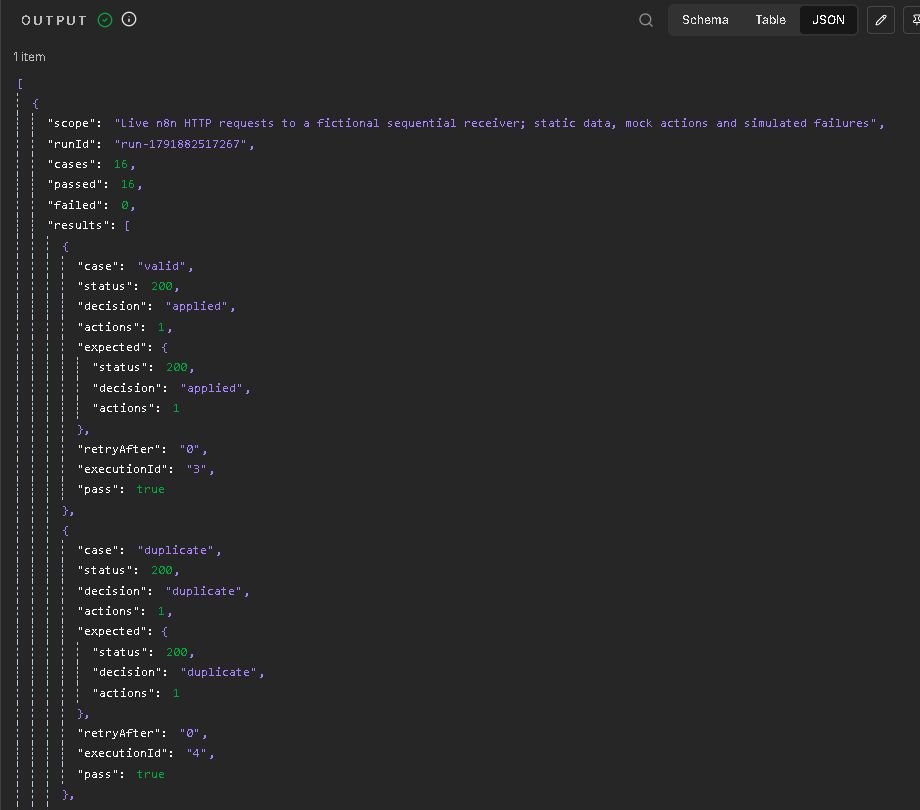
The most useful rows are valid, duplicate and manual replay. The first event applied once. Its immediate duplicate did not add an action. Replaying it later also left the final counter unchanged at 5.
The retry cases returned real HTTP 429 and 503 responses with Retry-After: 1. However, the sender’s next attempt is a predefined fixture. It does not parse that header or implement an automatic backoff loop. For that separate problem, follow our n8n rate-limit and Retry-After lab.
The 202 review case is also scripted. It demonstrates the decision to pause when an action’s outcome is uncertain. It does not simulate a real dropped connection, process crash or provider lookup. The reconciliation flag is a test input, not proof from an external service.
What n8n webhook duplicate prevention needs in production
A sequential demo is a useful starting point, but two requests can arrive together. Both can check “not seen” before either saves “seen.” That gap is why a lookup followed by a write is not enough on its own.
For production n8n webhook duplicate prevention, use a durable event record and an atomic claim. Atomic means the storage system decides which execution wins in one protected operation. A database unique constraint on the scoped event key is one common building block; the rest of the workflow must handle the conflict and recovery states correctly.
- Authenticate the sender. Verify the provider’s signature or supported authentication before trusting the payload. Check its documentation for timestamp and replay requirements.
- Claim the event once. Store its scoped key, action-relevant payload fingerprint, status and processing time. A duplicate must not start the action again.
- Protect the external action. If the destination supports idempotency keys, reuse the same key for retries of that action. Read its retention and conflict rules.
- Record the outcome. Keep complete, retryable and review states. Store the destination’s record ID or response evidence where appropriate.
- Recover deliberately. Give abandoned processing claims a controlled recovery path. Check the destination before retrying an uncertain successful write.
- Test overlap and failure. Send concurrent duplicates, interrupt a run after its external action, and test recovery from persisted records. The downloadable baseline has not passed these tests.
Workflow static data is experimental and can be unreliable at high frequency, according to n8n. Data Tables can be useful for stored records, but a Get Row followed by Upsert should not be described as an atomic lock without verifying its behaviour. Choose storage and constraints that match the guarantee you need.
For a destination-specific example, Stripe documents idempotent API requests. That support does not automatically make your whole webhook workflow exactly-once. Other destinations have different rules, and some offer no idempotency key at all.
Retry decisions: when should you wait, stop or review?
Treat the status code as one input, not the whole decision. A 429 usually means you should respect the service’s retry guidance. A 503 can be temporary. Invalid data needs fixing, and an unclear write outcome needs checking before you try the action again.
Set a maximum attempt count and a maximum elapsed time. Use backoff when the provider permits it, and honour Retry-After where applicable. An endless loop can keep failing while consuming executions. This lab stops its new-event retry fixture when the attempt number exceeds 3; that is a demonstration policy, not a universal limit.
The lab’s 200, 202, 409 and 422 responses are also its own contract. Real webhook senders may retry, pause or disable delivery differently. Check the sender’s retry policy before choosing the response you return.
If you add Never Error to an HTTP Request node, handle failures explicitly later in the workflow. A handled error response can leave an execution green. Our n8n error workflow guide explains why some failures do not reach an Error Trigger.
Troubleshooting the replay lab
The webhook returns 404
Check that the receiver is published and the sender uses its Production URL. Confirm the path and POST method. The test URL depends on the listener; copying it into this suite changes how the baseline stores state.
Every event appears new
Check that all 16 cases share the same generated run ID and that duplicate cases reuse their event ID. Do not use a timestamp or n8n execution ID as the duplicate key. Also confirm that you are calling the published receiver, rather than executing only its Code node manually.
The suite finishes, but failed is above zero
Open the results array and compare status, decision and actions with expected. A 400 points toward the input shape. A connection error suggests the endpoint, publication state or timeout. Changed fixture order can also break expected cumulative counts. Keep the original files as a baseline before adapting them.
Frequently asked questions
Does the Webhook node prevent duplicate events automatically?
This lab adds its own event check. Do not assume that receiving an event in the Webhook node means it is new. The official Webhook documentation covers receiving requests, URL modes and authentication. Your workflow still needs an action-specific duplicate policy.
Can I use Remove Duplicates for webhook reliability?
It can help with duplicate data, depending on its configuration. A production webhook also needs to handle overlapping executions, partial success and recovery. Test those requirements before treating any single duplicate filter as the whole solution.
Should I acknowledge the webhook before doing the work?
For longer work, a durable acceptance step followed by processing can be a useful design. Do not acknowledge success before you have safely accepted the event if losing it would matter. This learning receiver responds after its short mock action; it does not implement a durable queue.
Is this free lab safe for real payments or orders?
No. It uses fictional counters and experimental static state. It has no production authentication, atomic claim or tested crash recovery. Use it to learn and to design your test cases, then validate your actual storage and destination.
What should I do after the tests pass?
Unpublish the receiver and save your report. Then adapt the cases to your real event fields and destination in a separate test environment. Passing sequential checks is one part of n8n webhook duplicate prevention. Before launch, also test simultaneous delivery and the gap between an external write and saving its result.
Test notes: OperantSolo ran the 16 live sequential HTTP cases on n8n Cloud on 13 October 2026. The separate 15-case workflow used synthetic in-memory fixtures. We did not test concurrent delivery, real external writes, service restarts or network timeouts. The screenshots above are real captures from the workflow and its output; the featured image is an illustration.
You can read this article without subscribing. Want the next tested article?
Stuck on your own n8n workflow?
Send me the failing workflow and I will send back the fix in writing. Quick fix $29, full fix $79 with a tested corrected version. You pay only after I confirm I can help.