
n8n Webhook Authentication: Verify the Sender Before You Trust the Payload
Quick answer: A webhook URL that looks long and random is not authentication. Anyone who finds it can send to it. Use the Webhook node’s built-in authentication first — Basic Auth, Header Auth, or JWT Auth — when the sender supports it. For a provider that signs its payloads instead, check its HMAC signature in a Code node before you run any other action, and check the timestamp too, so an old signed request cannot simply be replayed.
What this guide is, and what it is not — please read this first. This is a documentation-based guide, not a lab result. The built-in authentication options described below are documented n8n Webhook node behaviour. The HMAC Code-node pattern is a proposed, documentation-based pattern. It has not been run in a lab for this guide, no provider’s signature scheme was tested here, and there are no screenshots or execution results to show you. Before you use any pattern in this guide for real work, run it yourself in a test workspace with fictional data, and check the exact signature scheme in your provider’s own documentation. Provider schemes differ, and a pattern copied from one provider will not automatically work for another.
The problem: a public URL anyone can fire
Imagine this. You build a workflow that receives an order update and writes it to your CRM. n8n gives you a webhook URL. It looks long, random, and hard to guess, so you paste it into the provider’s settings and move on.
- The URL leaks. It ends up in a screenshot, a shared document, a log file, or a support ticket. Now it is not secret at all.
- Someone guesses or scans for it. A webhook path is often more predictable than it looks, especially if it is a plain word like order-update.
- A well-meaning sender retries, or a stranger sends a plausible-looking payload, and your workflow treats it as real. It writes a fake order, sends a fake notification, or triggers a refund flow, because nothing in the workflow ever asked, ‘Who sent this?’
That is the core mistake this guide fixes. Receiving a payload is not the same as trusting it. Authentication is the step that comes before trust, and it has to come before any side effect — before a CRM write, before an email, before a payment action, before anything you cannot easily undo.
The order of the rest of this guide follows the order you should try things in: use what n8n already gives you first, add a signature check when the provider signs its payloads, and only then worry about extras like IP lists. Do not start with the cleverest option. Start with the one the sender actually supports.
1. Why a secret-looking URL is not authentication
A long URL is obscurity, not authentication. Obscurity helps a little — a random path is harder to guess than /webhook — but it fails in exactly the ways that matter:
- It cannot be revoked cleanly. If a URL leaks, you have to change the path and update every legitimate sender. With a real credential, you rotate the credential instead.
- It proves nothing about the sender. A request to the right URL could come from the provider, from a test tool, from a curious stranger, or from an attacker who copied the URL. The URL is the same in all four cases.
- It cannot tell a tampered payload from a real one. If someone intercepts a genuine payload and changes the amount, the customer, or the status, the URL still matches. Only a signature, checked against a secret the attacker does not have, can catch that.
- It gives you no way to say “stop” for one sender only. With authentication, a bad credential is rejected and a good one still works. With a bare URL, your only options are to accept everything or to change the URL for everyone.
Keep the random path anyway — there is no reason to make a webhook easy to find — but do not stop there. Think of the path as the address of the house. Authentication is the lock on the door. You need both, and only one of them actually checks who is knocking.
A related point, because it causes real confusion: a 200 response is not proof either. Returning “OK” to a sender means your workflow received something. It does not mean the something was genuine. If you return success before you check the signature, the sender will stop retrying, and you will have recorded a fake event as a success. Check first, respond second, whenever the workflow allows it.
2. Built-in options first: Basic Auth, Header Auth, and JWT Auth
The n8n Webhook node has an Authentication setting. For most webhooks you control on both ends, one of these three is the right first step. They are checked in the Webhook node itself, so an invalid request does not reach your downstream nodes. That matters: your CRM write, your email node, and your database update never even see a request that fails authentication.
Basic Auth
What it is. The sender sends a username and password with every request, in the standard HTTP Basic Auth header. You store those credentials in n8n, and the Webhook node checks them.
When to use it. When the sender is a system you control, an internal tool, or a service that already supports Basic Auth, and you can give it a username and password to send.
How to set it up, in outline:
- Open the Webhook node and find the Authentication section.
- Choose Basic Auth, and create or select a credential with a username and a password.
- Give the sender those same credentials, and confirm it sends them on every request.
- Use the production URL over HTTPS, and test with a wrong password first. A wrong password should be rejected before anything else runs.
What it stops, and what it does not stop. Basic Auth stops anyone who does not know the username and password. It does not stop someone who intercepts the request if you are not using HTTPS, because Basic Auth credentials are only base64-encoded, not encrypted. Base64 is not a secret. It is a way of writing the same secret in a different alphabet. Always use HTTPS in production, with no exceptions for “just a test” endpoints that later become real ones.
It also does not prove that the payload was not changed in transit, and it does not stop a legitimate sender’s credential from being reused by someone who stole it. That is why credential rotation matters: if a Basic Auth password leaks, change it, and check your execution history for unexpected runs while it was exposed.
Header Auth
What it is. The sender sends a secret value in a custom header — for example, a header called X-Example-Api-Key with a long, random value. The Webhook node checks that the header is present and that its value matches the credential you stored.
When to use it. When you control both ends, when the sender is an internal service, a second n8n instance, a cron job on another server, or a third-party service that lets you set a custom header on its outgoing webhooks. Header Auth is the most flexible of the simple options, because you choose the header name and the value.
How to set it up, in outline:
- Open the Webhook node and find the Authentication section.
- Choose Header Auth, and set the header name and the expected value in a credential. Use a long, random value. Do not reuse a password you use anywhere else.
- Tell the sender the exact header name and value, and confirm it sends them on every request.
- Test with a missing header, and then with a wrong value. Both should be rejected before anything else runs.
What it stops, and what it does not stop. Header Auth stops anyone who does not know the secret header value, and it is easy to rotate: change the value in n8n and in the sender, and old values stop working. Like Basic Auth, it depends entirely on HTTPS in production. A secret sent over plain HTTP is not a secret.
Header Auth also does not, on its own, prove that the payload was not tampered with. If an attacker can see the request, they can see both the header and the body. If they can change the body, the header still matches. For tamper evidence, you need a signature, which is the next section.
A practical tip that saves debugging time: header names are case-insensitive in HTTP, but different tools display and store them differently. When a test fails, check the exact header name first, in the sender and in n8n, before you assume the value is wrong. A mismatch in the name looks exactly like a mismatch in the value.
JWT Auth
What it is. The sender sends a signed JSON Web Token, usually in an Authorization: Bearer header. The Webhook node checks the token’s signature against the secret or public key you configured, and can check claims inside the token, such as its expiry time.
When to use it. When the sender already issues JWTs — for example, a service that authenticates with OAuth2 and calls your webhook with an access token — and when you need more than “knows a secret.” A token can carry an expiry, an issuer, and an audience, so you can say not just “this request has a secret” but “this token was issued by this service, for this purpose, and it has not expired yet.”
How to set it up, in outline:
- Open the Webhook node and find the Authentication section.
- Choose JWT Auth, and configure it with the shared secret or public key the sender uses to sign tokens, plus the claims you want to check, such as expiry.
- Confirm with the sender how it obtains and refreshes its tokens, and what happens when a token expires mid-delivery. A token that cannot be refreshed will start failing, and you want to know that before it happens in production.
- Test with an expired token and with a token signed with the wrong key. Both should be rejected.
What it stops, and what it does not stop. JWT Auth stops anyone who cannot produce a token signed with the right key, and expiry gives you a natural limit on how long a stolen token stays useful. It does not help if the sender does not issue JWTs at all. Many large webhook providers do not. They sign the payload instead, which is why the next section exists. Do not try to force JWT onto a provider that only offers HMAC signatures, and do not try to force HMAC onto a sender that only offers a bearer token. Match the check to what the sender actually sends.
Which built-in option to pick
| Option | Best for | Stops | Does not stop, on its own |
|---|---|---|---|
| Basic Auth | A trusted sender that supports a username and password | Requests without those credentials | Interception without HTTPS; payload tampering; credential reuse after a leak |
| Header Auth | A sender you control, or one that lets you set a custom header | Requests without the secret header value | Interception without HTTPS; payload tampering; credential reuse after a leak |
| JWT Auth | A sender that already issues signed tokens | Requests without a valid, unexpired, correctly signed token | Senders that do not issue JWTs; a stolen token used before it expires |
| None | A temporary test in an isolated workspace, with fictional data, that you delete afterwards | Nothing | Everything above |
If the sender supports more than one option, Header Auth is usually the simplest to set up and rotate for a system you control. If the sender is a large provider that signs its webhooks, skip ahead to the HMAC section — a header secret the provider will not send you is not a plan.
One more built-in setting worth knowing about, and worth not over-trusting: the Webhook node also has an IP allowlist option. It is useful as an extra layer, and it is not authentication on its own. See section 5.
3. HMAC signature checks: for providers that sign the payload
Some providers will not send you a username, a password, or a custom header. What they will do is sign the payload with a secret that only you and the provider share, and send that signature in a header. Your job is to recompute the signature on your side and compare the two. If they match, the payload came from someone who knows the secret, and it has not been changed since it was signed. If they do not match, you stop, before anything else runs.
This is the pattern the site’s duplicate-prevention guide points to when it says to authenticate the sender before trusting the payload. Authentication and duplicate prevention are two different jobs, and they belong in that order: first prove who sent it, then prove you have not already processed it. A duplicate check on an unauthenticated payload will happily record a fake event as “already seen” and block the real one later. Do the signature check first.
How an HMAC signature works, in plain terms
HMAC stands for Hash-based Message Authentication Code. In practice, for a webhook, it works like this:
- You and the provider share a secret. The provider never sends the secret itself. It uses the secret to compute a signature over the payload.
- The provider sends you the payload and the signature, in a header.
- You compute the same signature over the payload you received, using the same secret.
- If your computed signature matches the signature in the header, the payload is genuine and unaltered, as far as this check can tell. If it does not match, something is wrong: the sender is not who it claims to be, or the payload was changed, or your check is using the wrong secret, algorithm, or input.
The key word is “same.” The signature has to be computed over exactly the same bytes, with exactly the same secret, and exactly the same algorithm. Any difference, even a harmless-looking one, breaks the match. That is the source of the most common failure in this whole area, and it has its own section below.
The pattern, step by step (proposed, not tested)
The workflow shape is simple. Everything else in this section is detail about getting each step right.
Webhook → Code check → IF valid / stop
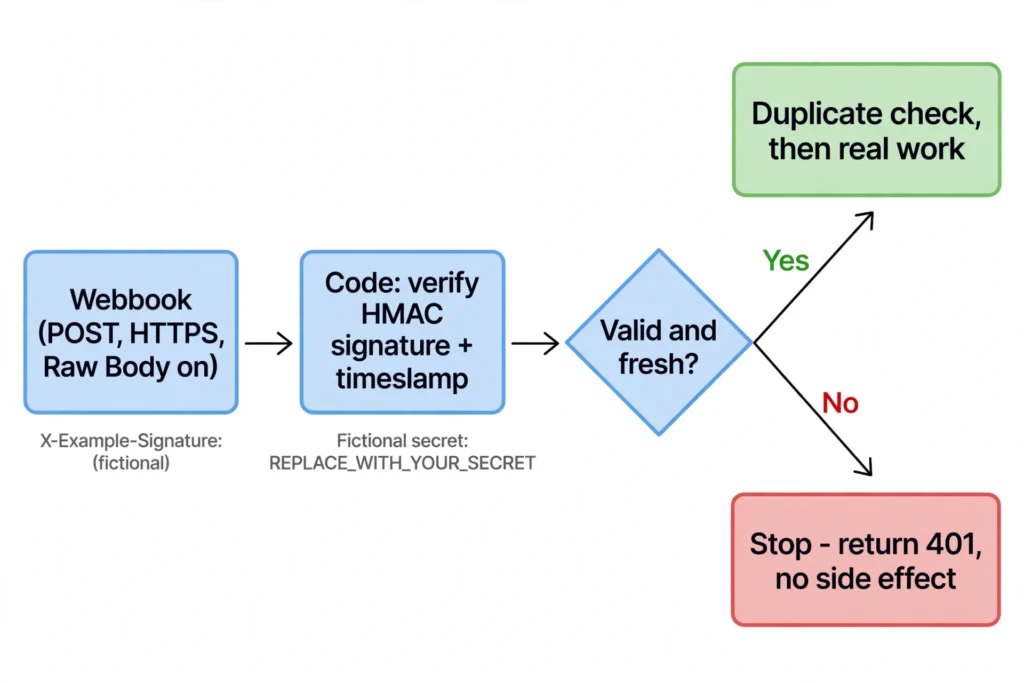
- Webhook node. Receives the request. Set it to keep the raw request body, not just the parsed JSON. See the raw-body trap below — this step is not optional for a signature check.
- Code node, immediately after the Webhook node, before any side effect. This node recomputes the signature and compares it with the header. Nothing else runs before it. No CRM write, no email, no database update, no Slack message.
- IF node, or a stop branch. If the signature matches and the timestamp is fresh (see below), the workflow continues to the real work, and then to the duplicate check. If either check fails, the workflow stops on that branch and returns an error response, such as 401. It does not continue, it does not retry the action, and it does not log the secret or the full payload in a way that leaks it.
A note on the code itself, because this is where guides most often mislead by accident: the code below is an illustrative pattern, not a tested workflow, and not any one provider’s scheme. Providers differ in the header name, the algorithm, whether the signature is hex or base64, whether a prefix like sha256= is included, and whether a timestamp is part of what gets signed. Read your provider’s documentation and adapt every one of those details to it. Do not paste this pattern into production and expect it to work for a provider you have not checked it against.
// Proposed pattern only — NOT tested for this guide.
// Adapt the header names, the signed string, and the algorithm
// to your provider's own documentation before using it.

// 1. Read the signature and timestamp from the request headers.
//    Header names below are fictional examples, not a real provider's.
const receivedSignature = $json.headers['x-example-signature'];
const receivedTimestamp = $json.headers['x-example-timestamp'];

// 2. Get the raw request body, exactly as it arrived.
//    Do NOT use JSON.stringify($json.body) here. See the raw-body trap below.
//    How your n8n version exposes the raw body may differ — check the
//    documentation for your version, and test it with a fictional payload.
const rawBody = /* the raw body, exactly as received, in your n8n version */;

// 3. Build the string your provider signs.
//    Some providers sign the raw body alone. Others sign
//    timestamp + "." + rawBody, or a similar combination.
//    Use your provider's exact format, not this example's, if they differ.
const signedString = receivedTimestamp + '.' + rawBody;

// 4. Compute the expected signature with the shared secret.
//    Store the secret in an n8n credential or a safe secret store.
//    Do NOT hard-code it here, and do NOT put the real value in this draft.
//    The placeholder below must be replaced before any real use.
const secret = 'REPLACE_WITH_YOUR_SECRET';
const crypto = require('crypto');
const expectedSignature = crypto
  .createHmac('sha256', secret)
  .update(signedString)
  .digest('hex');

// 5. Compare in a timing-safe way, and fail closed.
//    A plain "not equal" check can leak information through timing.
//    A timing-safe comparison takes the same time whatever the mismatch is.
//    If anything is missing, the check fails. There is no "probably fine" branch.
const valid =
  receivedSignature &&
  receivedTimestamp &&
  receivedSignature.length === expectedSignature.length &&
  crypto.timingSafeEqual(
    Buffer.from(receivedSignature),
    Buffer.from(expectedSignature)
  );

return [{ json: { signatureValid: Boolean(valid) } }];
Three decisions in that pattern deserve a sentence each, because each one is a place where a shortcut quietly removes the protection:
- Fail closed. If the signature header is missing, if the timestamp is missing, if the secret is not configured, or if the comparison fails for any reason, the workflow stops. It never continues on the grounds that the payload “looks plausible.” A check that passes when it cannot run is not a check.
- Timing-safe comparison. A normal string comparison stops at the first character that differs, so an attacker can, in theory, learn the correct signature one character at a time by measuring response times. A timing-safe comparison avoids that by taking the same time regardless of where the difference is. It is one function call. Use it.
- Check before any side effect. The Code node must be the first node after the Webhook node. If a logging node, a lookup node, or a “just in case” write runs first, then a forged request has already caused an effect, and the signature check is only deciding whether to cause more of them.
The raw-body trap: why re-serialising JSON breaks the check
This is the single most common reason a correct-looking HMAC check fails on genuine requests, and it is worth understanding properly, because it looks like a provider bug when it is actually your workflow’s fault.
The provider signs the exact bytes it sends: the JSON text, with its exact spacing, key order, and character escapes. When n8n receives that request, its default behaviour is to parse the JSON body into an object you can use in later nodes. That is convenient, and it is also destructive for a signature check, because parsing throws away the original text.
If you then take that parsed object and turn it back into JSON with something like JSON.stringify($json.body), you get JSON that means the same thing, but it is not byte-for-byte the same text. Key order may change. Whitespace may change. A character that was written as an escape sequence may now be written as the character itself, or the other way round. The signature you compute over this new text will not match the signature the provider computed over the old text, even though the payload is genuine and unchanged in meaning.
The fix is to stop n8n from parsing the body before the check, and to keep the original bytes:
- In the Webhook node, enable the Raw Body option. This tells n8n to keep the request body in its original form, alongside the parsed version, instead of replacing it.
- In the Code node, compute the signature over that raw body, exactly as received, not over a re-serialised object.
- Only after the signature passes should you parse the body and use its fields in later nodes.
Two warnings go with that fix. First, how the raw body is exposed can differ between n8n versions and between body types (JSON, form data, and plain text are not handled identically), so check the documentation for your version and test it with a fictional payload before you rely on it. Second, a raw body is still just bytes. If the provider sends a different content type than you expected, or an empty body, your check should fail closed, not fall back to parsing whatever arrived and hoping it matches.
If your genuine requests keep failing the signature check, check these in order before you blame the provider: is Raw Body actually enabled on this Webhook node, and not just on a copy of it? Are you hashing the raw body, or a re-serialised object? Is the secret the right one, and is it the signing secret, not an API key or a different credential from the same provider? Is the algorithm right — SHA-256, not SHA-1, and hex, not base64, if that is what the provider sends? Each of those, on its own, produces a clean, confident, completely wrong mismatch.
The timestamp and replay check: a valid signature is not enough
An HMAC signature proves that a payload was signed by someone who knows the secret, and that it has not been changed since. It does not prove that the payload is fresh. If an attacker captures a genuine, correctly signed request, they can send the exact same request again later, signature and all, and your signature check will pass it, because the signature is still correct. That is a replay attack, and a timestamp check is the usual defence against it.
Many providers include a timestamp in the signature — either as a header, or as part of the string that gets signed, as in the example pattern above. The check is then:
- Read the timestamp from the header.
- Check that it is a number, and that it is within an acceptable window of the current time. Five minutes is a common example tolerance, but use your provider’s documented tolerance, not this guide’s, if they differ.
- Reject anything older than that window, even if the signature is valid. An old request is not a fresh request, however genuine it once was.
- If the provider also sends a unique event or delivery ID, record it, and reject a request that reuses an ID you have already processed. That is the duplicate-prevention job, and it belongs after authentication, not instead of it.
A timestamp check on its own does not stop a replay inside the window. If the tolerance is five minutes, an attacker has five minutes to replay a captured request. That is why the timestamp check and the event-ID check work together: the timestamp limits how long a captured request stays useful, and the event-ID record stops it from being processed twice even inside that window. Neither one replaces the other, and neither one replaces the signature check itself.
Be careful with clock skew. If your n8n server’s clock is minutes off, genuine requests will start failing the timestamp check, and the failure will look like a signature problem. Check the server clock before you widen the tolerance. Widening the window to “fix” a clock problem just gives replay attacks a longer window to work in.
4. Putting it together: a worked, fictional example
No real provider, no real payload, no real secret. The example below is fictional from start to finish, so you can follow the logic without exposing anything real, and so you can replace every fictional detail with your own provider’s real ones when you test it yourself.
The setup. A fictional service, ExampleShop, sends an “order updated” webhook to your n8n workflow. ExampleShop signs each delivery with a shared secret, sends the signature in a fictional header called X-Example-Signature, and sends the delivery time in a fictional header called X-Example-Timestamp. Your workflow writes the update to a CRM — but only after authentication, and only if the event has not already been processed.
The workflow, in order:
- Webhook node. Receives the POST, with Raw Body enabled, over HTTPS, on the production URL.
- Code node: verify signature. Recomputes the signature over the timestamp and raw body, compares it in a timing-safe way, and returns
signatureValid: trueorfalse. This pattern has not been run for this guide. Test it with fictional payloads first. - IF node: is it valid and fresh? Checks that the signature is valid and that the timestamp is within the provider’s tolerance. If either answer is no, the workflow takes the stop branch.
- Stop branch: Respond to Webhook, 401. Returns an error and stops. No CRM write, no email, no log entry containing the secret or the full payload. Log only what you need to investigate later, such as the time, the event ID if one was sent, and the reason for rejection.
- Valid branch: duplicate check. Looks up the event ID in your event record, exactly as the site’s duplicate-prevention guide describes. If it has already been processed, return a duplicate response and stop. If it is new, claim it, and only then continue.
- Real work. Write to the CRM, send the notification, or whatever the event actually requires. This is the first node in the workflow that is allowed to change something outside n8n.
- Respond to Webhook. Returns a clear success response, so the sender knows the delivery was accepted and does not retry it unnecessarily.
What should happen, case by case — test these yourself, with fictional data, before production:
| Case | Signature | Timestamp | Expected result |
|---|---|---|---|
| Genuine delivery, fresh | Matches | Within tolerance | Continues to duplicate check, then to real work |
| Wrong or missing signature | Does not match, or absent | Any | Stops at the IF node, returns 401, no side effect |
| Genuine signature, tampered body | Does not match (body changed after signing) | Within tolerance | Stops, returns 401, no side effect |
| Genuine signature, old delivery replayed | Matches | Outside tolerance | Stops, returns 401, no side effect |
| Genuine signature, fresh, same event ID twice | Matches | Within tolerance | First delivery processes, second is caught by the duplicate check, not by the signature check |
| Missing timestamp, where your provider requires one | Cannot be verified | Missing | Stops, fails closed, no side effect |
Notice what that table does not promise. It does not promise that this pattern will work for your provider without adaptation, because providers differ. It does not promise that a passing check means the business event is correct — a genuine sender can still send a wrong order update, and that is a business validation problem, not an authentication problem. And it does not promise anything about concurrent deliveries, crash recovery, or exactly-once processing. Those are the duplicate-prevention guide’s territory, and they need their own testing.
5. What not to do
These are the mistakes that turn up again and again, in guides, in community threads, and in real workflows. Avoiding them is at least as valuable as adding the right check.
- Do not leave a production webhook on “None.” Authentication set to None is fine for a five-minute test in an isolated workspace with fictional data. It is not fine for anything that touches a CRM, an inbox, a payment system, or a customer record. If you used None while building, set the real authentication before you publish the production URL, and test the rejection path, not just the happy path.
- Do not put secrets in screenshots, workflow exports, or error messages. A screenshot of the Webhook node with a real header value visible, a workflow JSON file shared with a secret still in it, or an error notification that echoes the request headers will leak the very secret your authentication depends on. Blur secrets, replace them with placeholders like
REPLACE_WITH_YOUR_SECRET, and check every image and export before you share it. If a secret does leak, rotate it. Patching the workflow does not revoke a leaked secret. - Do not trust an IP allowlist alone, especially behind a proxy. An IP list says “this request came from this address.” Behind a reverse proxy or a load balancer, the address your workflow sees may be the proxy’s address, or a forwarded address supplied in a header that anyone can forge. If you use an IP allowlist, configure it at the proxy or network level, where the real source address is known, and make sure forwarded headers are only trusted from your own proxy. On its own, an IP list also cannot tell a tampered payload from a genuine one, and provider IP ranges change. Use it as an extra layer, after authentication, not instead of it.
- Do not log the secret, and do not log the full payload by default. Logs are useful for debugging a rejected request, and they are also a place secrets go to leak. Log the time, the event ID, and the rejection reason. Do not log headers containing secrets, and do not log full customer payloads unless you have a specific reason and a safe place to keep them.
- Do not use the same secret everywhere. A signing secret for one provider, a header secret for an internal tool, and an API key for a third service should not all be the same value. If one leaks, the others should still be safe. Rotation is also much easier when each integration has its own secret to rotate.
- Do not accept a signature check that passes when it cannot run. If the secret is missing, if the raw body is empty when it should not be, if the header is absent, or if the code throws an error before comparing, the workflow must stop. An error in the check is not a reason to continue. It is a reason to stop and investigate.
- Do not confuse authentication with authorisation. Authentication answers “who sent this?” Authorisation answers “is this sender allowed to do this action?” A genuine sender can still send an event it should not be able to trigger — for example, a read-only integration sending a delete, or a test account triggering a production action. If an action is destructive or irreversible, check not just the signature, but whether this sender, for this event type, is allowed to cause it. For consequential actions, consider a human approval step as well, as described in the site’s human-in-the-loop tutorial.
- Do not test with real data. Use fictional orders, fictional customers, and fictional payloads. A test that uses a real customer’s order to check a signature is a test that has already exposed that customer’s data to a workflow you have not finished securing.
6. Checklist: before you publish a webhook
Run through this list for every production webhook, not just the first one. It is short on purpose — a checklist you will actually use beats a long one you will skip.
- ☐ The Webhook node uses HTTPS on its production URL, and the test URL is not the one you gave the provider.
- ☐ Authentication is set: Basic Auth, Header Auth, or JWT Auth, whichever the sender supports. It is not set to None.
- ☐ A wrong credential is rejected before any downstream node runs. You tested this, with a fictional request.
- ☐ If the provider signs its payloads, a Code node checks the signature immediately after the Webhook node, before any side effect, and fails closed.
- ☐ Raw Body is enabled for the signature check, and the signature is computed over the raw body, not over a re-serialised object.
- ☐ The timestamp is checked, within your provider’s tolerance, and old requests are rejected even if their signature is valid.
- ☐ The duplicate check runs after authentication, using the provider’s event ID, so a replayed genuine request is caught as a duplicate, not processed twice.
- ☐ Secrets are stored in n8n credentials or a safe secret store, not hard-coded in the workflow, not in screenshots, and not in shared exports. Each integration has its own secret.
- ☐ Logs record the time, event ID, and rejection reason — not secrets, and not full customer payloads by default.
- ☐ If the action is destructive or irreversible, there is an authorisation check, or a human approval step, on top of authentication.
- ☐ You have a rotation plan: if a secret leaks, you know how to change it in n8n and in the sender, and how to check the execution history for unexpected runs while it was exposed.
- ☐ The workflow has been tested with fictional data for the cases in section 4: genuine, wrong signature, missing signature, tampered body, old timestamp, and duplicate event ID.
If you cannot tick a box, that box is the next thing to fix, before the webhook handles real traffic. A webhook that is “mostly secured” is, in practice, a webhook that an attacker will test until they find the box you left unticked.
Frequently asked questions
Is a long, random webhook URL enough?
No. It is obscurity, not authentication. It helps a little, and it is worth keeping, but anyone who finds the URL can use it, and a leaked URL cannot be revoked without changing it for every sender. Add Basic Auth, Header Auth, JWT Auth, or an HMAC signature check, whichever the sender supports.
Should I use Header Auth or an HMAC signature check?
It depends on who the sender is. If you control the sender, or if the sender lets you set a custom header, Header Auth is simpler and usually enough. If the sender is a large provider that signs its payloads and will not send a custom header, you need the HMAC check. If the sender supports both, use the signature check for tamper evidence, and treat Header Auth as a simpler alternative only when you understand what you are giving up — namely, proof that the payload was not changed.
Why does my HMAC check fail on genuine requests?
Check, in this order: is Raw Body enabled on the actual Webhook node you published? Are you hashing the raw body, or a re-serialised object? Is the secret the signing secret, not a different credential? Is the algorithm and encoding right — for example, SHA-256 and hex, if that is what the provider sends? Is the signed string exactly what the provider signs — raw body alone, or timestamp plus raw body? One wrong detail in any of those produces a confident mismatch on a genuine request. Test with a fictional payload and compare each detail against the provider’s documentation, one at a time.
Does authentication stop duplicate deliveries?
No. Authentication stops forged deliveries. Duplicate prevention stops genuine deliveries from being processed twice, for example when a sender retries because it did not receive your response. You need both, in that order: authenticate first, then check the event ID. The site’s duplicate-prevention guide covers the second job in detail.
Does an IP allowlist replace authentication?
No. It is an extra layer, and a weak one on its own, especially behind a proxy, where forwarded addresses can be forged and provider ranges change. Configure it at the network or proxy level if you use it, and keep authentication as the real check.
What if my provider does not support any authentication or signing?
Then you have a design problem, not just a configuration problem. Options, in order of preference: ask the provider whether it supports a custom header, a signing secret, or an IP range you can allowlist at your proxy; put the webhook behind a proxy or gateway that can add authentication before the request reaches n8n; or, if the action is low-risk and the data is fictional or public, accept the risk explicitly, document it, and do not connect that webhook to anything destructive. Do not connect an unauthenticated webhook to a CRM write, an email send, or a payment action and hope nobody finds it. Hope is not a security control.
Is this guide tested?
No. This guide is documentation-based, and it says so at the top. The built-in authentication options are documented n8n behaviour. The HMAC pattern is a proposed pattern, adapted from provider documentation and public guides, not a lab result. Run it yourself with fictional data, in a test workspace, before you trust it with real traffic, and adapt it to your provider’s exact scheme and to your n8n version.
Where to go next
- If you have not secured the rest of the instance yet, read the site’s security guide, which covers version checks, public entry points, editor access, credentials, and tested restores, in that order: n8n Security Vulnerabilities 2026: Fixes and Self-Hosted Checks
- If authentication passes but events are still processed twice, the next job is duplicate prevention, with its event-ID record and atomic claim: n8n Webhook Duplicate Prevention: 16 Tests + Free Lab
- If the action a webhook triggers is consequential — a send, a delete, a payment, a customer-facing change — add a human approval step after authentication, so a genuine but wrong request still needs a person to approve it: n8n Human in the Loop Tutorial: Slack and Form Approval, Tested Approve / Reject / Timeout
- If you are building the workflow from scratch, start from the hub, which lists webhook authentication as a proposed guide, not yet tested or published, until this draft is reviewed, tested, and published: n8n Workflows: Tutorials and Troubleshooting
Authentication does not make a webhook safe on its own. It makes it checkable. After that, duplicate prevention, careful logging, secret rotation, and, for consequential actions, human approval are what turn a checkable webhook into one you can actually trust with real work. Start with the sender check, test it with fictional data, and do not let a payload touch anything real until it has passed.