🔄 Updated September 2026
Why WhatsApp is the Ultimate AI Frontend
Building a whatsapp ai agent n8n workflow is one of the fastest ways to answer customers on the app they already use every day. Traditional web forms are obsolete. Consumers reside entirely on messaging applications and demand immediate, intelligent interactions. Deploying the official whatsapp business api n8n architecture enables organizations to converse naturally with leads at scale.
Quick Answer: To build a WhatsApp AI agent with n8n, connect a WhatsApp Business Platform number to n8n’s WhatsApp Trigger node, pass each message to an AI Agent node with memory keyed to the sender’s phone number, and send the reply with the WhatsApp node. From October 1, 2026, Meta charges for service replies beyond 1,000 free messages per number per month, so keep replies short and consolidated.
This guide provides a comprehensive technical breakdown of the architecture required to deploy a production-grade AI agent on WhatsApp.
Disclosure: Operant Solo is reader-supported. We may earn an affiliate commission when you purchase through links on this page, at no additional cost to you. Recommendations are based on independent testing and evaluation.
The Core whatsapp ai agent n8n Architecture
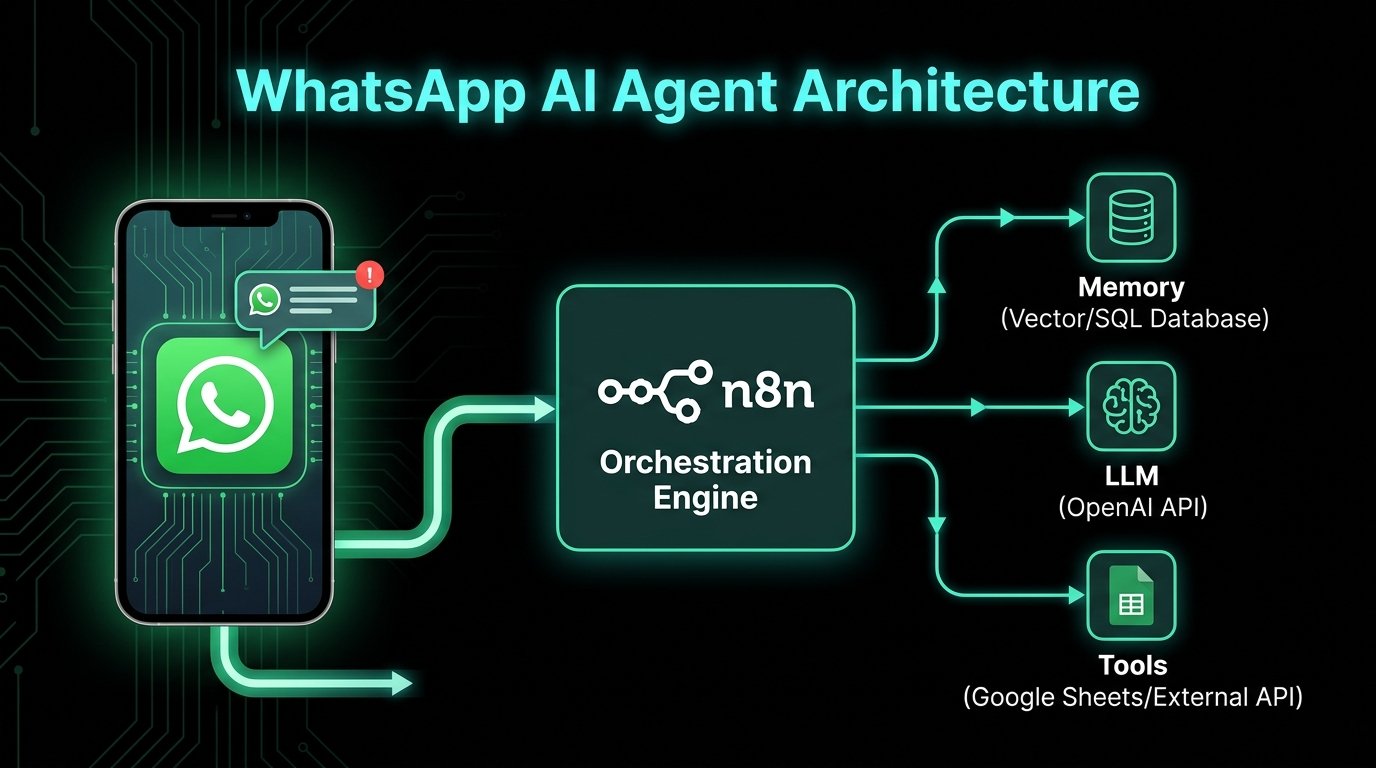
n8n serves as the central orchestration layer for enterprise ai agents, functioning as the critical bridge connecting the user’s phone to the AI’s reasoning engine. Without this middle layer, building a memory-aware bot requires extensive custom programming.
The message lifecycle operates in four distinct phases:
- The Trigger: The Meta API fires a secure webhook to the n8n instance the moment a message arrives.
- Memory Injection: n8n queries a backend database (via the Window Buffer Memory node) to retrieve the specific chat history, providing conversational context.
- AI Processing: n8n routes the new message, historical context, and system prompt to an LLM.
- The Reply: Utilizing the n8n whatsapp integration, the system extracts the generated text and pushes it back to the user instantly.
Building the n8n Workflow
Deploying a commercial-grade bot requires bypassing the standard consumer application. A verified whatsapp account linked to the official whatsapp business api is mandatory to run a whatsapp ai agent n8n system successfully.
Step 1: Meta Authentication
Navigate to the Meta Developer Portal and create a “Business” application. Add the WhatsApp product to generate the Phone Number ID and Access Token. These credentials authenticate the whatsapp business api n8n connection.
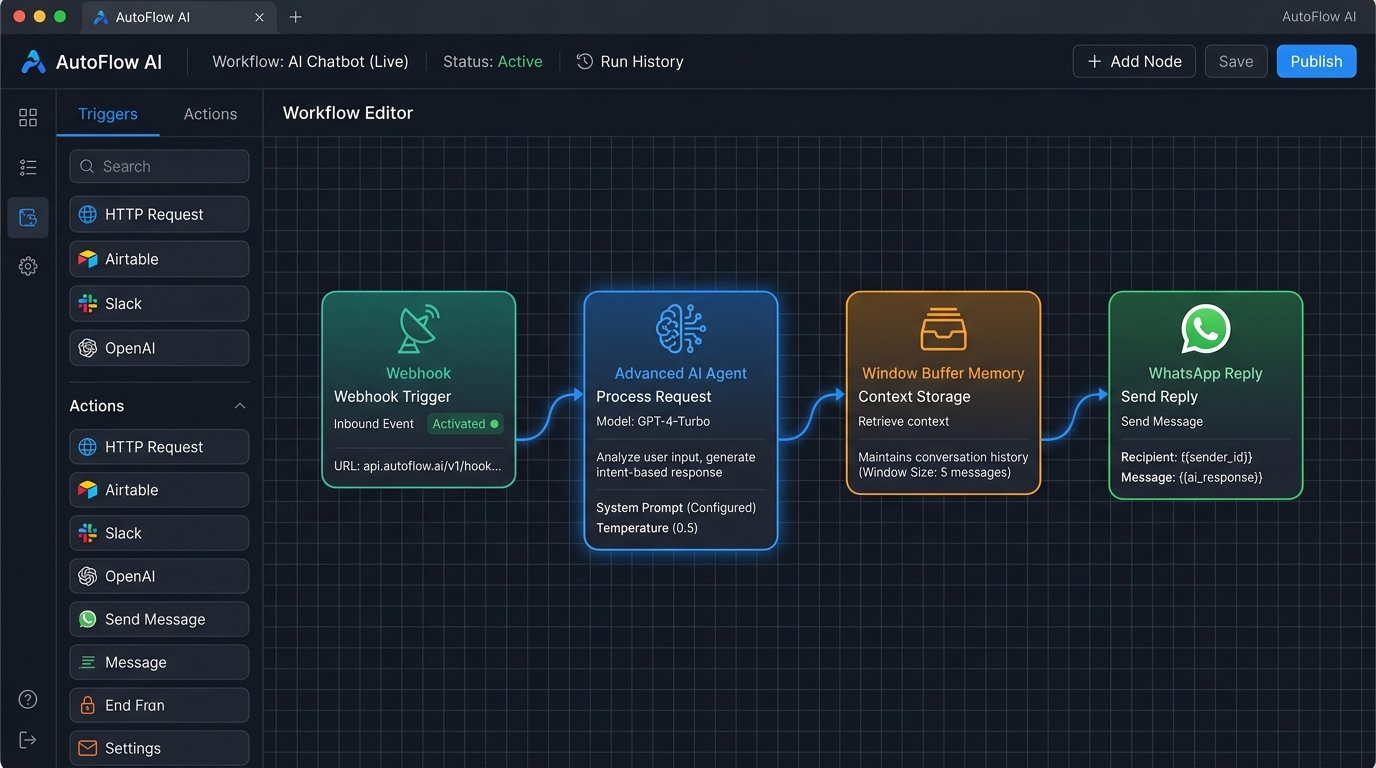
Step 2: The n8n Canvas
Within the n8n platform, connect a Webhook node (configured to POST) to an Advanced AI Agent node. Inject a Window Buffer Memory node, setting the Session ID to the user’s phone number to maintain context. Connect a WhatsApp reply node to deliver the response.
To handle complex data formatting before passing parameters to the AI, developers routinely insert custom code nodes between these primary steps.
What a WhatsApp AI Agent Costs (the October 2026 Change)
WhatsApp Business Platform pricing has changed twice in two years:
| Date | Change |
|---|---|
| July 1, 2025 | Meta switched from per-conversation to per-message billing for template messages |
| Until Sept 30, 2026 | Replies inside the 24-hour customer service window are free |
| From Oct 1, 2026 | Replies inside that window become billable after 1,000 free service messages per business number per month |
The allowance applies per business number, resets monthly, and doesn’t roll over. For example, 10,000 service messages in a month means 1,000 free and 9,000 billed. Rates vary by country and message category, so check Meta’s WhatsApp pricing page for your market.
Two exceptions stay free:
- Messages sent from the WhatsApp Business App itself (not the API).
- The 72-hour free entry point window. When a customer messages you from a Click-to-WhatsApp ad or a Facebook Page button and you reply within 24 hours, you can send any messages free for 72 hours.
Act now: several WhatsApp providers warn that service messages may stop being delivered if no payment method is set up when the new billing starts. Add one to your WhatsApp Business Account before September 30, 2026.
What this means for AI agents: billing is now per message, so an agent that replies in three short messages costs three times as much as one that sends one complete reply. Instruct your agent to answer in a single message.
Give the Agent Memory That Survives Restarts
- For testing, use n8n’s Simple Memory node (formerly Window Buffer Memory), with the session key set to the sender’s phone number.
- For production, switch to Postgres Chat Memory or Redis Chat Memory. Simple memory lives in n8n’s process and is lost when the instance restarts.
- Limit memory to the last 10–20 messages. Longer histories raise model costs without improving answers.
Hand Off to a Human
- Detect handoff triggers. Add an instruction to the agent: when the customer asks for a person, complains, or asks something outside its knowledge, reply with a fixed handoff message.
- Pause the bot. Store a “human_active” flag for that phone number in your database, and have the workflow check it before calling the AI. If it’s set, skip the AI.
- Notify your team in Slack or email with a link to the conversation. See our n8n human-in-the-loop tutorial for the approval pattern.
Gotchas
- The 24-hour rule. You can only send free-form replies within 24 hours of the customer’s last message. After that, you need a pre-approved template.
- Template approval takes time. Submit reminder and follow-up templates to Meta early.
- Billing is now per message. Every extra reply after October 1 counts toward your bill once you pass 1,000 a month.
- Use the official API. Unofficial WhatsApp automation tools risk getting your number banned.
Prompt Engineering for Hinglish Support
The technical setup routes the data, but prompt engineering dictates the conversational intelligence. For the Indian market, native Hinglish support is essential.
Define strict persona rules in the AI Agent system prompt:
“You are a customer support agent. Detect the user’s language. If the user speaks Hinglish, reply in natural, polite Hinglish. Keep messages under three sentences.”
To prevent hallucinations when answering business inquiries, implement Retrieval Augmented Generation (RAG). Upload pricing PDFs to a vector store and connect it as a tool to the AI Agent. The AI will search the document and synthesize accurate answers autonomously.
Advanced Lead Generation
Once the baseline conversation functions correctly, integrating these agents with existing business tools unlocks massive operational ROI.
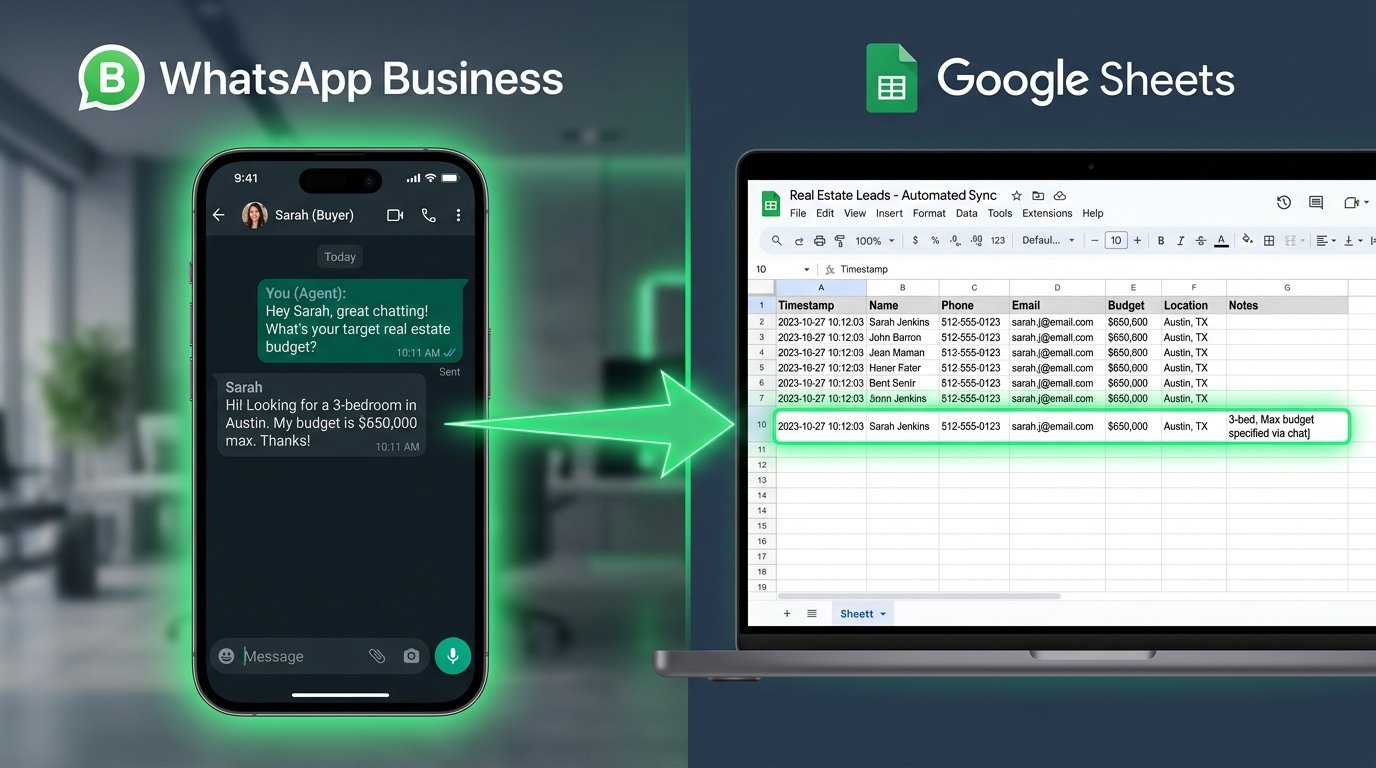
Equip the AI agent with a Google Sheets integration. When a prospect inquires about a real estate listing, the AI qualifies the lead by requesting their budget and preferred location. The system extracts this exact data from the natural conversation and automatically inserts a new row into the spreadsheet.
Why Developers Choose n8n for WhatsApp
The unprecedented ability to build complex workflows natively in n8n has sparked massive enthusiasm across the tech industry. When engineering teams test n8n against legacy platforms, the feedback is remarkably consistent.
As prominent developer Igor Fediczko noted during a recent review, the platform executes workflows that other tools simply cannot handle due to rigid limitations. Users routinely echo this sentiment, offering congratulations on your work to the core engineering team. Once development teams deploy their first multi-step agent, they quickly realized what we were building was essentially the holy grail of automation.
Tasks requiring massive backend engineering sprints are now trivial. As one developer stated, building a persistent agent manually would’ve taken me 3 days, but with n8n, developers quickly validate and implement high-value ideas in a matter of hours.
Whether engineers start a side project or scale an enterprise-level platform, the infrastructure is flawless. The self-hosted applications are excellent, and the cloud version is great for immediate deployment. The platform’s ceiling is limited only by technical knowledge imagination.
Connecting third-party services is absolutely seamless, and the visual debugging process is absolutely mind blowing. Non-technical founders frequently complete a beginners course and promptly deploy production-ready bots within a single week.
Frequently Asked Questions
What is a WhatsApp AI Agent in n8n?
A whatsapp ai agent n8n setup is a dynamic architecture connecting the whatsapp business api directly to an AI model. n8n receives the messages, manages conversational memory via databases, and sends intelligent responses back to the user.
Can the bot speak Hinglish?
Yes. By instructing the AI in its core system prompt to use polite Hinglish, the system will dynamically adapt its language to match the customer.
How do I automate whatsapp with ai?
To automate whatsapp with ai, you must connect a verified whatsapp account to n8n via a webhook. n8n then passes the incoming messages to an LLM like OpenAI to generate human-like responses.
How does the bot remember past messages?
A Window Buffer Memory node stores the chat history mapped specifically to the user’s phone number. The n8n whatsapp integration then injects this historical context into the prompt before generating the next reply.
How much does a WhatsApp AI agent cost after October 2026?
From October 1, 2026, each business number gets 1,000 free service messages a month. After that, Meta bills every service message individually, at a rate that depends on the country and message category. Messages sent from the WhatsApp Business App and replies inside the 72-hour free entry point window (from Click-to-WhatsApp ads or Facebook Page buttons) stay free. On top of Meta’s fees, you pay for the AI model and your n8n hosting.
Related Reading:
Pingback: AI Receptionist for Dental Clinics Demand: 2026 Guide