When There Is No API
Every modern automation guide assumes the same starting point: both systems have publicly documented application programming interfaces. You grab an api key, hit the api endpoints, and data flows seamlessly between multiple systems.
The reality for many businesses is far more complicated. Legacy ERP systems, niche industry-specific databases, older government portals, and heavily customized internal tools frequently lack any accessible interface. You cannot integrate what you cannot connect to.
This is the fundamental challenge of no api integration: building reliable, scalable automation pipelines between software products that were never designed to communicate with each other.
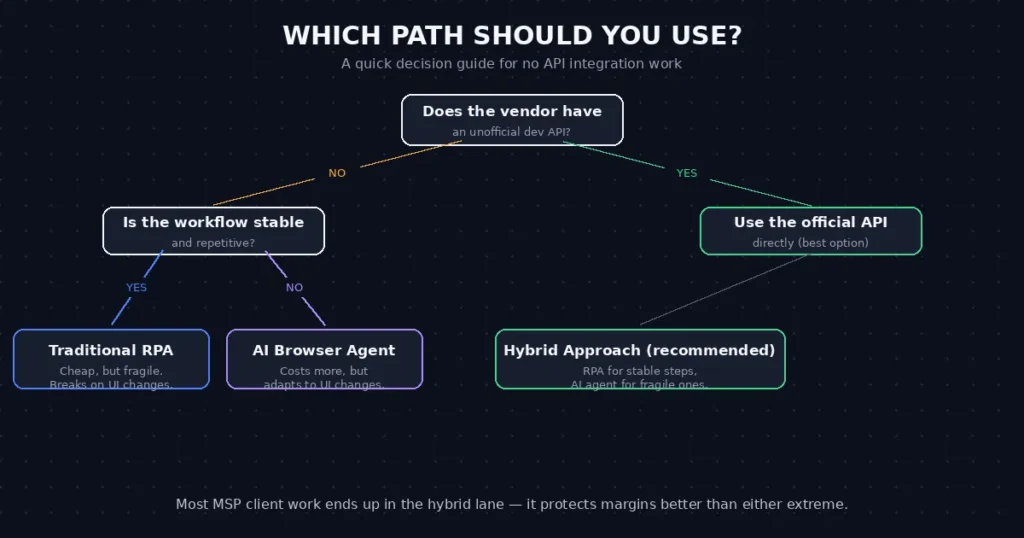
Quick answer: To connect software without an API, first check whether the vendor permits a file export or import, email intake, a webhook, or approved database access. If those routes do not meet the need, use RPA or browser automation for repeatable interface steps; test an AI-assisted browser agent only where the interface or input varies enough to justify extra review. For MSPs, document access permissions, failure alerts, and who will maintain the automation before rolling it out to clients.
This guide compares practical no-API integration routes, including file exchange, RPA, browser agents, and middleware, with examples for legacy systems and MSP workflows. Start with a small, authorized test and measure how often the interface or data format changes.
Disclosure: Operant Solo is reader-supported. We may earn an affiliate commission when you purchase through links on this page, at no additional cost to you. Recommendations are based on independent testing and evaluation.
Why API-First Integration Is Not Always Possible
Before examining the solutions, we must understand why no api integration challenges are so common in practice.
Legacy Systems
Many businesses — particularly in manufacturing, healthcare, government, and logistics — operate software that was built in the 1990s or early 2000s. These platforms were never designed to expose api endpoints. Their data lives in proprietary databases accessible only through the application’s own graphical interface.
Replacing these systems entirely is extremely expensive. Many companies continue running them for decades because they work reliably, even as the surrounding technology landscape has shifted dramatically.
Custom and Niche Software
Industry-specific platforms for law firms, dental clinics, and construction companies frequently provide limited or no public API access. Vendors intentionally restrict external connections to protect their moat or simply because developer resources to build them do not exist.
Rate Limits and Access Restrictions
Even when application programming interfaces exist, some organizations restrict access based on subscription tier. A company on a basic plan may find that API access requires upgrading to an enterprise contract — a cost that does not justify the workflow being automated.
Approach 1: Robotic Process Automation (RPA)
Robotic process automation RPA is the most established method for building no api integration pipelines. RPA tools record how a human interacts with a software interface, then replay those interactions at speed — clicking buttons, typing data, copying values between screens — in an automated loop.
How RPA Works in Practice
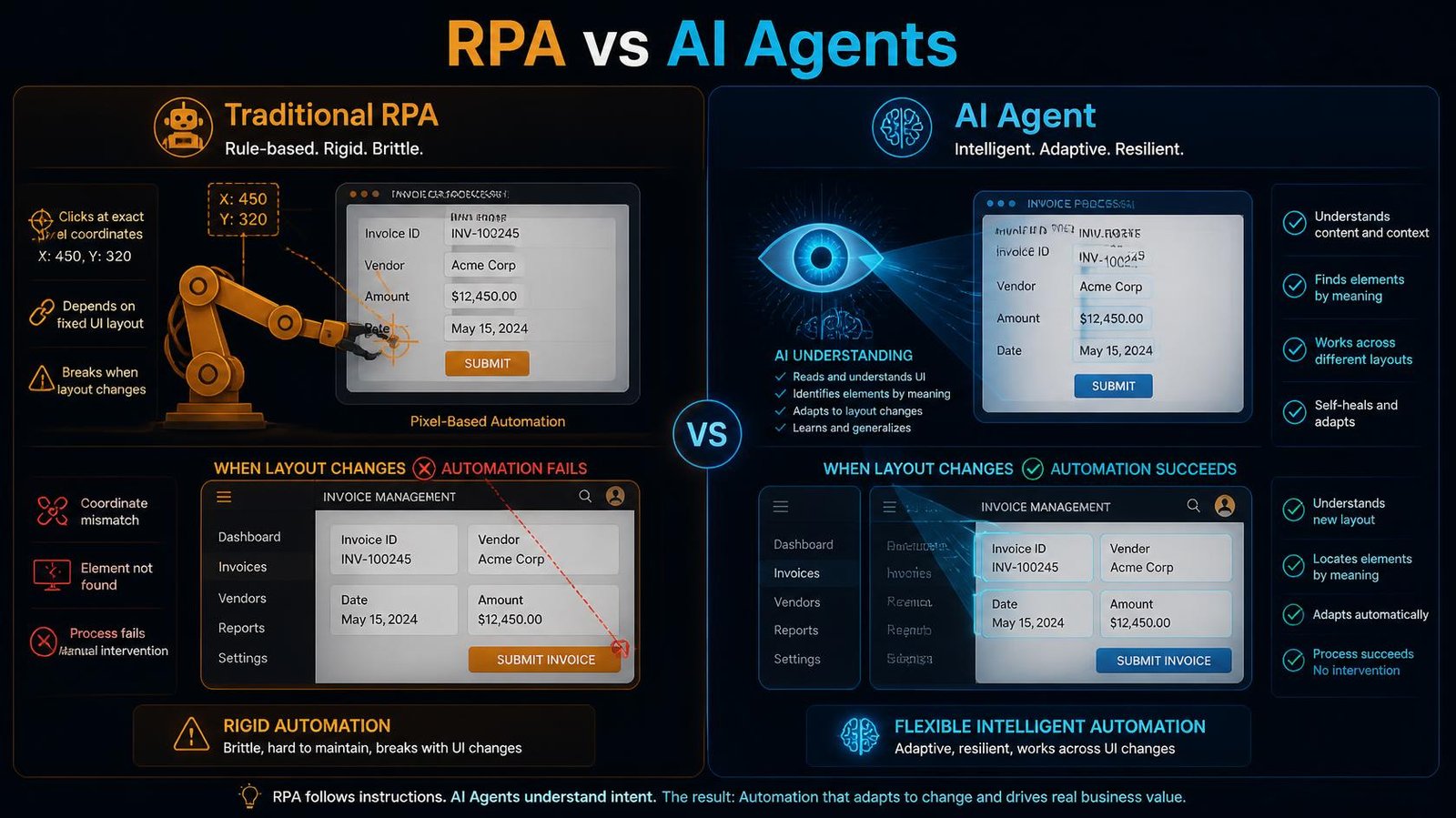
RPA software creates a “bot” that interacts with a desktop or web application at the UI layer. The bot reads pixel coordinates and element identifiers on the screen. When an element appears in the expected position, the bot executes the programmed action.
For example, a traditional finance team might manually open their accounting software, copy invoice totals from a spreadsheet, and paste them into a supplier portal. An RPA bot replicates this exact process at high volume, running around the clock and eliminating the human intervention and human errors inherent in manual workflows.
RPA Strengths
- Structured environments: RPA excels at repetitive tasks within consistent, predictable interfaces. If a button is always in the same location and a table always has the same columns, RPA completes the task reliably.
- No code changes required: Because RPA interacts at the UI layer, you do not need access to the underlying application code or database.
- Speed: RPA bots execute tasks far faster than humans, enabling high volume data processing across multiple systems without increasing headcount.
RPA Limitations
RPA breaks immediately when an interface changes. If a software vendor releases a UI update — even something minor like repositioning a button or renaming a menu item — the bot fails. Repairing these breaks requires development time and prevents the workflow from running in the interim.
Approach 2: AI-Driven Browser Agents
Where robotic process automation rpa uses fixed coordinates, ai driven browser agents use large language models to interpret a rendered webpage visually. These agents observe a screenshot of the current state, reason about what action to take next, and execute that action using browser control tools.
The fundamental difference in rpa vs ai agents is adaptability.
How AI Browser Agents Work
An AI browser agent receives a high-level objective: “Log into the supplier portal, locate today’s purchase orders, and extract the order numbers and totals.”
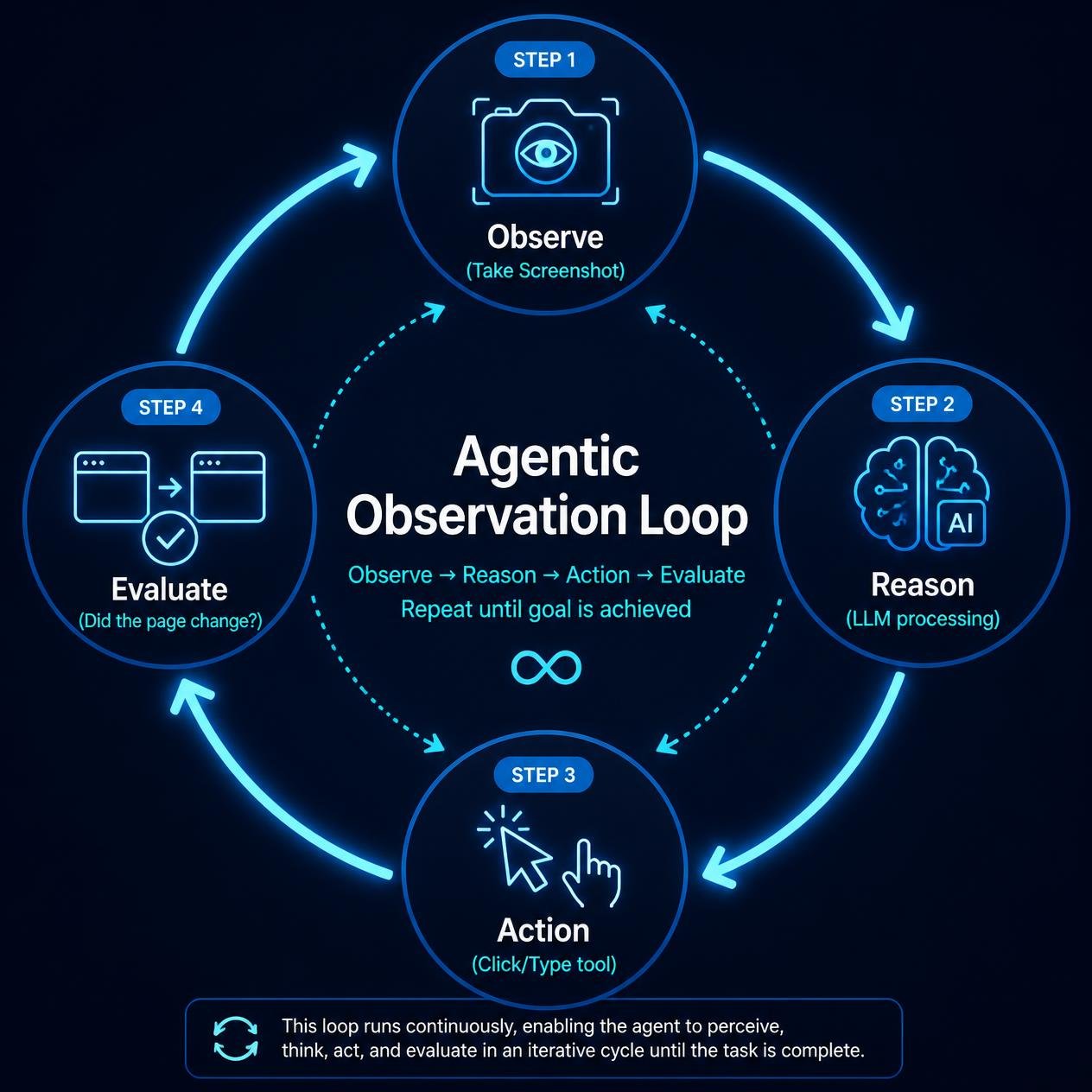
The agent then enters an observation-action loop:
- It takes a screenshot of the current browser state.
- It passes that screenshot to a vision model (a current model with strong computer use, such as GPT-6 Astra or Claude Opus 5.5).
- The model identifies the relevant elements and instructs the agent to click, type, or scroll.
- The agent executes the action and takes a new screenshot to verify the result.
Because the agent reads the page semantically rather than by coordinates, it tolerates interface changes. If a vendor redesigns their portal, the agent adapts automatically on the next execution.
Step-by-Step: Automating a Legacy Portal
Let us walk through a real-world scenario. Your client receives daily invoices in a legacy vendor portal that has no API. You need to log in, download the PDF, and save it to Google Drive.
Here is how you build the agent in n8n.
Step 1: Initialize the Browser Session
In your n8n workflow, use a Node.js code block or a dedicated HTTP node to ping your Browserless instance. Tell it to navigate to the login URL of the legacy portal.
Step 2: Give the Agent its Tools
In n8n, drag an AI Agent node onto the canvas. Connect your preferred LLM (like a current model with strong computer use, such as GPT-6 Astra or Claude Opus 5.5). Crucially, you must provide the agent with “Tools.” These are functions the AI can call to interact with the browser. You will provide tools for:
Click_ElementType_TextScroll_PageGet_Screenshot
Step 3: The System Prompt
You must explicitly instruct the agent on how to achieve its goal.
“You are an autonomous browser agent. Your goal is to log into the vendor portal, navigate to the ‘Invoices’ tab, and click the download button for today’s invoice. You have access to browser manipulation tools. Use the Get_Screenshot tool to look at the page, identify the username and password fields, and use Type_Text to input the credentials. If you encounter a popup, close it.”
Step 4: The Autonomous Loop
When the workflow triggers, the agent enters an observation-action loop.
- It takes a screenshot.
- It sees the username field.
- It calls the
Type_Texttool with the login credentials. - It takes another screenshot to verify.
- It sees the “Submit” button and calls the
Click_Elementtool.
The agent navigates the entire site autonomously, downloading the invoice and passing the file object back to the main n8n workflow, which then uploads it to Google Drive.
If a site blocks automated access, ask the vendor for an export or API option, or keep that step manual.
Real-World Applications for MSP Automation
MSP automation presents a highly relevant use case. Managed Service Providers operate across dozens of client environments, each using different software stacks. When a client’s ticketing system lacks robust api endpoints, an AI browser agent can log into the system, extract open tickets, and sync them to the MSP’s central management dashboard without requiring human intervention.
This dramatically reduces the manual labour that otherwise consumes MSP technician time during daily reporting cycles.
How MSPs and Agencies Automate Client Software With No API
MSPs often inherit a client’s core industry software (practice management, dispatch, legacy ERP) that has no public API. Rebuilding it isn’t an option, and Zapier-style connectors don’t exist for it. Four approaches work, in this order of preference:
| Approach | When to use it | Reliability | Cost to maintain |
|---|---|---|---|
| 1. Database or file-level integration | The software stores data in a database or exports files you can access | Highest | Low |
| 2. Scheduled exports + automation | The software can export CSV or reports on a schedule | High | Low |
| 3. AI browser agents | Data only lives in the web interface, and screens change often | Medium | Medium |
| 4. Traditional RPA | Stable desktop apps with fixed screens | Medium | High (breaks on UI changes) |
Always try approaches 1 and 2 first. They’re the most stable and cheapest to run. Use browser agents or RPA only for the steps that truly require the user interface. Then run everything through one orchestration layer, such as n8n, so every client’s integrations are logged, monitored and version-controlled in one place.
Pricing the work: browser-agent and RPA integrations need ongoing maintenance whenever the vendor changes their interface. Price them as a monthly retainer, not a one-off build, or the maintenance will eat your margin.
RPA vs AI Agents: A Direct Comparison
Understanding when to deploy each approach is the foundation of any effective automation strategy.
| Criteria | Traditional RPA | AI Browser Agents |
|---|---|---|
| Interface Resilience | Low (breaks on layout changes) | High (adapts visually) |
| Setup Complexity | Medium | Medium-High |
| Running Cost | Low | Medium (LLM token costs) |
| Structured Tasks | Excellent | Good |
| Complex Navigation | Poor | Excellent |
| Human Errors Eliminated | Yes | Yes |
| Best For | Stable, repetitive desktop tasks | Dynamic web applications |
For integration platforms that must connect legacy desktop software (older databases, installed applications), traditional RPA remains the more reliable and cost-efficient choice.
For browser-based workflows that interact with modern web applications prone to UI updates, ai assisted browser agents deliver superior uptime and substantially lower maintenance overhead.
Approach 3: Middleware and Data-Layer Integration
When neither RPA nor AI agents are appropriate — particularly when connecting data sources that share a common database layer — middleware provides a direct integration path.
Some legacy platforms store data in standard relational databases (PostgreSQL, MySQL, or SQL Server). If you have direct database access credentials, you can bypass the application interface entirely and connect to the raw data layer.
Using a platform like n8n, you can query these databases directly, transform the data, and push it to a modern system without interacting with the legacy application interface at all. This approach is faster, more reliable, and requires no ongoing maintenance as long as the underlying database schema remains consistent.
Important caveat: Reading directly from a production database always carries risk. Writing directly to one without fully understanding the application’s data model can corrupt records. Only implement this approach when you have explicit permission from the system owner and a complete understanding of the schema.
Building an MSP Automation Strategy Without APIs
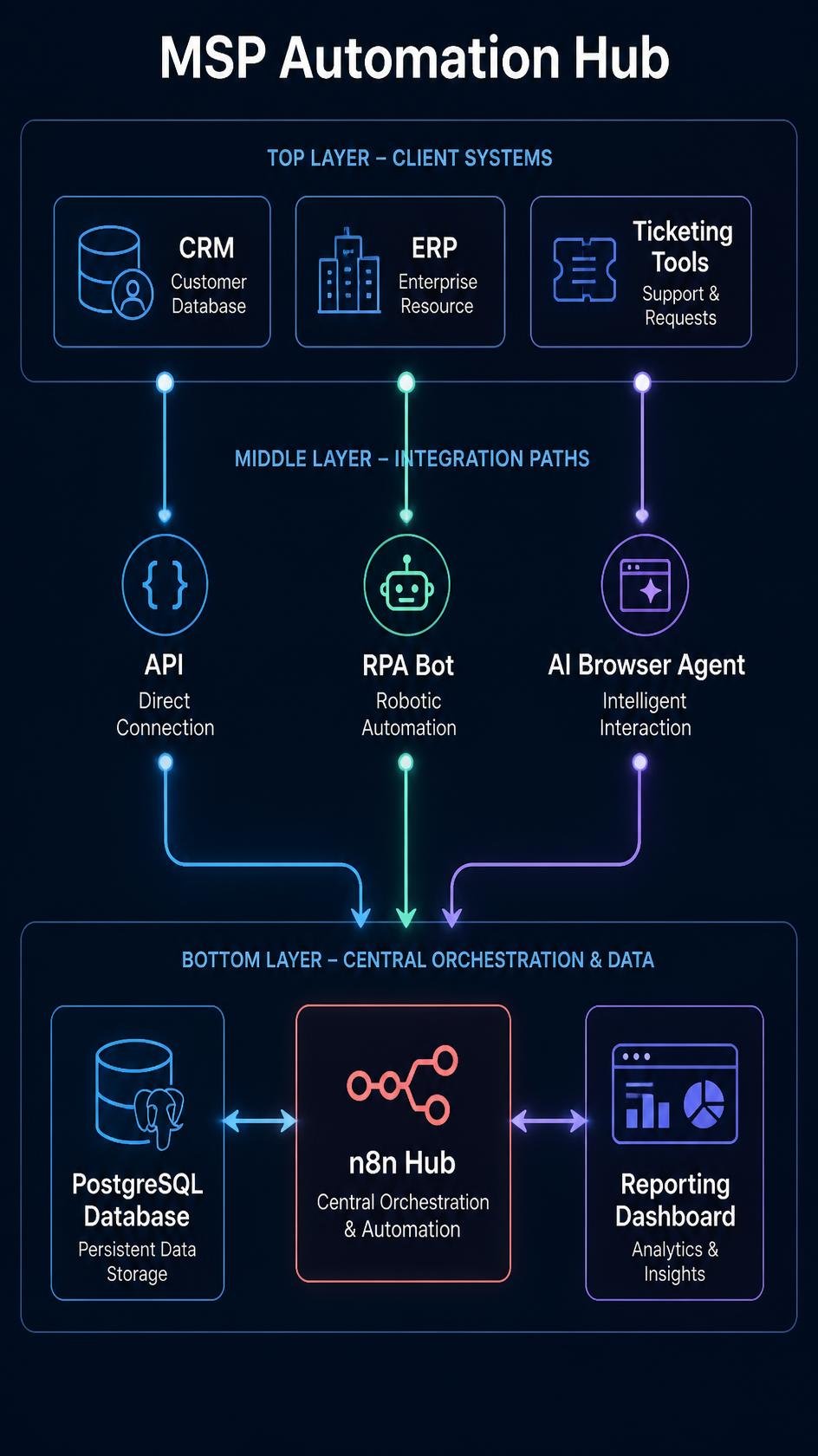
For Managed Service Providers, no api integration challenges arise daily. Client environments rarely conform to a standardised stack. A robust msp automation framework must accommodate diverse data sources and multiple integration approaches simultaneously.
Here is a practical framework for building that infrastructure:
Step 1: Inventory and Classify All Client Systems
Document every software product across your client base. Classify each one into three categories:
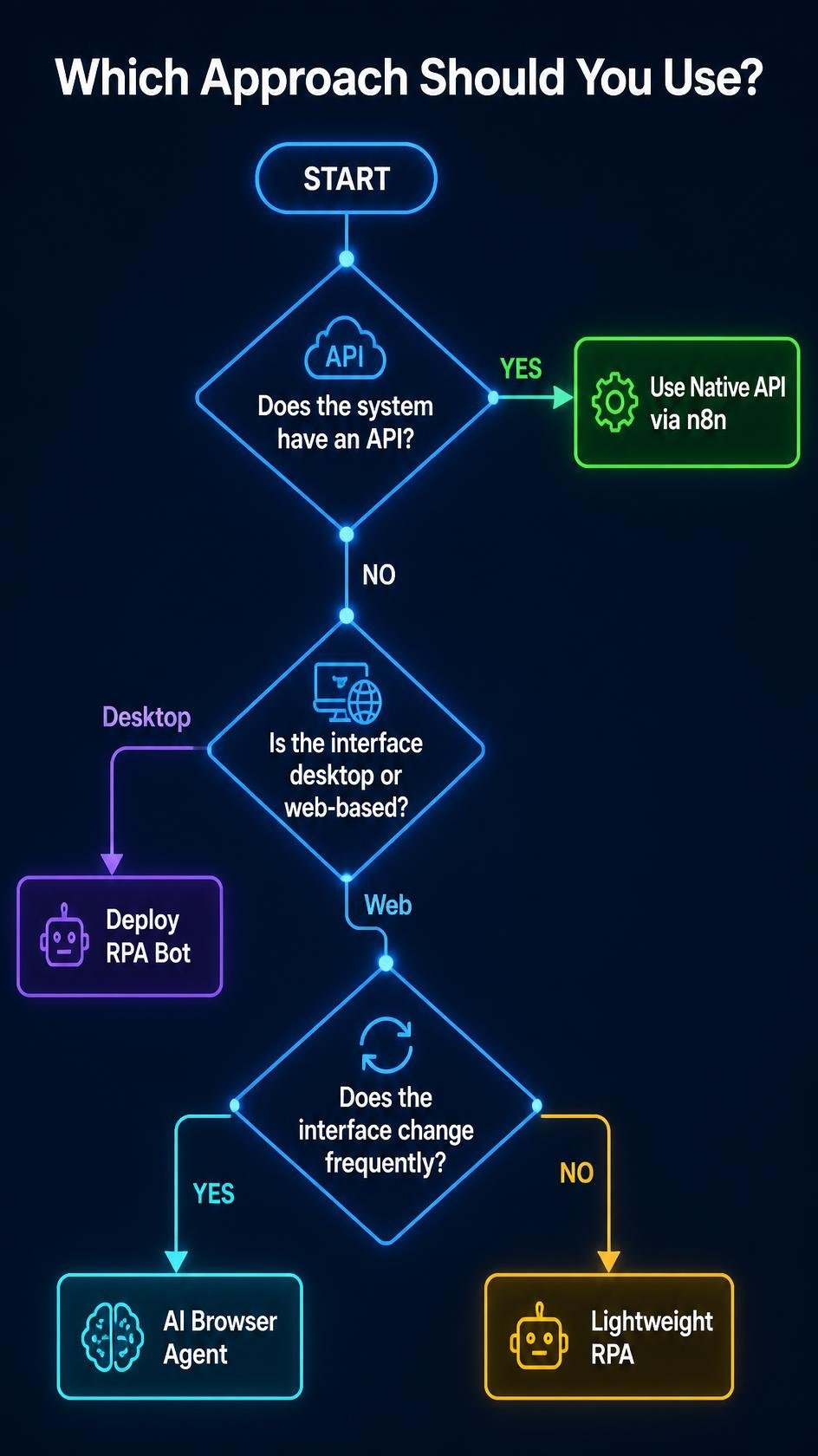
- API Available: Connect via n8n using standard nodes or HTTP requests.
- No API, Stable Interface: Deploy an RPA bot for structured repetitive tasks.
- No API, Dynamic Interface: Deploy an AI browser agent for complex navigation.
Step 2: Centralise Data in a Standardised Hub
Route all data — regardless of source — into a single, standardised hub. A self-hosted n8n instance with a connected PostgreSQL database serves this purpose effectively. Every integration connects to this central layer, enabling real time reporting across all client environments without manually aggregating data from individual tools.
Step 3: Implement Monitoring and Alerting
Unlike native API integrations that return structured error codes, RPA bots and browser agents fail silently when they encounter unexpected interface states. Build monitoring workflows that verify each automation completed successfully and send alerts when executions fail.
Step 4: Version Control Your Bots
Treat automation scripts the same way a development team treats application code. Store configurations in a version-controlled repository. When a client’s software updates and breaks an automation, you can roll back to the previous working state while you build and test the updated bot.
Key Takeaways
The key takeaways from this guide are as follows:
- No API does not mean no automation. Three proven approaches — RPA, AI browser agents, and data-layer middleware — enable you to connect software without api access across virtually any technology stack.
- RPA vs AI agents is a context decision. For stable desktop interfaces, RPA is more cost-efficient. For dynamic web applications, ai driven browser agents provide higher uptime.
- MSP automation requires a multi-method approach. No single approach addresses all integration scenarios. An effective msp automation strategy deploys the right tool for each specific client system.
- Centralisation is the force multiplier. Routing all data through a single n8n hub enables consistent reporting and monitoring regardless of the diversity of underlying data sources.
- Maintenance is the hidden cost. Both RPA bots and AI browser agents require active monitoring. Build alerting into every workflow from day one.
Frequently Asked Questions
What is no API integration?
No api integration refers to the practice of connecting software applications that do not expose application programming interfaces. Instead of calling api endpoints directly, you use alternative methods such as robotic process automation rpa, AI browser agents, or direct database connections to move data between multiple systems.
What is the difference between RPA and AI agents?
In the rpa vs ai agents comparison, the core difference is adaptability. RPA bots follow rigid, pre-recorded instructions based on specific pixel coordinates and element identifiers. Ai agents use vision models to visually interpret a rendered interface, making them far more resilient when software interfaces change without warning.
Can you connect software without API access?
Yes. You can connect software without api access using several automation tools. Robotic process automation rpa automates interactions at the UI layer. Ai driven browser agents navigate interfaces intelligently using large language models. Direct database connections provide an additional integration path when you have the necessary access credentials.
What is MSP automation and why does it matter?
Msp automation refers to the practice of Managed Service Providers automating the repetitive tasks involved in managing multiple client environments. Because MSP clients use diverse and often legacy software stacks, MSPs frequently face no api integration challenges. Automating client data collection, reporting, and system monitoring eliminates human errors and significantly increases operational capacity without scaling headcount.
What automation tools work for no-API scenarios?
Effective automation tools for no api integration scenarios include UiPath and Automation Anywhere for traditional RPA, Playwright and Browserless for AI browser agent deployments, and n8n for central orchestration and database-level integration connects. Combining these tools within a unified automation strategy provides the broadest coverage across diverse client environments.
How do I automate a website without an API?
To automate a website without an API, you must use browser automation tools (like Playwright or Puppeteer) combined with an AI vision model (like a current model with strong computer use, such as GPT-6 Astra or Claude Opus 5.5). The AI acts as a virtual user, “looking” at the rendered webpage and autonomously clicking buttons and typing into fields to extract data or complete tasks.
What is a headless browser?
A headless browser is a web browser (like Chrome) that runs without a visible user interface. It renders websites exactly like a normal browser in the background. Tools like n8n use headless browsers to interact with websites programmatically during an automation workflow.
Related Reading:
- n8n vs Make (2026): Which is Better for AI Automation? →
- AI Lead Enrichment: How to Automate Client Research →
- n8n Security Vulnerabilities 2026: Is n8n Safe to Use? →
- Cursor AI vs Make: Should You Code Automations in 2026? →
n8n
Best for: technical automation workflows
Consider n8n when your workflow needs custom logic or control over deployment. Self-hosting also requires time for updates, backups, and monitoring.
Operant Solo may earn a commission if you purchase through this link, at no extra cost to you.
Pingback: How to Automate Website Without API (AI Agents vs Make.com)
Pingback: How to Automate Freelance Business (And Stop Doing Free Admin Work)