Disclosure: Operant Solo is reader-supported. We may earn an affiliate commission when you purchase through links on this page, at no additional cost to you. Recommendations are based on independent testing and evaluation.
The Hidden Cost of Manual Prospecting
Every successful freelancer and agency owner knows the drill. A new lead enters your pipeline. Before you get on a discovery call or send a pitch, you spend 20 minutes opening tabs.
You check their company website to understand their product. You scan their LinkedIn profile for recent posts. You search for their tech stack using BuiltWith. You try to find valid email addresses.
Researching each new lead by hand takes time, but an enrichment workflow should improve the quality of the notes as well as the speed. A short brief tied to a source is more useful than a confident summary that cannot be checked.
Quick answer: An AI lead enrichment workflow can take a company domain from your CRM, fetch information from a source you are permitted to access, draft a brief, and attach the source URL for review. Validate the domain and source before updating the record. If the page is missing, blocked, or ambiguous, leave the field unknown and route the lead to a human.
Below is an n8n workflow outline and a fictional input you can run through a test branch before connecting your CRM.
Test a source-backed lead brief
The lead enrichment JSON cases contain a fictional company page, its source URL and an expected one-sentence summary. Feed the supplied text to your extraction step and check that each claim is supported by that text. Keep fields such as contact email unknown unless a permitted source supplies them. This is a dry run of the review rules, not a test of a live scraper, model account or CRM.
Three branches matter before an update: a usable source produces a draft brief with its URL for human review; a missing domain goes to manual review; a 403 or failed fetch stops and logs the error. Record when the page was fetched, and do not turn a model’s guess into a CRM fact.
What is AI Lead Enrichment?
Traditional data enrichment relies on static databases like Clearbit or Apollo. You give them a domain, and they return standard firmographic data: company size, industry, and location.
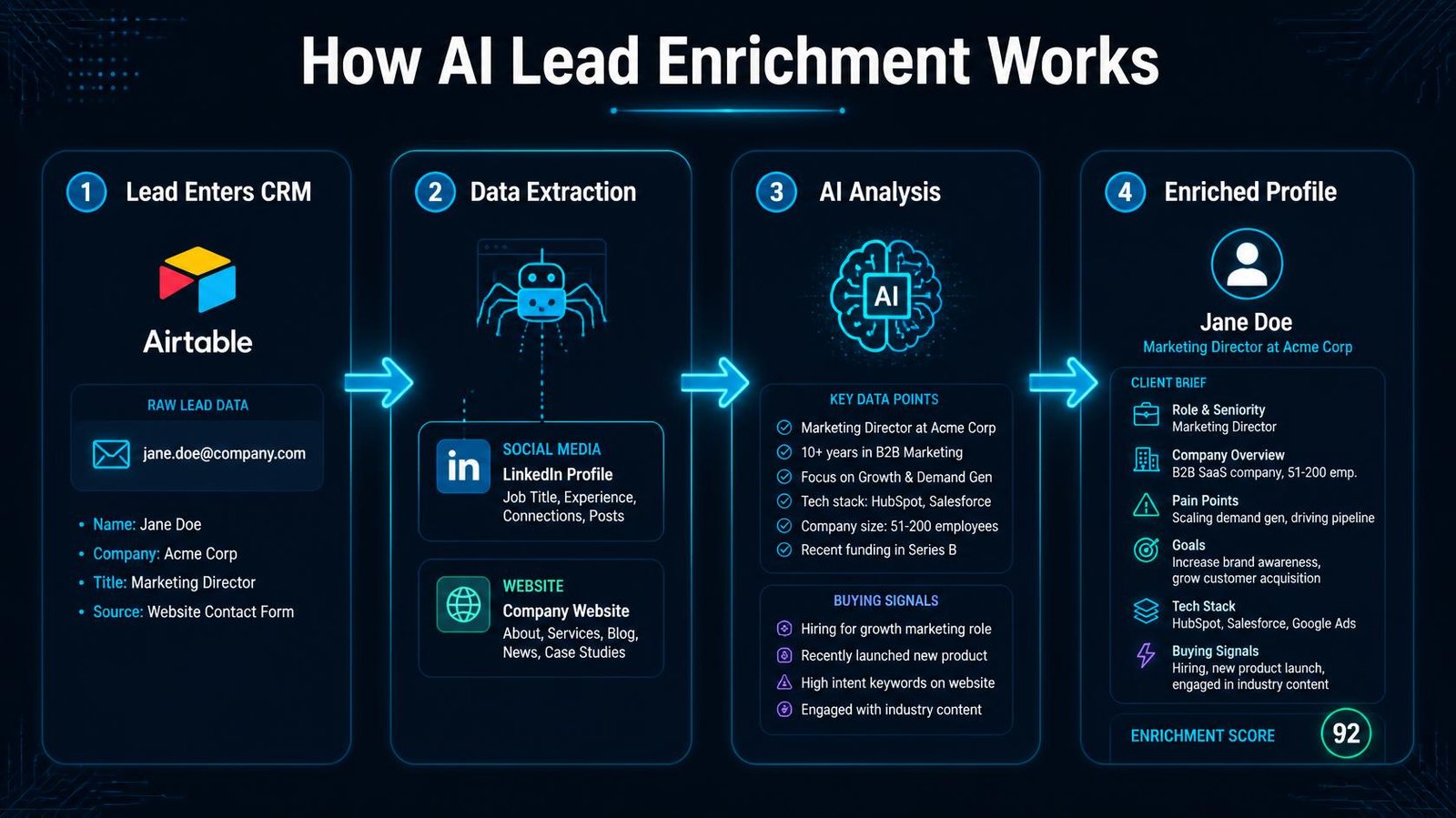
AI lead enrichment goes a step further. Instead of just pulling database rows, it uses machine learning models (like GPT-4o or Claude 3.5 Sonnet) to actively read and interpret unstructured data in real time.
An AI enrichment agent can:
- Read a company’s “About Us” page and summarize their unique value proposition in one sentence
- Scan recent blog posts to identify current company priorities
- Extract specific buying signals (e.g., “Are they currently hiring for marketing roles?”)
- Format this enrichment data perfectly for your CRM
This level of depth is what makes personalized outreach actually effective, moving your process from basic automation to true ai sales intelligence.
🔄 Updated September 2026
When n8n Fits a Lead Enrichment Workflow
n8n can connect a CRM trigger, an approved data source, a model and a review step. Compare it with managed enrichment tools on the data you are allowed to use, the number of records, the amount of maintenance and the accuracy you need.
Most lead enrichment tools charge a premium per lead. By building it yourself in n8n, you control the logic and only pay fractions of a cent for the API calls.
| Feature | n8n workflow | Managed enrichment service |
|---|---|---|
| Source handling | Choose and maintain approved sources | Provider coverage and provenance vary |
| AI summary | Configure model and review rules | Depends on the provider’s feature set |
| Cost | Platform, model, retrieval and maintenance | Plan, seats, credits and data coverage |
| Best fit | Custom logic with an operator to maintain it | Faster setup if its coverage meets your needs |
By leveraging n8n, you can enrich leads using the exact same logic you use when researching manually, just executed in seconds.
Step-by-Step: Building the AI Enrichment Workflow
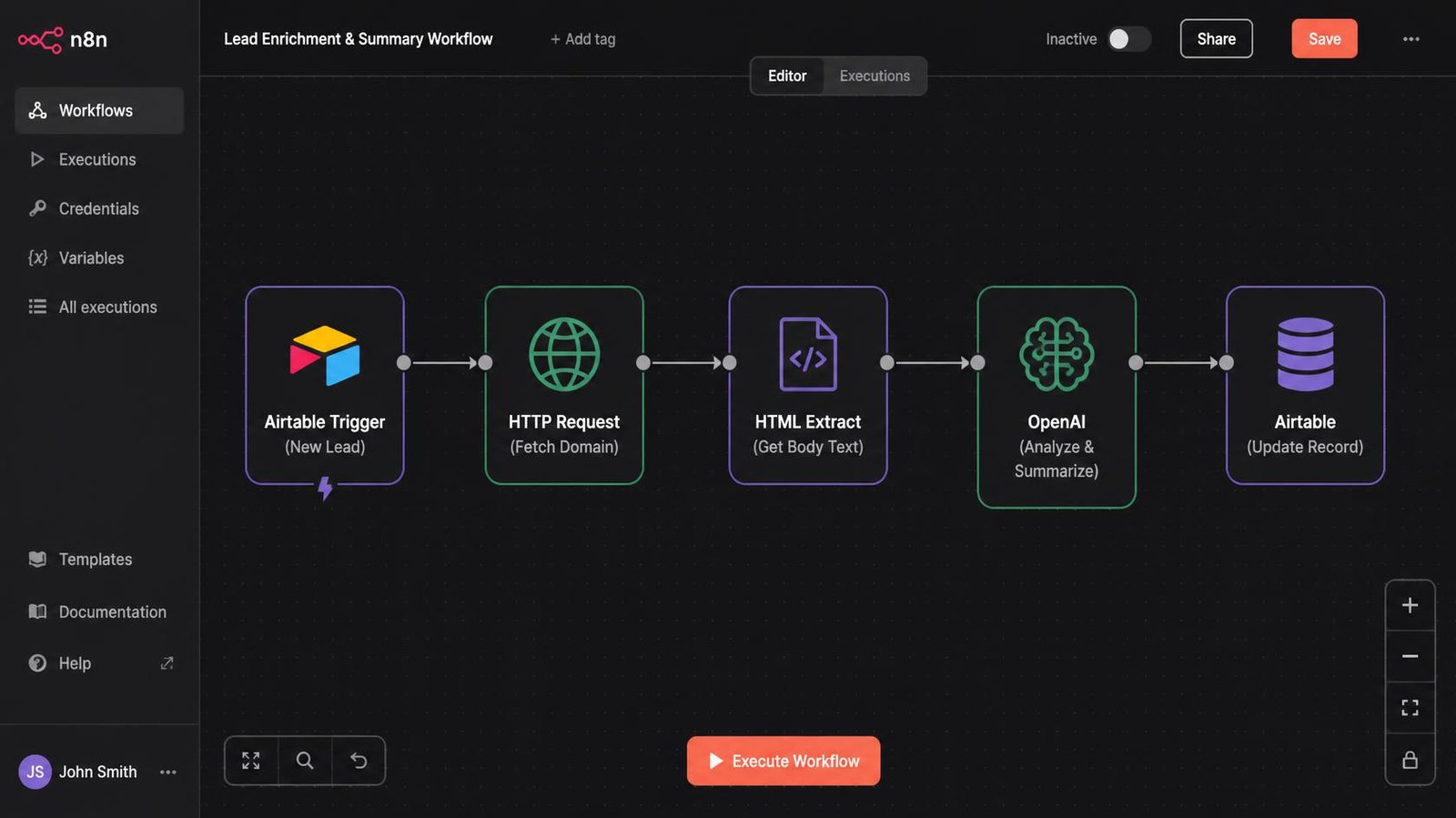
The workflow outline is: receive a new lead with a valid company domain, retrieve an allowed source, extract source-backed facts, review the result, and then update the CRM. Keep the source URL and fetch time with the draft brief.
Step 1: The CRM Trigger
- Open n8n and add a trigger node for your CRM (e.g., Airtable, Notion, or HubSpot).
- Set the trigger to fire on “New Record Added.”
- Ensure the record contains at least a company domain name (e.g.,
acmecorp.com).
Step 2: Extracting the Website Content
To get data points for the AI to analyze, we must read the prospect’s website.
- Add an HTTP Request node.
- Set the URL to dynamically pull the domain from the CRM trigger (e.g.,
https://{{ $json.domain }}). - Add an HTML Extract node right after it. Configure it to target the
<body>tag and extract the raw text.
When a page blocks retrieval: Stop that branch, log the status and check whether the site offers an authorized API, export or other permitted route. Do not assume a 403 is permission to bypass the site’s controls.
Step 3: The AI Analysis Layer
This is where you automate data interpretation.
- Add an Advanced AI node (like the OpenAI node).
- Connect the extracted website text as the input.
- Write a highly specific system prompt:
“You are an expert sales researcher. Read the following website text and extract three things:
- A one-sentence summary of what the company does.
- Their target audience.
- Two potential pain points our agency could solve for them. Output strictly in JSON format.”
Step 4: Updating the CRM
Finally, push the enrichment data back to where you need it.
- Add an Update Record node for your CRM.
- Map the JSON output from the AI node directly into a “Research Notes” field in your CRM.
When you open the lead’s profile five minutes before the call, you aren’t staring at a blank page. You are looking at a tailored brief.
Expanding the Stack: Social Media and Contact Data
Reading a website is just the baseline. To build a truly comprehensive profile for marketing campaigns or direct outreach, you need to expand your tech stack.
Finding Email Addresses
Do not ask an AI model to guess an email address. If you use a contact-data provider, check its terms, the provenance of the data and whether the result is actually verified for your use. Keep unconfirmed addresses out of the CRM.
Analyzing Social Media for Buying Signals
Public posts may help you understand a prospect’s stated priorities, but a model’s interpretation is not a confirmed buying signal. Use only access methods permitted by the platform, retain a source link and date, and have a person review outreach claims.
Prompt the AI: “Read these recent posts. What is this person currently focused on? Are they hiring? Are they launching a new product?”
Mentioning these specific, recent initiatives is the foundation of highly effective personalized outreach.
Using Enriched Data for Personalized Outreach
The primary goal of ai lead enrichment is not just to have a clean database; it is to drive revenue.
Once your CRM is populated with high quality insights, you can trigger automated email sequences. However, because you now have contextual data, the emails don’t feel automated.
Standard Automation (Without Enrichment):
“Hi [Name], I saw you work at [Company]. We help companies like yours increase revenue. Want to chat?”
AI-Enriched Automation:
“Hi [Name], I noticed [Company] is targeting enterprise logistics firms this quarter. Since your recent focus has been on improving supply chain visibility, I wanted to share how we helped a similar firm cut reporting time by 40%.”
The second email gets replies. The first gets marked as spam. By using n8n to gather the context, you scale the second email to hundreds of prospects without writing them manually.
Cost Breakdown of an AI Enrichment Engine
For a 500-lead estimate, calculate the actual monthly runs, fetched pages, model input and output tokens, optional contact-data lookups, failed retries, and review time. Provider prices and plan limits change; the table lists cost drivers rather than a universal saving.
| Component | Cost driver to measure | What can change the estimate |
|---|---|---|
| Workflow platform | Executions, hosting and maintenance | Retries, polling and self-hosted operations |
| Model | Input and output tokens per lead | Page length and model choice |
| Source retrieval | Allowed API or fetch requests | Rendering needs and blocked pages |
| Contact data | Provider lookups if used | Coverage, verification and plan limits |
| Human review | Minutes per accepted or rejected brief | Accuracy and sensitive fields |
Compare a representative batch on quality, time and total cost with a managed enrichment service. The cheapest option depends on your volume, source coverage and how many records require manual review.
Overcoming Common Technical Hurdles
When you automate data collection, you will run into edge cases. Here is how to handle them:
- Blocked retrieval: If a source returns
403 Forbidden, stop and log it. Check for an authorized API, export or alternate public source; do not retry through proxies simply to bypass a site’s controls. - AI Hallucinations: AI will confidently invent facts if the source text is ambiguous. Always set your AI node’s “Temperature” setting to
0.0or0.1for data extraction tasks to ensure strict adherence to the provided text. - Missing Domains: If a lead enters the CRM with a generic
@gmail.comaddress, the website scraper will fail. Add an “If” node at the start of your workflow to filter out generic email providers before the enrichment process begins.
When a data source has no API at all, use the approaches in our guide to connecting software without an API.
Next Steps
Stop doing manual data entry. AI lead enrichment is one of the highest-leverage workflows a freelancer or agency can build.
Start small. Build a basic n8n workflow that triggers when a new domain is added to Airtable, scrapes the homepage, and uses OpenAI to generate a one-sentence summary. Once that works reliably, expand the workflow automation to include contact APIs and social media scraping.
You will never go into a discovery call unprepared again.
Frequently Asked Questions
What is AI lead enrichment?
AI lead enrichment is the process of using artificial intelligence models to automatically gather, interpret, and format unstructured data about a prospect (from websites, news, or social media) and update your CRM. It provides deeper context than traditional database lookups.
How does n8n help automate client research?
n8n is a workflow automation tool that connects APIs together. You can use it to build a custom pipeline that watches your CRM for new leads, triggers a web scraper to read the lead’s company website, sends that text to an AI model for summarization, and pastes the result back into your CRM.
Can AI find email addresses?
No. AI models like ChatGPT should not be used to guess or generate email addresses; they will hallucinate incorrect data. To get accurate contact data, you should connect your n8n workflow to a dedicated contact API like Hunter.io or Dropcontact.
What are buying signals?
Buying signals are indicators that a prospect has an immediate need for your service. Examples include recent funding rounds, new executive hires, or specific phrases in recent social media posts. Lead enrichment tools can be configured to scan for these specific signals automatically.
Is building a custom enrichment stack cheaper?
It depends on your lead volume, data sources, model usage, maintenance and review time. Run a small representative batch on both a custom workflow and a managed service, then compare quality and total cost before choosing.
Related Reading:
- How to Automate Client Onboarding (Stripe, Drive & n8n) →
- How to Automate Your Freelance Business (And Stop Doing Free Admin Work) →
- n8n Human in the Loop: How to Safely Control AI Agents →
- How to Build an AI Email Parser (And Stop Manual CRM Entry) →
- n8n Review 2026: Is Self-Hosting Actually Worth the Effort? →
n8n
Best for: technical automation workflows
Consider n8n when your workflow needs custom logic or control over deployment. Self-hosting also requires time for updates, backups, and monitoring.
Operant Solo may earn a commission if you purchase through this link, at no extra cost to you.
Pingback: How to Build an AI Email Parser (And Stop Manual CRM Entry)
Pingback: How to Automate Freelance Business (And Stop Doing Free Admin Work)
Pingback: How to Build Multi-Model AI Agents in n8n Using GitHub's HydraFusion Patterns (Cut Costs Up to 67%) - Operant Solo
Pingback: How to Automate Client Onboarding (Stripe, Drive & n8n)
Pingback: No API Integration: Connect Any Software Without an API (2026)
Pingback: White Label Voice AI Platforms for Agencies: 2026 Buyer's Guide
Pingback: Pipedream vs Zapier 2026: Code-First vs No-Code Automation
Pingback: Claude for Small Business vs. Building Your Own Automation
Pingback: Zapier AI Agents Review 2026: Hidden Costs & Best Alternatives
Pingback: n8n's $5.2B Valuation: What It Means for Solo Automation Builders (2026)
Pingback: Claude Sonnet 4.5 vs GPT-5: Which API is Cheaper in 2026?
Pingback: OpenAI Structured Outputs in n8n (Fix JSON Errors)