Claude AI for Small Business: When Paying More Is Actually Cheaper
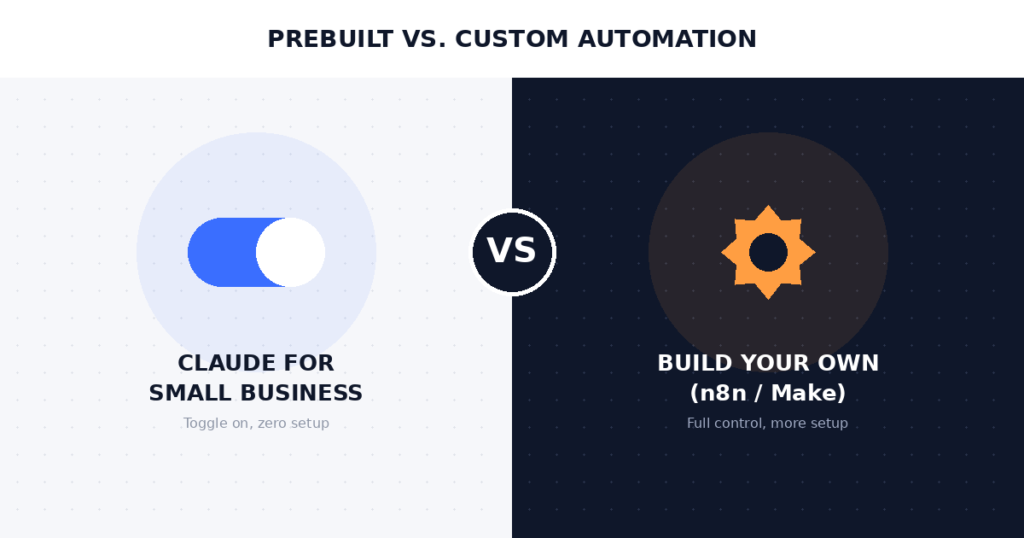
Every small business owner eventually faces the same decision: buy a subscription to an AI tool that handles the work, or invest time learning to build your own automated workflows. Neither answer is universally correct, and the question becomes significantly more nuanced when claude for small business enters the comparison.
Anthropic’s commercial positioning of Claude has matured considerably since the april 2026 platform update that introduced Claude Cowork, expanded agentic workflows, and deepened google workspace integrations. Claude is no longer simply a premium chat tool. It is a structured platform with dedicated ai capabilities spanning contract review, code generation, research synthesis, and step by step task execution — all in plain english, without requiring any programming knowledge.
Quick Answer: Is claude ai good for small businesses? Yes, for operators who need high-quality output on legal documents, client communications, and research tasks without the overhead of managing automation infrastructure. However, for businesses processing high-volume, repetitive data flows, DIY platforms like n8n offer far greater cost efficiency and control. The right answer depends on your volume, your team’s technical comfort, and where your bottlenecks actually sit.
This guide compares claude ai vs diy automation across five dimensions — cost, capability, effort, scalability, and risk — so you can make a clear, well-informed decision for your specific situation.
Disclosure: Operant Solo is reader-supported. We may earn an affiliate commission when you purchase through links on this page, at no additional cost to you. Recommendations are based on independent testing and evaluation.
What Claude for Small Business Actually Offers
Working with Claude as a commercial platform means interacting with a suite of tools built on the same underlying model powering the Claude.ai interface, with additional enterprise-grade features layered on top.
Claude Plans Breakdown
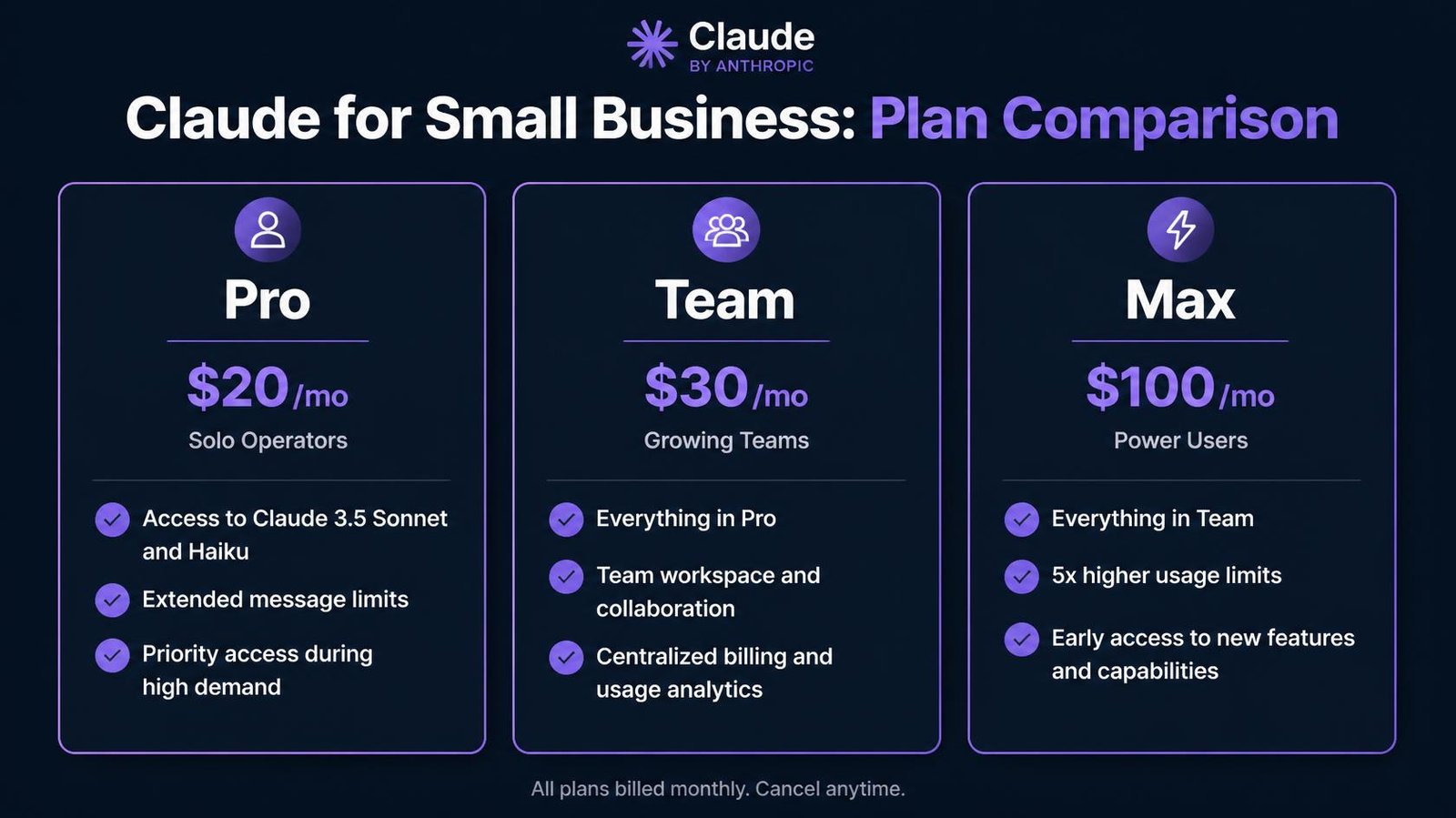
Anthropic structures its pricing in tiers designed to serve both individual users and growing teams.
- Claude Pro: $20/month per user. Access to Claude Sonnet 4.5 and Opus, expanded context windows, priority access during high-traffic periods.
- Claude Team: $25–30/month per user. Centralized administration, usage analytics, shared project spaces, and data isolation between users.
- Claude Max Subscription: $100/month per user. The highest throughput tier, designed for heavy users who regularly hit rate limits on the Pro plan. Provides 5× the message volume of Pro.
- API Access: Usage-based pricing starting at $3.00 per 1M input tokens for Sonnet 4.5. Suitable for builders connecting claude to other tools programmatically.
For a solo operator primarily using Claude for writing, research, and contract review, the $20/month Pro plan is almost universally sufficient and highly competitive with comparable tools.
Is claude ai affordable? For the output quality it delivers, yes. The comparison point is not other chatbots — it is the cost of a human contractor performing the same tasks. Claude drafts a 2,000-word legal summary in approximately 90 seconds. A paralegal charges between $75 and $150 per hour for the equivalent.
Claude Cowork and Agentic Workflows
The april 2026 release of claude cowork was the most significant commercial update Anthropic has delivered for business users. It transformed Claude from a single-session assistant into a persistent collaborative workspace.
Claude Cowork allows teams to maintain shared project contexts — brief documents, style guides, standard operating procedures — that Claude references automatically across every conversation. Instead of re-explaining your business context in every new session, Claude retains the operational background needed to produce immediately relevant output.
More significantly, the april 2026 update introduced native agentic workflows within the Claude interface. An ai agent inside Claude can now execute sequences of tasks autonomously: researching a prospect, drafting a proposal, formatting it according to your template, and flagging it for your review — all within a single instructed workflow.
Claude handles a genuinely wide range of these compound tasks without requiring any external platform integration. For operators not interested in building automation infrastructure, this is the defining advantage of the platform.
What DIY Automation Actually Means
Claude ai vs diy automation is not a comparison between “smart AI” and “simple rules.” Modern DIY automation platforms have incorporated sophisticated ai tools and ai powered logic at every layer.
The DIY Automation Stack
Building your own automation infrastructure typically means selecting from three platform categories:
Visual No-Code Platforms (Make.com, Zapier): Connect thousands of apps via pre-built nodes. Ideal for simple data routing — when a new lead arrives in your CRM, automatically send a Slack notification and create a Google Drive folder. Requires no coding. Charges per operation.
Open Source Hybrid Platforms (n8n): An open source alternative that combines visual workflow building with the ability to drop raw JavaScript into any node. Self-hosted versions eliminate per-operation costs entirely. Requires moderate technical comfort.
Claude Code and Coding Agents: For technically inclined operators, claude code allows you to build entirely custom applications through conversational programming. You describe what you want in plain english, and the coding agents generate, test, and refine the code. This path offers the highest ceiling but demands the steepest time investment.
Claude vs Make vs n8n: A Direct Comparison
The claude vs make vs n8n decision is not about which platform is objectively superior. It is about which platform is appropriate for your specific operational profile.
| Dimension | Claude (Pro/Team) | Make.com | n8n (Self-Hosted) |
|---|---|---|---|
| Setup Time | None | Hours | Days |
| Technical Skill Required | None | Low | Moderate |
| Monthly Cost (Solo) | $20 flat | $9–$29 + operations | ~$5 server cost |
| Best For | Writing, research, documents | Simple app-to-app routing | Complex AI agent pipelines |
| Scalability | Rate-limited by plan | Expensive at high volume | Unlimited self-hosted |
| AI Agent Capability | Native (Cowork) | Via AI nodes | Deep (LangChain native) |
| Open Source | No | No | Yes |
| Google Workspace Integration | Native | Via connectors | Via HTTP/API |
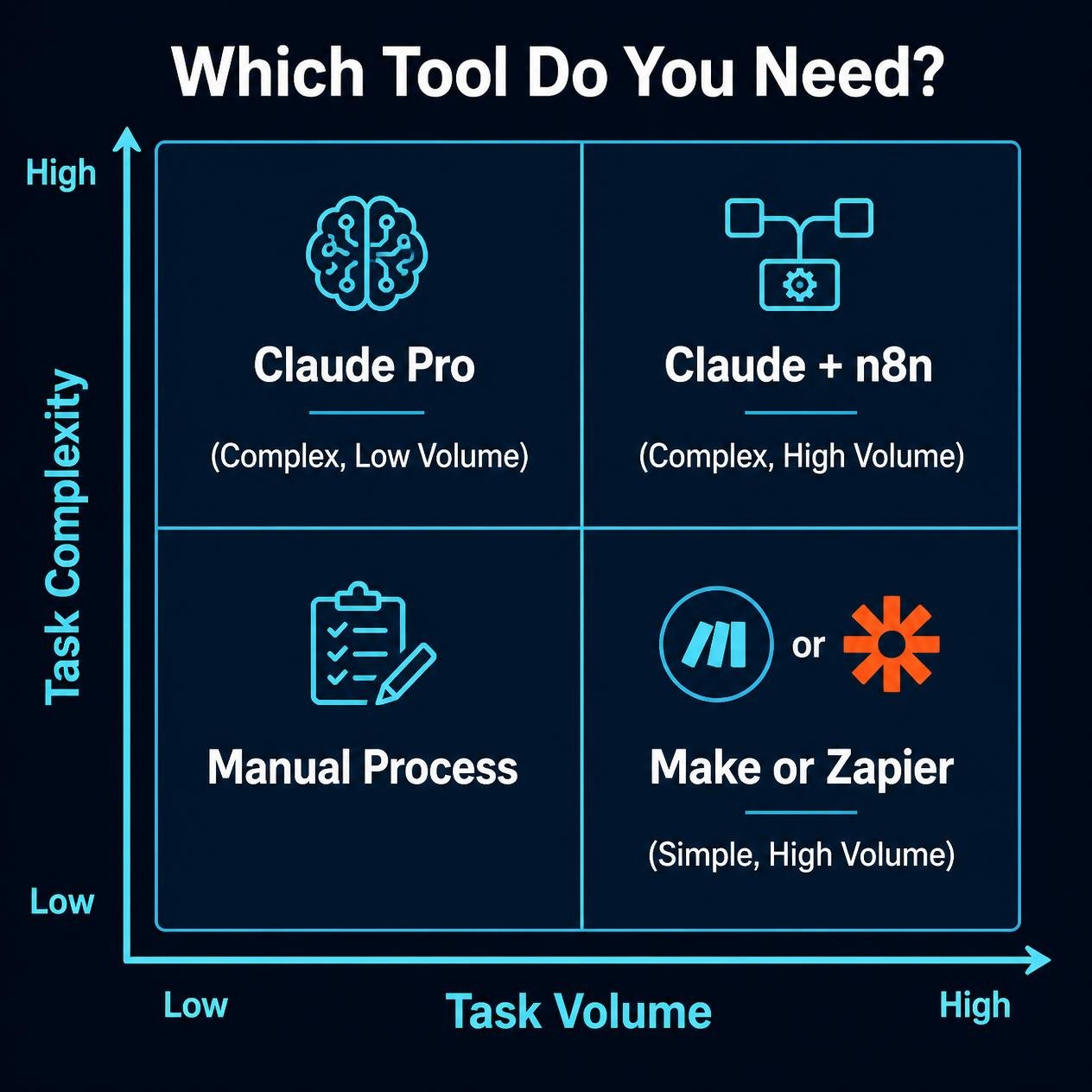
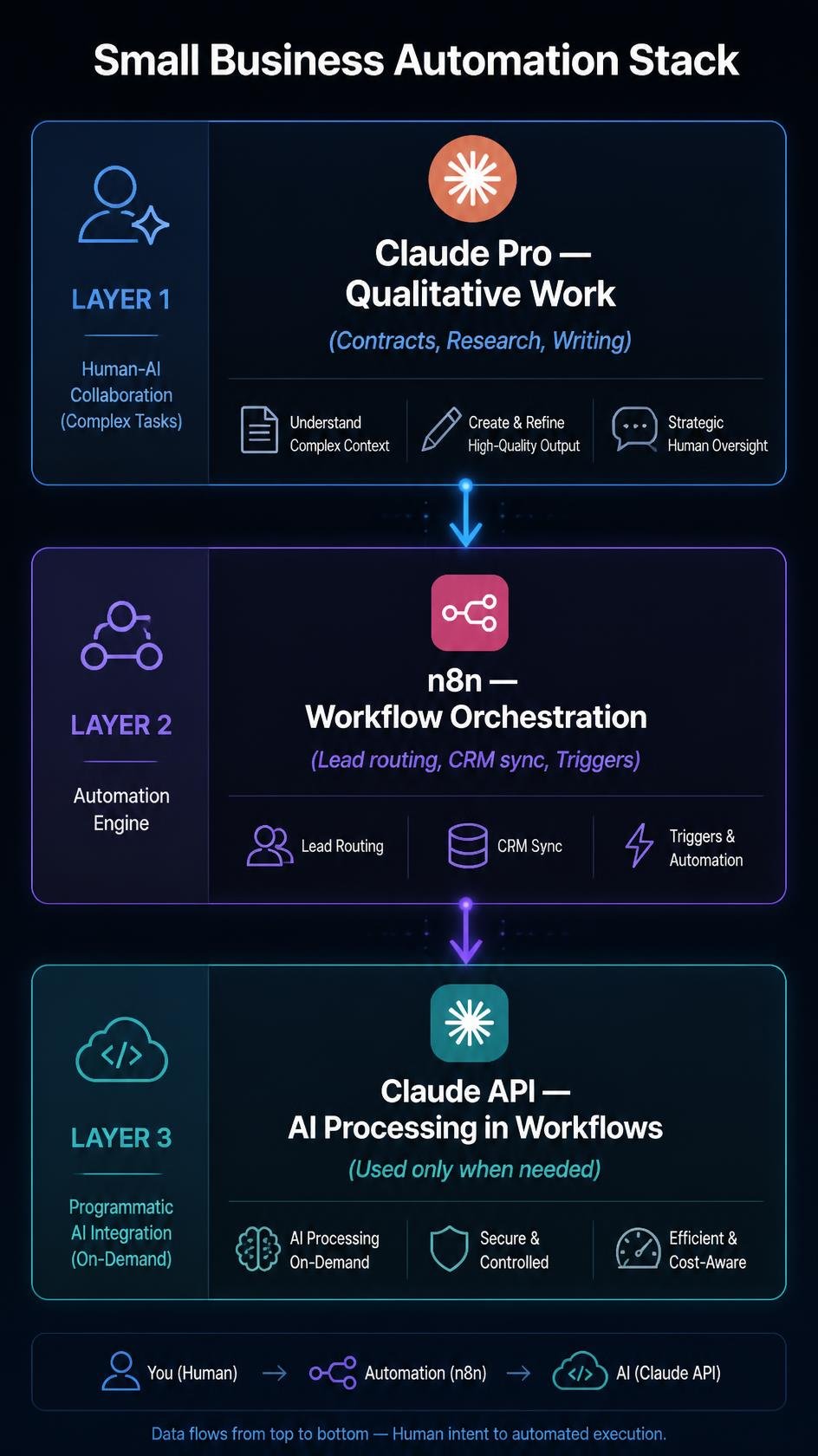
The most common pattern among successful small business operators is not an either/or choice — it is a layered architecture. Claude Pro handles the qualitative, judgment-intensive tasks: drafting client emails, reviewing contracts, synthesizing research. n8n or Make handles the quantitative, repetitive routing tasks: syncing leads, triggering notifications, processing form submissions.
Connecting Claude to Your Existing Stack
Connecting Claude to external tools is one of the platform’s most underrated capabilities for small business operators.
Google Workspace Integration
Native google workspace integration allows Claude to read and write Google Docs, interact with Google Sheets, and access Gmail within an agentic workflow. For businesses that operate primarily within Google’s ecosystem, this eliminates the need for any external automation platform for document-heavy workflows.
A common use case: a client sends an email with a project brief. An ai agent reads the email, creates a new Google Doc from your proposal template, populates it with the brief details, and adds it to the shared client folder — without any manual steps.
Claude API and n8n
For operators who want deeper integration flexibility, connecting claude via the API to an n8n workflow unlocks a genuinely powerful combination. n8n provides the orchestration layer — triggering workflows, routing data between systems, and handling retries — while Claude provides the intelligent processing layer.
For example: an incoming support email arrives via webhook in n8n. Claude evaluates the urgency and drafts a response. n8n routes high-priority cases to a human agent’s Slack channel and sends standard responses automatically. The entire workflow processes in under ten seconds.
Where Claude Excels for Small Business
Is claude ai good for small businesses for every use case? The honest answer is no. Claude’s strengths are concentrated in specific categories of work.
Strong Fit: Document-Heavy Operations
Contract review, proposal drafting, client onboarding documents, and policy writing are areas where Claude’s output quality is consistently exceptional. The combination of large context windows and nuanced language understanding allows claude handles complex legal and commercial language more accurately than general-purpose AI tools.
Strong Fit: Research and Synthesis
For businesses that require regular competitive analysis, market research, or technical summaries, Claude’s reasoning capability makes it the strongest available tool at the Pro price point. Working with claude on a wide research brief consistently produces structured, well-reasoned output that would otherwise require an hour of analyst time.
Weaker Fit: High-Volume Data Processing
If your primary automation need is processing thousands of records — enriching a lead database, syncing inventory counts, or generating thousands of templated emails — Claude’s per-message rate limits and conversational interface are genuine constraints. At this volume, a dedicated automation platform running batch operations on the Claude API (or a lower-cost model) delivers far better economics.
Weaker Fit: Real-Time Event Triggers
Claude does not natively listen for webhooks, monitor email inboxes, or trigger actions based on external events. These capabilities require connecting claude to an orchestration platform. For workflows where timing is critical — like notifying a sales rep within seconds of a new lead submission — n8n or Make must handle the trigger layer.
A Practical Small Business Architecture
For most small businesses generating between $300,000 and $2,000,000 in annual revenue, the following architecture delivers the strongest return for the least operational overhead.
Layer 1 — Claude Pro ($20/month): Handles all qualitative tasks: client communications, contract review, research, content creation, and internal documentation. Used directly through the Claude.ai interface by all team members.
Layer 2 — n8n (Self-Hosted, ~$10/month server): Handles all quantitative routing: new lead notifications, CRM sync, form processing, invoice generation triggers, and email triage. Calls the Claude API only for steps requiring genuine language processing.
Layer 3 — Claude API (Pay-Per-Use): Powers the AI processing nodes inside n8n workflows. Because n8n only calls the API for specific, high-value steps rather than every interaction, the monthly API cost for a small business typically falls between $10 and $30.
Total infrastructure cost: approximately $40–$60 per month. This architecture replaces thousands of dollars of contractor hours annually.
Frequently Asked Questions
Is Claude AI good for small businesses?
Is claude ai good for small businesses? Yes, particularly for document-intensive operations. Contract review, proposal drafting, client communication, and research synthesis are areas where claude handles tasks at a quality level that meaningfully reduces the need for external contractors. For high-volume, repetitive data processing, a DIY automation platform on the Claude API delivers better economics.
Is Claude AI affordable for a solo operator?
Is claude ai affordable? The Claude Pro plan at $20/month is competitive with every comparable AI tool at equivalent capability. The max subscription at $100/month is only necessary for users who consistently hit rate limits on the Pro tier — a small minority of solo operators. Most small business use cases are well-served by the $20 plan.
How does Claude compare to Make and n8n?
In claude vs make vs n8n, the distinctions are purpose-driven. Claude is an intelligent reasoning and writing tool — it excels at qualitative judgment tasks. Make is a visual connector for simple app-to-app routing. n8n is an open source platform for building complex agentic workflows with full programmatic control. The three tools are more complementary than competitive.
What is Claude Cowork?
Claude cowork is Anthropic’s collaborative workspace feature, released in april 2026. It allows teams to maintain persistent project contexts — company briefs, style guides, operational procedures — that claude handles automatically across all team conversations. It transforms Claude from a single-session assistant into a continuous business partner.
Can I connect Claude to my existing tools without coding?
Yes, for google workspace tools natively. For other platforms, connecting claude without coding is possible via Make.com, which provides a Claude node that requires no programming. For advanced integrations with full control over the ai capabilities, connecting via the Claude API through n8n offers the most flexibility and requires only basic familiarity with JSON configuration.
Related Reading:
- Claude Sonnet 4.5 vs GPT-5: Which API is Cheaper in 2026? →
- n8n vs Make (2026): Which is Better for AI Automation? →
- Cursor AI vs Make: Should You Code Automations in 2026? →
- How to Automate Your Freelance Business →
- AI Lead Enrichment: How to Automate Client Research →
n8n
Best for: technical automation workflows
Consider n8n when your workflow needs custom logic or control over deployment. Self-hosting also requires time for updates, backups, and monitoring.
Operant Solo may earn a commission if you purchase through this link, at no extra cost to you.
Pingback: Claude Sonnet 4.5 vs GPT-5: Which API is Best for Automation
Pingback: GPT-6 Astra: Should You Upgrade Your Automation Workflows?