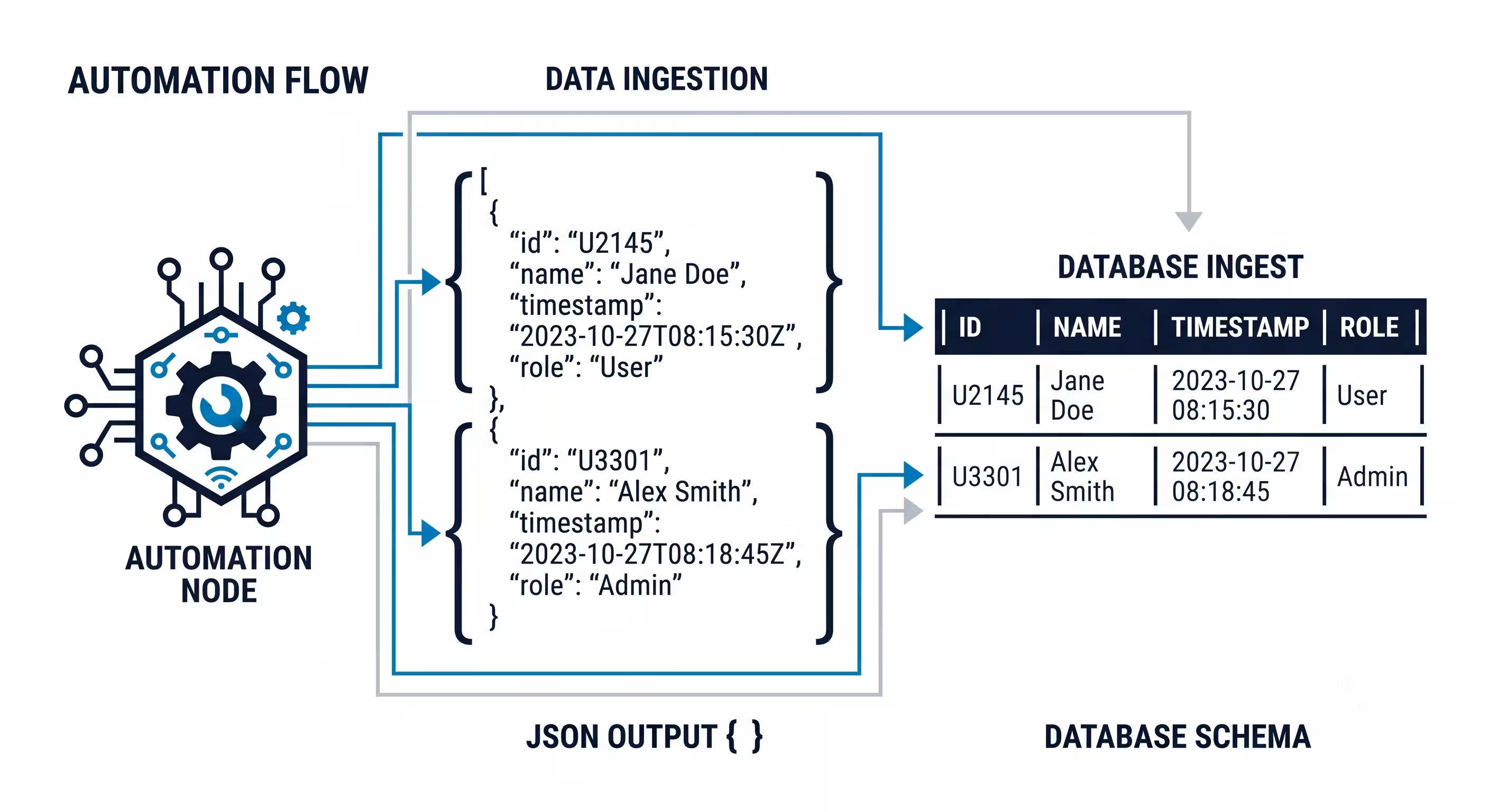
OpenAI Structured Outputs in n8n: JSON Schema Tutorial
If you build AI automations for long enough, you will inevitably experience the dreaded n8n json parse error.
You also had searched about how to use openai structured outputs in n8n
Your workflow runs flawlessly during testing. It successfully extracts data from incoming emails, formats it, and pushes it to your CRM. You deploy it to production. Three days later, the entire workflow crashes.
Why? Because the AI model decided to prepend the text “`json to its output, or it returned a string where your database expected an array. The subsequent node failed to parse the text, and the automation halted.
Before August 2024, enforcing strict formatting from LLMs required complex prompt engineering, retry loops, and heavy regex sanitization.
Quick Answer: You can reduce schema-related JSON failures in n8n by using OpenAI’s structured outputs feature. By passing a strict json schema directly to the OpenAI node in n8n, a completed, non-refusal response can follow the schema you define. You still need paths for API errors, refusals, incomplete output and incorrect extracted values.
Here is the definitive guide to implementing openai structured outputs in n8n for more predictable data extraction pipelines.
Disclosure: Operant Solo is reader-supported. We may earn an affiliate commission when you purchase through links on this page, at no additional cost to you. Recommendations are based on independent testing and evaluation.
What Are Structured Outputs?
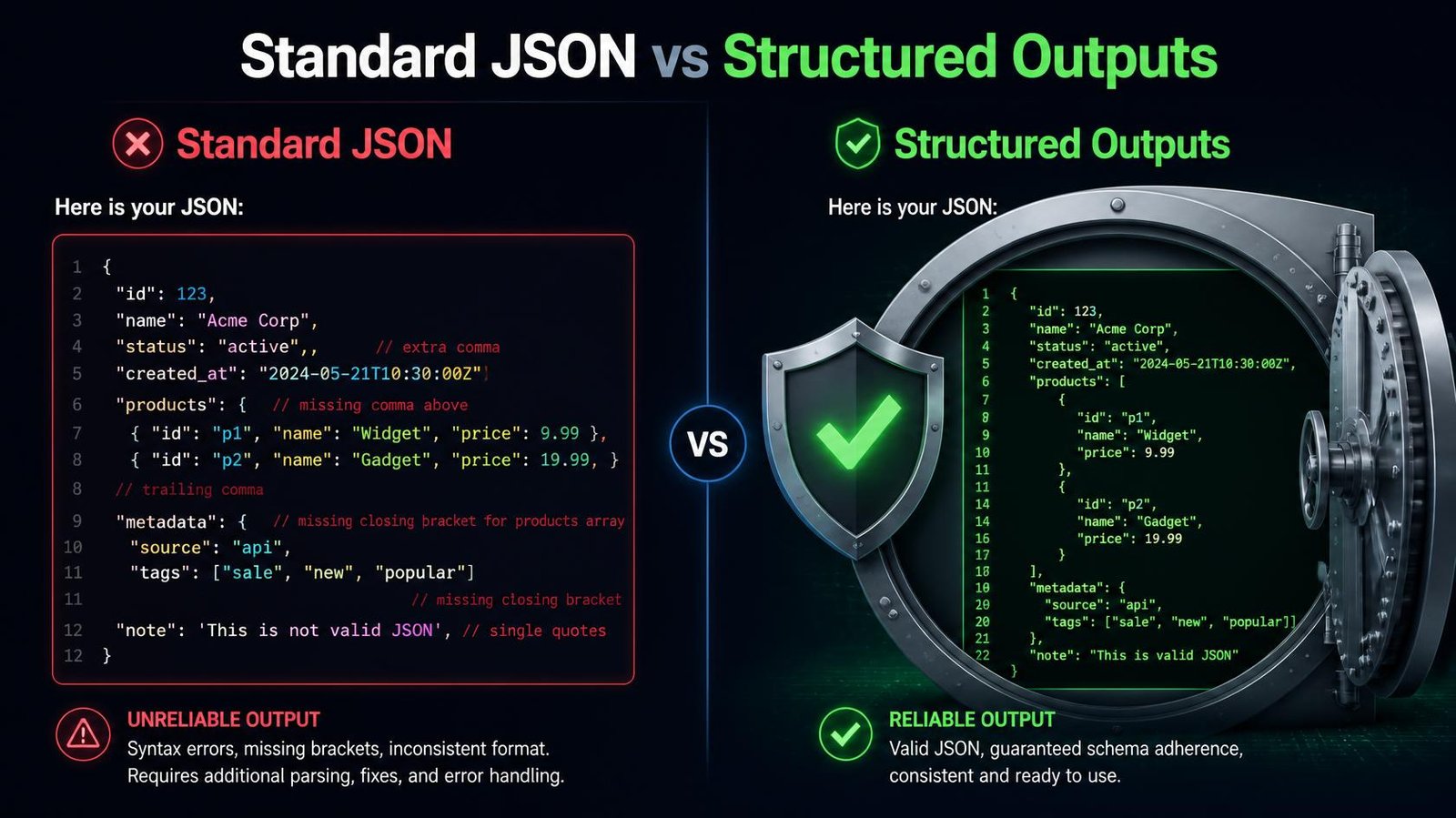
Historically, when you made api calls to an LLM and requested a specific response format (like JSON), the model would use probabilistic generation to try to match your request. Most of the time, it succeeded. But occasionally, it hallucinated an extra comma, missed a closing bracket, or changed a key name.
Structured outputs fundamentally change how the model generates text.
When you provide an n8n openai json schema, the OpenAI API essentially restricts the model’s vocabulary during generation. For a completed, non-refusal response with a supported strict schema, the API constrains the output to that schema; handle refusals and incomplete responses separately. If your schema dictates that a specific field is a boolean, the model can only generate true or false — it cannot output “yes” or “no”.
This is not just prompt engineering; it is a deterministic constraint applied at the API level.
How to Implement OpenAI Structured Outputs in n8n
Implementing this in n8n requires configuring the OpenAI node specifically for structured outputs automation. You cannot just use the standard “Basic LLM Chain” node if you want strict JSON adherence.
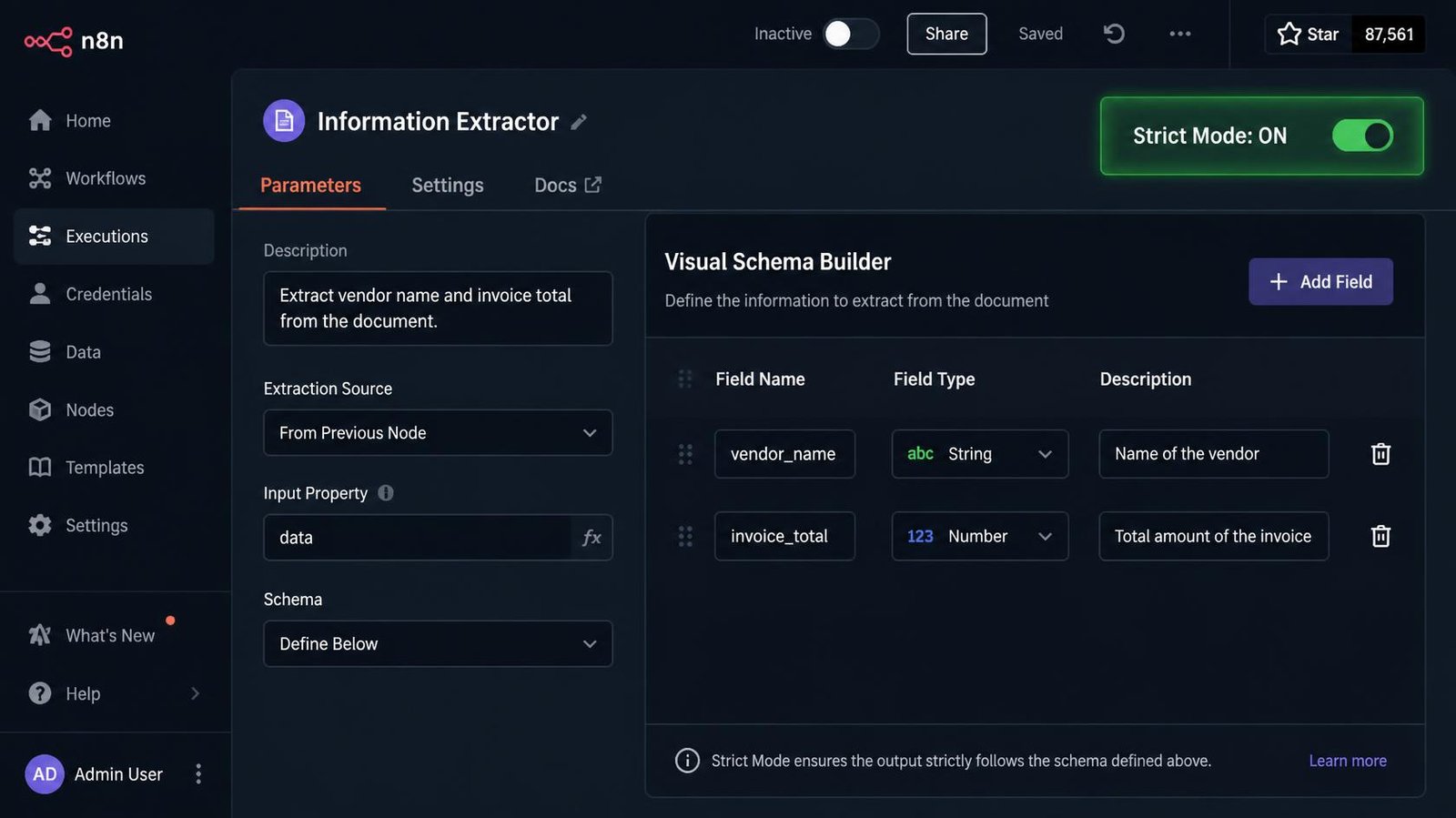
Step 1: The Information Extractor Node
The easiest way to implement this is using n8n’s dedicated Information Extractor node.
- Add the Information Extractor node to your workflow.
- Connect it to an OpenAI Chat Model node (use a current OpenAI model such as GPT-6 Luna (cheapest) or GPT-6 Sol).
- Connect your input data (e.g., the text of an email or a scraped website) to the Extractor node.
Step 2: Defining the JSON Schema
Inside the Information Extractor node, you must define the exact structure of the data you want to extract.
This is where you build your json schema. n8n allows you to do this via a visual interface or by pasting raw JSON.
Imagine you are extracting lead data from an email. You need to define the properties:
first_name(Type: String)last_name(Type: String)company(Type: String)budget(Type: Number)
Step 3: Enforcing Strict Mode
List each expected field in the schema. Strict schemas require all fields, and nullable types can represent missing information; the surrounding workflow still needs error handling.
If you use the raw OpenAI node (via the function call method or the raw HTTP Request node), you must set "strict": true in the API payload. This forces the model to return every key defined in your schema, even if the information is missing from the source text (it will return null instead of omitting the key).
A completed, non-refusal response can match a supported strict schema, which reduces downstream type mismatches. Your workflow still needs branches for API failures, refusals, incomplete output and values that have the right type but are factually wrong. OpenAI’s Structured Outputs guide documents those cases.
Two n8n routes: output parser or OpenAI strict schema
n8n’s Information Extractor and output parser can produce structured fields for a workflow, but their settings are not automatically the same as sending a strict: true JSON Schema to the OpenAI API. Check the actual node request and supported model if your integration requires the API-level guarantee. A required field can use a nullable type when the source does not supply it; validate the extracted value before writing to a CRM.
| Test input or outcome | Safe next step |
|---|---|
| Complete response with valid fields | Validate business rules, then continue. |
| Refusal or incomplete response | Do not assume schema fields exist; log and route to review or retry. |
| Schema-valid but wrong email or amount | Compare against source data and require human review for consequential writes. |
OpenAI documents the refusal, incomplete-response and strict-schema cases. The free schema file and test inputs let you exercise the shape of a response; they do not prove a model extracted the correct facts.
Anatomy of a Strict JSON Schema
When writing an n8n openai json schema, precision is critical. The model relies entirely on the descriptions you provide for each field.
Here is an example schema object for invoice data. Pass it through a supported API request format and test it with missing and ambiguous fields before using it in a workflow:
{
  "name": "extract_invoice_data",
  "strict": true,
  "schema": {
    "type": "object",
    "properties": {
      "vendor_name": {
        "type": "string",
        "description": "Name on the invoice."
      },
      "invoice_total": {
        "type": "number",
        "description": "Total due as a number."
      },
      "is_paid": {
        "type": "boolean",
        "description": "Whether the invoice states it was paid."
      },
      "line_items": {
        "type": "array",
        "items": {
          "type": "object",
          "properties": {
            "item_name": {
              "type": "string"
            },
            "price": {
              "type": "number"
            }
          },
          "required": [
            "item_name",
            "price"
          ],
          "additionalProperties": false
        }
      }
    },
    "required": [
      "vendor_name",
      "invoice_total",
      "is_paid",
      "line_items"
    ],
    "additionalProperties": false
  }
}
Key Elements of the Schema:
- Descriptions: The
descriptionfield acts as the prompt for that specific key. - Strict Typing: Defining
"type": "number"ensures the model will output150.00and not"$150.00", which would cause a type mismatch in your database. - Array Items: If you need a list (like multiple line items on an invoice), you must define the structure of each array item within the
itemsobject. - additionalProperties: Setting
"additionalProperties": falseis mandatory when using"strict": truewith OpenAI. It prevents the model from hallucinating extra keys that you did not ask for.
Common Mistakes When Using Structured Outputs
Even with strict enforcement, developers frequently encounter errors when configuring their schemas incorrectly. Here is how to fix json errors n8n during setup.
1. The “String Required” Error
If your source text is missing information, the model might try to return null for a key. If you defined that key strictly as a string (without allowing null), OpenAI will throw a validation error, stating a string required condition was not met.
The Fix: If a piece of information might not be present in the source text, define its type as a union in your schema: ["string", "null"]. This allows the model to safely output null if the data does not exist, keeping the json objects intact.
2. Vague Field Descriptions
If your key is named revenue and you do not provide a description, the model does not know if you want Monthly Recurring Revenue, Annual Revenue, or Gross Revenue. The Fix: Always write highly specific descriptions for every key. The schema description is the prompt.
3. Using Incompatible Models
Strict structured outputs require a model that supports them. Current GPT-6 models do, but older models like gpt-3.5-turbo will reject strict schemas. Check the model’s page in OpenAI’s docs before switching.
Real-World Use Case: Automated Support Triage
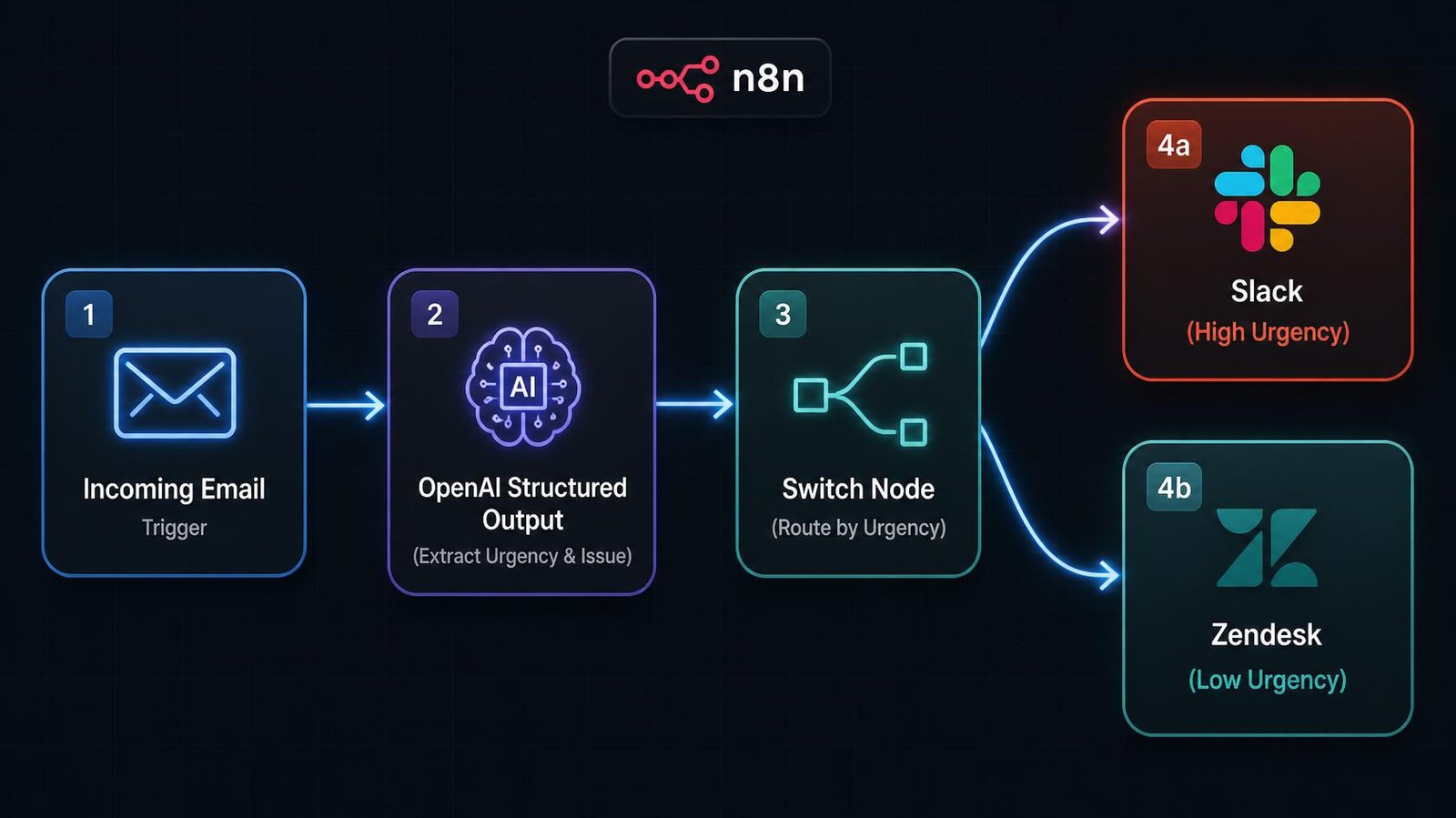
To understand the power of structured outputs automation, consider an automated customer support triage system.
When an email arrives, you want an AI to read it, categorize the urgency, identify the product mentioned, and extract the user’s core question.
Without structured outputs, you would ask the AI to return JSON, parse it with an n8n JSON node, and hope it worked. If a frustrated customer sent an email formatted weirdly, the AI might output a conversational response instead of JSON, breaking your automation and leaving the customer’s email unread.
With openai structured outputs in n8n:
- You define a strict schema requiring three exact fields:
urgency_level(enum: high, medium, low),product_category, andcore_issue. - The model reads the furious email.
- A completed, non-refusal response follows the supported schema; handle other response states separately.
- The n8n router perfectly directs the high-urgency JSON object to a human agent’s Slack channel.
A successful structured response matches the schema; refusals, incomplete responses and downstream errors still need a fallback path.
| Parsing Method | Reliability | API Support | Risk of Parse Error |
|---|---|---|---|
| Raw Prompting (“Return JSON”) | Low | All Models | Very High |
JSON Mode (response_format) | Medium | Standard Models | Moderate |
Structured Outputs (strict: true) | Matches supported schema on a completed, non-refusal response | Supported OpenAI models | Refusals, incomplete responses and factual errors remain |
Download and test the schema
Use this small strict JSON Schema with your own sample inputs. It does not handle refusals or incomplete responses by itself.
Want more practical workflow examples? Subscribe to the Operant Solo newsletter if you like. The file is free without signing up.
Next Steps: Upgrade Your Existing Workflows
If you have existing n8n workflows that rely on AI data extraction, you should audit them immediately. Any node that uses standard prompting to request a JSON response is a ticking time bomb for a n8n json parse error.
- Identify every LLM node in your workflow that outputs data intended for a database, CRM, or API.
- Replace those basic nodes with the n8n Information Extractor node.
- Translate your text-based prompts into strict JSON schema descriptions.
- Use GPT-6 Luna for high-volume extraction; move to Sol if accuracy on complex documents matters more than cost.
By transitioning to openai structured outputs in n8n, you reduce schema mismatches in your data pipeline, while retaining checks for refusals, incomplete responses and factual mistakes.
Frequently Asked Questions
What causes an n8n JSON parse error?
An n8n json parse error occurs when a node in your workflow (often an AI model) outputs text that is not perfectly formatted JSON. If the output contains conversational text like “Here is the JSON:” or misses a closing bracket, the subsequent node cannot parse it into usable data, causing the workflow to crash.
How do OpenAI structured outputs work?
OpenAI structured outputs allow you to pass a strict json schema to the model alongside your prompt. The API uses this schema to mathematically constrain the model’s vocabulary during generation, ensuring the model output exactly matches your required schema without any missing brackets or incorrect data types.
How do I fix JSON errors in n8n?
To reduce schema mismatches in n8n, define the fields your next node needs and use a supported structured-output method. OpenAI’s strict JSON Schema option constrains completed responses; n8n also has its own Information Extractor and output parser features. They are related but are not the same API guarantee. Route refusals, incomplete responses and failed validation to an error or review branch.
What does “strict: true” do in an OpenAI JSON schema?
Setting "strict": true in an n8n openai json schema (or via a direct API function call) forces the model to adhere completely to your schema. On a completed, non-refusal response, the schema requires every declared field and prevents extra keys to the json objects.
Can structured outputs extract data into arrays?
Yes. If you need to extract multiple items (like a list of attendees from an email), you define a field as an array in your schema. You must then define the exact structure of each array item (e.g., each item must be an object containing a name and email string). A completed, non-refusal response should follow the supported array schema; validate the extracted values as well as the shape.
Related Reading:
- Claude Sonnet 4.5 vs GPT-5: Which API is Cheaper in 2026? →
- AI Email Parser: How to Automate Email to CRM →
- n8n Human in the Loop: How to Safely Control AI Agents →
- Multi-Model AI Agent n8n: Build HydraFusion Patterns →
- AI Lead Enrichment: How to Automate Client Research →
n8n
Best for: technical automation workflows
Consider n8n when your workflow needs custom logic or control over deployment. Self-hosting also requires time for updates, backups, and monitoring.
Operant Solo may earn a commission if you purchase through this link, at no extra cost to you.
Pingback: n8n Human in the Loop: How to Safely Control AI Agents
Pingback: GPT-6 Astra Review: What Automation Builders Need to Know
Pingback: Automate Website Without API: Build AI Browser Agents
Pingback: 7 n8n Security Vulnerabilities in 2026 (How to Patch Them)
Pingback: AI Agent Wallets: Autonomous Spending Risk (2026 Guide)
Pingback: AI Receptionist Agency: Pricing, Models & How to Pick One (2026)