
Disclosure: Operant Solo is reader-supported. We may earn an affiliate commission when you purchase through links on this page, at no additional cost to you. Recommendations are based on independent testing and evaluation.
When a visual workflow reaches its limits
Cursor is a code editor, while Make and n8n are workflow runtimes. Compare them by the job: use Make for a supported integration you want to maintain visually; use n8n when you need flexible branching or self-hosting; use Cursor to write and test custom code when an existing node cannot express the behavior. Cursor-generated code still needs hosting, credentials, monitoring and maintenance. A hybrid setup is often the practical answer.
For the last five years, if a non-technical founder wanted to automate a business process, the answer was always the same: use Make.com or Zapier. You dragged a bubble representing Gmail, connected it with a line to a bubble representing Airtable, and you had an automation.
But the rapid evolution of developer tooling in 2026 has completely changed the landscape. With the rise of AI-assisted code editors like Cursor, anyone who can write a clear prompt in plain English can now generate working Python scripts.
This creates a massive dilemma for operators today. In the battle of cursor ai vs make, the question is no longer “Which visual builder is better?” The question is, “Should I even be using a visual builder at all, or should I just have AI write the code for me?”
Quick Answer: Make.com remains superior for visual learners who want instant, reliable connections to thousands of external services without managing servers. However, cursor ai for automation workflows is the better choice if you want total control, zero per-task based pricing penalties, and are willing to learn basic server deployment.
Here is exactly how to evaluate whether you should stick with visual workflow automation or finally cross the chasm into AI-assisted coding.
What is Cursor AI?
Cursor is a code editor built natively for the AI era. It is a fork of VS Code, meaning it looks and functions exactly like the software a professional software engineer uses.
However, its ai capabilities are deeply integrated into the workspace. Instead of copying and pasting code from ChatGPT into a file, Cursor has access to your entire codebase.
Through its multi file editing feature, you can press Ctrl+K, type “Build a script that reads my inbox and saves attachments to Google Drive,” and the ai generates the exact Python script required. It will seamlessly span its code generations across multiple files, updating your main.py, your requirements.txt, and your .env configuration simultaneously.
For the first time in history, using cursor ai for non coders is a mathematically viable path to building production grade software.
Cursor AI vs Make: The Core Differences
To understand whether you should migrate, you must understand how fundamentally different these two paradigms are.
1. The Interface: Canvas vs Terminal
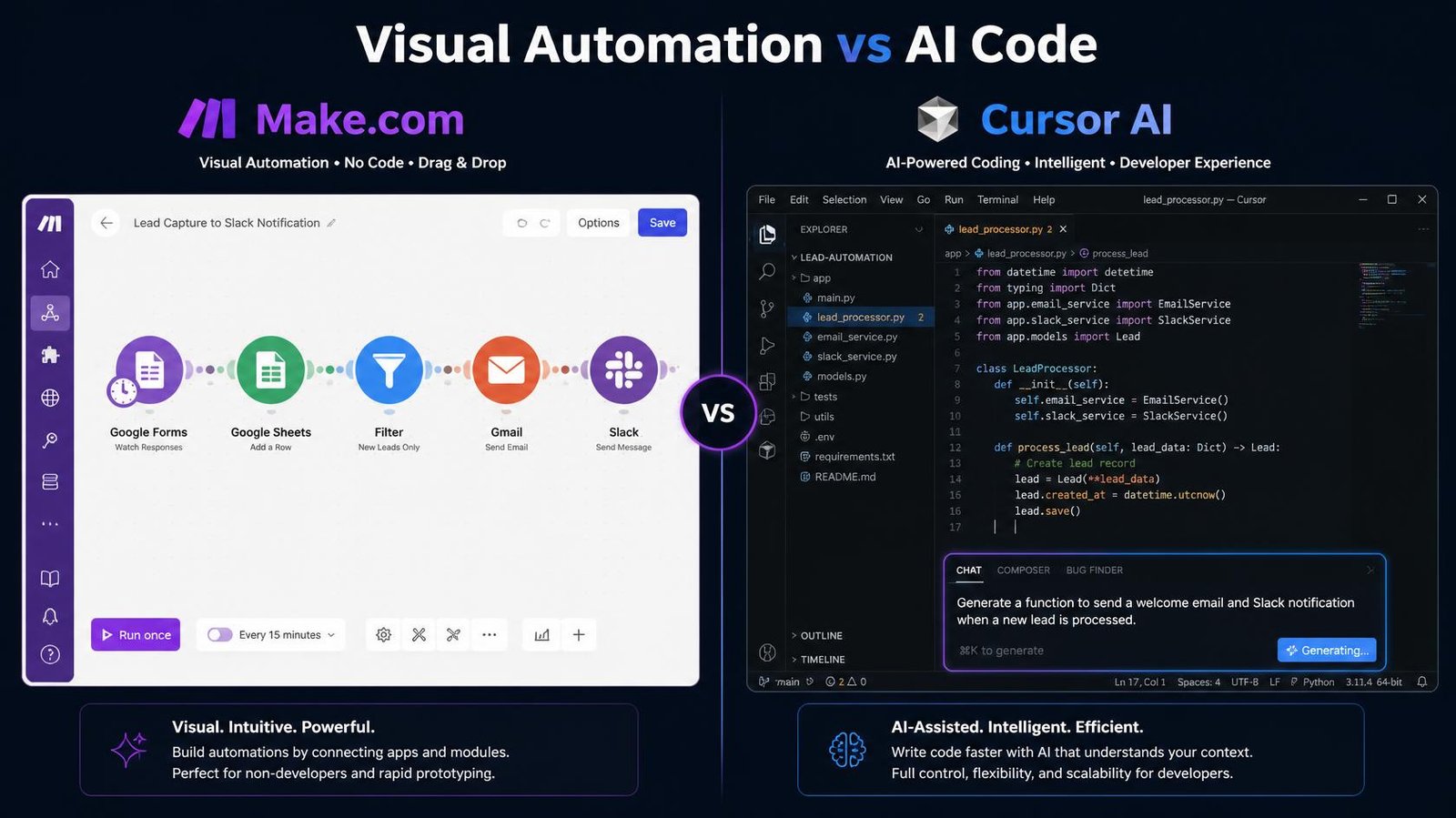
Make provides a visual canvas. You build an automation by connecting colorful nodes. If a node fails, it turns red, and you click it to see the error. It abstracts away all the underlying complexity.
Cursor provides a text editor and a terminal window. You build an automation by prompting the AI to write ai code. If the code fails, the terminal outputs a wall of red error text. You then highlight the error, press a shortcut, and the AI fixes it. It abstracts the writing of the code, but you still see the raw complexity.
2. The Pricing Model
Make.com charges based on credits, one for most module actions. If your workflow checks a database 10,000 times a month, you pay for 10,000 credits, regardless of whether it found anything.
Cursor operates on a flat monthly subscription ($20/month for the Pro plan, per Cursor’s pricing page in September 2026) for the code editor and its premium AI features. Once the AI writes your Python script, executing that script on your own machine or a $5/mo DigitalOcean server is virtually free. There is no per-step pricing.
3. Connection and Maintenance
Make handles API updates silently. If HubSpot changes how their API authenticates, Make’s engineering team updates the HubSpot node globally. Your automation continues to run without you ever knowing an update occurred.
With cursor automations, you own the code. If HubSpot changes their API, your Python script will break. The terminal will throw an authentication error. You will have to open Cursor, paste the error to the AI, ask it to update the code to the new API version, and redeploy it.
Can You Really Replace Zapier with Python?
The internet is flooded with tutorials claiming you can easily replace zapier with python using AI. While technically true, these tutorials gloss over the reality of deployment.
Writing the Python script is only 10% of the work in code development.
If you use Zapier to sync Stripe payments to a database, Zapier guarantees that automation runs 24/7 on their secure servers.
If you use Cursor to write a Python script that does the same thing, you now have to figure out:
- Where does this script run? (You have to rent a VPS or use AWS Lambda).
- How does it stay running if it crashes? (You have to learn Docker or PM2).
- How do you secure the API keys? (You have to manage environment variables).
While ai tools can write the code to solve all three of these problems, a non-coder is suddenly thrust into the role of a DevOps engineer.
If you are a solo operator focused on marketing or sales, spending three days learning how to deploy a Docker container just to save $30 a month on Zapier is a terrible use of your time.
Should I Learn Python or n8n in 2026?
This brings us to the ultimate question for ambitious operators: should i learn python or n8n 2026?
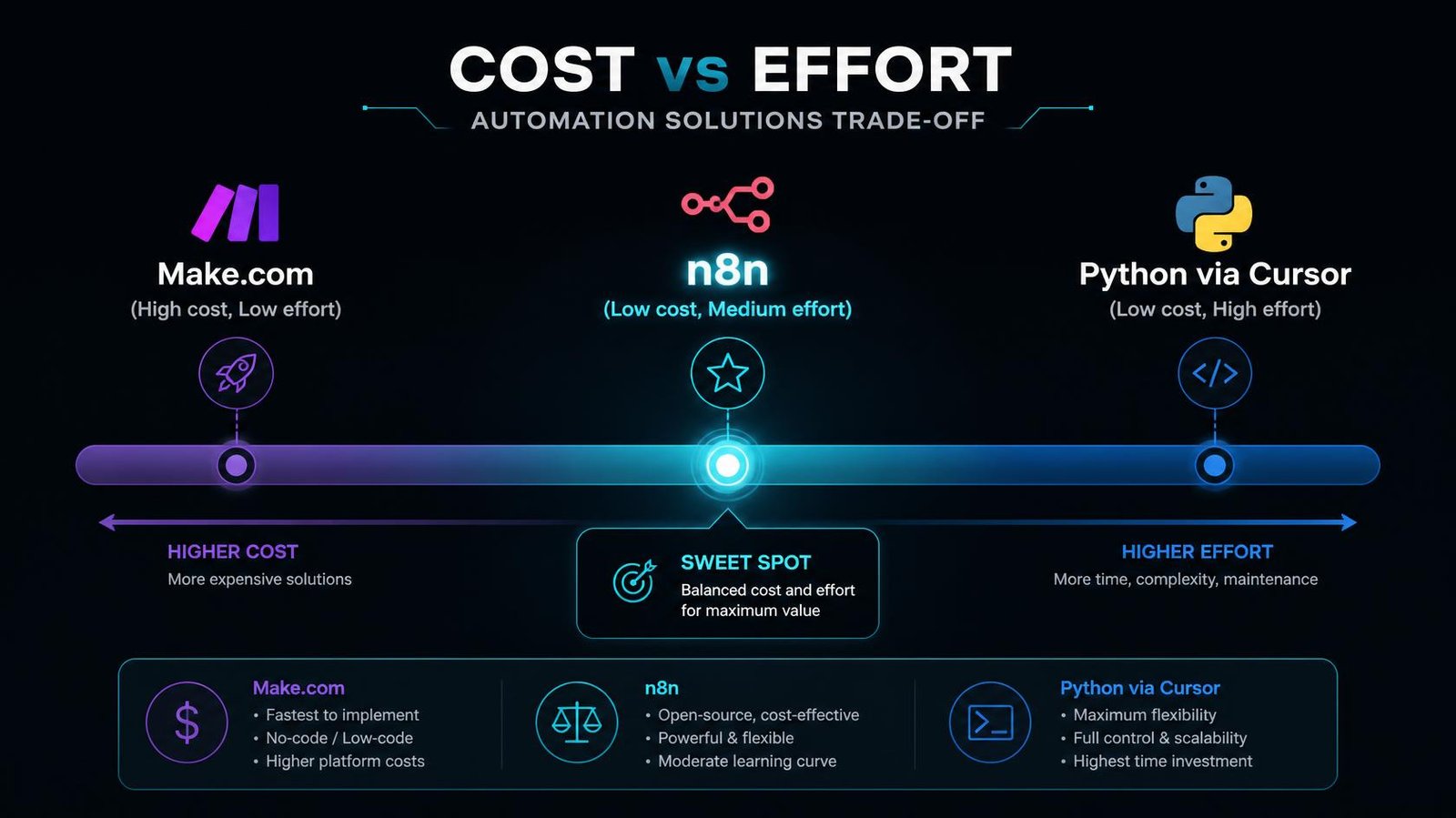
n8n represents the perfect middle ground. It is a visual, node-based automation platform like Make, but it is deeply designed for developers and AI builders.
| Feature | Python (via Cursor AI) | n8n (Self-Hosted) | Make.com |
|---|---|---|---|
| Learning Curve | Extremely Steep | Moderate | Low |
| Visual Interface? | ❌ No | ✅ Yes (Nodes) | ✅ Yes (Bubbles) |
| Execution Cost | ~$0 | ~$0 | High (per task) |
| Maintenance Burden | High (API breaks) | Low (Node updates) | Very Low |
| Human-in-the-Loop | Requires custom code | Native (Wait node) | Complex workaround |
The Case for Python (Cursor): You should learn Python if you are building an actual SaaS product, processing massive datasets locally, or want a career as a software engineer. Cursor makes learning Python 10x faster than it was in 2020.
The Case for n8n: You should learn n8n if your goal is strictly workflow automation to run your business. n8n allows you to self-host (eliminating execution costs), provides visual nodes (eliminating syntax errors), but allows you to drop raw JavaScript into any step if you need custom logic.
In 2026, learning n8n gives non-coders the raw power of a developer without the crushing maintenance burden of deploying raw scripts.
Building AI Agents: Cursor vs Make
The definition of automation changed when ai agents were introduced. We are no longer just building linear “If This Then That” sequences. We are building agents that can reason, search the web, and make decisions autonomously.
Building Agents in Make
Make’s visual router is excellent for simple branching logic, but building a true, autonomous AI agent is clumsy. Make forces a linear progression. If you want an agent to loop recursively (e.g., “Keep searching Google until you find a specific PDF, then stop”), building that loop visually in Make is extremely fragile.
Building Agents in Cursor
This is where ai powered code shines. Writing recursive loops in Python using LangChain or AutoGen is native and robust. When you use cursor ai for automation workflows involving true agents, the AI can effortlessly write the logic required for an agent to access a calculator, query a database, and scrape a website simultaneously.
When agents run natively in Python, they are infinitely more flexible than a visual node wrapper.
Use Cursor to build code around Make or n8n
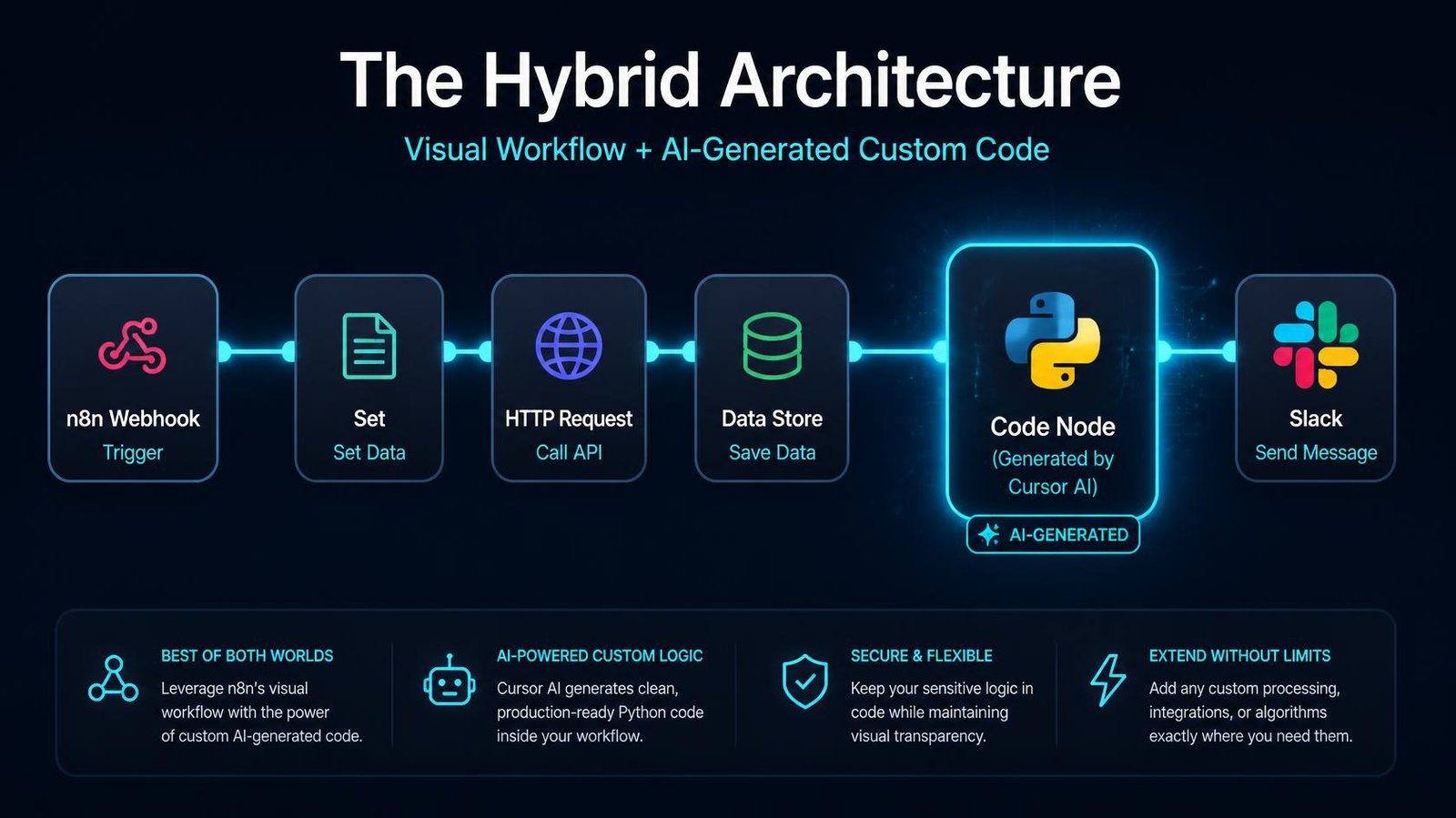
The most successful builders in 2026 are not choosing a side in the cursor ai vs make debate; they are using a hybrid approach.
Use a visual builder (n8n or Make) as the central nervous system. Let it handle the webhooks, the API authentication, and the routing.
When you hit a limitation — like needing to convert a complex CSV file into a specific XML format — do not waste hours struggling with Make’s formatting tools.
Instead, open Cursor. Ask the AI: “Write a Python script that converts this CSV to XML.” Let it generate the code. Then, paste that code directly into a “Code Node” inside n8n or Make.
This hybrid approach leverages the best of both worlds:
- You get the stability, visual debugging, and zero-maintenance API connections of a visual platform.
- You get the unlimited data-manipulation power of raw code, instantly written by Cursor.
For non-developers, the simpler route may be using Claude directly instead of building automations.
Real-World Use Cases: Which Tool Wins?
To make the decision practical, here is how you should approach three common automation scenarios.
Scenario 1: Syncing Facebook Leads to Airtable
- Winner: Make.com
- Why: The native integrations exist. You map the fields visually in 30 seconds. Asking Cursor to write an OAuth authentication script for the Facebook API is a painful, multi-hour debugging nightmare.
Scenario 2: Scraping a Website Behind a Login
- Winner: Cursor AI (Python)
- Why: Visual tools struggle with complex DOM traversal and handling browser sessions. Using Cursor to generate a Puppeteer or Playwright script allows you to build a custom, highly resilient scraper in minutes.
Scenario 3: AI Lead Enrichment Pipeline
- Winner: n8n
- Why: This requires hitting multiple APIs (OpenAI, Hunter.io, LinkedIn) and passing JSON between them. Make will charge you a fortune in credits for the high volume of steps. Python will require building a massive logging infrastructure to track failures. n8n gives you free executions, visual logging, and easy API integration.
Next Steps
Do not fall into the trap of thinking you must become a full-stack engineer just because AI can write code.
If you are a non-technical founder, start with Make.com to understand the logic of automation. Once your workflows become expensive or complex, transition to n8n to eliminate per-step credit costs.
Download Cursor AI today — but use it to write the small, custom scripts you paste inside your visual automations, rather than trying to build and deploy standalone Python servers from scratch.
The goal is to automate your business, not to spend your weekends debugging server deployment errors.
Which should you choose?
Cursor AI
Choose Cursor if the job needs custom code, such as scraping a site behind a login or complex data logic.
Make
Choose Make if native integrations already exist and you want to map fields visually in minutes.
n8n
Choose n8n if you’re chaining several APIs and passing JSON between them, like an AI lead-enrichment pipeline.
Operant Solo may earn a commission if you purchase through these links, at no extra cost to you.
Frequently Asked Questions
What is the main difference in Cursor AI vs Make?
In the cursor ai vs make comparison, the main difference is the interface and maintenance. Make is a visual, no-code builder where you connect pre-built app nodes. Cursor is an AI-assisted code editor that writes raw Python scripts for you. Make handles all server deployment and API maintenance automatically; with Cursor, you must deploy and maintain the code yourself.
Is Cursor AI for non coders actually viable?
Yes and no. Cursor ai for non coders is incredible at generating the raw code. An absolute beginner can use it to write a functional script in minutes. However, it is not viable for non-coders who do not want to learn how to deploy that code to a server, secure API keys, or manage runtime environments (DevOps).
Should I replace Zapier with Python using AI?
You should only replace zapier with python if your workflow is costing you hundreds of dollars in Make credits, or if it requires highly complex logic (like web scraping or recursive loops) that Zapier cannot handle. For simple A-to-B data transfers, Zapier’s reliability and zero-maintenance architecture is worth the cost.
Should I learn Python or n8n in 2026?
For business operators, the answer to should i learn python or n8n 2026 is definitively n8n. n8n provides the limitless flexibility and self-hosting cost benefits of a coded solution, but with the visual debugging and stable API connections of a visual builder. Learn Python only if you intend to become a dedicated software developer.
Can Cursor handle multi file editing for automations?
Yes. Cursor’s standout feature is its ability to contextually read your entire codebase. Its multi file editing allows it to generate a main Python script, update a configuration file, and write a deployment script all in a single prompt, making complex code generations significantly easier than copying from ChatGPT.
Related Reading:
- n8n vs Make (2026): Which is Better for AI Automation? →
- Zapier AI Agents Review (2026): The Hidden Costs & Alternatives →
- n8n Review 2026: Is Self-Hosting Actually Worth the Effort? →
- n8n Human in the Loop: How to Safely Control AI Agents →
- How to Build an AI Email Parser (And Stop Manual CRM Entry) →
n8n
Best for: technical automation workflows
Consider n8n when your workflow needs custom logic or control over deployment. Self-hosting also requires time for updates, backups, and monitoring.
Operant Solo may earn a commission if you purchase through this link, at no extra cost to you.
Make
Best for: visual, branching automation workflows
Consider Make when you prefer building workflows visually. Check how your scenario’s actions and repeated runs affect usage before choosing a plan.
Operant Solo may earn a commission if you purchase through this link, at no extra cost to you.
Pingback: Pipedream vs Zapier (2026): Which Should Solopreneurs Actually Use?
Pingback: Claude Sonnet 4.5 vs GPT-5: Which API is Best for Automation
Pingback: Automate Website Without API: Build AI Browser Agents
Pingback: n8n Security Vulnerabilities 2026: Is n8n Safe to Use?
Pingback: GPT-6 Astra Review: What Automation Builders Need to Know
Pingback: Claude for Small Business vs. Building Your Own Automation
Pingback: GPT 5.5 vs Claude Opus 4.8: Which AI Wins in 2026?
Pingback: Multi-Model AI Agent n8n: Master the HydraFusion Pattern
Pingback: How to Build AI Agents in 2026 (Using n8n, Make & GPT-5.5)
Pingback: n8n MCP Integration: Build AI Agents in 2026
Pingback: n8n SAP Investment: What the $5.2B Valuation Means for Solopreneurs
Pingback: Why US AI Voice Bots Fail at Hinglish ai receptionist
Pingback: No API Integration: Connect Any Software Without an API (2026)