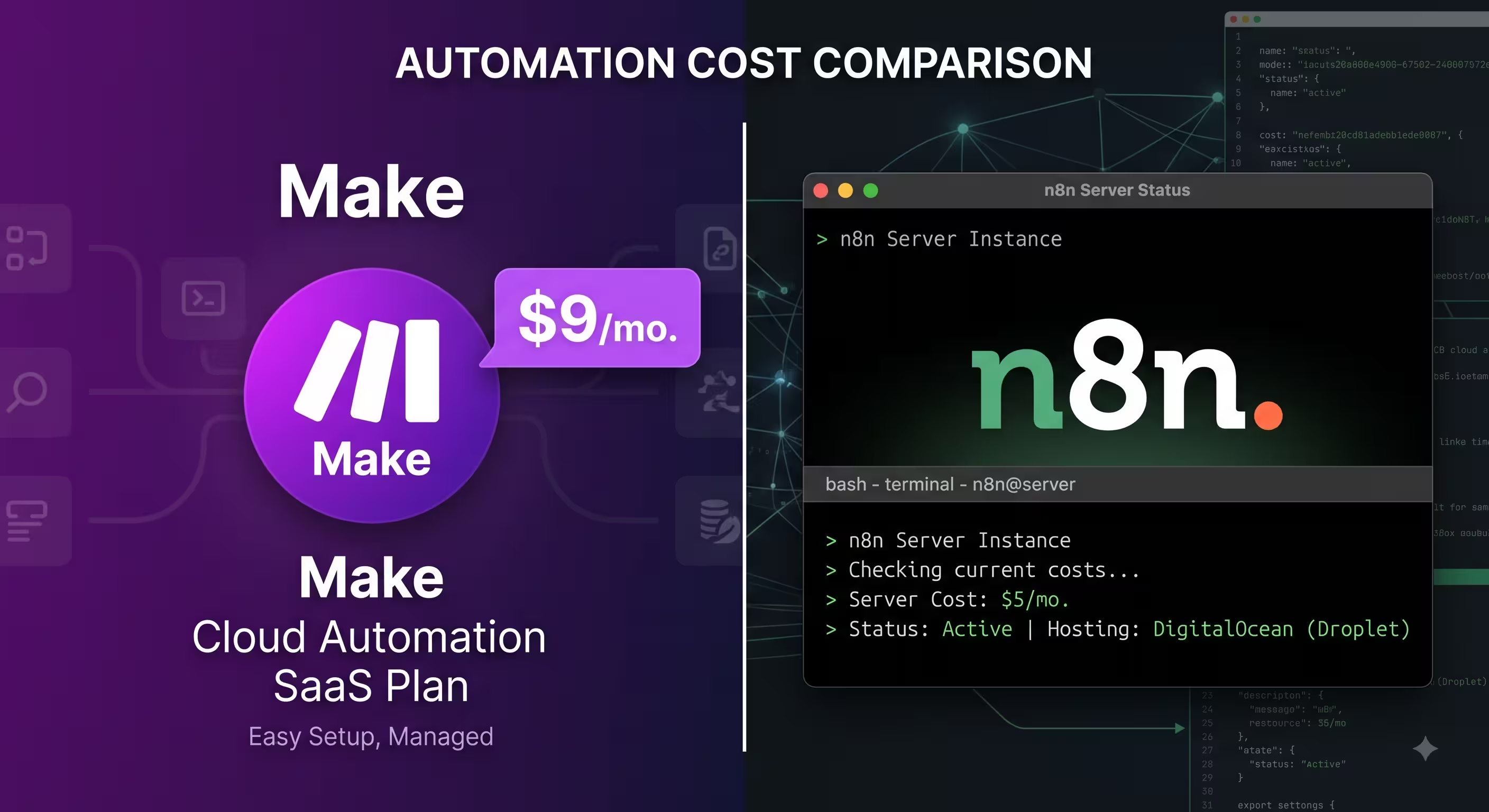
Disclosure: Operant Solo is reader-supported. We may earn an affiliate commission when you purchase through links on this page, at no additional cost to you. Recommendations are based on independent testing and evaluation.
Quick Answer: Choose n8n if your workflows include AI agents, loops or heavy data processing. n8n bills per workflow run, and self-hosting removes the limit entirely. Choose Make if you’re non-technical and your workflows are simple and linear. Make bills per module run, so agent loops and multi-step scenarios consume credits quickly.
| Feature / Architectural Metric | n8n | Make.com |
| Pricing Model | Per workflow execution (Cloud) or server cost only (self-hosted) | Per module run, billed in credits |
| Cloud Entry Pricing | €24/mo, or €20/mo billed annually, for 2,500 executions | Core plan: $12/mo for 10,000 credits (less if billed annually) |
| AI Agent Cost at Scale | Flat rate ($5–$20/mo self-hosted for unlimited steps) | Compounding usage tiers ($100–$300+/mo at scale) |
| Self-Hosting Capability | Yes (Free Community Edition via Docker, npm, Kubernetes) | No (SaaS multi-tenant cloud only) |
| Native Application Catalog | 400+ pre-built nodes (plus custom community nodes) | 1,500+ pre-built SaaS connectors |
| Custom API Integrations | Native HTTP Request node, raw cURL import, custom JS/Python | Native HTTP module, visual key-value mapping |
| Agentic Frameworks | Native LangChain nodes, memory buffers, sub-workflows as tools, MCP | Generic OpenAI/Anthropic assistant modules, webhook routing |
| Custom Code Runtime | Full JavaScript (Node.js) & Python with external npm access | Visual regex, math/string formulas, custom webhook parsers |
| Data Residency & Privacy | Complete data sovereignty (runs on local server / private VPC) | Multi-tenant cloud (EU or US regional data centers) |
| Ideal Target User | Technical teams, developers, and high-volume AI operators | Visual builders, non-technical teams, rapid prototyping |
Selecting the right automation tool in 2026 requires looking beyond linear data pipelines. Modern workflows are no longer deterministic sequences that simply sync a CRM contact to an email list. Instead, builders are deploying ai powered workflows that evaluate context, query vector databases, and execute dynamic api calls in real time.
Checkout Dedicated n8n Review here
When comparing n8n vs make, the core difference comes down to engine architecture, data governance, and pricing mechanics. While both platforms provide intuitive visual drag-and-drop builders, their underlying execution engines handle computational steps differently. Choosing the wrong system can easily inflate your software bills by hundreds of dollars while stalling the development of technical teams.
Here is our comprehensive, production-tested breakdown of n8n vs make 2026.
1. Execution Mechanics: How Each Engine Processes Data
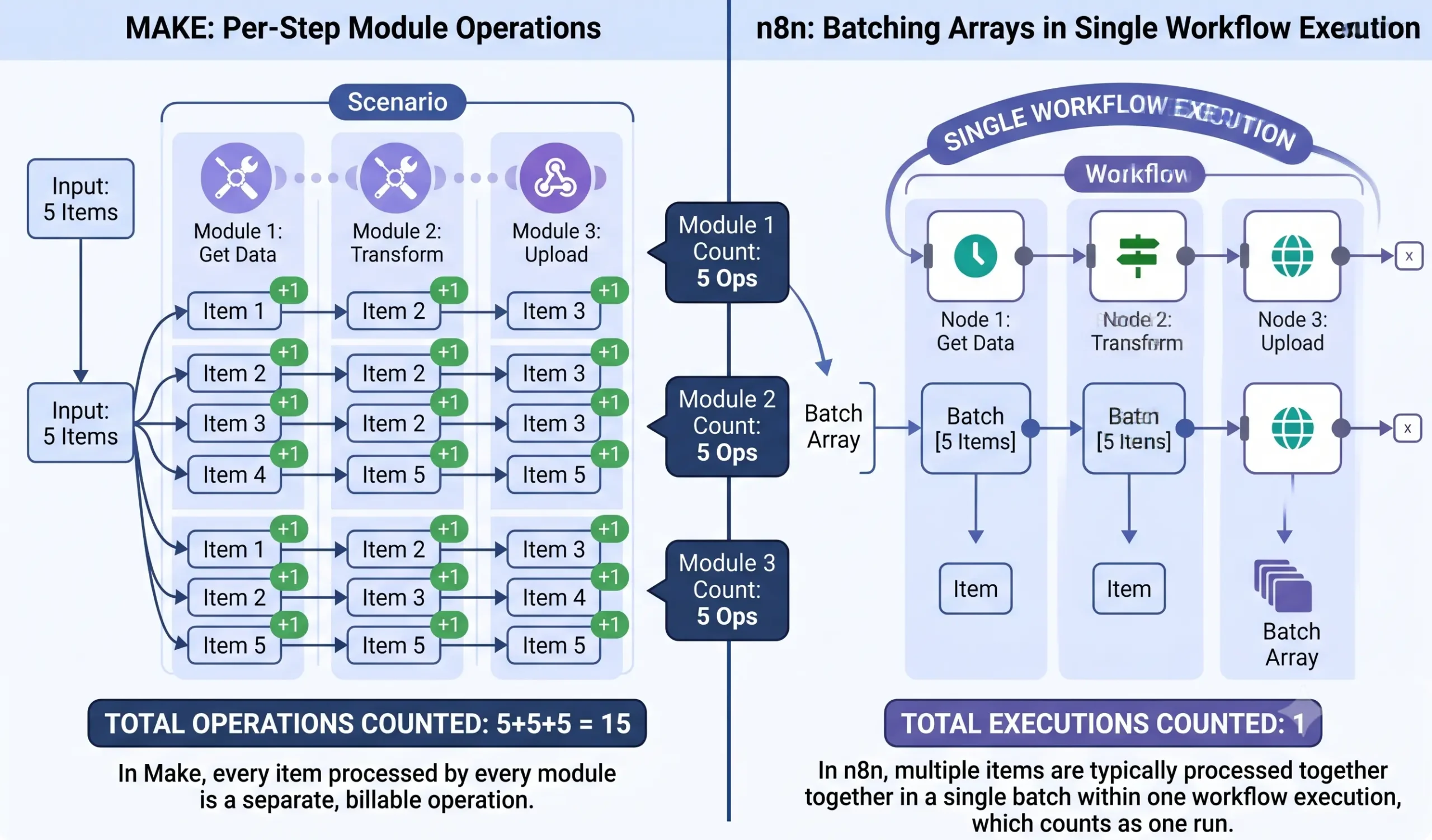
The most critical architectural distinction between Make and n8n lies in how their runtimes ingest, process, and bill data payloads.
Make: Bundle-Based Processing
Make executes workflows around atomic units called bundles. When a trigger module retrieves data—for instance, twenty updated rows from a Google Sheet—it outputs twenty distinct bundles. Downstream modules then process each bundle one by one.
Every time a module processes a single bundle, Make records that action as one credit. If you run an eight-step scenario on those twenty bundles, Make calculates:
MAKE (Bundle-Based Processing):
[Trigger: 20 Records] ──> Module 1 ──> Module 2 ──> Module 3
                          (20 credits)     (20 credits)     (20 credits)
Total Cost = 60 Credits

N8N (Array-Based Execution):
[Trigger: 20 Records Array] ═════════════════════════> [Workflow Execution]
Total Cost = 1 Unified Execution
This model simplifies visual debugging. You can click on the execution bubble of any module to inspect the exact input and output of an individual bundle. However, this approach creates compounding costs when processing high-volume arrays or running iterative AI loops.
n8n: Array-Based Workflow Execution
n8n structures data payloads as JSON arrays within a unified pipeline. When an n8n node retrieves twenty rows from a database, it outputs a single array containing twenty JSON objects. Downstream nodes ingest and process that entire array together.
On n8n Cloud, the platform bills by workflow execution, not by individual node steps. An execution begins when a trigger fires (via a webhook, schedule, or manual test) and ends after the final node executes. Processing those twenty records across eight nodes in n8n still counts as exactly one workflow execution.
On a self-hosted n8n instance, execution limits do not exist. Your only constraint is the CPU and memory capacity of your underlying server.
2. The Unit Economics of AI-Powered Agent Loops
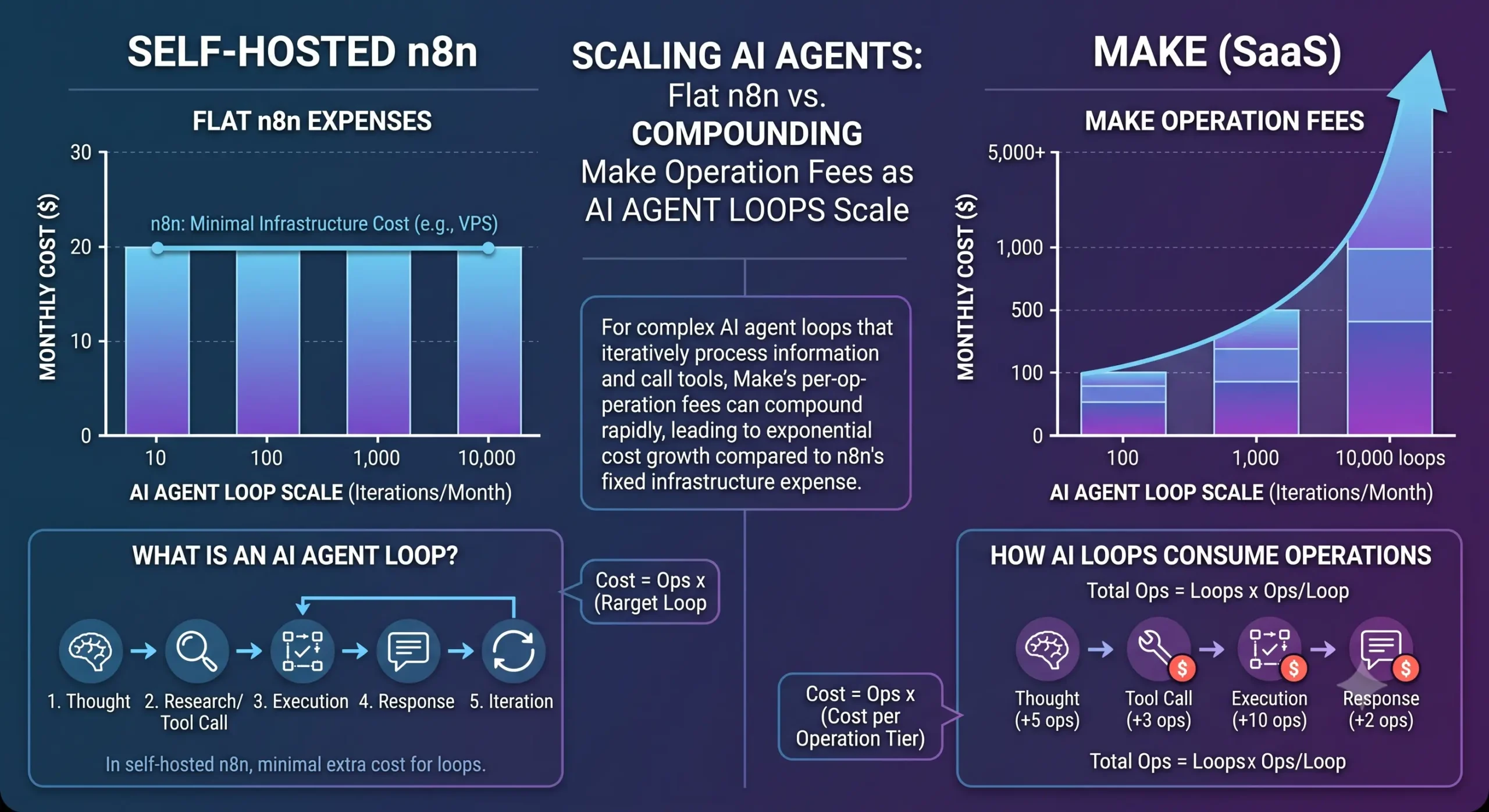
Traditional automations run straight from left to right: Webhook Trigger $\rightarrow$ Filter $\rightarrow$ Update Record $\rightarrow$ Send Notification. In this linear design, Make’s low starting price provides a cost-effective solution.
However, ai powered agents rely on dynamic feedback loops. Under standard autonomous patterns—such as ReAct (Reasoning and Acting) or tool-calling agents—an LLM continuously evaluates tasks in multi-turn cycles:
- Ingests an unstructured user prompt.
- Formulates a plan and decides which tool to call.
- Fires an api calls payload to an external database or CRM.
- Evaluates the retrieved data against the original prompt.
- Fires a second API call if additional data is needed.
- Synthesizes the information and drafts a response.
- Executes a final notification or database write.
A single support ticket or research task can trigger 15 to 45 tool executions before the agent completes its run.
Linear Automation (Zapier / Make standard):
[Webhook] ──> [Filter] ──> [Database Write] ──> [Send Slack]
Total: 4 module runs / 1 execution

AI Agent ReAct Loop (n8n / Autonomous):
[Customer Query] ──> [LLM Agent Core] <──> [Search Vector DB Tool]
                           │        <──> [Fetch CRM Record Tool]
                           │        <──> [Check Refund API Tool]
                           ▼
                    [Draft Resolution] ──> [Slack Approval]
Total: 15–45 compound module runs / 1 single n8n execution
The Cost Reality at 2,500 Agent Tasks/Month
Let us evaluate the economics of running 2,500 multi-turn AI customer triage workflows per month, where each interaction requires an average of 20 tool queries:
Make.com:
- 2,500 agent runs $\times$ 20 module runs = 50,000 credits per month.
- Make’s entry plan ($12/mo for 10,000 credits) runs out within the first week. To maintain 50,000 credits, your bill increases to $58 to $70 per month. If query volume doubles, operational costs scale proportionally.
n8n Cloud:
- 2,500 agent runs = 2,500 executions per month.
- The n8n Cloud Starter plan covers this volume for €20/month (~$22/month). Even if an agent loops 30 times during a single run, the execution cost remains fixed.
Self-Hosted n8n:
- Platform licensing: $0 (n8n Community Edition).
- Infrastructure hosting: A 4GB RAM Cloud VPS (via Hetzner, DigitalOcean, or AWS Lightsail) runs between $6 and $14 per month.
- Total operational limit: Unlimited. Whether your agent executes 2,500 or 150,000 tool iterations, your software infrastructure bill remains flat.
For solo developers and technical teams deploying agentic workflows, execution-based billing prevents unexpected runaway cloud costs.
3. Connecting Unsupported APIs: HTTP Module vs. HTTP Request Node
Every real-world automation eventually encounters a service without a pre-built app connector. How each platform handles raw api calls defines its developer experience.
Make: The HTTP Module
Make provides a dedicated HTTP module designed to communicate with external REST endpoints.
- Strengths: It lets you configure URL paths, headers, query parameters, and basic authentication using a visual field builder. It parses incoming JSON responses directly into visual data pills for subsequent modules.
- Limitations: Handling advanced authentication protocols—such as dynamic HMAC-SHA256 request signing, multipart file streaming, or recursive pagination—requires complex multi-module workarounds. You often have to link repeated sleep timers, custom routers, and iterator modules just to page through an external REST API.
n8n: The Native HTTP Request Node & Custom Code
n8n’s native HTTP Request node serves as a visual wrapper around modern HTTP clients like Axios, supporting raw API flexibility:
- Direct cURL Import: You can paste a raw cURL command directly from a third-party documentation page into the node; n8n automatically parses headers, URL paths, query parameters, and body payloads instantly.
- Complex Authentication: Supports generic OAuth2, predefined credential vaults, custom header signatures, and client certificates out of the box.
- Integrated Pagination: The node includes a dedicated pagination tab that natively handles cursor-based, URL-based, and offset-based pagination loops without requiring extra modules.
- Inline Code Transformation: If an external API returns malformed JSON or nested arrays, you can drop an n8n Code Node immediately after the request. With full access to JavaScript (Node.js) or Python, you can normalize payloads in 10 lines of clean code instead of chaining multiple visual modules together.
MAKE HTTP MODULE:
[Endpoint URL] ──> [Visual Field Mapper] ──> [Multi-module Router / Iterators] ──> Output

N8N HTTP REQUEST NODE:
[cURL Import / URL] ──> [Native Pagination & Auth Vault] ──> [Inline JS/Python Code Node] ──> Clean Output
4. Agentic Frameworks: LangChain & MCP vs. Make AI Modules
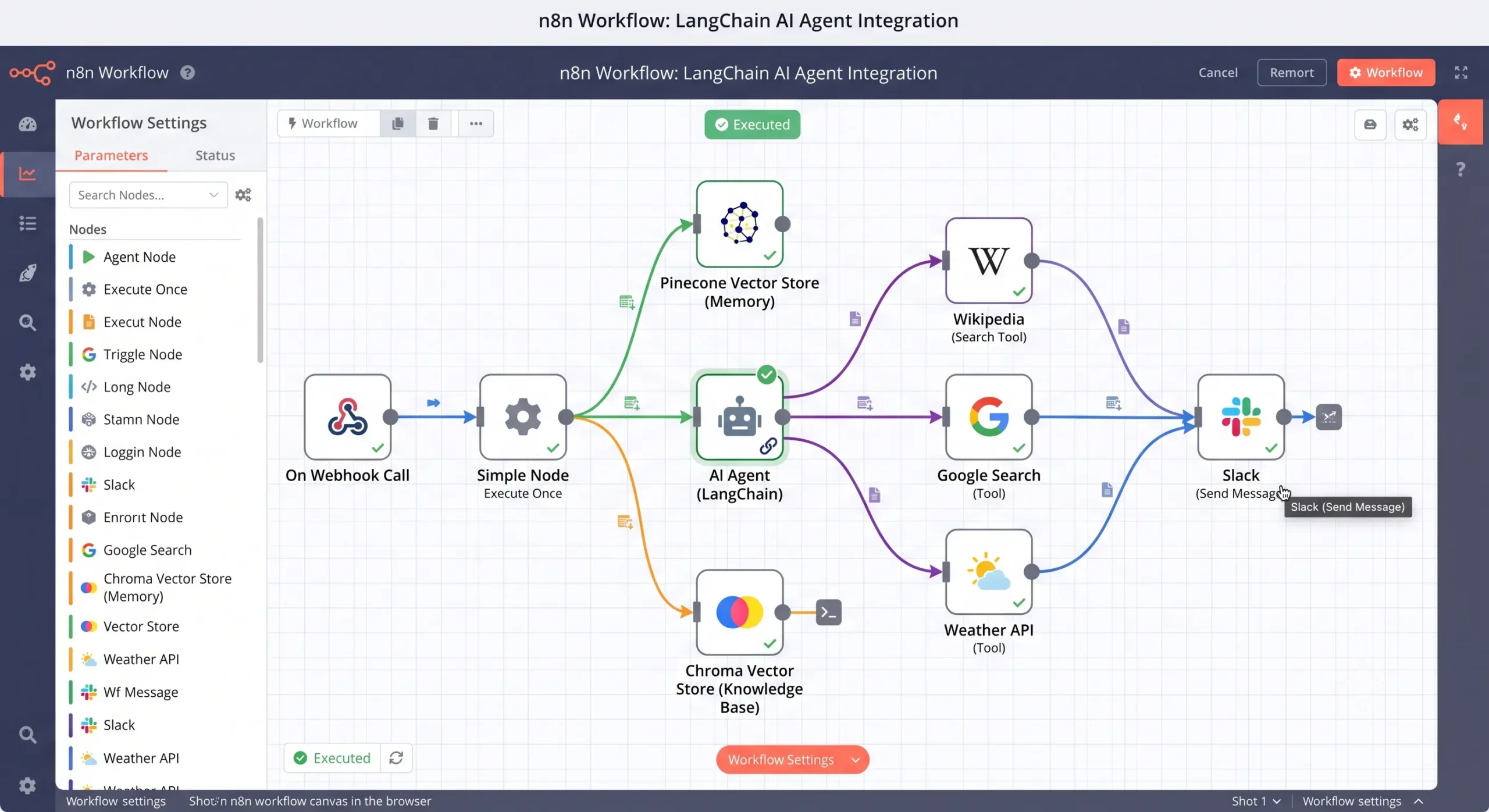
While both platforms feature AI capabilities, their core architectural approaches address different types of problems.
n8n: Native LangChain & Model Context Protocol (MCP)
n8n has integrated core LangChain primitives into its workflow canvas:
- Modular AI Nodes: You configure an AI Agent node and connect it to modular components for Memory (Window Buffer, Redis, Postgres Chat Memory), Embeddings (OpenAI, Cohere), and Vector Stores (Pinecone, Qdrant, Supabase).
- Sub-Workflows as Tools: Any n8n workflow can serve as a callable tool for an AI agent. An agent can accept a user prompt, identify that it needs invoice details, dynamically invoke a child workflow to fetch and clean the data, and incorporate that context back into its reasoning chain.
- Model Context Protocol (MCP): n8n natively supports MCP Server Triggers and MCP Client Tools. You can turn your entire n8n setup into an MCP server, allowing external AI clients like Claude Desktop to discover and run your automations dynamically.
- Advanced Multi-Model Architectures: Because n8n handles routing via native code, you can easily build advanced multi-model architectures like GitHub’s HydraFusion patterns to cut inference costs up to 67%.
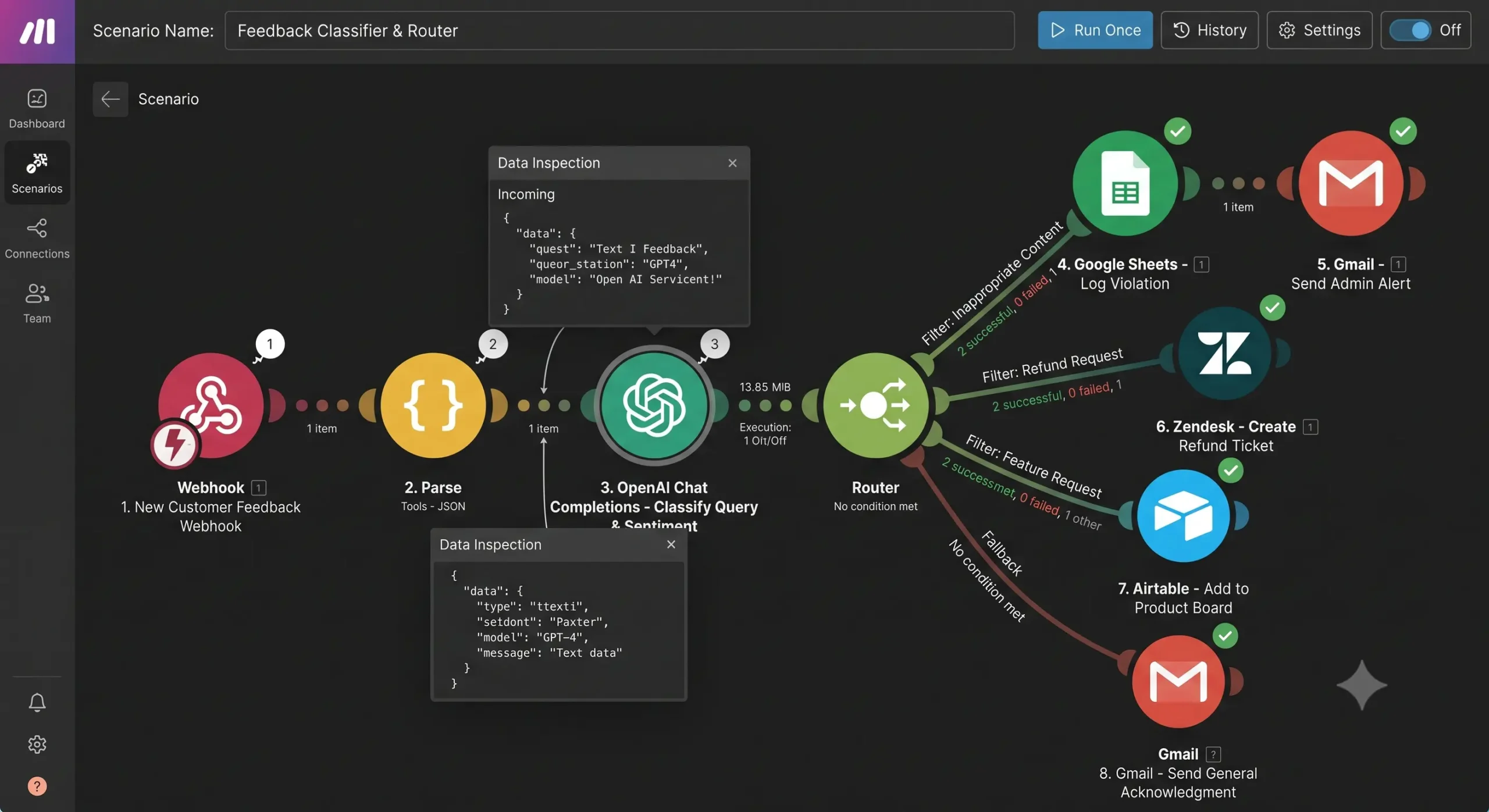
Make: Scenario-Based AI Integrations
Make provides pre-built modules for OpenAI, Anthropic, and generic AI endpoints.
- Linear Text Processing: Make excels at single-pass AI tasks. If your goal is to summarize incoming email text, parse a PDF document, or run sentiment analysis on a customer review, Make executes that step with minimal setup.
- Architectural Limitations: Make does not offer dynamic runtime memory management or modular tool attachment. To build a multi-turn agent that chooses between multiple operational paths, you must construct complex branching routers, error handlers, and variable stores. This structure consumes extensive credits and becomes fragile under unexpected edge cases.
5. Scaling, Infrastructure, and Data Sovereignty
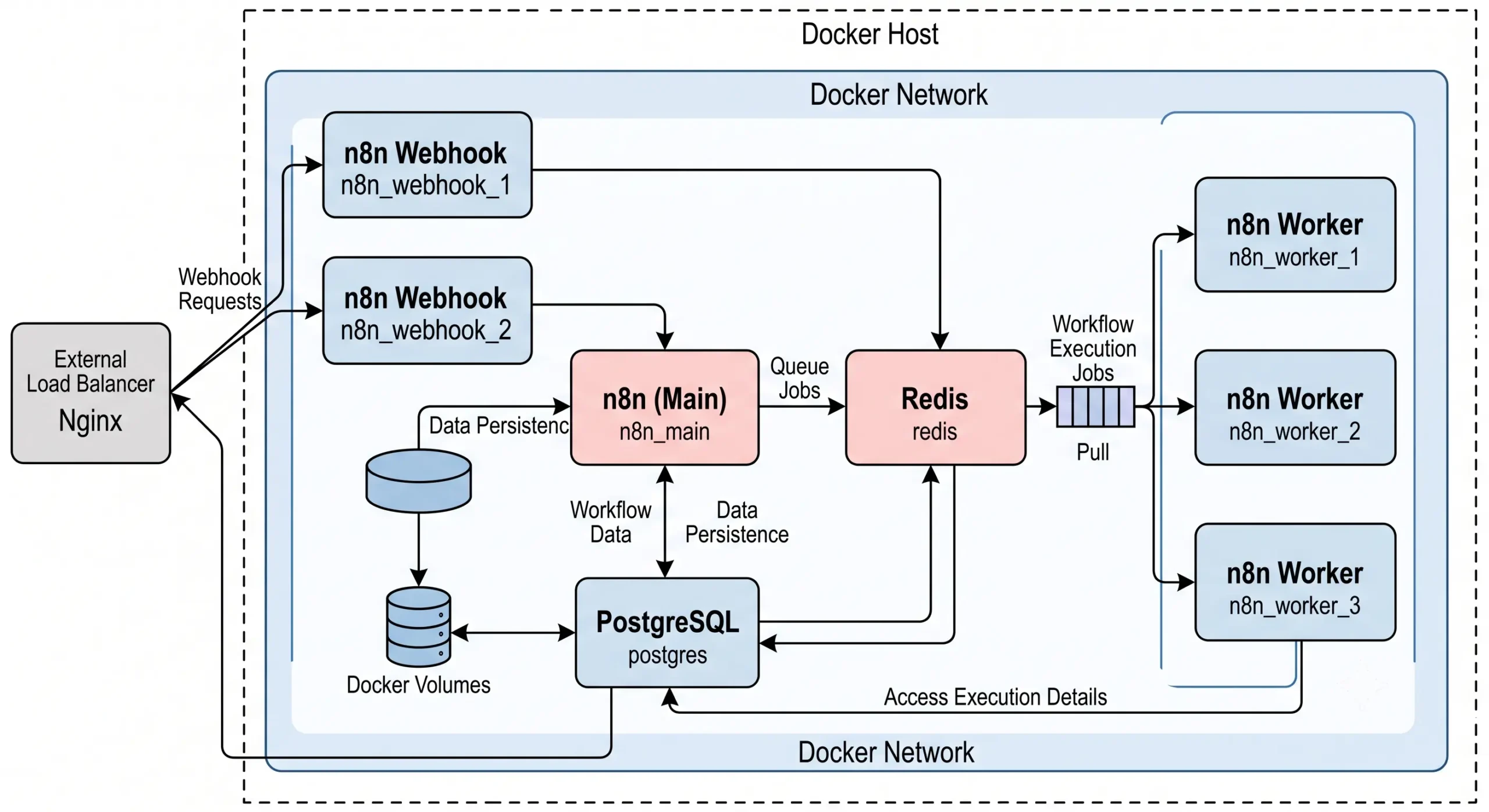
Platform reliability, regulatory compliance, and operational overhead represent critical checkpoints when selecting an automation tool.
PRIVATE CLOUD / VPS (Hetzner / DigitalOcean):
 ┌────────────────────────────────────────────────────────┐
 |  Reverse Proxy (Caddy / Nginx / Traefik - SSL & /mcp*)  |
 └──────────────────────────┬─────────────────────────────┘
                            ▼
 ┌────────────────────────────────────────────────────────┐
 |                n8n Core Container (Docker)             |
 └──────┬───────────────────┬─────────────────────┬───────┘
        ▼                   ▼                     ▼
 [PostgreSQL DB]     [Redis Queue / BullMQ]    [Local LLM (Ollama)]
 (Workflow State)    (Webhook Concurrency)     (Air-Gapped AI)
Data Privacy and Compliance Mandates
- Make: Processes data entirely on its multi-tenant cloud infrastructure. While Make offers European hosting options and adheres to GDPR compliance standards, your customer data inevitably traverses external shared systems. For organizations in regulated sectors (such as healthcare, legal, or finance) that require strict data isolation, multi-tenant cloud processing can trigger security review hurdles.
- n8n: The Community Edition can run on an isolated private VPC, an on-premise bare-metal server, or an air-gapped internal network. Workflows can interact directly with local PostgreSQL databases, internal microservices, and self-hosted open-weight LLMs (via Ollama or vLLM). No private payload ever leaves your internal network.
Scaling Architecture: Redis and Worker Queues
For high-throughput systems processing thousands of simultaneous webhooks, n8n scales horizontally using Queue Mode:
- A lightweight webhook process captures incoming requests and pushes jobs into a Redis queue powered by BullMQ.
- Dedicated worker containers pull jobs from Redis and run the workflows asynchronously.
- If incoming traffic spikes, you can spin up additional worker containers via Docker Compose or Kubernetes without dropping webhook events.
Make handles horizontal scaling entirely behind the scenes. You do not have to manage Redis clusters or monitor server RAM. However, you cannot customize concurrency policies, process execution timeouts, or thread allocation.
6. Production Case Study: Support Ticket Classification & Resolution
To see the real-world operational differences between make vs n8n, consider a practical support triage workflow:
Building in Make.com
- Module Count: 11 modules (Custom Webhook, Email Parser, Database Search, OpenAI Assistant, 3-way Router, Linear Module, Slack Module, HTTP module for Stripe, Vector Search Module, Email Send Module).
- Setup Time: Approximately 40 minutes. Connecting the visual bubbles and mapping variables is fast and intuitive.
- Credit Burn: Every incoming email uses between 6 and 9 credits. If your company processes 8,000 support emails a month, this single scenario uses roughly 56,000 credits/month, pushing your Make plan into the $60–$80/month range.
Building in n8n
- Node Count: 6 nodes (Webhook Trigger, Code Node for payload cleanup, Database Node, AI Agent Node with 3 sub-workflow tools attached, Response Node).
- Setup Time: Approximately 75 minutes. Requires setting up sub-workflow inputs and verifying JSON schemas.
- Execution Footprint: Every inbound email counts as one workflow execution. 8,000 support emails consume exactly 8,000 executions on n8n Cloud, or zero incremental software cost on a self-hosted instance.
7. Strategic Decision Matrix: Which Tool Should You Choose?
Do you have internal engineering resources or basic JavaScript proficiency?
├── NO ──> Does your workflow depend on niche, long-tail SaaS integrations?
│           ├── YES ──> CHOOSE MAKE.COM (Fastest setup, zero server maintenance)
│           └── NO  ──> CHOOSE MAKE.COM (Intuitive interface, gentle learning curve)
│
└── YES ──> Are you building looping AI agents, processing heavy data batches,
            or required to maintain strict on-premise data sovereignty?
            ├── YES ──> CHOOSE N8N (Self-hosted or Cloud: flat costs, full code control)
            └── NO  ──> Are your workflows simple, linear notifications?
                        ├── YES ──> CHOOSE MAKE.COM (Lower initial development time)
                        └── NO  ──> CHOOSE N8N (Superior version control and JavaScript runtime)
Do you have internal engineering resources or basic JavaScript proficiency?
Choose Make.com If:
- Speed to launch is your primary goal: You want to connect standard SaaS apps (Airtable, Slack, HubSpot, Shopify) in minutes without reading API schemas.
- You want zero infrastructure management: You prefer paying a SaaS fee to eliminate server monitoring, database backups, and software patching.
- Your workflows are primarily linear: Your business logic flows from step A to step B without recursive AI reasoning loops.
- Your team is non-technical: Marketers, virtual assistants, and operations teams can troubleshoot visual data bubbles without writing code.
Choose n8n If:
- You are deploying autonomous AI agents: You leverage LangChain, custom vector stores, memory buffers, or MCP to build multi-turn systems.
- You run high-volume data pipelines: You process thousands of tasks each month and want to avoid compounding per-credit fees.
- You require absolute data sovereignty: You operate under strict compliance rules (GDPR, HIPAA) and must keep client payloads on your own private servers.
- You have developer resources: Your team can manage Docker containers, write JavaScript, and configure REST endpoints using the native HTTP Request node.
Want Zapier in the comparison too? See n8n vs Zapier vs Make (2026).
Which should you choose?
n8n
Choose n8n if you’re building looping AI agents, processing heavy data batches, or need self-hosting for control over your data.
Make
Choose Make if speed to launch matters most and your workflows are simple, linear scenarios you want to build visually.
Operant Solo may earn a commission if you purchase through these links, at no extra cost to you.
Frequently Asked Questions
Is n8n cheaper than Make?
For low-volume, linear workflows, Make’s Core plan ($12/month for 10,000 credits) offers an accessible starting point. However, as operational volume expands—especially with AI agents that loop through repeated sub-steps—n8n is far more cost-effective. By self-hosting n8n on a virtual private server ($5–$15/month), you can run unlimited workflow executions without paying per-step fees.
What is the primary difference between a Make credit and an n8n execution?
A Make credit (called an operation before Make switched to credits) is used every time an individual module runs an action on a single data bundle. If a scenario contains seven modules and processes three bundles, it consumes 21 credits. In n8n, a workflow execution covers the entire run of a workflow from trigger to final node, regardless of how many nodes or loops take place during that cycle.
Can Make.com be self-hosted on a private cloud?
No. Make is exclusively a cloud-hosted Software-as-a-Service (SaaS) platform. If your team requires on-premise hosting, VPC isolation, or strict data residency, n8n is the only option of the two that provides an open-source Community Edition you can deploy via Docker, Kubernetes, or npm.
Can non-technical teams use n8n effectively?
Non-technical users can assemble basic workflows using n8n’s visual canvas and pre-built node library. However, handling complex data structures, authentication protocols, or deployment updates often requires familiarity with JavaScript, JSON objects, and API documentation. For teams without engineering support, Make provides a smoother, more accessible onboarding experience.
Does n8n integrate with local, open-source AI models?
Yes. Using n8n’s LangChain nodes or the HTTP Request node, you can route tasks directly to local open-weight models powered by Ollama, LocalAI, or vLLM. This architecture enables technical teams to build private AI automations where both the workflow engine and the language model run entirely inside a secure local network.
n8n
Best for: technical automation workflows
Consider n8n when your workflow needs custom logic or control over deployment. Self-hosting also requires time for updates, backups, and monitoring.
Operant Solo may earn a commission if you purchase through this link, at no extra cost to you.
Pingback: What Should You Actually Let an AI Agent Do? 4 Safe Workflows for Solopreneurs
Pingback: How to Automate Freelance Business (Step-by-Step)
Pingback: Zapier AI Agents Review (2026): The Hidden Costs & Alternatives
Pingback: Claude 3.5 vs GPT 4o: Which API is Best for Automations?
Pingback: Cursor AI vs Make: Should You Switch in 2026?
Pingback: How to Automate Website Without API (AI Agents vs Make.com)
Pingback: n8n Review 2026: Is Self-Hosting Actually Worth the Effort?
Pingback: Zapier vs Pipedream (2026): Which Should Solopreneurs Actually Use?
Pingback: Claude for Small Business vs. Building Your Own Automation
Pingback: n8n Is Now Worth $5.2B After n8n SAP Investment — What It Means for You
Pingback: n8n MCP Integration 2026: Why Static Automation is Dead
Pingback: n8n Human in the Loop Tutorial (2026)
Pingback: n8n Statistics 2026: Users, Revenue & Growth Data
Pingback: Multi-Model AI Agent n8n: Master the HydraFusion Pattern
Pingback: GPT 5.5 vs Claude Opus 4.8: Which AI is Best in 2026?
Pingback: Why US AI Voice Bots Fail at Hinglish ai receptionist
Pingback: Claude Sonnet 4.5 vs GPT-5: Which API is Cheaper in 2026?
Pingback: Build an AI Email Parser: Automate Email to CRM in 2026
Pingback: White Label Voice AI Platforms for Agencies: 2026 Buyer's Guide
Pingback: n8n Security Vulnerabilities 2026: Is n8n Safe to Use?
Pingback: AI Receptionist Agency: Pricing, Models & How to Pick One (2026)
Pingback: n8n vs Zapier vs Make (2026): Which Automation Platform Should You Use? - Operant Solo
Pingback: No API Integration: Connect Any Software Without an API (2026)
Pingback: Best AI Receptionist in Hinglish: 2026 Comparison & Trial Guide
Pingback: Build AI Agents: The 2026 Solopreneur Guide