
Disclosure: Operant Solo is reader-supported. We may earn an affiliate commission when you purchase through links on this page, at no additional cost to you. Recommendations are based on independent testing and evaluation.
The High Cost of Convenience in AI Automation
For years, Zapier was the undisputed king of automation. If you needed to move data from a Facebook Lead Form into an Airtable database, building a two-step zap was the easiest way to do it.
But the automation landscape shifted fundamentally in the last year. We are no longer just moving data; we are processing it with artificial intelligence. The transition from simple triggers to complex ai features and autonomous agents requires a different kind of architecture — and a different pricing model.
If you are evaluating the platform today, this zapier ai agents review breaks down exactly what you are paying for, where the platform excels, where the hidden costs lie, and why many technical teams are migrating to zapier ai alternatives.
Quick Answer: Zapier AI Agents are incredibly easy to set up and offer massive app integrations, making them great for beginners. However, the per-task pricing model makes multi step workflows utilizing AI prohibitively expensive at scale. For serious builders, zapier ai alternatives like Make and n8n offer vastly superior ai capabilities, better conditional logic, and significantly lower operating costs.
Here is the unvarnished truth about building AI agents on Zapier in 2026.
🔄 Updated September 2026
Where Zapier Excels: The “First Hour” Experience
To write a fair zapier ai agents review, we have to acknowledge what the platform gets absolutely right: the onboarding experience.
If you have never built an automation before, Zapier is magic. Their user interface is arguably the best in the industry. You simply select two apps, authenticate them, and the platform guides you through the mapping process.
1. Unrivaled Native Integrations
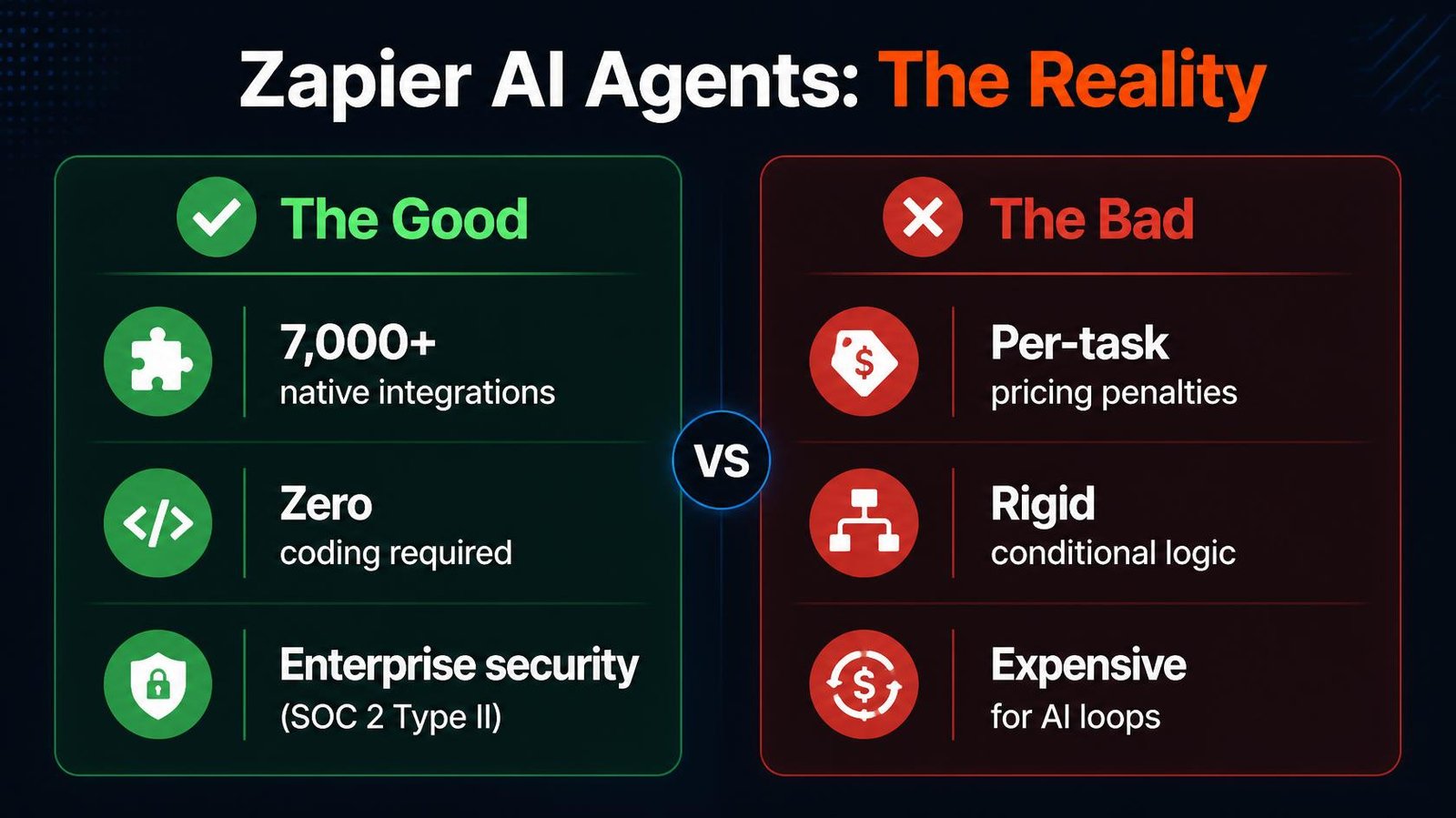
The primary reason companies choose Zapier is the sheer volume of native integrations. As of 2026, over 7,000 apps connect directly within their ecosystem. Whether you are using a niche CRM or a legacy email marketing tool, Zapier almost certainly has a pre-built connector for it.
2. The Built-in AI Agent Builder
Zapier’s recent push into AI allows you to build conversational agents that connect directly to your Zaps. You can give the agent a system prompt, attach knowledge sources (like PDFs or text files), and allow it to trigger specific workflows when a user interacts with it.
If you want an AI chatbot that can read a user’s request and automatically add a row to google sheets, you can build it in Zapier in about ten minutes.
3. Enterprise Security out of the Box
For corporate environments, Zapier provides enterprise-grade security features. They maintain soc 2 type ii compliance, offer SAML Single Sign-On (SSO), and provide detailed audit logs so administrators can track exactly who built or modified an automation.
How task billing changes AI workflow costs
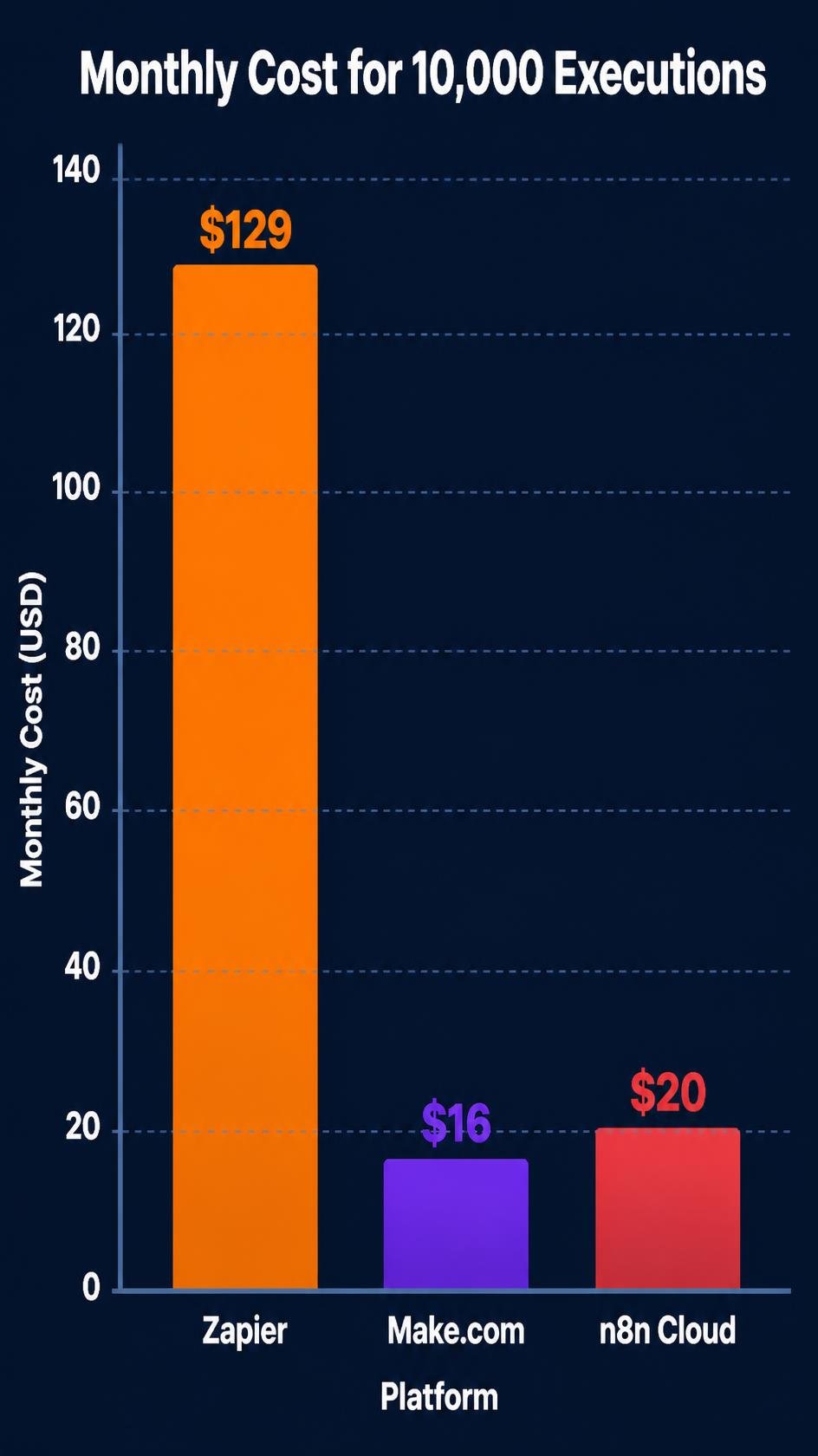
Estimate costs from a real workflow before switching platforms. Record the number of runs per month, the billable steps or credits consumed by one successful run, retries and branches, model or third-party API charges, and any hosting or maintenance time. Compare the total against your actual Zapier plan and the equivalent Make or n8n setup. The cheapest option changes with workflow shape, not just the advertised starting price.
The biggest issue identified in this zapier ai agents review isn’t the technology; it’s the billing model.
Zapier charges you per “Task.” Every time a step in your workflow successfully executes, it consumes a Task.
Historically, this was fine. A simple workflow (Trigger → Filter → Action) uses one or two Tasks. But AI workflows are fundamentally different. True AI automation requires looping, formatting, web scraping, and validation.
Imagine building an AI lead enrichment agent:
- Trigger: New lead arrives.
- Formatter: Clean the email address.
- Webhooks: Scrape the lead’s company website.
- AI Node: Summarize the website text.
- AI Node: Extract buying signals.
- Conditional logic: If a buying signal is found, send a Slack message.
- Action: Update the CRM.
This single multi step workflow consumes 5-7 Tasks per lead. If you process 1,000 leads a month, that one workflow burns through 7,000 Tasks.
Zapier’s Professional plan starts at $19.99/month billed annually ($29.99 monthly) for 750 tasks, and the price rises with each higher task tier.
Past your task limit, Zapier bills overage at about 1.25× your plan’s per-task rate unless you turn off pay-as-you-go. On the Free plan (100 tasks), Zaps are limited to two steps.
When you start chaining multi step zaps with ai capabilities, your monthly bill explodes exponentially. You are effectively penalized for building complex, intelligent systems.
Zapier vs Make AI Agents
The most common comparison for growing businesses is zapier vs make ai agents.
Make.com (formerly Integromat) took a completely different approach to automation. Instead of a linear top-to-bottom list, Make gives you an infinite visual canvas where you can build sprawling, multi-branched workflows.
Compared to zapier, Make excels in complex logic. If you need an AI agent to read an email, determine if it is a sales lead or a customer support ticket, and route it down five different possible paths, Make’s visual router makes this trivial. Building that same conditional logic in Zapier requires messy nested “Paths” that are difficult to debug.
Furthermore, Make charges per credit (it used to call these “operations”) rather than per Task, but their pricing tiers are drastically lower. Make’s Core plan gives you 10,000 credits for $12/month. The same volume on Zapier needs a much higher Professional task tier.
Comparison: Zapier vs Make
| Feature | Zapier | Make.com |
|---|---|---|
| Best For | Beginners, simple linear logic | Visual thinkers, complex routing |
| Pricing for 10k Actions | Higher Professional tier (check zapier.com/pricing) | $12 / month (Core plan) |
| Interface | Linear (Step 1, Step 2, etc.) | Visual Canvas (Drag and drop) |
| App Integrations | 7,000+ | 1,500+ |
| Conditional Logic | Basic (Paths) | Advanced (Routers, unlimited branches) |
| AI Routing | Expensive at scale | Highly scalable |
When evaluating zapier vs make ai agents, Make wins on price and complexity, while Zapier wins on sheer volume of connect apps.
When n8n is a better fit
While Make is a fantastic upgrade from Zapier, serious technical teams and AI builders are moving to n8n.
n8n is a node-based automation platform that fundamentally solves the pricing penalty problem by offering unlimited executions.
Why n8n Beats Zapier for AI Agents
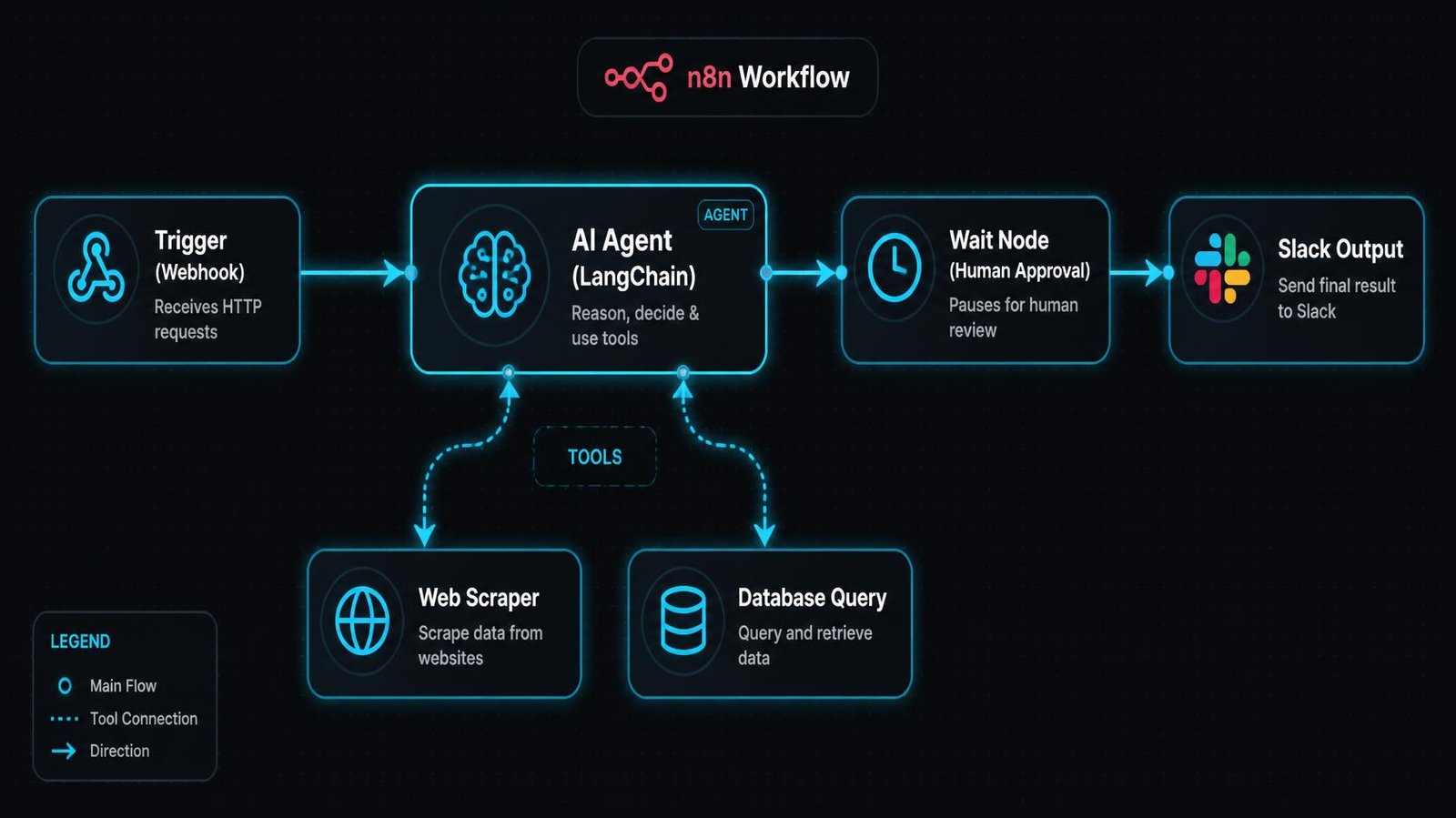
1. Advanced AI Capabilities (LangChain) Zapier treats AI like a black box: send text in, get text out. n8n integrates deeply with LangChain, allowing you to build actual autonomous agents. You can give an n8n agent a set of tools (e.g., “Here is a calculator, a web scraper, and access to our database”) and tell the agent to solve a problem on its own. The agent will decide which tools to use and in what order.
2. The Wait Node (Human-in-the-Loop) This is the holy grail for AI automation. If an AI agent drafts an email to your biggest client, you do not want it to send automatically. In n8n, you can use a Wait node. The workflow pauses, sends you a Slack message with the drafted text and “Approve/Reject” buttons, and waits in real time for your human input before continuing. Zapier has no native equivalent that actually suspends execution efficiently.
3. Execution Pricing n8n’s Cloud plan starts at $20/month. Because it does not charge per task/credit, you can build massive, 50-step AI loops that run thousands of times a day without your bill increasing by a single cent. You only pay for your underlying LLM usage (via the OpenAI/Anthropic API).
If your data requires strict compliance, you can self-host n8n on your own servers for free, completely bypassing cloud platform fees and ensuring sensitive data never leaves your infrastructure.
If n8n isn’t the right fit either, our guide to n8n alternatives compares the other options by why you’re switching.
Feature Matrix: Zapier vs Make vs n8n
To summarize the zapier ai alternatives, here is how the top three automation platforms stack up for AI workloads in 2026:
| Feature | Zapier | Make | n8n |
|---|---|---|---|
| Pricing Model | Per Task (Very Expensive) | Per Credit (Cheap) | Unlimited Executions (Cloud/Self-hosted) |
| Native Integrations | 7,000+ | 1,500+ | 1,000+ |
| AI Agent Memory | Basic | Manual setup | Advanced (Buffer, Window, Postgres) |
| Human-in-the-Loop | Very difficult | Possible but complex | Native (Wait Node) |
| Visual Interface | Linear | Canvas | Node-based |
| Data Privacy | Cloud only | Cloud only | Cloud OR Self-hosted |
| Target Audience | Non-technical marketers | Automation specialists | Engineers and AI builders |
For the full three-way breakdown, read n8n vs Zapier vs Make (2026).
When Should You Actually Use Zapier?
This zapier ai agents review would be incomplete without acknowledging when you should use it.
You should stick with Zapier if:
- You are automating a legacy tool: If your company uses a highly specific piece of niche software, Zapier is the most likely platform to have a native integration for it.
- You are building simple 2-step workflows: If you just want to send a Slack notification when a Stripe payment clears, Zapier’s $19.99 Starter plan is perfectly fine.
- You have zero technical inclination: If the idea of mapping a JSON payload makes you break out in a cold sweat, Zapier’s hand-holding interface is worth the premium.
However, the moment you transition from “moving data” to “processing data with AI,” Zapier’s architecture becomes a bottleneck.
If you’re comfortable writing code, compare it with a code-first option in our Pipedream vs Zapier breakdown.
The Transition: How to Migrate Your Workflows
If you realize that Zapier’s pricing is stunting your growth, you need a migration strategy. Do not try to move every step zap at once.
- Audit your usage: Look at your Zapier dashboard and sort your workflows by “Task History.” Identify the top 3 workflows that consume the most tasks.
- Rebuild the high-volume flows: Move these specific, high-volume workflows to Make or n8n first. These are usually the automated workflows that handle customer support triage or lead enrichment.
- Leave the niche triggers: Keep your low-volume workflows that rely on obscure native integrations in Zapier.
- Downgrade Zapier: Once the heavy lifters are migrated to an alternative, downgrade your Zapier plan to the cheapest tier, keeping it strictly as a bridge for legacy apps.
Final Verdict
Zapier is the undisputed king of API connections, but it is a legacy platform trying to adapt to an AI world.
Their task-based pricing model was designed for linear data transfer, not recursive AI logic. Building complex, intelligent agents on Zapier is like trying to race a Formula 1 car on a dirt track — the environment severely limits the machine’s potential.
If you are serious about deploying autonomous agents, processing data in real time, and retaining control over your operating costs, the zapier ai alternatives are simply better.
Start with Make for complex visual routing, or transition directly to n8n to build true LangChain agents with unlimited execution volume.
Which should you choose?
Zapier
Choose Zapier if you need the widest app library and your automations are simple and linear.
Make
Choose Make if you want complex visual routing at a lower cost than Zapier.
n8n
Choose n8n if you’re running AI agents at volume and want control over your running costs.
Operant Solo may earn a commission if you purchase through these links, at no extra cost to you.
Frequently Asked Questions
Are Zapier AI agents worth the cost?
For simple, low-volume tasks, yes. However, any thorough zapier ai agents review will conclude that they are not cost-effective for high-volume or complex multi step workflows. Zapier’s per-task pricing penalizes the looping and multi-step logic required by advanced ai capabilities, making it significantly more expensive than alternatives.
What are the best Zapier AI alternatives?
The two best zapier ai alternatives in 2026 are Make.com and n8n. Make is superior for visual routing and complex conditional logic, charging a fraction of Zapier’s price per credit. n8n is the best choice for technical teams and serious AI builders, offering unlimited executions and deep LangChain integration.
In the Zapier vs Make AI agents debate, which is better?
When comparing zapier vs make ai agents, Zapier wins on ease of use and the sheer volume of app integrations (7,000+). Make wins decisively on pricing, flexibility, and handling complex branching logic. If your workflow requires an AI to make decisions and route data down multiple paths, Make is the superior platform.
Does n8n have as many integrations as Zapier?
No. Zapier has over 7,000 native integrations, while n8n has roughly 1,000. However, n8n provides an incredibly powerful HTTP Request node that allows technical teams to connect to any API on the internet easily. If a service has an API, you can connect it to n8n, even if a native node doesn’t exist yet.
How does Zapier ensure data security?
Zapier is designed for enterprise environments. It maintains soc 2 type ii compliance, provides comprehensive audit logs, and supports SAML SSO. However, for organizations with the strictest data privacy requirements (where data cannot leave the company server), a self-hosted alternative like n8n is required, as Zapier is exclusively a cloud product.
Related Reading:
- n8n vs Make (2026): Which is Better for AI Automation? →
- n8n Review 2026: Is Self-Hosting Actually Worth the Effort? →
- n8n Human in the Loop: How to Safely Control AI Agents →
- How to Build an AI Email Parser (And Stop Manual CRM Entry) →
- AI Lead Enrichment: How to Automate Client Research →
n8n
Best for: technical automation workflows
Consider n8n when your workflow needs custom logic or control over deployment. Self-hosting also requires time for updates, backups, and monitoring.
Operant Solo may earn a commission if you purchase through this link, at no extra cost to you.
Make
Best for: visual, branching automation workflows
Consider Make when you prefer building workflows visually. Check how your scenario’s actions and repeated runs affect usage before choosing a plan.
Operant Solo may earn a commission if you purchase through this link, at no extra cost to you.
Pingback: AI Agent Wallets: Should You Let AI Spend Money Autonomously?
Pingback: AI Agent Workflows for Solopreneurs: What's Safe to Automate in 2026
Pingback: Cursor AI vs Make: Should You Code Automations in 2026?
Pingback: Pipedream vs Zapier 2026: Code-First vs No-Code Automation
Pingback: Build an AI Receptionist Agency: The 2026 Guide for Builders
Pingback: GPT 5.5 vs Claude Opus 4.8: Which AI is Best in 2026?
Pingback: n8n Statistics 2026: Users, Revenue & Growth Data
Pingback: Build AI Agents: The 2026 Solopreneur Guide
Pingback: Best Hinglish AI Receptionist for Dentists: 2026 Guide
Pingback: Multi-Model AI Agent n8n: Master the HydraFusion Pattern
Pingback: n8n Human in the Loop Tutorial (2026)
Pingback: Claude Sonnet 4.5 vs GPT-5: Which API is Cheaper in 2026?
Pingback: White Label Voice AI Platforms for Agencies: 2026 Buyer's Guide
Pingback: n8n MCP Integration: Build AI Agents in 2026